3:06
Arbaaz Khan - After years working on robot memory at @NASAJPL, @GoogleDeepMind , @M
Graphon Labs · Nov 2026
Crustdata’s 0:53 launch film runs 28 scenes, about 1.9 s each. The product shows up at 0:02 and 3 features are revealed, with social proof. The call to action lands at 0:46 (87% in), over a voiceover. The video opens on a monospace promise card, names the product, then alternates short text cards with UI demos of each capability, and closes on a static end card with the sign-up URL. Signature moves: left-to-right text reveals, scramble-to-clean decode, blur-in and blur-out transitions, line-by-line JSON fills, and counting bar charts, all over a drifting purple gradient with a slow dark blur.
Is this your launch? to your site or press kit.
Films whose music sounds like this one, voice left out
Incredible · Modern electronic
NVIDIA · Modern electronic with orchestral elements
Netter · Modern electronic
A grainy lavender-to-white gradient fills the frame. The phrase Turn the web fades in at center in indigo monospace type, the words resolving left to right. The frame stays locked and still.
On-screen text: “Turn the web”
Techniques: Kinetic type
Camera: Static
A soft purple gradient holds the blue phrase Turn the web, which blurs out as the background deepens. White words Into and An API slide in left and right, framing a flat API Integration card that pops up in the center.
On-screen text: “Turn the web”, “Into”, “An API”
Techniques: Kinetic type
Camera: Static
A purple gradient background frames a centered API Integration modal that fades in and sharpens, revealing a JSON code block and CLOSE and CONNECT buttons. The white words Into and An API sit on either side, and a cursor slides onto the CONNECT button.
On-screen text: “Into”, “An API”
Techniques: Cursor demo
Camera: Push in
A purple gradient background holds an API Integration code card that blurs and exits, flanked by the words Into and An API. A dark pill badge with WebSearch API then slides into the center and holds.
On-screen text: “Into”, “An API”, “WebSearch API”
Camera: Static
A dark rounded badge labeled WebSearch API sits top left on a soft purple gradient. Below it, a grid of dark rounded tiles pops in one by one, each holding a light purple link or globe icon, filling three rows.
On-screen text: “WebSearch API”
Camera: Static
A loose grid of small dark rounded tiles, each holding a purple globe or link icon, floats over a soft blue gradient. The tiles thin out and fade until only a few remain, then a single translucent search bar materializes at center with a faint placeholder word.
Camera: Static
A white rounded search bar with black monospace text slides left across a blurred purple background, ending on the query and a black up-arrow button. A cursor arrow glides up from below toward the button.
Techniques: Cursor demo
Camera: Static
A white search bar slides into a purple background, revealing the query “Find companies that use Salesforce.” A dark dropdown then appears below with four monospace search strings, while a cursor arrow points at the bar.
Techniques: Kinetic type
Camera: Static
On a blurred purple field, a search bar with a dark dropdown of query strings slides left out of frame, exposing a Proposal Email card addressed to [email protected] with body text and Back and Send buttons.
Camera: Pan
A proposal email window floats on a soft purple gradient. Its body text starts as overlapping scrambled lines and decodes into clean monospace copy, while the title bar and the BACK and SEND buttons stay fixed.
Techniques: Kinetic type
Camera: Static
A rounded search bar sits centered on a soft lavender gradient. The placeholder 'Ask Crustdata...' slides out as the query 'Find data engineers with Kafka experience' types in, then a cursor clicks the arrow. A second pill appears below with the generated Crustdata query.
Techniques: Cursor demo
Camera: Static
A purple gradient holds a query pill and a white card reading Find data engineers with Kafka experience, with a send button and a cursor. The card gives way to a dark output window whose JSON results scroll up, then the UI fades to the plain background.
On-screen text: “Find data engineers with Kafka experience”
Techniques: Cursor demo
Camera: Static
White monospace text “One Question” scales in on a soft blue gradient, then becomes “Hundreds of Sources” as small search-result cards with titles and URLs settle at the four corners, cycling through different queries. The cards blur and the text fades to a plain gradient.
On-screen text: “One Question”, “Hundreds of Sources”
Techniques: Kinetic type
Camera: Pull out
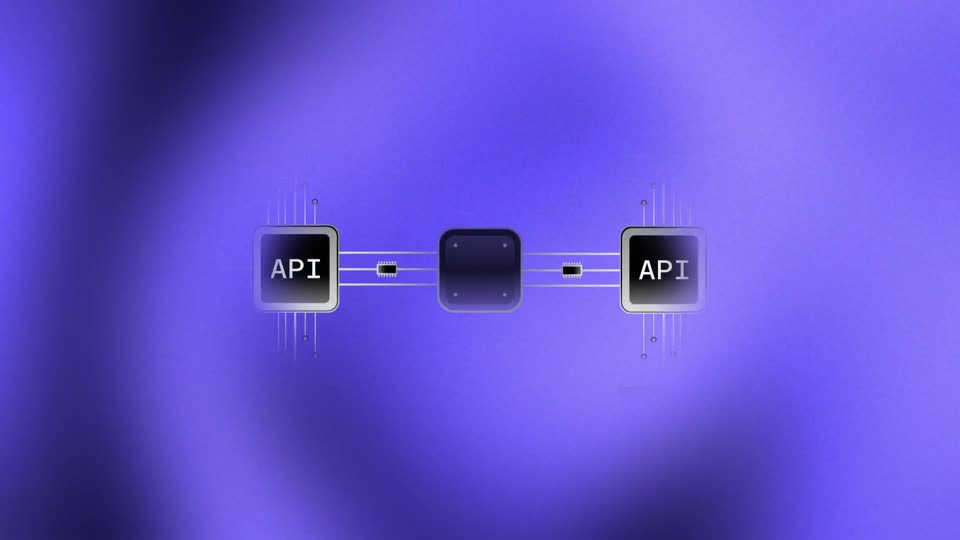
A flat circuit diagram of three square chips in a row, the outer two marked API, racks from soft blur into focus on a purple gradient as thin PCB traces with dots fade in around the side chips.
Camera: Static
A symmetrical circuit diagram on a blue gradient field. Two API chips link to nodes labeled AI SDR, AI Recruiter and AI Investor. A hexagon logo glows at the top, then dims as the same mark appears in the center chip while the connecting lines brighten.
Camera: Static
A symmetrical circuit diagram glows on a blue gradient. Two large API chips flank a central purple wireframe logo, each linked by glowing lines to smaller nodes labeled AI SDR, AI Recruiter and AI Investor, with small pulses traveling along the connections.
Techniques: Particles
Camera: Static
A lavender search bar with a Web-Fetch toggle floats on a blurred blue gradient. The toggle flips green as a monospace query types itself in, then the bar slides up and a dark Output panel drops in, filling with JSON code line by line.
Techniques: Kinetic type, Cursor demo
Camera: Static
A purple gradient backdrop holds a product interface: a green Web-Fetch toggle, a monospace search bar, and a black Output panel where JSON code scrolls upward past a blinking text cursor. The framing stays static throughout the short clip.
Camera: Static
A dark interface card sits on a purple gradient. A prompt bar at top reads Find features and pricings on stripe.com beside an up arrow button, while the output window below scrolls JSON results upward.
Camera: Static
A dark indigo monospace headline, 'You control / what your AI sees', holds centered on a soft lavender gradient. The final word fades in, then the whole frame dissolves into a blurred blue field.
On-screen text: “You control”, “what your AI sees”
Techniques: Kinetic type
Camera: Static
A black pill reading FILTER BY: holds left of center over a blurred purple gradient. To its right, a vertical column of white monospace words cycles: SOURCE, SITE, GEOGRAPHY, TIME slide up in turn, sharpening as each reaches the center line and blurring as it leaves.
On-screen text: “FILTER BY:”, “SOURCE”, “SITE”, “GEOGRAPHY”, “TIME”
Techniques: Kinetic type
Camera: Static
A purple hexagon logo on a dark tile scales up at the center of a soft lavender gradient as circuit lines extend outward to four dark feature cards that pop in around it.
On-screen text: “Most accurate search results”, “Fastest WebSearch API: Sub-second latency”, “90s Access latest web pages indexed within 90 seconds”, “Find social posts within seconds of posting”
Techniques: Morph
Camera: Static
Four dark cards form a 2x2 grid on a lavender background, each holding a glowing icon and a white monospace caption. A purple geometric logo badge sits at the center, linked to the cards by circuit traces. Card borders pulse with a white glow, then the bottom captions fade out.
On-screen text: “Most accurate search results”, “Fastest WebSearch API: Sub-second latency”, “90s”, “Access latest web pages indexed within 90 seconds”, “Find social posts within seconds of posting”
Camera: Static
A soft purple gradient fills the frame. The headline reveals left to right in purple monospace. Two dark benchmark cards sit side by side; their horizontal bars grow from left to right, filling the Latency and Accuracy charts.
On-screen text: “Fastest and most accurate WebSearch API”
Techniques: Kinetic type, Split screen
Camera: Static
Two black benchmark cards float on a soft purple gradient beneath a violet headline. The horizontal bars on each chart extend from left to right while the millisecond and percentage readouts count up to their final values.
On-screen text: “Fastest and most accurate WebSearch API”
Camera: Push in
Two dark benchmark bar-chart cards, Latency and Accuracy, hold on a purple gradient beneath a purple monospace headline. They dissolve as the Crustdata cube mark and wordmark fade in at center.
On-screen text: “Fastest and most accurate WebSearch API”
Camera: Static
On a soft purple gradient, the Crustdata logo holds at top center. The bold white headline WebSearch API builds out beneath it, then a monospace tagline fades in line by line. Static camera, centered composition.
On-screen text: “WebSearch API”, “Bringing the web's data to your AI agents”
Techniques: Kinetic type
Camera: Static
A static end card on an animated purple gradient: the Crustdata logo sits above a bold white headline, a monospace tagline, and a sign-up URL, while a soft dark blur drifts slowly across the background.
On-screen text: “Crustdata”, “WebSearch API”, “Bringing the web's data to your AI agents”, “Sign up:”, “/crustdata.com/”
Camera: Static