1:28

Capveon - AI that discovers, understands, and wins government work
Capveon · Government · Oct 2026
Incredible · Sep 2026 · 0:49 · AI-annotated
Incredible’s 0:49 launch film runs 46 scenes, about 1.1 s each. The product shows up at 0:28. The call to action lands at 0:41 (85% in), over a voiceover. A voice-controlled AI product launch built on a fast-cut glitch aesthetic: a hook question, a long problem montage of tedious clicks and crashes, a turn to the voice concept, a short form-filling demo, and a URL close. The signature move is the red-cyan chromatic aberration fringe on every text card and UI shot, paired with hard locked-off frames and rapid 152 bpm cuts that make the glitch feel like a deliberate style rather than noise.
Is this your launch? to your site or press kit.
Capveon · Government · Oct 2026
Money Printer · Nov 2026
On a black background, white serif math equations flash with a red-and-blue chromatic aberration glitch. A stack of formulas, including an entropy term and Newton's gravity, gives way to a single line of the Schrödinger equation.
Camera: Static
A man in a dark suit sits at a table in a dim room, hand resting on his chin, gazing at a laptop. The shot carries a chromatic glitch effect, and the word Computers sits centered in white serif type.
On-screen text: “Computers...”
Camera: Static
A locked-off close-up of a bearded man in three-quarter profile against a dark, bokeh-lit background. He blinks once as small static caption fragments flank his face, each fringed with red-cyan chromatic aberration.
On-screen text: “Computers...”, “suppose to make”, “work easier”
Camera: Static
Macro close-up of a finger tapping keys on a dark keyboard, shallow depth of field with a teal color grade. The frame is locked off as the finger moves across the keys, and a small two-line caption sits still in the frame.
On-screen text: “suppose to make”, “work easier”
Camera: Static
A tight close-up of a light interface input field where a prompt types out letter by letter, reading “Why does humanity keep rel”, with a paperclip, globe and slider icon row below and a list of items sliding along the left edge.
Camera: Static
A blurred, dark frame sharpens into a light document page with a horizontal rule, revealing a line of black text ending in a blinking caret. The frame stays locked-off as the text holds.
On-screen text: “Why does humanity keep reaching further?”
Camera: Static
A black frame cuts to a green-on-black terminal. Faint code panels fill the background while a green-outlined box holds the word LOADING above a progress bar that fills left to right, the red 86 % held steady beneath it.
On-screen text: “LOADING”, “86 %”
Camera: Static
A rapid montage of glitch-distorted images: an orange vinyl record on a marbled psychedelic background, a ringed planet and galaxy in space, a black-and-white crowd under red text, then a retro error dialog box. Heavy chromatic aberration and static throughout.
On-screen text: “CAN'T RUSH GREATNESS”
Camera: Static
A white email inbox list fills the frame, its edges fringed with red and blue glitch. A black cursor arrow clicks the checkboxes beside sender names, checking Maya Heller then IT Support as the list scrolls down slightly.
Techniques: Cursor demo
Camera: Static
A tight close-up holds on two hands typing on a beige keyboard, a vintage CRT monitor blurred in the warm, golden background. Fingers strike the keys in a steady rhythm while the camera stays still.
Camera: Static
Extreme close-up of a man's eye and thick-rimmed glasses in profile, shot with a shallow depth of field that blurs a corkboard into soft color patches. His gaze holds steady toward an off-screen screen, the lens catching a faint reflection.
Camera: Static
A white context menu with Cut, Copy, Paste, Select All sits above the selected word rivera in rivera sisterz®, highlighted blue with corner handles. The locked frame stays still, with faint chromatic aberration on the type.
Camera: Static
A white spreadsheet file icon with a grid mark and an XLSX label floats over a pink, glitch-fringed mountain sky inside a letterboxed frame. A black-and-white arrow cursor hovers at the icon's lower corner while small white caption text sits beneath it.
On-screen text: “rivera sisterz®”
Techniques: Cursor demo
Camera: Static
A locked-off close-up of a light interface: a white rounded card holds the prompt text above a document icon, with a plus sign to the left. A cursor rests on the icon while the file label OnboardMail_R6 slides in beneath it.
Techniques: Cursor demo
Camera: Static
A light comment list shows two rows of short text with small square thumbnails on the right edge. A hand-pointer cursor hovers over the middle row while the locked-off frame scales up slightly.
Techniques: Cursor demo
Camera: Push in
A person in a maroon zip jacket types on a dark laptop at a cluttered desk, a bearded man in a vest works behind. Warm low light, heavy grain and color fringing, letterboxed frame, held static.
On-screen text: “Nice work, keep inspiring us!”, “Thanks matel”
Camera: Static
On a black background, the pixelated text Downloading... sits above a green progress bar that fills from left to right with solid green blocks. A red and cyan glitch fringe shimmers around the text and the bar.
On-screen text: “Downloading...”
Camera: Static
A blue pill button reading Upload sits centered on a dark field. The cursor clicks it, and the label flips to Downloading, then to 0%.
Techniques: Cursor demo
Camera: Static
The word Rename in large white type with red and cyan color fringes slides left across a dark frame, its letters passing a fixed vertical bar on the right edge. Quick horizontal scroll, locked-off framing.
On-screen text: “Rename”
Techniques: Kinetic type
Camera: Static
A tight close-up of a bearded man in round glasses, head bowed, in a dark room. A bright screen glows in his lenses and a blurred monitor sits out of focus behind him. The frame holds still as he studies the display.
Camera: Static
The word “ops.” sits centered on a black background, huge white lowercase letters edged with a red and blue chromatic-aberration fringe. The frame is locked off and the text holds still for the full shot.
On-screen text: “ops.”
Camera: Static
A plain white frame holds the centered caption “Wrong one” in black sans-serif, its letters edged with red and cyan chromatic-aberration fringes. The shot is locked off and static for the whole beat.
On-screen text: “Wrong one”
Camera: Static
The words Go Back sit centered in white on a black field, their edges fringed with red and blue chromatic aberration. The frame holds still for the duration.
On-screen text: “Go Back”
Camera: Static
A news article layout sits on a white ground, its dark serif headline backed by a lavender bar. The frame jitters with a red-blue chromatic glitch and pans down a few pixels, a byline and a small portrait peeking at the edges.
On-screen text: “BY DANA OKAFOR”, “Mocha Crosses 200,000 Builders Named Product Hunt's Product of the Week”
Camera: Pan
A bordered code editor panel sits centered on black; TypeScript lines type in one by one, the caret moving as GitHub OAuth setup lines fill the view.
Techniques: Kinetic type
Camera: Static
A retro Windows loading dialog with a progress bar floats over a cloudy blue sky, then the frame cuts to a flat blue error screen. A white sad-face emoticon sits at left above the white restart message, both edged with pink and cyan chromatic aberration.
On-screen text: “Your PC ran into a problem and needs to restart. We're just collecting some error info, and then we'll restart for you.”
Camera: Static
On a black field, the words This, not, easy cut in one at a time in the center, each carrying a red-blue chromatic aberration glitch, timed to the voiceover “This is not easy.”
On-screen text: “This”, “not”, “easy”
Techniques: Kinetic type
Camera: Static
An isometric blueprint of a computer assembly with numbered callouts fills the frame as black line art on white. It snaps to a green wireframe on dark green with a glitchy color shift, the camera locked off.
On-screen text: “easy”
Camera: Static
A blue blueprint sheet shows an isometric laptop with exploded views and inventory grids, then cuts to a macro view of a green circuit board with chips. Both frames carry a glitchy chromatic aberration look.
Camera: Static
A glitch-distorted macro of a green motherboard with CPU socket and capacitors cuts to a grainy black-and-white shot of a man in a white shirt at a wall of vintage mainframe racks. RGB split and scanlines flicker across both frames.
Camera: Static
Black and white archival footage with a chromatic aberration glitch, letterboxed. Three men in suits gather around a large computer console, then the shot widens to a room where one man works a console and another carries a panel past a row of cabinets.
Camera: Static
A beige retro desktop computer with a CRT monitor stacked on top and a keyboard in front sits on a dark desk, edged with a red-and-cyan glitch fringe. The camera holds still on the setup.
Techniques: 3D mockup
Camera: Static
On a black field, the line “Every single time” types out character by character in the center, a thin vertical cursor bar sits at the end, and red-blue chromatic aberration fringes the white letters.
On-screen text: “Every single time”
Techniques: Kinetic type
Camera: Static
A flat Mac window sits on a dark backdrop and switches from a Photos grid to a Mail inbox, its border fringing with red and cyan chromatic aberration, while a large headline slides in.
On-screen text: “Every single time”
Techniques: Kinetic type
Camera: Static
A flat browser window mockup sits centered on a dark gray background, its border fringed with a red and cyan glitch. The content inside switches from a favorites start page to a San Francisco map with a right sidebar.
Camera: Static
A macOS window floats in 3D perspective with a multicolor glowing border. Its content crossfades from the App Store, showing a grid of app icons, to a Notes app with a list of notes and a requirements document.
Techniques: 3D mockup
Camera: Static
Black words swap in one at a time at the center of a white background, each carrying a red and cyan chromatic aberration offset. The sequence reads 'Every', 'single', 'Time', 'most', each locked off and centered before the next replaces it.
On-screen text: “Every”, “single”, “Time”, “most”
Techniques: Kinetic type
Camera: Static
On a black background, white monospace text types itself out word by word, ending with a vertical cursor. A red and blue chromatic aberration offsets the glyphs as they appear.
On-screen text: “The most human thing”
Techniques: Kinetic type
Camera: Static
A white letterboxed card holds the word voice in oversized black sans-serif, panned horizontally so the letters sweep across the frame. Red and blue chromatic fringing outlines every stroke, giving a glitchy VHS look.
On-screen text: “voice”
Techniques: Kinetic type
Camera: Static
A red-haired woman looks down in a soft-focus shot, then the frame cuts to four vertical panels showing four people, each with a colored square icon stamped over their face. The footage carries a VHS glitch and chromatic aberration look.
On-screen text: “ice”
Techniques: Split screen
Camera: Pull out
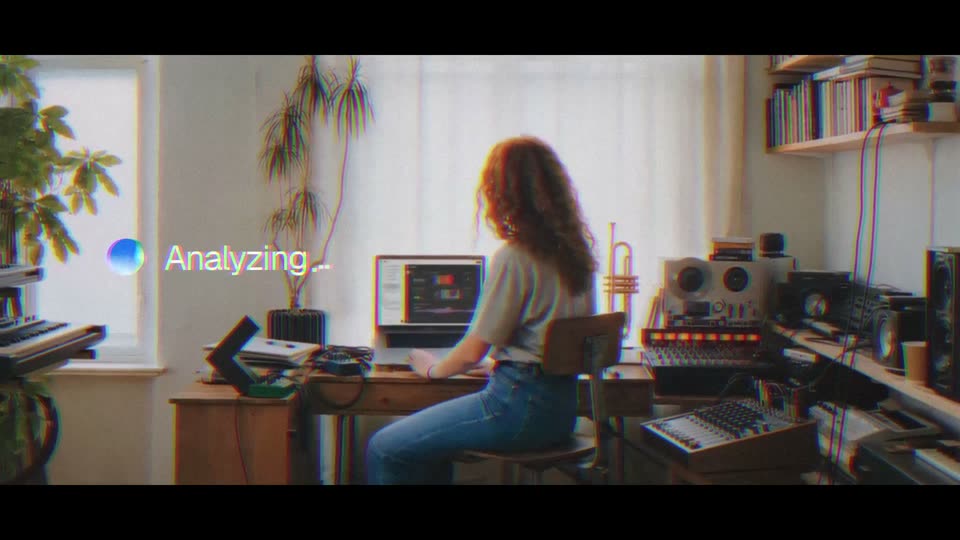
A woman with curly hair sits at a desk in a sunlit home studio, facing a computer monitor. A small gradient circle and a white status label on the left read Scanning, then switch to Analyzing. The image has a soft grain and color-fringe look.
On-screen text: “Scanning”, “Analyzing”
Camera: Static
A laptop on a wooden desk in a sunlit room with a plant and window behind it shows a dark dashboard with a waveform and color swatches. A white Working caption with a blue-purple gradient dot holds on the left as the frame carries a chromatic-aberration glitch.
On-screen text: “Working...”
Camera: Static
A light-blue contact form with name, email, phone, company and message fields plus an orange send button fills the frame. A black pill with a live audio waveform sits at the top. On the left, a large headline with an RGB-split glitch reads Your Free AI Audit and the brand Tratai.
Camera: Static
A browser window shows the Stratai form page with glitchy chromatic headings reading 'Book your free half-day AI audit'. Above it, a dark pill holding an audio waveform types out a sentence word by word in the same glitch style.
On-screen text: “Hey! Incredible, can you fill out this form and”
Techniques: Kinetic type
Camera: Static
A glitching contact form, cursor on the orange Send Message button, cuts to a white card holding the black title A Conversation, letterboxed in black with red-cyan chromatic aberration fringing.
On-screen text: “A Conversation”
Techniques: Cursor demo
Camera: Static
A white letterboxed card holds the black headline “A Conversation” with a red and cyan glitch fringe on its edges. After two seconds it cuts to a smaller centered URL, “www.incredible.one”, carrying the same fringe.
On-screen text: “A Conversation”, “www.incredible.one”
Camera: Static