2:02

Launch YC: Harbera
Harbera · Healthcare · Feb 2025
Composio’s 1:17 launch film runs 12 scenes, about 6.4 s each. The product is on screen from the first frame. There is no explicit call to action; a voiceover carries the film. The video is a presenter-led screen demo: a home-office host names the product, then a locked-off UI tour walks through installing Rube in ChatGPT developer mode and generating a Google Slides deck, broken only by a time-skip card. Pacing is steady and methodical, with the cursor doing all the work over flat white windows on a blurred mountain desktop, and the host's smile plus a black logo card close the loop.
Is this your launch? to your site or press kit.
Harbera · Healthcare · Feb 2025
Metofico · B2B · Mar 2024
Voyage Labs · Nov 2026
Films whose music sounds like this one, voice left out
Phone Harness · Modern electronic
PathPilot · Modern electronic
Warp · Upbeat electronic, lo-fi hip-hop
A bearded man in a gray jacket sits behind a laptop with a white Composio sticker, talking to the camera and gesturing with his hands, then looking down at the screen. A bookshelf with plants is behind him, a camera on a tripod to the right.
Camera: Static
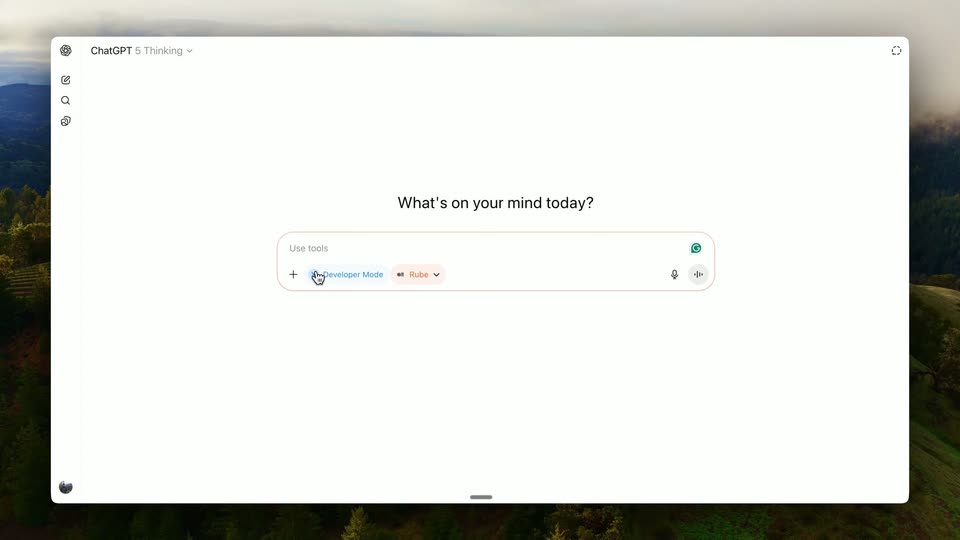
A flat white ChatGPT window sits over a blurred mountain landscape. A cursor glides to the Use tools box, hovers over the Developer Mode chip, then rests on the Rube chip. The frame stays locked off.
On-screen text: “Composio”, “STANFORD GSB”
Techniques: Cursor demo
Camera: Static
A flat browser window over a mountain photo shows the Rube site with the line with 500+ apps in your chat. A cursor clicks Install Rube, opening a Select Platform modal where ChatGPT is selected and an installation guide appears.
Techniques: Cursor demo
Camera: Static
A product interface shows a Select Platform modal over a dimmed page. A hand cursor moves down and clicks the Developer Mode tab, swapping the installation guide to a URL field with a Copy button.
Techniques: Cursor demo
Camera: Static
A chat app window sits over a blurred mountain backdrop. A cursor hovers the prompt field as a message types itself out, a status dot turning red into a stop button. The view then reflows, the prompt becoming a sent bubble above a fresh input field.
Techniques: Cursor demo
Camera: Static
A centered loading state on a plain white background: the word Thinking in dark gray sits above a lighter Skip label with a right chevron. Both lines hold still on a locked-off frame.
Camera: Static
A red-tinted tile pattern of squares and pineapple illustrations fills the frame behind a centered pink hand-drawn caption. The two-line text holds static on a locked-off frame for the full duration, marking a time skip.
On-screen text: “A FEW”, “MOMENTS LATER”
Camera: Static
A chat app window sits on a mountain wallpaper. The assistant's long thinking block collapses into short tool-call lines, the view scrolls to a finished answer with a deck link, then a cursor clicks the link and a link-safety dialog pops up.
On-screen text: “A FEW”, “MOMENTS LATER”
Techniques: UI zoom, Cursor demo
Camera: Static
A ChatGPT window floats over a blurred mountain lake background. A modal titled Check this link is safe sits in the center as a cursor moves down and clicks the dark Open link button, then the window fades.
Techniques: Cursor demo
Camera: Static
A Google Slides window rests on a mountain-wallpaper desktop. A cursor clicks down the left thumbnail rail, flipping a blue deck of white headline-and-bullet slides from a title page through trend pages to an appendix.
Techniques: Cursor demo
Camera: Static
A man in a brown jacket sits at a wooden desk behind a laptop, looking down at the screen. He lifts his head and smiles at the camera. The set has a bookshelf with cameras and a plant, and a Canon camera on a tripod at right.
Camera: Static
A black sign-off holds the small Composio logo with the caption STANFORD GSB, both static in a locked-off frame for the full duration.
On-screen text: “Composio”, “STANFORD GSB”
Camera: Static