
2:04
Explore
00:00:00 / 00:44:14
- Length
- 0:44
- Scenes
- 38 · 1.2 s avg
- Product on screen
- 0:33
- Call to action
- 0:42 · 95%
- Voiceover
- Yes
- Views
- 8.2M on YouTube
as of November 19, 2026
Cognition’s 0:44 launch film runs 38 scenes, about 1.2 s each. The product shows up at 0:33. The call to action lands at 0:42 (95% in), over a voiceover. The video is a slow problem montage of macro and top-down developer shots cut at a steady 95 bpm, pivoting through a halftone 3D dissolve into a Kanban board and a static logo card. Signature moves are whip pans, fingertip macro shots, and the live-to-halftone transition, with all interface shown in dark mode.
Footage neededEstimated needs: 1 capture group — your screens or recordings · 1 official logo — reused across the film · 30 filmed passages — shoot, supply or replace · 2 3D passages — build or supply
Is this your launch? to your site or press kit.
More like this


Similar soundtrack
Films whose music sounds like this one, voice left out
1:20

Replit ⠕ - You're going to be embarrassed by the slides you made before AI Meet
Replit · Electronic dance music (trance/progressive house style)
1:03

Launch Video for LandAtlas
LandAtlas · Electronic Dance Music
3:34

What’s New in Creative Cloud and Adobe Firefly | Adobe MAX 2026
Adobe · Electronic dance music, house, deep house, and pop-rap crossover.
Introducing Devin Desktop, scene by scene
· 38 scenes as text
01 · Hook · 0:00–0:01
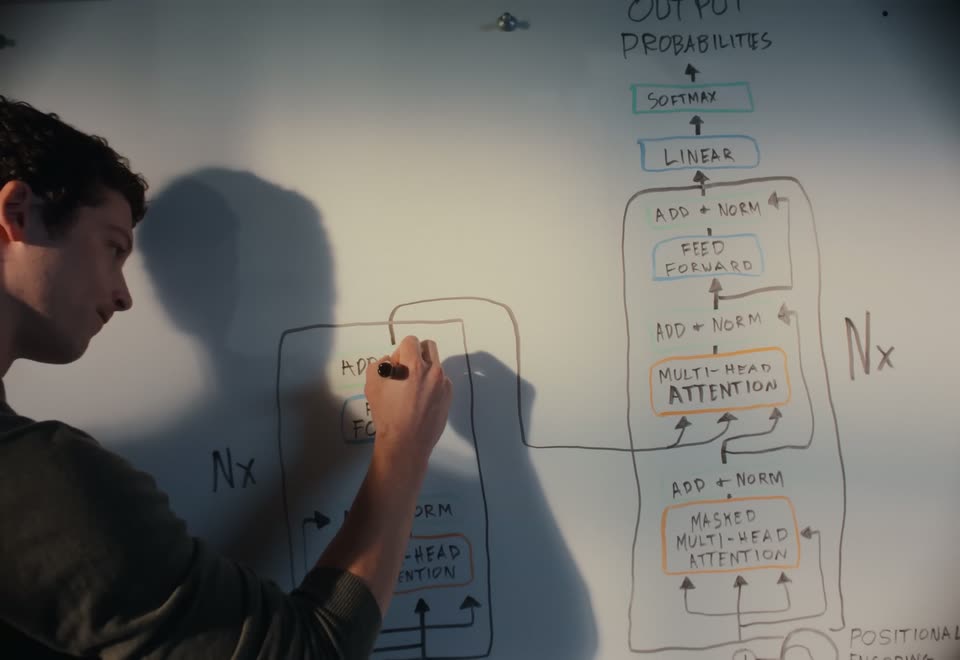
A man in profile fills a box on a whiteboard with a black marker, completing a hand-drawn transformer diagram of stacked attention blocks. His head and arm throw a sharp shadow across the wall. The camera stays still on the left of the board.
Camera: Pull out
02 · Hook · 0:01–0:02
A shallow-focus whiteboard shows hand-drawn wireframe boxes labeled ADD+NOKA and FEED. A hand holding a black marker sketches a connecting line across the right side, moving steadily. The background stays blurred and out of focus throughout the locked-off shot.
Camera: Static
03 · Hook · 0:02–0:03
Two fingertips pinch a small white connector on a pale surface, a thin cable crossing the left edge. The image dims to dark blue and a hand-drawn sketch of a rounded box with the words FEED and ADD+NOKA appears behind the fingers.
On-screen text: “ADD+NOKA”, “FEED”
Camera: Static
04 · Problem · 0:03–0:04
A macro close-up tracks a fingertip as it descends and presses a key on a dark laptop keyboard. The shallow focus keeps the key crisp while the screen behind blurs into soft blue and teal shapes. The finger lifts away, leaving the row of keys in sharp view.
Camera: Static
05 · Problem · 0:04–0:05
Lines of Python code fill a black screen with line numbers and orange, green and white syntax colors. The view scrolls vertically with a glitchy double-exposure flicker, then settles on the top of the file.
Camera: Static
06 · Problem · 0:05–0:08
A large letter D slides over the footage as a dim open office brightens. A man walks to a seated colleague and points at the monitor, then a close-up shows code on the screen while a hand gestures toward it.
On-screen text: “D”
Techniques: Kinetic type
Camera: Push in
07 · Problem · 0:08–0:09
A hand enters from the right, fingers curling as it hovers over a tilted monitor running a dark code editor. A yellow sticky note is stuck to the lower bezel. The office background stays soft and out of focus.
Camera: Static
08 · Problem · 0:09–0:10
A dark code editor view sits heavily out of focus, white monospaced lines on a black background. The top line brightens as the soft focus drifts across the blurred text.
Camera: Static
09 · Problem · 0:10–0:11
Top-down shot of a white keyboard on a pale blue desk. A pair of hands types rapidly, fingers blurred with motion, while a black pen and the edge of a dark device sit at the left.
Camera: Static
10 · Problem · 0:11–0:12
A bright open-plan office is shown in a fast horizontal pan. The camera glides from one developer at a desk with a code-filled laptop to two more working side by side, the whole frame soft with motion blur.
Camera: Pan
11 · Problem · 0:12–0:13
A fast pan sweeps across a bright open-plan office. Developers sit at desks with monitors and laptops while a couch, chairs and empty tables fill the background, all blurred by the quick camera move.
Camera: Pan
12 · Problem · 0:13–0:14
A rapid whip pan sweeps across an open office where people sit at desks with monitors and a small plant. Heavy horizontal motion blur streaks the entire frame, smearing the workers and equipment into soft bands of color.
Camera: Pan
13 · Problem · 0:14–0:15
A fast horizontal pan blurs the frame, then settles into a steady wide shot of an open office where several people work at desks with laptops and monitors.
Camera: Pan
14 · Problem · 0:15–0:16
Over the shoulder of a person facing a monitor of code, a man in a brown shirt writes in a notebook in a bright open-plan office. A laptop and a small plant sit on the desk between them.
Camera: Static
15 · Problem · 0:16–0:18
Close-up of a curly-haired man in an olive polo shirt, seated in a dim room with a pale blue wall and a blurred lamp behind him. He looks down, then lifts his head and glances toward an off-screen screen on his left. Slow, quiet staging.
Camera: Push in
16 · Problem · 0:18–0:19
A close-up of a hand holding a pen checks off items on a handwritten checklist in a grid notebook, the pen tip moving down toward the empty box beside the MULTI-SESSION line.
Camera: Static
17 · Problem · 0:19–0:20
Close-up of a hand holding a pen over a handwritten checklist on blue grid paper. The hand ticks checkboxes next to items like @ Mentions, MCP Tool, and Multi-Session, moving down the tilted list. The frame stays locked on the paper.
Camera: Static
18 · Problem · 0:20–0:20
Extreme close-up of a man with dark curly hair against a pale wall, lit by warm side light. He looks down, then his eyes snap to the side. Large text overlays sit over the locked-off shot, one scaling in.
On-screen text: “@MENTIONS”, “MULTI-SESSION”
Techniques: Kinetic type
Camera: Static
19 · Problem · 0:20–0:22
A dark editor splits the screen between a TypeScript test file and a terminal listing passing unit tests. The view zooms into the terminal, enlarging the “All unit tests passed” summary and the npm test result with its duration.
Techniques: UI zoom
Camera: Push in
20 · Problem · 0:22–0:23
A man in profile, wearing headphones, types on a keyboard at a desk in a dim room. A monitor showing code lights his face from the left, while a soft blue wall with a warm orange glow fills the background. The frame is locked off.
Camera: Static
21 · Problem · 0:23–0:23
A top-down close-up of two hands typing on a white Apple keyboard set on a dark surface. The fingers press keys steadily in a locked-off frame, with a small static numeral held in the corner.
On-screen text: “00”
Camera: Pan
22 · Problem · 0:23–0:24
Extreme close-up of a person's eye in dim light, half the face lost in shadow. A small bright reflection sits in the pupil as the eye holds still, gazing at an unseen screen.
Camera: Static
23 · Problem · 0:24–0:25
A person with curly hair sits at a desk seen from behind, facing a curved array of monitors that display a six-person video call, code editors, and chat panels. The dim room keeps focus on the glowing screens.
Camera: Static
24 · Problem · 0:25–0:25
A dark room frames a monitor showing a six-person video call grid above a code editor, while a person's blurred head sits in the right foreground. The participants shift and talk as the camera holds a steady, shallow-focus shot.
Camera: Static
25 · Problem · 0:25–0:26
A dark interface lists code bugs and flags, with a mouse cursor hovering near a highlighted bug entry.
Techniques: Cursor demo
Camera: Push in
26 · Problem · 0:26–0:27
A low-angle macro shot follows a hand typing on a dark laptop keyboard, fingertips pressing the keys as the camera holds at key level. The background stays softly out of focus, showing a warm-lit desk and a laptop screen.
Camera: Push in
27 · Problem · 0:27–0:28
A dark pull request screen on the Bugs tab shows a spinner and green status text, then the whole interface dims and dissolves into a top-down shot of two people at desks with keyboards and sticky notes.
Techniques: Morph, Masking
Camera: Push in
28 · Problem · 0:28–0:29
Top-down view of two workstations divided by a central monitor. Hands type on white keyboards and move mice on the left brown desk and the right white desk, which holds a notebook, glasses and a small figurine. The frame settles to show the full split layout.
Techniques: Split screen
Camera: Pull out
29 · Problem · 0:29–0:30
Top-down view of two adjacent desks, each with hands typing on a keyboard and laptop, leather folders, a watch and pens. The frame drifts down to reveal the floor and a small table.
Camera: Pull out
30 · Problem · 0:30–0:31
Top-down view: the camera drops from a blurred overhead of the floor to two people seated at a white table, each typing on a laptop, with a plant, notebook, cup and mouse laid out between them.
Camera: Pull out
31 · Problem · 0:31–0:32
Overhead 3D view of a white office table where two people type on laptops, a plant and a coffee cup between them. The camera rotates from a tilted angle to a flat top-down shot, then drifts to reveal a second table at the bottom.
Camera: Pull out
32 · Problem · 0:32–0:33
Top-down view of two white desks with seated workers, laptops and plants on a concrete floor. The live footage dissolves into a black-and-white halftone dot pattern that covers the whole frame.
Camera: Pull out
33 · Product intro · 0:33–0:34
Halftone purple figures sit at three stacked tables in 3D perspective, devices on the surfaces, as the camera drifts vertically with motion blur.
Techniques: 3D mockup, Parallax
Camera: Pull out
34 · Product intro · 0:34–0:38
A Kanban board tilts in 3D perspective, its task cards flickering with a hatched glitch overlay. The camera pulls back to a laptop on a desk, hands typing on the keyboard as the board settles into focus.
Techniques: 3D mockup
Camera: Pull out
35 · Product intro · 0:38–0:39
A hand in the foreground grips a small black rounded device, rotating it slightly, while a blurred man watches from behind. On the right, a tablet on a wooden stand shows a pointing hand silhouette.
Camera: Static
36 · Product intro · 0:39–0:40
A man in a green shirt holds a dark device toward the lens, soft focus, in a warm room with a monitor on the right. A white rounded-square logo with a black pentagon mark fades in at the center of the frame.
Camera: Static
37 · Product intro · 0:40–0:42
A blurred shot of a man at a desk fills the frame while a white rounded-square app icon with a black geometric mark stays sharp in the center. The caption 'Devin Desktop' fades in beneath the icon.
On-screen text: “Devin Desktop”
Camera: Static
38 · CTA · 0:42–0:44
A white rounded square containing a black hexagonal outline and a plus sign sits centered on a black field, above the title and a download URL. The frame is locked off and holds without motion.
On-screen text: “Devin Desktop”, “devin.ai/download”
Camera: Static