0:42

Shopify Editions Winter ’23 is live
Shopify · Business software · Feb 2023
Cognition · Nov 2026 · 1:58 · AI-annotated
Cognition’s 1:58 launch film runs 36 scenes, about 3.3 s each. The product is on screen from the first frame and 2 features are revealed. The call to action lands at 1:55 (98% in), over a voiceover. A single presenter holds a static medium shot in a warm concrete loft while product UI wipes in from the left as a split screen, then expands to full frame for each demo, with quick white fades between beats. Signature moves are the left-side panel wipes, isometric 3D infographics for abstract concepts like memory snapshots, and the recurring orange teddy bear anchoring every live shot.
Is this your launch? to your site or press kit.
Shopify · Business software · Feb 2023
Ramp · Finance · Sep 2026
A man in a navy zip sweater sits at a dark table, hands clasped, speaking to camera beside a laptop and an orange teddy bear. The office set behind him has concrete walls and a shelf of colorful books. A white name caption fades in at the lower right.
On-screen text: “Jonathan Kelley”, “Member of Technical Staff”, “Cognition”
Camera: Pan
Split screen: a product Apps list on the left, a man at a desk on the right speaking to camera beside a laptop and a teddy bear. A lower-third names him.
On-screen text: “Jonathan Kelley”, “Member of Technical Staff”, “Cognition”
Techniques: Split screen
Camera: Static
Split screen: the left half shows the Devin Apps interface, the pinned list view switching to a detail page with a page-views line chart, while the right half shows a man at a desk with a laptop and a teddy bear, identified by a name caption.
On-screen text: “Jonathan Kelley”, “Member of Technical Staff”, “Cognition”
Techniques: Split screen, Cursor demo
Camera: Static
A split screen pairs a product dashboard on the left, with a chart and a deployments table, against a man in a navy zip-up at a desk on the right, next to a laptop and a teddy bear. A white caption names him Jonathan Kelley, Member of Technical Staff, Cognition.
On-screen text: “Jonathan Kelley”, “Member of Technical Staff”, “Cognition”
Techniques: Split screen
Camera: Pan
A product app page fills the frame. A cursor clicks Share, opening a permissions modal that the camera zooms into. The cursor opens the General access dropdown, switches it from Anyone in Cognition to Anyone in your enterprise, then moves to Copy link.
Techniques: Cursor demo, UI zoom
Camera: Push in
A white share dialog listing access roles and a Copied button sits centered over a dimmed analytics dashboard, a cursor resting on the button. The dialog and the screen behind it then fade to a pale, washed-out white.
Techniques: Cursor demo
Camera: Pan
A man in a navy zip sweater sits at a dark table, hands clasped, speaking to camera. An open silver laptop faces the lens with a flower sticker, and a small orange teddy bear sits beside it. The loft background holds a book shelf and a brown armchair.
Camera: Static
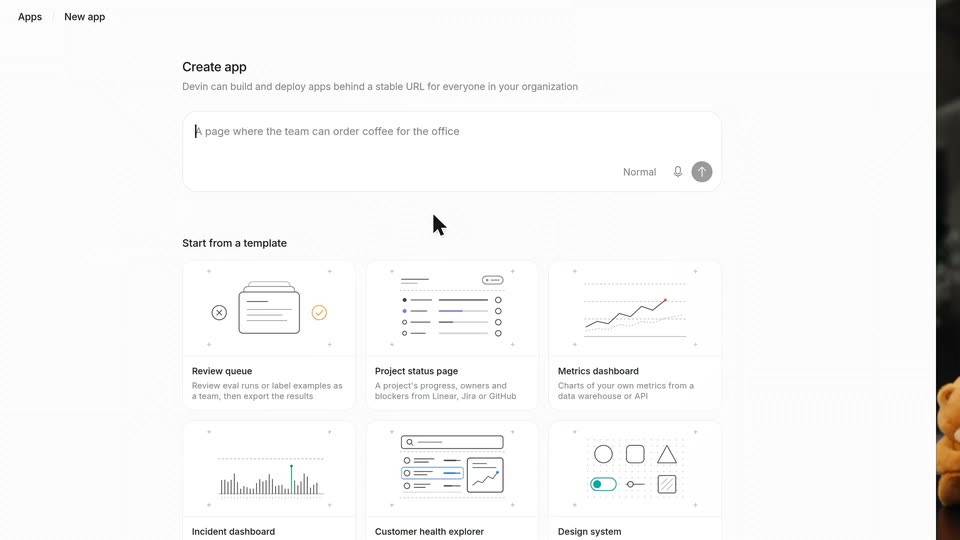
A man with reddish hair and a beard sits at a dark table with a silver MacBook and an orange teddy bear, talking to camera. A white panel slides in from the left, covering the frame and revealing an app-creation interface with a text field and template thumbnails.
Camera: Static
A product UI screen shows an app-creation form. A cursor types a prompt into the text box, then the page scrolls to the template grid and hovers the first card, tilting its wireframe illustration and filling the checkmark orange.
Techniques: Cursor demo, UI zoom
Camera: Push in
A light product screen titled Start from a template shows a two-by-three grid of line-art template cards, each with a bold title and short caption. A cursor glides from card to card, and the small illustrations animate as it hovers.
Techniques: Cursor demo
Camera: Pan
A man in a navy zip sweater sits at a dark round table, hands clasped, speaking to camera. A silver laptop and an orange teddy bear with a white bib sit in front of him. The industrial loft background holds a shelf of colorful books and two small bears. The shot is a static medium close-up.
Camera: Static
A man in a navy quarter-zip sits at a round table with a laptop and an orange teddy bear. A white panel wipes in from the left carrying an isometric stack of compute servers and a progress bar, splitting the frame.
Techniques: Masking, Split screen
Camera: Pan
Split screen. Left: an isometric stack, a Cost dashboard UI on top, a gray grid with a black logo tile, and a blue grid base, above a Compute-to-Running progress bar. Right: a red-haired man in a navy zip-up sits at a desk with a teddy bear and laptop.
On-screen text: “Compute”, “Running”
Techniques: Split screen, 3D mockup
Camera: Static
Split screen: an isometric stack of a dashboard, a grid and a blue base on the left, a man speaking on the right. The base dims to a checkered pattern, the progress bar shrinks, and the label swaps from Running to Hibernating to Near zero.
On-screen text: “Compute”, “Running”, “Hibernating”, “Near zero”
Techniques: Split screen, 3D mockup
Camera: Static
Split screen. Right: a man in a navy zip-up talks at a desk. Left: an isometric stack of interface layers animates as the top screen gains a blue outline, grids light up blue, and the compute bar moves from 'Near zero' to '1 app in use.'
On-screen text: “Compute”, “Near zero”, “1 app in use”
Techniques: Split screen, 3D mockup
Camera: Static
Split screen: an isometric stack of app layers, line chart and compute grid on the left, a red-bearded man in a navy zip-up talking on the right. The graphic crossfades out, leaving the man full frame against a blurred room.
Techniques: Split screen, 3D mockup
Camera: Static
A red-haired man in a blue zip sweater speaks to camera, then looks down to type on a laptop showing a white screen with a small logo. A teddy bear and shelves holding books and two orange cat plush toys frame the desk.
Camera: Static
A live-action presenter at a desk holds the right half of the frame while a Cloud Cost Explorer dashboard panel wipes in from the left and expands to fill most of the screen. Its cost figures count up and a line chart draws in, showing live updates.
Techniques: Split screen, Masking
Camera: Pan
The Cloud Cost Explorer dashboard fills the frame as a cursor switches to the Dedicated SaaS tab and unchecks platform rows, updating the KPI cards. The camera zooms onto the gross margin and breakeven cards, then pulls back to reveal a live-action office behind the interface.
Techniques: Cursor demo, UI zoom
Camera: Pull out
A blond man in a navy sweater sits at a desk with a laptop and a teddy bear, talking to camera on the left. On the right, a Cloud Cost Explorer dashboard shows cost and revenue metrics, a line chart, and a component bar list.
Techniques: Split screen
Camera: Static
A presenter sits at a desk on the left while a Session Cost Breakdown dashboard fills the right half. The dashboard's metrics and bar chart update as a cursor moves across the chart.
Techniques: Split screen, Cursor demo
Camera: Static
A bearded man in a navy zip-up speaks to camera on the left, glancing down then up, against a soft-focus plant backdrop. The right half holds a cost-breakdown dashboard: a per-request bar chart with a cursor on the cache-drop spike and a request detail card below.
Techniques: Split screen, Cursor demo
Camera: Static
A man in a navy quarter-zip sits at a dark round table with a silver laptop and an orange teddy bear. He looks to camera, then down at the screen and types. The concrete-walled set holds a shelf of colorful books and two small bears.
Camera: Pan
A man in a navy zip sweater types on a silver laptop at a black table, an orange teddy bear propped beside it. He lifts his head and speaks to camera in a concrete room, a shelf of colorful books and two more bears behind him.
Camera: Static
A man with reddish hair and a beard, wearing a dark blue zip-up sweater over a white tee, speaks in a softly lit room. He looks down, then lifts his gaze toward the camera. The background shows blurred green plants and a tan couch.
Camera: Static
A split view pairs the product dashboard on the left with a presenter at his desk on the right, then the dashboard expands to full screen. Live cards type out updates, the terminal logs test runs, and the view zooms onto two finished cards.
Techniques: Split screen, UI zoom
Camera: Push in
A red-haired man in a navy zip sweater sits in a dim room, speaking in a medium close-up. Blurred green plants fill the soft-focus background. He looks down and to the side, blinking and shifting his head slightly as he talks.
Camera: Pull out
A bearded man in a navy sweater types on a laptop at a round table, an orange teddy bear beside him. A white product panel with an isometric teddy-bear scene slides in from the left, splitting the frame between the live shot and the interface.
Techniques: Split screen
Camera: Pan
A split screen shows a 3D paintball arena on the left, where brown otter characters toss blue and orange balls across ink-stained ground, and a man in a navy zip-up on the right, speaking and typing on a laptop beside a teddy bear.
Techniques: Split screen
Camera: Static
A split screen pairs a 3D paintball game on the left, where brown otter characters throw orange and blue balls across an ink-splattered office floor, with a bearded man in a navy zip-up speaking to camera on the right.
Techniques: Split screen
Camera: Pan
A chat interface fills the frame as a cursor clicks the input field and types a deploy command. The message sends, a cooking spinner appears, then a live deployment card with a thumbnail and a link slide in as the view zooms onto the conversation.
Techniques: Cursor demo, UI zoom
Camera: Push in
A man with short blond hair and a reddish beard, in a navy zip-up sweater over a white shirt, speaks to camera in a medium close-up. He sits in a warm interior with blurred green plants behind him, looking just off lens as he talks.
Camera: Pan
A man in a navy zip sweater sits at a black table between an orange teddy bear and a silver laptop, speaking to camera with hands clasped. The medium shot cuts to a tighter close-up of his face in the final second.
Camera: Static
A man with reddish-blond hair and a beard speaks in a medium close-up, wearing a dark blue zip-up sweater. The shot widens to show him sitting at a wooden table with a laptop and an orange teddy bear.
Camera: Static
A man in a navy quarter-zip sits at a round black table, hands clasped, speaking to camera. A laptop with a flower sticker and a small orange teddy bear sit in front of him; shelves with colorful books and two more bears fill the concrete background.
Camera: Static
The black Devin logo holds centered on a white field, then dissolves as the centered line Try it today at devin.ai appears in its place.
On-screen text: “Devin”, “Try it today at devin.ai”
Camera: Static