0:30

Introducing Linear Releases
Linear · Productivity · Apr 2026
Clerk · Dec 2025 · 1:04 · AI-annotated
Clerk’s 1:04 launch film runs 18 scenes, about 3.6 s each. The product shows up at 0:06 and 4 features are revealed. The call to action lands at 0:54 (85% in). The video is built as a chain of short beats: a claim typed out letter by letter on a near-white card, followed by a clean UI or 3D demo of that claim, repeated four times before a closing imperative and the Clerk logo. Its signature moves are the character-by-character typing with a blinking caret and the shallow-depth 3D panels that float and drift over a white void.
Is this your launch? to your site or press kit.
Linear · Productivity · Apr 2026
HeroUI · Oct 2026
Perplexity · AI · May 2026
A plain off-white frame holds two centered lines of bold dark sans that type out character by character behind a thin cursor, completing the question by the end.
On-screen text: “What if you could ship”, “API keys with one toggle?”
Techniques: Kinetic type
Camera: Static
On a pale lavender gradient, the bold dark gray question 'What if you could ship API keys with one toggle?' sits centered in a locked-off frame. It cuts to a smaller gray 'we' typed letter by letter with a blinking cursor.
On-screen text: “What if you could ship”, “API keys with one toggle?”, “we”
Techniques: Kinetic type
Camera: Static
A dark bold sans-serif line types out letter by letter at the center of a near-white field, a thin vertical cursor blinks behind the last typed character, then the full sentence holds still on a locked-off frame.
On-screen text: “Well, now you can.”
Techniques: Kinetic type
Camera: Static
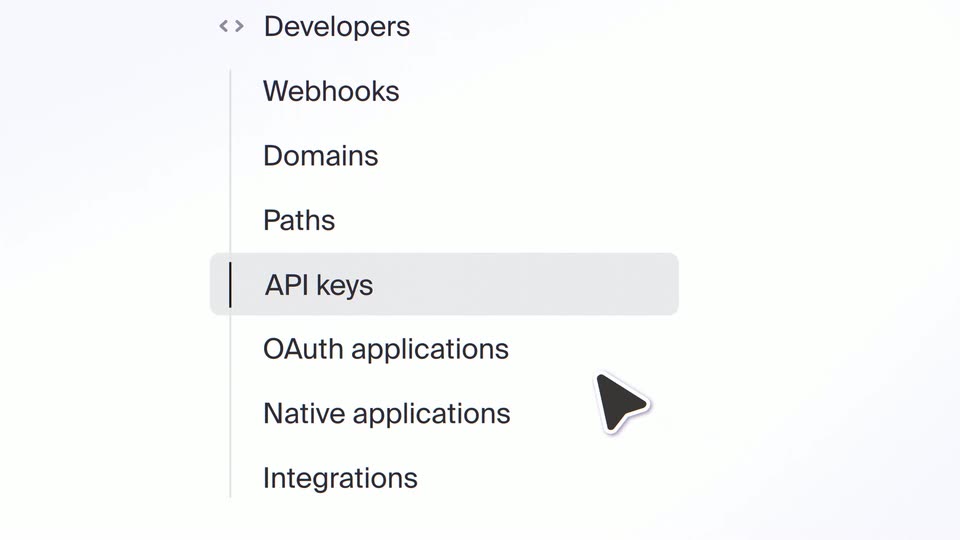
A light sidebar menu lists Developers, Webhooks, Domains, Paths, API keys and OAuth applications; the API keys row carries a gray highlight bar. The list scrolls up a few rows while a cursor arrow rests at the right edge.
Techniques: Cursor demo
Camera: Static
A cursor hovers over the API keys row in a left sidebar, then the menu fades out as a centered settings card with a key icon and an Enable API keys button scales in. The cursor moves onto the button.
Techniques: Cursor demo
Camera: Push in
A pale lavender screen shows a centered card with a key icon, the heading Enable API keys, two lines of body copy, and a button. A large dark cursor glides in from the left and stops on the button.
Techniques: Cursor demo
Camera: Static
A thin cursor blinks at center, then the headline Enable secure API access. types out on a pale off-white background. The line clears and a settings card scales in, showing a green Enabled badge and a red Disable link.
On-screen text: “Enable secure API access.”
Techniques: Kinetic type
Camera: Static
A pale settings card on a white field shows the heading User API keys beside a green pill badge, with a gray subline below. The badge label dissolves from Enabled to Disable as the row eases in with a slight scale.
Techniques: UI zoom, Morph
Camera: Static
A centered dark sans headline types itself onto a near-white background, starting with “No” and completing to the full line, then holds still.
On-screen text: “No boilerplate required.”
Techniques: Kinetic type
Camera: Static
A light sidebar menu scrolls up as the selection highlight, a gray rounded pill with a thin vertical bar, moves from API keys to M2M authentication, keeping the selected row centered in the frame.
Camera: Push in
A dark sans-serif headline types out line by line with a blinking cursor on a pale off-white background, then the frame cuts to a tilted 3D view of the account interface showing Profile and Security items.
On-screen text: “One identity system.”, “Users & machines.”
Techniques: Kinetic type, 3D mockup
Camera: Static
A tilted account panel with Profile, Security and API keys rows sits in focus over a blurred API keys table on white. The camera pans right, the front panel slides out left while the table drifts into center, revealing a PanelFlow Key row.
Techniques: 3D mockup, Parallax
Camera: Static
A tilted 3D view of an API keys list with shallow depth of field, the middle rows in focus while the header and bottom row blur. The camera drifts slowly, holding on two key names and their expiry metadata.
Techniques: 3D mockup
Camera: Static
A tilted 3D panel of an Add new API key form sits on a white background with shallow depth of field. A black cursor types a key name, opens the Expiration dropdown, scrolls to 180 Days, then hovers the Create key button.
Techniques: 3D mockup, UI zoom, Cursor demo
Camera: Pull out
A plain off-white frame holds a centered dark sans headline. The line types on from a short fragment to the full sentence, then remains static.
On-screen text: “Fully built, drop-in UI.”
Techniques: Kinetic type
Camera: Static
A dark terminal types a curl POST request line by line, a block cursor marking the input; the authorization header and JSON body complete, then the response line prints below as the text settles into a soft glow.
Techniques: Kinetic type
Camera: Static
A white background holds a centered headline that types out letter by letter behind a blinking cursor, reading “Offer first-class API key management.” The line holds, then the frame cuts to the Clerk logo, a purple person mark beside the black wordmark, centered on white.
On-screen text: “Offer first-class API key management.”
Techniques: Kinetic type
Camera: Static
The Clerk logo, a purple person icon beside the black lowercase wordmark, holds centered on a plain off-white field, static and locked off for the entire shot.
Camera: Static