0:59
Explore
00:00:00 / 03:33:20
- Length
- 3:33
- Scenes
- 60 · 3.6 s avg
- Product on screen
- 0:00
- Features shown
- 4
- Call to action
- 3:19 · 93%
- Voiceover
- Yes
- Views
- 5.4K on X
as of November 22, 2026
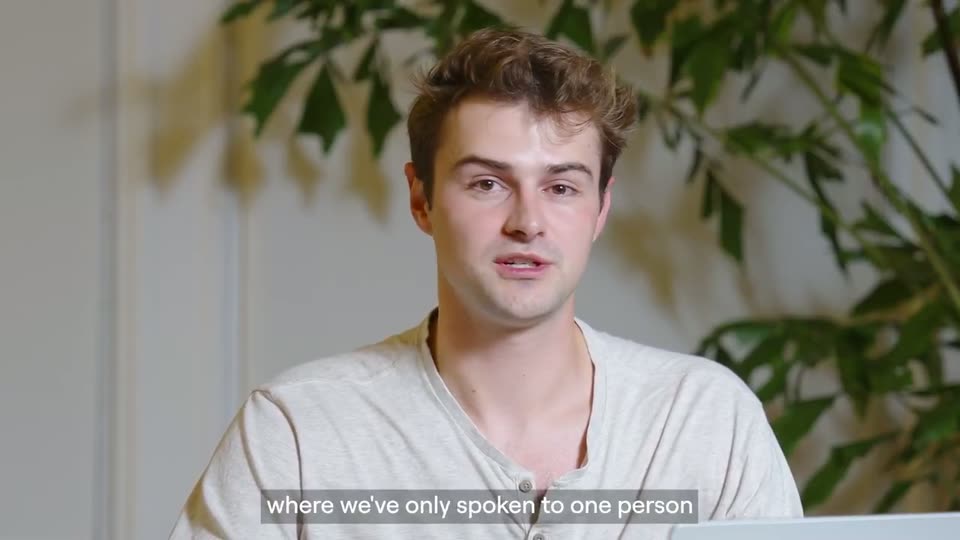
Clay’s 3:33 launch film runs 60 scenes, about 3.6 s each. The product is on screen from the first frame and 4 features are revealed. The call to action lands at 3:19 (93% in), over a voiceover. A talking-head presenter at a plant-filled white desk alternates with dark ChatGPT and Clay interface screens, walking one end-to-end sales workflow from query to launched campaign. The pacing is steady and conversational, cutting between the locked-off presenter and the UI on each sentence, with the cartoon cloud sticker on the laptop and the rainbow clay logo as the only recurring visual signatures.
Footage neededEstimated needs: 4 capture groups — your screens or recordings · 1 official logo — reused across the film · 34 filmed passages — shoot, supply or replace
Is this your launch? to your site or press kit.
More like this

Similar soundtrack
Films whose music sounds like this one, voice left out
1:12

Property Management Software Explainer | Deckard Longterm Rentals x MotionCue
Deckard · Upbeat electronic
2:17

Introducing the Agents API
OpenAI · Modern electronic
2:56

Stripe Terminal | Terminal de paiement et Plateforme de commerce unifiée
Stripe · Upbeat electronic, with a brief funk/disco instrumental break and a short distorted guitar riff
Clay - Today, we’re excited to relaunch our official MCP connection with @Op, scene by scene
· 60 scenes as text
01 · Product intro · 0:00–0:03
A man in a cream henley sits at a white desk with a laptop, speaking and gesturing to camera against a leafy green backdrop. A large yellow italic title, Clay in ChatGPT, is overlaid across the frame, and white subtitles run along the bottom edge.
On-screen text: “There's always another”, “Clay in”, “ChatGPT”, “account to research,”, “contact to find, and follow up to send.”
Camera: Static
02 · Problem · 0:03–0:05
A young man with curly brown hair in a light gray henley sits at a laptop and speaks to the camera, a leafy plant and white wall behind him. Subtitles at the bottom carry the question, held on a locked-off frame.
On-screen text: “ChatGPT”, “How do you decide what to deserves”, “your attention next?”
Camera: Static
03 · Problem · 0:05–0:08
A man in a light gray henley sits at a white desk with a silver laptop and green plants behind him. He gestures with both hands while talking to the camera in a locked-off medium shot. White captions on a dark bar sit at the bottom.
On-screen text: “That decision”, “depends on what you know”, “about your accounts,”
Camera: Static
04 · Problem · 0:08–0:11
A young man in a light gray henley speaks to camera against a white wall with a leafy plant behind him. The locked-off medium shot widens at the end to reveal his hand gesturing over a sticker-covered laptop. White subtitles roll along the bottom.
On-screen text: “the signals you're seeing,”, “and the conversations”, “your team is already having.”, “The Clay Plugin takes that context”
Camera: Static
05 · Product intro · 0:11–0:15
A man in a cream henley sits at a desk with an open laptop, gesturing while talking to camera, leafy plants behind him. White captions run along the bottom. At 3.5s the frame cuts to a tighter close-up of his face and hands.
On-screen text: “The Clay Plugin takes that context”, “and brings it into ChatGPT Work,”, “where you can turn it into Workflows”
Camera: Static
06 · Product intro · 0:15–0:19
A young man in a white henley sits at a desk and speaks to the camera, gesturing with both hands in front of his chest. A leafy green plant fills the right side of the frame against a white paneled wall. Subtitles at the bottom swap with his speech.
On-screen text: “where you can turn it into Workflows”, “that help you decide”, “where to focus and what to do next.”
Camera: Static
07 · Product intro · 0:19–0:23
A man in a light shirt sits at a white desk with an open laptop, gesturing as he speaks to camera, framed by green plants; a name caption fades in at the right.
On-screen text: “Dane Williams”, “Engineer, Clay”, “I'm Dane Williams from Clay's”, “engineering team,”, “and we're partnering”, “with OpenAI for their Sales Launch.”
Camera: Static
08 · Product intro · 0:23–0:25
A man in a white henley shirt sits before a white wall and leafy green plant, speaking to the camera and gesturing with one hand. White subtitle lines on a dark bar swap in place at the bottom center of the locked-off frame.
On-screen text: “with OpenAl for their Sales Launch.”, “Through a conversation”, “with ChatGPT,”, “you can query and prioritize”
Camera: Static
09 · Product intro · 0:25–0:28
A man in a light gray shirt sits at a white desk before a silver laptop, gesturing with his right hand as he speaks to camera. Green plants fill the background. White subtitles on a dark bar appear along the bottom edge.
On-screen text: “you can query and prioritize”, “accounts and audiences,”, “and then run workflows”
Camera: Static
10 · Product intro · 0:28–0:30
A young man in a cream henley sits at a laptop, speaking to camera against a white wall with a leafy plant. He shifts his gaze and gestures slightly. White captions on a dark bar read his words at the bottom of the frame.
On-screen text: “and then run workflows”, “to find new contacts to reach out to.”
Camera: Static
11 · Product intro · 0:30–0:32
A man in a cream long-sleeve shirt sits at a white desk, arms crossed, talking to camera. A silver laptop with a cartoon sticker sits in front of him; leafy green plants fill the background. The frame is locked off. Subtitles run along the bottom.
On-screen text: “You can see how your workflows are”, “built, get feedback on specific steps”, “to find new contacts to reach out to.”
Camera: Static
12 · Product intro · 0:32–0:36
A man in a light grey t-shirt sits at a desk with a laptop, speaking to camera and gesturing with his hands. Green plant leaves fill the right side of the frame. White subtitles on a dark bar change at the bottom.
On-screen text: “built, get feedback on specific steps”, “and adjust them”, “as your priorities change.”
Camera: Static
13 · Product intro · 0:36–0:41
A young man in a cream long-sleeve shirt sits at a white desk with a laptop, gesturing with his hands as he speaks to camera, leafy plants filling the background. The shot is locked off and static.
On-screen text: “as your priorities change.”, “Let's jump into ChatGPT Work”, “and see how Clay turns”, “what your team knows into”, “what it does next.”
Camera: Static
14 · Feature reveal · 0:41–0:49
A man in a light gray henley sits at a desk before a white wall and leafy plant, speaking to camera and gesturing with his hands while a laptop edge peeks in at the bottom right. Subtitles appear line by line at the bottom center. The camera is locked off.
On-screen text: “Today we're going to do”, “some multithreading.”, “We're going to find stage 2 accounts”, “in our Audiences”, “where we've only spoken to one person”, “so far.”
Camera: Static
15 · Feature reveal · 0:49–0:51
A young man in a cream henley sits at a white table with an open laptop bearing a cartoon sticker, gesturing with his hands as he speaks to camera, framed by leafy plants. A static lower-third caption runs across the bottom of the frame.
On-screen text: “so far.”, “I'm going to use ChatGPT to help me do that.”
Camera: Static
16 · Feature reveal · 0:51–0:53
A dark chat field beneath a white prompt line is the focus on black. A white cursor hovers at the field's edge as '@clay' is typed and a dropdown filters to a single Clay option. A caption reads at the bottom.
On-screen text: “We'll say @Clay, can you find me”
Techniques: Cursor demo
Camera: Static
17 · Feature reveal · 0:53–0:54
A man in a cream henley sits at a white desk with plants behind him, looking at a laptop with a cartoon sticker. The shot cuts to the app's dark input screen with a waveform and a blue send button, while captions of his prompt run along the bottom.
On-screen text: “We'll say @Clay, can you find me”, “stage 2 accounts”
Camera: Static
18 · Feature reveal · 0:54–1:01
A dark chat interface shows a voice waveform filling the input bar, then a cursor clicks the send button as the typed query appears. The view zooms into the conversation, where a blue message bubble and a Thinking status appear above bottom captions.
On-screen text: “stage 2 accounts”, “where we've only spoken to one person”, “Now we'll let”, “ChatGPT do its thing,”, “and it's going to start searching”, “up in Audiences for us.”
Techniques: Cursor demo, UI zoom
Camera: Pull out
19 · Feature reveal · 1:01–1:02
A young man in a cream henley sits at a white desk, speaking to camera in front of a laptop with a cartoon sticker. Green plants fill the background. He glances down at the screen. A subtitle line is locked at the bottom of the frame.
On-screen text: “up in Audiences for us.”
Camera: Static
20 · Feature reveal · 1:02–1:06
A dark Clay chat interface stays locked on a blue prompt bubble above a results table of three Stage 2 companies. A white subtitle caption slides up at the bottom edge while a cursor rests at the right margin.
On-screen text: “So now ChatGPT got back to us”
Camera: Static
21 · Feature reveal · 1:06–1:11
A young man in a cream henley sits at a white desk with a silver laptop, leafy plants behind him. He looks down at the screen, then up to camera, then back, talking. White subtitles on a dark bar sit at the bottom.
On-screen text: “and it found three accounts”, “that are stage 2,”, “and we've only spoken”, “to one person there.”, “We have”
Camera: Static
22 · Feature reveal · 1:11–1:15
A dark interface panel shows a Companies table with three Stage 2 rows, while a white cursor glides from the Open button down to the company names. A large white caption at the bottom updates in sequence to match the voiceover.
On-screen text: “We have”, “Stellholm,”, “Conclusive AI, and Orbitfern cloud.”
Techniques: Cursor demo
Camera: Static
23 · Feature reveal · 1:15–1:19
A man in a cream shirt sits at a desk with an open laptop, talking to the camera while white subtitles caption his speech. The scene then cuts to a dark product interface showing a company table and a chat input.
On-screen text: “Let's now”, “build a workflow”, “to help us find more contacts”, “we can reach out to”, “at these companies.”
Camera: Static
24 · Feature reveal · 1:19–1:31
A dark CRM table with three company rows and a result note sits static while a voice waveform and caption lines type out a prompt in the chat bar below. A white cursor hovers at the right edge. At the end the scene cuts to a man at a desk with a laptop, plants behind him.
On-screen text: “Can you build me a workflow”, “that finds new contacts”, “at these companies.”, “we haven't spoken to yet, and are”, “people who work in RevOps”, “and have worked at the company”, “for at least two years.”, “After you do that,”
Camera: Static
25 · Feature reveal · 1:31–1:33
A man in a cream henley sits at a white desk before a silver laptop bearing a cartoon sticker. He gestures with his hands while speaking, framed against leafy green plants. Subtitles read at the bottom of the frame.
On-screen text: “After you do that,”, “then find all of their emails.”
Camera: Static
26 · Feature reveal · 1:33–1:37
A dark chat interface holds a blue prompt bubble and a status that ticks from Thinking to Working for 2s while a cursor rests on the right. The locked frame cuts to a man in a light shirt at a desk with a laptop and plants behind him.
On-screen text: “And so now we sent that to ChatGPT”, “and we can kind of”
Techniques: Cursor demo
Camera: Static
27 · Feature reveal · 1:37–1:41
A young man in a cream henley sits at a white desk, speaking to camera in front of a laptop with a cartoon sticker. He gestures, then looks down at the screen. Green plants fill the background. Subtitles run along the bottom.
On-screen text: “and we can kind of”, “just let it do its thing”, “here for a bit while”, “it builds the workflow.”
Camera: Static
28 · Feature reveal · 1:41–1:43
A dark agent interface scrolls up from a text response to a dotted-grid workflow canvas. A header card for the workflow sits at the top with buttons, and a cursor hovers over the Manual node.
On-screen text: “it builds the workflow.”
Techniques: Cursor demo
Camera: Static
29 · Feature reveal · 1:43–1:44
A man in a light henley sits at a desk with an open laptop, gesturing with one hand as he speaks, leafy plants filling the background. Subtitles fade in at the bottom of the locked-off frame.
On-screen text: “Great.”, “So we now have our workflow.”
Camera: Static
30 · Feature reveal · 1:44–1:45
A dark workflow panel with a vertical chain of node cards sits center frame, with a side panel on the right. A cursor glides in from the right and clicks the blue Open button, while white captions swap at the bottom.
On-screen text: “So we now have our workflow.”, “Let's take a look at it”
Techniques: Cursor demo
Camera: Static
31 · Feature reveal · 1:45–1:46
A close-up of a dark workflow canvas with a cursor on the Open button pulls back to reveal a chat window, the workflow now open in a right side panel.
On-screen text: “Let's take a look at it”
Techniques: Cursor demo, UI zoom, Split screen
Camera: Pull out
32 · Feature reveal · 1:46–1:50
A split view shows a chat panel on the left and a workflow canvas of stacked nodes on the right. The cursor hovers beside the nodes, then the view zooms into the right panel to read the node labels.
On-screen text: “and we'll see here in the side”, “panel we've got the whole thing.”
Techniques: Split screen, Cursor demo, UI zoom
Camera: Static
33 · Feature reveal · 1:50–1:52
A dark dotted workflow canvas fills the right side, showing a vertical stack of node cards connected by lines, with a chat panel cut off at the left edge. A white cursor hovers over the middle node while a white caption at the bottom reads the voiceover, then changes to the next phrase.
On-screen text: “We can see all of the nodes.”, “I actually want to add”
Techniques: Cursor demo
Camera: Static
34 · Feature reveal · 1:52–1:55
A man in a cream henley talks at a desk with a laptop, framed by plants, then a cut reveals a dark dotted workflow canvas with stacked step cards as a cursor hovers over one.
On-screen text: “I actually want to add”, “another step to this workflow now.”
Techniques: Cursor demo
Camera: Static
35 · Feature reveal · 1:55–1:58
A dark workflow editor shows a vertical chain of step nodes on a dotted canvas. A white cursor slides down the list and clicks the bottom node, which gains a white selection outline. Subtitle captions swap at the bottom of the frame.
On-screen text: “another step to this workflow now.”, “So let's click on the work email.”
Techniques: Cursor demo
Camera: Static
36 · Feature reveal · 1:58–2:05
A split-screen product interface: left, a chat thread with a blue user message and a results panel; right, a vertical column of workflow node cards on a dotted grid. A white cursor rests on the left panel while white captions swap phrase by phrase along the bottom edge.
On-screen text: “Can you add another”, “step that checks in Audiences”, “if this person has interacted”, “with us on social media yet,”
Techniques: Split screen, Kinetic type
Camera: Static
37 · Feature reveal · 2:05–2:07
A young man in a white henley sits at a white desk among leafy plants, typing on a silver laptop with a blue cartoon sticker on the lid. He watches the screen, then glances up. A subtitle sits at the bottom of the locked-off frame.
On-screen text: “and now we'll let ChatGPT”
Camera: Static
38 · Feature reveal · 2:07–2:10
A split-screen view shows a Clay chat on the left, where a blue prompt and white agent replies update as the agent works, beside a vertical workflow graph on a dotted grid at right. White bold captions cycle along the bottom.
On-screen text: “and now we'll let ChatGPT”, “do its thing again”, “and iterate on this workflow”, “and add a new node.”
Techniques: Split screen, Kinetic type
Camera: Static
39 · Feature reveal · 2:10–2:13
A dark chat interface holds a blue user prompt and an AI response with two short paragraphs. A text caret sits in the bottom input field while a black caption bar with the voiceover line rises into view.
On-screen text: “Great, so now we added the additional node”
Camera: Static
40 · Feature reveal · 2:13–2:16
A young man in a light gray henley sits at a white desk with an open laptop, framed by leafy plants, speaking to camera and glancing down at the screen. A locked-off medium shot holds as subtitles swap at the bottom.
On-screen text: “Great, so now we added the additional node”, “for checking social interaction”, “to our workflow.”
Camera: Static
41 · Feature reveal · 2:16–2:21
A man in a light henley shirt sits at a desk, looking down at his laptop and up at the camera as he speaks. Green houseplants fill the soft-focus background. The shot widens at the end to reveal the open laptop with a sticker on its lid.
On-screen text: “to our workflow.”, “Let's now run the workflow”, “and get these contacts”, “into an audience segment.”
Camera: Static
42 · Feature reveal · 2:21–2:23
A man in a white henley sits at a white desk, typing on a silver laptop bearing a cartoon cloud sticker, framed by leafy plants. White subtitles on a dark bar at the bottom swap from one line to the next.
On-screen text: “Can you run the workflow”, “into an audience segment.”
Camera: Static
43 · Feature reveal · 2:23–2:28
A dark chat interface holds still: a blue prompt bubble and the assistant's answer with action icons, while a white cursor glides down toward the stop button on the voice bar and voiceover captions swap at the bottom.
On-screen text: “on our three companies”, “and add the contacts that we find”, “at those companies into”, “the audience segment?”
Techniques: Cursor demo
Camera: Static
44 · Feature reveal · 2:28–2:30
A dark two-pane product screen: the left chat pane switches from a drafted prompt with a send button to a Working status with a stop control, while the right pane holds a static vertical workflow graph. A hand cursor rests on the send button, then drifts to the divider.
Techniques: Cursor demo, Split screen
Camera: Static
45 · Feature reveal · 2:30–2:32
A man in a light gray henley sits at a white desk, typing on a silver laptop with a cartoon sticker on the lid. Green plants fill the background. He looks at the screen and speaks while subtitles appear at the bottom of the frame.
On-screen text: “Great.”, “And now”, “ChatGPT is”, “going to start running the workflow,”
Camera: Static
46 · Feature reveal · 2:32–2:38
A dark chat screen holds a blue prompt bubble at the top while a working timer ticks from 9s to 13s and a task line updates below. White captions swap at the bottom, and a cursor rests at the lower right.
On-screen text: “going to start running the workflow,”, “which will qualify the contacts”, “and add their results”
Camera: Static
47 · Feature reveal · 2:38–2:42
A man in a light henley sits at a white desk, typing on a laptop with a colorful sticker, framed by leafy plants. The locked-off shot holds on him, then cuts to a dark interface showing a chat panel and a vertical node graph.
On-screen text: “and add their results”, “to an audience”, “segment after it gets them back.”
Camera: Static
48 · Feature reveal · 2:42–2:47
A dark split view shows a Clay chat on the left and a vertical workflow node list on the right. The chat scrolls up to reveal a six-row contacts table and a Done message, while the workflow stays fixed and a cursor rests at the divider.
On-screen text: “segment after it gets them back.”, “So we now got six people”, “from the workflow results”
Techniques: Split screen
Camera: Static
49 · Feature reveal · 2:47–2:54
A young man in a light henley sits at a white desk with a laptop, speaking to camera against a backdrop of green plants. He looks down at the screen near the end as white subtitles roll along the bottom.
On-screen text: “and they're in an audience segment.”, “Let's actually draft a campaign”, “with two emails in the sequence”, “to reach out to these people.”
Camera: Static
50 · Feature reveal · 2:54–3:02
A dark product UI shows a contact table beside a workflow diagram, with white captions building a question at the bottom. The view then zooms into the chat, where the typed question appears as a blue bubble above a Thinking label.
On-screen text: “Can you now build a two email sequence with outreach to all of these people?”
Techniques: Kinetic type, UI zoom
Camera: Pan
51 · Feature reveal · 3:02–3:04
A locked-off two-panel screen: on the left a chat thread streams the assistant reply and an email-sequence widget expands to reveal the draft copy, while the right panel holds a static dark workflow graph of ten nodes. A white caption fades in at the bottom.
On-screen text: “So we now have our email sequence.”
Camera: Static
52 · Feature reveal · 3:04–3:06
A man in a cream henley sits at a white desk in front of a silver laptop, speaking to camera with leafy plants behind him. He glances down at the screen, then back to the lens, while subtitles roll along the bottom.
On-screen text: “So we now have our email sequence.”, “We can see it in”, “the widget in ChatGPT.”
Camera: Static
53 · Feature reveal · 3:06–3:12
A dark chat panel with an email-draft widget sits left of a vertical workflow diagram. A cursor clicks the second step dot, the frame zooms onto the widget to show the follow-up email, then the cursor hovers the View in Clay button.
On-screen text: “the widget in ChatGPT.”, “See the other email here.”, “We can open this up in Clay now”
Techniques: Cursor demo, UI zoom
Camera: Static
54 · Feature reveal · 3:12–3:13
A white screen shows a small loading spinner in the center that resolves into a tiny cyan 3D dome with an orange interior. A cursor rests in the top right corner while a caption bar sits at the bottom.
On-screen text: “We can open this up in Clay now”
Camera: Static
55 · Feature reveal · 3:13–3:14
A Clay sequence editor fills the frame; the email draft in the center updates from a generic template to a personalized version for Lena Wren while a cursor rests on the Launch sequence button. A gray caption bar at the bottom swaps phrases in time with the voiceover.
On-screen text: “We can open this up in Clay now”, “and actually”
Camera: Static
56 · Feature reveal · 3:14–3:19
Close-up of an email composer interface showing a draft with body copy and a top toolbar. A cursor rests on the blue Launch sequence button at the top right. A lower caption updates phrase by phrase in sync with the voiceover.
On-screen text: “and actually and start”, “launch that sequence and start”, “sending outreach”, “to these new contacts.”
Techniques: Cursor demo
Camera: Static
57 · CTA · 3:19–3:21
A man in a cream henley sits at a white desk with an open silver laptop, gesturing with both hands as he speaks to camera. Green plants fill the background and a cartoon sticker decorates the laptop lid. Subtitles run along the bottom edge.
On-screen text: “So that's Clay and ChatGPT.”, “You can build workflows,”
Camera: Static
58 · CTA · 3:21–3:27
A man in a light henley sits at a desk before a white wall and leafy plants, talking to the camera. White subtitles on a dark bar at the bottom swap with his words. The shot widens at the end to show a laptop with a cartoon sticker.
On-screen text: “You can build workflows,”, “you can query your data in audiences,”, “and you can schedule outreach”, “to new contacts.”, “You can go into the”
Camera: Static
59 · CTA · 3:27–3:31
A man in a light henley sits at a white desk with an open laptop bearing a cartoon sticker, speaking to camera against a leafy plant backdrop. He gestures with both hands, then clasps them. White subtitles on dark bars appear at the bottom.
On-screen text: “to new contacts.”, “You can go into the”, “marketplace today and”, “try it for yourself.”
Camera: Static
60 · Outro · 3:31–3:33
A 3D rainbow arch mark and the lowercase wordmark clay sit centered on a plain white background. The wordmark fills in from gray to black over the first second, then the lockup holds still for the rest of the clip.
On-screen text: “clay”
Techniques: Kinetic type
Camera: Static