
0:50
Explore
00:00:00 / 00:51:14
- Length
- 0:51
- Scenes
- 8 · 6.4 s avg
- Product on screen
- 0:00
- Features shown
- 1
- Call to action
- 0:47 · 92%
- Voiceover
- Yes
- Views
- 29K on YouTube
as of November 27, 2026
Canva’s 0:51 launch film runs 8 scenes, about 6.4 s each. The product is on screen from the first frame and 1 feature is revealed. The call to action lands at 0:47 (92% in), over a voiceover. A 51 second Canva Create launch clip built as a single feature reveal: a three second brand bumper, a presenter introduction, a long locked wide shot of the Courses interface cycling through editor, design chooser, assignment and progress views, then a confetti closing card with the URL. The style is flat bright blue with rounded Canva UI cards, fast collage cuts at the head and tail, and a slow held demo in the middle, anchored by named collaboration cursors and a search pill CTA.
Footage neededEstimated needs: 4 filmed passages — shoot, supply or replace · 3 graphic passages — draw or supply
Is this your launch? to your site or press kit.
More like this

Similar soundtrack
Films whose music sounds like this one, voice left out
1:20

Y Combinator - Zolvo (@zolvo_ai) automates commercial lending back offices so firms
Zolvo · Corporate Tech / Electronic
0:32

Get Paid & Relax — et Xavier Niel · Cleavr TV
Cleavr · Electronic dance music
0:32

Introducing Duolingo Math and Music!
Duolingo · Cinematic trailer transitioning to upbeat electronic pop
Canva Create 2024: Introducing Canva Courses, scene by scene
· 8 scenes as text
01 · Product intro · 0:00–0:02
On a blue abstract background, Canva Create scales down from the center to the top as Courses types out with a green caret. A yellow Sonya cursor tag slides across, then the frame cuts to a panel layout with a vertical Canva Create label and a purple Maya cursor.
On-screen text: “Canva Create”, “Courses”
Techniques: Kinetic type
Camera: Pull out
02 · Feature reveal · 0:02–0:04
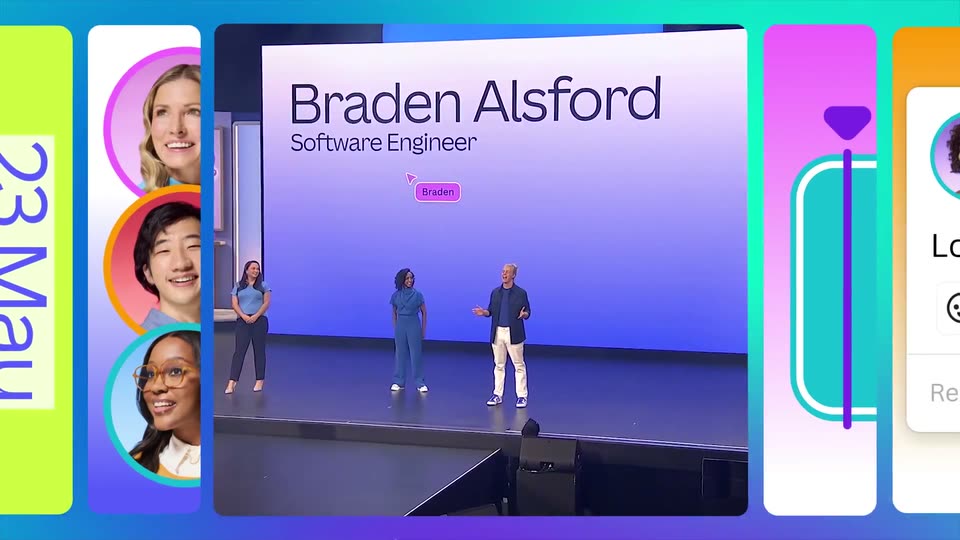
A teal-to-purple gradient holds a fast-cut collage of Canva cards: a blue icon with 'Courses', a vertical 'Canva Create' script panel, circular portraits, a green '23 May' card, and a stage clip titled 'Braden Alsford', all sliding and scaling into place.
On-screen text: “Canva Create”, “Courses”, “Maya”, “Braden Alsford”, “Software Engineer”, “23 May”
Techniques: Split screen, Kinetic type
Camera: Pan
03 · Feature reveal · 0:04–0:12
A presenter in a denim shirt stands center on a blue stage, gesturing as he speaks. Vertical graphic panels with portraits and shapes slide out at the start. A name card slides in from the right, then a second bar and a doodle card stack below it.
On-screen text: “Hey everyone, we are really proud of this one.”, “Braden Alsford”, “Software Engineer”, “Canva Create”, “Braden”, “It's my absolute honor to introduce Canva Courses.”
Camera: Static
04 · Feature reveal · 0:12–0:13
A man with a blonde bun in a dark blue shirt stands center stage before a white grid screen and blue backdrop, gesturing with open hands then clasping them. A caption bar sits at the bottom of the frame.
On-screen text: “Braden”, “Alsford”, “Software Engineer”, “It's my absolute honor to introduce Canva Courses.”
Camera: Static
05 · Feature reveal · 0:13–0:46
Wide locked-off shot of a stage where three presenters stand before a large screen. The screen cycles through the Canva Courses interface: a Courses card, the Onboarding course editor, a Choose design dialog, an assign panel, and a progress summary. White subtitles appear at the bottom as the presenters gesture.
On-screen text: “Gone are the days of boring mandatory training.”, “Now you can create engaging courses and assign them to your team.”, “Choose from a Presentation, Whiteboard, or Video,”, “or utilize your existing content,”, “then prepare them as a set of sequenced learning materials.”, “Whether you're onboarding new starters or helping people upskill,”, “you can track your team's progress and keep everyone motivated to learn.”, “It's my absolute honor to introduce Canva Courses.”
Camera: Pull out
06 · Feature reveal · 0:46–0:47
Three presenters stand on a dimly lit stage before a large screen showing an onboarding course dashboard with summary stats and a student list. The camera holds a wide locked-off frame; the presenters shift weight while the interface stays static.
Camera: Static
07 · CTA · 0:47–0:49
Two presenters stand on a stage before a Canva screen, framed by vertical Canva Create and 23 May panels. The panels slide to reveal a blue card where Work Redesigned scales in with a dashed box and green cursors, confetti falls, and portrait and UI panels line the edges.
On-screen text: “Canva Create”, “23 May”, “Work”, “Redesigned”, “Wei”, “Jamie”, “canva.com/canva-create”
Techniques: Split screen, Kinetic type, Particles, Masking
Camera: Push in
08 · CTA · 0:49–0:51
On a blue 3D abstract backdrop with falling confetti, the headline Work Redesigned sits center, Work inside a magenta text-selection box. Pink and lime speech bubbles labeled Wei and Jamie drift apart; a search pill with the URL rests below.
On-screen text: “Canva Create”, “Wei”, “Work”, “Redesigned”, “Jamie”, “canva.com/canva-create”
Techniques: Particles, Parallax
Camera: Static