
0:41
Explore
00:00:00 / 01:33:24
- Length
- 1:33
- Scenes
- 17 · 5.5 s avg
- Product on screen
- 0:00
- Features shown
- 3
- Voiceover
- Yes
- Views
- 9K on YouTube
as of November 27, 2026
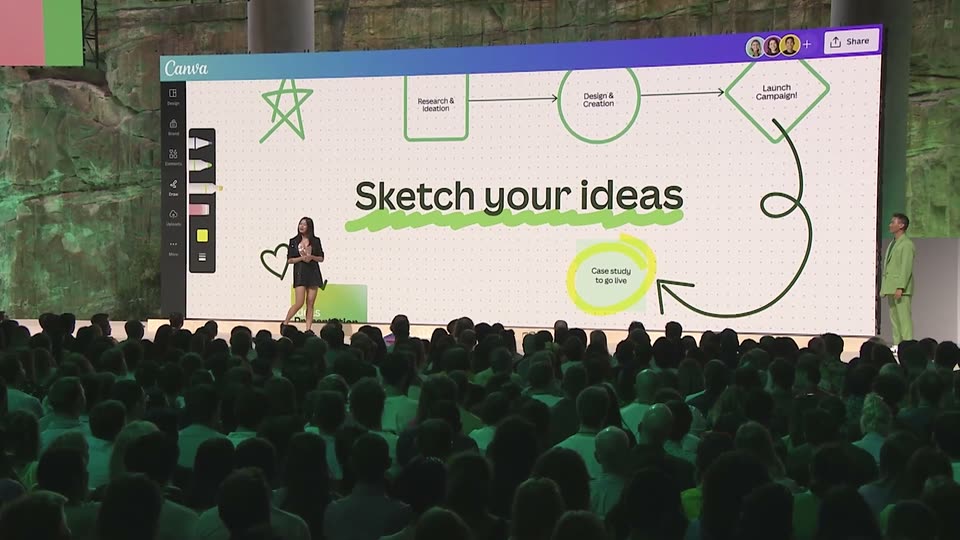
Canva’s 1:33 clip runs 17 scenes, about 5.5 s each. The product is on screen from the first frame and 3 features are revealed. A live launch talk bookended by a purple-to-yellow gradient title card, walking the Draw feature across a white dotted canvas from freehand sketching to Shape Assist, team cursors, and Sketch to Graphic. Its signature moves are hand-drawn green strokes that animate in (underlines, circles, stars, hearts), named cursor tags, and gradient wipe transitions, cut at a steady ~6 cuts per minute.
Footage neededEstimated needs: 15 filmed passages — shoot, supply or replace
Is this your launch? to your site or press kit.
More like this
1:30

FullSeam Launch Video
FullSeam · B2B · Feb 2026
1:04

Pitch Agent: On-brand AI presentations, made for professionals
Pitch · Productivity · May 2026
Canva Create 2023: Introducing Draw, scene by scene
· 17 scenes as text
01 · Product intro · 0:00–0:03
A purple-to-yellow gradient fills the frame with a white “Brand New Era” box top left and the Canva wordmark top right. “Introducing Draw” fades in at bottom right, then a filmed conference stage with a “Draw” screen slides in over the gradient as the title exits right.
On-screen text: “Brand New Era”, “Introducing Draw”
Techniques: Kinetic type
Camera: Static
02 · Problem · 0:03–0:04
Wide shot of a packed conference hall with a presenter on stage and three large screens. The left screen shows a Canva flowchart titled Sketch your ideas, the center green screen reads Draw beside marker icons. A white Canva logo sits in the top right.
On-screen text: “Canva”
Camera: Static
03 · Problem · 0:04–0:13
A speaker in a black sequined jacket paces and gestures on a stage before a seated audience, backed by a green painted wall and potted plants. A screen on the right shows the product's file menu, and the white Canva logo is locked in the top right.
On-screen text: “Canva”
Camera: Static
04 · Feature reveal · 0:13–0:31
A woman in a black dress presents in front of a giant screen showing a Canva whiteboard with “Sketch your ideas” and hand-drawn shapes. A man in a green suit stands at the right edge while the camera slowly pushes in over the seated audience.
Camera: Push in
05 · Feature reveal · 0:31–0:36
A wide locked-off shot of a launch stage: a presenter in a black dress stands before a giant screen while the audience fills the foreground. The screen zooms from a sketch canvas into a pen toolbar, then opens a Color panel with a campaign palette and a selected green swatch.
Techniques: UI zoom
Camera: Static
06 · Feature reveal · 0:36–0:37
A presenter in a black dress stands on stage before a large screen showing a dark drawing-tool panel with four marker icons, a cursor and a row of labeled tools. An audience fills the foreground; a person in a green suit stands at the right.
Camera: Static
07 · Feature reveal · 0:37–0:40
A presenter in a black dress walks before a white screen showing “Make it pop!” in dark green sans-serif with green accent lines, over a seated audience. A purple “Diane” tag slides beside her as a green underline draws under the headline.
On-screen text: “Make it pop!”, “Diane”
Camera: Static
08 · Feature reveal · 0:40–0:57
A woman in a black dress walks a stage before a whiteboard screen. A green circle draws around highlighted text, a purple cursor tag moves, and a hand-drawn star snaps into a clean shape as yellow note boxes appear. A man in a green suit stands at the right.
Techniques: Cursor demo, Morph
Camera: Static
09 · Feature reveal · 0:57–0:58
Two presenters stand on a stage before a large screen showing a design canvas with sticky notes and a tool sidebar. The audience fills the foreground as the pair gesture while speaking.
Camera: Static
10 · Demo · 0:58–1:03
A man in a light green blazer and headset mic stands on stage, gesturing with both hands and smiling as he speaks. A large screen behind him shows a green abstract texture, with a pixelated LED panel to the left.
Camera: Push in
11 · Demo · 1:03–1:07
A woman in a black dress and a man in a green suit stand on stage before a large screen showing a dotted white layout, a green marker drawing and a green photo. The man gestures with both hands as the audience watches from the foreground.
Camera: Static
12 · Demo · 1:07–1:13
Two presenters stand on a stage before a large screen showing a Canva canvas of sticky notes and doodles. A cursor labeled Diane draws a yellow circle around a note at the top right while the man in green gestures to the seated audience.
Techniques: Cursor demo
Camera: Static
13 · Feature reveal · 1:13–1:19
A woman in a black sequined jacket gestures while speaking beside a man in a green suit on stage. Behind them a large screen shows a slide with green text blocks and a pen drawing, then goes blank white. The audience fills the foreground.
On-screen text: “the box!”, “looove making”, “, circles, squares,”, “and scribbles -”
Camera: Static
14 · Feature reveal · 1:19–1:29
Two presenters stand on a stage before a large Canva screen. A heart sketch titled 'Sketch anything' sits on a coral tile while a 'Sketch to Graphic' panel cycles through heart designs. The main heart morphs from a blue outline into a glossy 3D purple heart.
Techniques: Cursor demo, Morph
Camera: Static
15 · Outro · 1:29–1:30
Two presenters stand on a stage before a giant screen showing the Canva app with a heart design. The screen flips to a red heart sketch, then a multicolor gradient frame wipes in from the edges as the word Introducing appears bottom right.
On-screen text: “Introducing”
Techniques: Masking
Camera: Static
16 · Outro · 1:30–1:32
A purple-to-yellow vertical gradient fills the frame. A small white card with the stacked words Brand New Era slides in at the top left, while the large black headline Introducing Draw sits at the bottom right, the word Draw sliding into place.
On-screen text: “Brand”, “New”, “Era”, “Introducing”, “Draw”
Techniques: Kinetic type
Camera: Static
17 · Outro · 1:32–1:33
A small purple-to-teal gradient square with stacked white text “Brand New Era” holds center on black, the words sliding and scaling in, then the tile is replaced by large centered white text “Introducing Draw”.
On-screen text: “Brand New Era”, “Introducing Draw”
Techniques: Kinetic type
Camera: Static