0:38

Loom - It’s a new year — and it’s easier than ever to embrace new ways of wo
Loom · Productivity · Jan 2024
Canva · Oct 2024 · 0:13 · AI-annotated
Canva’s 0:13 launch film runs 9 scenes, about 1.5 s each. The product is on screen from the first frame and 1 feature is revealed. There is no explicit call to action; a voiceover carries the film. A 13 second Canva launch clip for the Dream Lab image generator, built as one continuous zoom-through: gradient title card, prompt field, style list, generated asset, then a fast montage of that asset placed in decks, landing pages, social posts and storyboards. The style is defined by soft blue-purple gradient washes, depth-layered drifting image cards, smooth push-ins between UI layers, and a recurring named collaborator cursor.
Is this your launch? to your site or press kit.
Loom · Productivity · Jan 2024
Spline · Design · Sep 2026
ClickUp · Productivity · Jun 2023
The word “Introducing” in a blue-violet gradient scales at the center of a bright gradient background. Two rounded image cards, a 3D hummingbird on a pink flower and a helmeted duck, drift in from the top-left and bottom-right corners as the text fades.
On-screen text: “Introducing”
Techniques: Kinetic type
Camera: Static
Floating AI image cards, a pink castle, hummingbird, forest and penguin, drift at different depths over a purple to white gradient. The white words Dream and Lab scale up at center while Introducing appears above them.
On-screen text: “Introducing”, “Dream”, “Lab”
Techniques: Kinetic type, Parallax
Camera: Pull out
The large white Dream Lab heading scales out as the view zooms into the prompt field, where a purple Mo cursor types Futuristic space flowers above the Add Image, Dynamic and 16:9 toolbar.
Techniques: UI zoom, Cursor demo
Camera: Pan
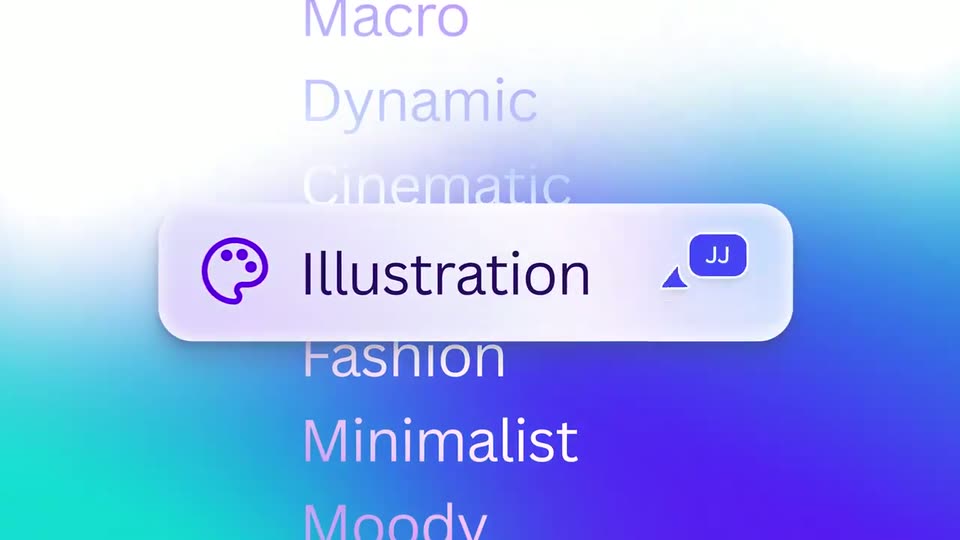
On a soft blue-purple gradient, the heading Choose any style sits centered. A vertical list of style names scrolls upward behind a white rounded pill with a purple palette icon, which highlights each style in turn: Dynamic, Cinematic, Illustration.
On-screen text: “Choose any style”, “Futuristic space flowers”
Techniques: Kinetic type
Camera: Push in
A rounded card showing a glowing purple and blue space-flower illustration on a teal gradient scales up to fill the frame, revealing a white asset card with a purple button and a small Vivi tag.
Techniques: UI zoom
Camera: Static
The Canva editor shows the Vision Deck title slide, a purple header over a black panel of glowing purple and blue flowers. A collaborator tag reading Vivi pops in at the left margin, and a filmstrip of slide thumbnails lines the bottom of the frame.
Techniques: Cursor demo
Camera: Static
The Canva editor fills the frame, its left icon toolbar and gradient top bar surrounding a landing page design. The hero pairs bold white “Website Landing Page” with stylized 3D flowers on a pink-to-blue gradient, while two Vivid tags shift position and a small cursor appears.
Camera: Static
The Canva editor frame shows a purple social post with bold white “Social Ready” lettering and iridescent 3D flowers. A cursor tagged “Vivi” hovers and drifts slightly at the right edge of the canvas.
Techniques: Cursor demo
Camera: Static
The Canva editor displays a storyboard document with a purple header reading Storyboard Concepts and a grid of flower and butterfly frames, each captioned with shot and action notes. A purple Vivi collaborator cursor drifts right and shrinks near the top of the middle frame.
Camera: Static