1:30

Oasive (YC F26): Find better bonds to buy
Oasive · Fintech · Sep 2026
Canary’s 1:37 launch film runs 38 scenes, about 2.6 s each. The product shows up at 0:15, with social proof. The call to action lands at 1:31 (94% in), over a voiceover. The video alternates flat mustard brand cards, motion-graphic card collages, locked-off live-action testimony and zooming screen captures, all tied together by a single amber palette and a white canary mark. Pacing is steady at about 120 bpm with hard cuts between UI states, captions in a dark rounded pill, and a recurring hand cursor that drives every interface action.
Is this your launch? to your site or press kit.
Oasive · Fintech · Sep 2026
Zolvo · Fintech · Apr 2026
Films whose music sounds like this one, voice left out
Shiraz AI · Electronic
Inflight · Modern electronic
White chat cards, a news article card, a service status list and a dark terminal window fly in from the edges over a yellow grid, then drift slowly upward. The cards carry outage messages and red error logs.
Camera: Static
A layered collage of incident cards, chat bubbles, a status page and a terminal drifts across a white and yellow grid. Cards slide at different speeds, the terminal log scrolls red error lines, and a critical checkout failure card rises into view.
Techniques: Parallax
Camera: Static
A crowded stack of flat white cards, each carrying a news headline or a system alert, lies on a flat yellow field. The cards overlap edge to edge and drift with a slow, subtle float.
Camera: Static
A flat collage of white and cream UI cards, news headlines and chat messages fills the frame, then the cards tilt and scatter outward, tumbling across the screen.
Camera: Static
A man in a gray shirt sits at a table with a closed laptop, plant, and lamp behind him, speaking to camera. At the start, tilted white notification cards with red error text burst away. White subtitles on dark bars appear at the bottom center.
On-screen text: “Just one bug shatters”, “trust built over years.”, “An enterprise contract worth”
Camera: Static
A bearded man in a grey t-shirt sits in a warm, softly lit room, speaking off-camera. A locked-off medium close-up holds him right of center while captions swap in at the bottom, a houseplant and lamp blurred behind him.
On-screen text: “An enterprise contract worth”, “millions churns,”, “because an edge case,”, “caused a data leak.”
Camera: Static
A man in a teal long-sleeve shirt sits at a white desk beside a silver laptop, speaking to the camera. A monstera plant and a lit floor lamp fill the background. A white caption line rests on a dark bar at the bottom of the locked-off frame.
On-screen text: “And that's why we built Canary, the”
Camera: Static
A man with dark curly hair and a beard in a grey t-shirt looks off-camera while speaking in a dim room, a houseplant and lamp blurred behind him. White subtitles on a dark bar appear at the bottom of the locked-off frame.
On-screen text: “And that's why we built Canary, the”, “validation layer for Al code.”
Camera: Static
A white canary logo and the URL runcanary.ai sit centered on a flat amber background, locked off. The lockup then dims as a dark rounded caption pill reading 'Here is how it works:' fades in at the bottom.
On-screen text: “runcanary.ai”, “Here is how it works:”
Camera: Static
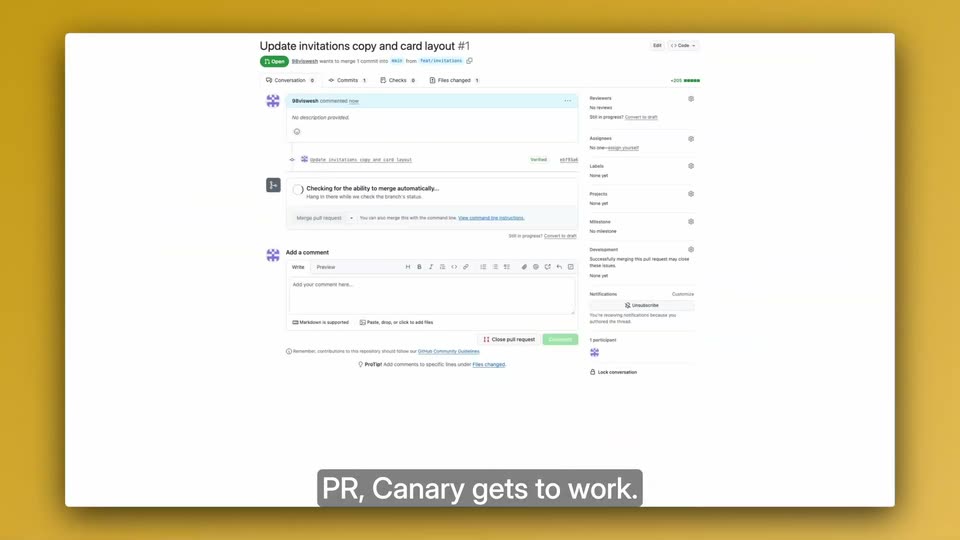
A close-up of a GitHub pull request page shows a hand cursor pressing the green Create pull request button under a dark caption bar. The view blurs and pulls back to the full PR page, tilted in 3D on a mustard yellow background.
On-screen text: “A developer raises a”, “PR, Canary gets to work.”
Techniques: Cursor demo, UI zoom, 3D mockup
Camera: Pull out
A GitHub pull request page zooms in on a bot comment titled Canary Analysis, then a fast horizontal blur sweeps across the Change Summary text before settling on the Affected User Flows table, while white captions cycle at the bottom.
On-screen text: “It analyzes the diff,”, “figures out which user”, “workflows the feature impacts,”, “and creates tests for each of them.”
Techniques: UI zoom, Speed ramp
Camera: Push in
A GitHub pull request page displays a canary execution table listing three generated tests. The camera zooms into the table while a cursor hovers over rows and a View live execution link. A gray caption bar at the bottom completes the sentence.
On-screen text: “Not just happy paths, every”, “combination a user could try.”
Techniques: UI zoom, Cursor demo
Camera: Push in
A close-up of a PR comment card showing Canary Results pans right across the failed-tests table as a large hand cursor moves to the Execution column and clicks the View recording link. A caption pill reads Video recordings drop at the bottom.
On-screen text: “Video recordings drop.”
Techniques: UI zoom, Cursor demo
Camera: Pan
A flat product UI: a test-step list on the left with one step boxed in red as failed, and a session-recording panel on the right showing a browser. The view zooms into the red step, then pans right to the recording. A dark caption sits at the bottom.
On-screen text: “Any bugs get flagged all before merge.”
Techniques: UI zoom
Camera: Push in
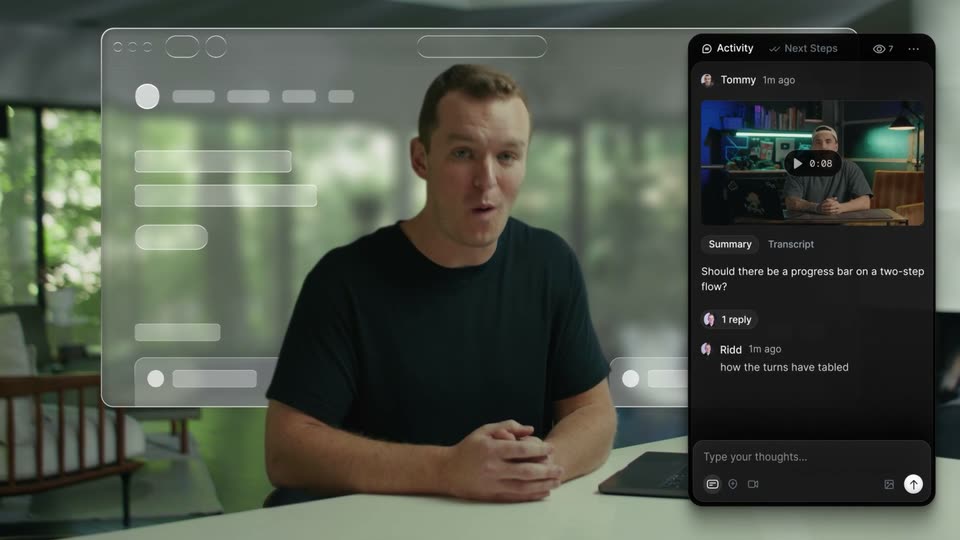
A product admin screen with a left menu and a team invitation card sits above a black video player bar showing a play icon and a running timecode. A hand cursor rests on the scrubber while the interface blurs in and out, and a mouse arrow drifts across the panel.
Techniques: Cursor demo, UI zoom
Camera: Pan
A web app dashboard plays inside a video-player frame on a yellow gradient. The center shows 'No pending invitations', a 'Getting Started' checklist sits at right, and a white cursor hovers over an 'Invitation rejected' toast. A timecode bar runs along the bottom.
Techniques: Cursor demo
Camera: Push in
A close-up of a pull request comment box; a cursor types a command into the field while the view zooms out to reveal the full form, then the cursor moves to the green Comment button and a hand icon clicks. Bottom captions change in sequence.
On-screen text: “Got something specific to test?”, “Ask Canary to run it, right from the PR.”
Techniques: Cursor demo, UI zoom
Camera: Pull out
A GitHub pull request thread shows a comment and a green merge box, then the view zooms and blurs rapidly across the screen. A caption bar sits at the bottom throughout the move.
On-screen text: “Ask Canary to run it, right from the PR.”
Techniques: UI zoom
Camera: Pull out
A close-up of a pull request page settles from a quick zoom, showing a comment, a green no-conflicts check and a merge button. A dark caption bar with a question fades in at the bottom edge.
On-screen text: “Want more coverage?”
Techniques: UI zoom
Camera: Pull out
Close-up of a cream web UI. A cursor types a prompt into a yellow-outlined input box, clicks the orange Generate button, then the frame zooms to a Flying around status line with a GitHub URL. White captions on dark bars track the voiceover.
On-screen text: “Want more coverage?”, “Just type what to test.”, “Those tests, they become part of your”, “regression suite automatically.”
Techniques: Cursor demo, UI zoom
Camera: Push in
A close-up of a test suite list with green checkmarks and a hand cursor pulls back to reveal the wider dashboard, showing Total Suites, Total Tests and Bugs stat cards. A bottom caption reads Canary understands your branching logic.
On-screen text: “Canary understands your branching logic,”
Techniques: Cursor demo, UI zoom
Camera: Static
On a test-suite editor, a numbered list of billing steps fills the screen. The frame zooms in and pans down the rows, a hand pointer and an I-beam cursor hover over them, while subtitle captions cycle along the bottom edge.
On-screen text: “Can generate tests from your branching,”, “generates tests for full coverage,”, “and runs them on every commit and on”
Techniques: UI zoom
Camera: Pan
A light test-suite editor shows a numbered step list; a hand cursor clicks the Schedules item in the left menu, and the view reframes onto a schedules card listing timezone, suite and environment. White subtitle captions read across the bottom.
On-screen text: “and runs them on every commit and on”, “nightly schedules automatically.”
Techniques: Cursor demo, UI zoom
Camera: Static
A hand cursor sweeps right across a beige dashboard, landing on a schedules table as the frame reframes onto the list. A dark caption bar reads nightly schedules automatically at the bottom.
On-screen text: “nightly schedules automatically.”
Techniques: UI zoom, Cursor demo
Camera: Pan
A close-up of a schedules table zooms out to reveal the full Schedules page and its header. A mouse cursor hovers over the Auth row, then shifts right as the view widens.
Techniques: UI zoom, Cursor demo
Camera: Pull out
A white canary mark and the wordmark runcanary.ai sit centered on a mustard yellow background, locked off.
On-screen text: “runcanary.ai”
Camera: Static
A white canary mark sits centered on a flat mustard background with the URL runcanary.ai below it. A white caption on a dark bar appears at the bottom. The frame stays locked and still.
On-screen text: “runcanary.ai”, “In the early days of Hyperspell,”
Camera: Static
A man in a black zip-up jacket sits against a tan wall, turning from profile to face the camera as he speaks. A white lower-third name caption and a black-box subtitle sit at the bottom of the locked-off frame.
On-screen text: “In the early days of Hyperspell,”, “Conor Brennan-Burke | Canary Customer”, “Founder @ Hyperspell (YC F25)”, “we actually had a customer go in and they”
Camera: Static
Two men sit on a green couch against a tan wall. The man in a black zip-up jacket gestures with both hands while speaking to the man in a gray shirt, who listens. Locked-off medium shot with a lower-third name caption and subtitles.
On-screen text: “Conor Brennan-Burke | Canary Customer”, “Founder @ Hyperspell (YC F25)”, “we actually had a customer go in and they”, “ran to all these issues and bugs.”
Camera: Static
A man in a black zip-up fleece sits before a plain tan wall, mid-sentence, gesturing with an open palm, then lowers his hand and turns his head aside. A white lower-third names him, and burned-in subtitles at the bottom track his speech.
On-screen text: “Conor Brennan-Burke | Canary Customer”, “Founder @ Hyperspell (YC F25)”, “And that customer actually ended up not”, “signing the customer.”
Camera: Static
Two men sit on a green couch against a tan wall, the man in a black jacket gesturing as he speaks while the man in a blue shirt listens. A lower-third caption names the speaker and a subtitle runs along the bottom.
On-screen text: “Conor Brennan-Burke | Canary Customer”, “Founder @ Hyperspell (YC F25)”, “signing the customer.”, “We decided to double down on QA.”
Camera: Static
A man in a black zip-up jacket sits against a plain beige wall, gesturing with his right hand as he speaks. The frame stays locked off while two white subtitle lines appear at the bottom center.
On-screen text: “We were spending hours”, “chasing down random UI bugs.”
Camera: Static
Two men sit on a green couch against a plain tan wall. The man on the right in a black jacket gestures with both hands while talking; the man on the left in a gray shirt listens with hands clasped. A white subtitle line stays fixed at the bottom.
On-screen text: “chasing down random UI bugs.”
Camera: Static
A young man in a black zip-up jacket sits against a plain beige wall, speaking and gesturing with his right hand. The locked-off camera holds a medium close-up as he turns his head and raises his hand, while white caption lines swap at the bottom.
On-screen text: “Your most valuable and most expensive”, “resource in a startup”, “is your engineering's time and bandwidth.”
Camera: Static
Two men sit on a green couch against a plain tan wall in a static shot. The man on the right in a black jacket gestures with both hands while speaking; the man on the left in a gray shirt listens with hands clasped. White subtitles sit at the bottom.
On-screen text: “is your engineering's time and bandwidth.”, “It's tens of thousands of dollars.”
Camera: Static
A young man in a black zip jacket sits against a tan wall, raising his hand to gesture as he speaks, then turns his head to the side with a smile. A white subtitle sits at the bottom of the frame.
On-screen text: “Those hours that they spend,”
Camera: Static
Two men sit on a green sofa against a tan wall, mid-conversation. The man on the right in a black jacket lifts one hand to gesture, then folds his hands, while the man on the left in a gray shirt listens with hands clasped. White subtitles run along the bottom.
On-screen text: “you can't get them”, “back once they disappear.”
Camera: Static
A white bird mark with a location pin and the wordmark runcanary.ai sit centered on a flat mustard field. Caption lines in a dark brown rounded box appear below in sequence, then clear, leaving the logo alone.
On-screen text: “runcanary.ai”, “We are building the”, “validation layer for AI code.”, “Check us out at runcanary.ai.”
Camera: Static