
2:48
Explore
00:00:00 / 01:37:09
- Length
- 1:37
- Scenes
- 36 · 2.7 s avg
- Product on screen
- 0:15
- Features shown
- 2
- Call to action
- 1:31 · 94%
- Voiceover
- Yes
- Views
- 553K on X
as of November 25, 2026
Canary’s 1:37 launch film runs 36 scenes, about 2.7 s each. The product shows up at 0:15 and 2 features are revealed, with social proof. The call to action lands at 1:31 (94% in), over a voiceover. The video alternates flat mustard-yellow motion graphics with locked-off live-action interviews, cutting on a steady 120 bpm pulse. Its signature moves are the card-collage hook, the 3D pull-back of interface screens onto the yellow field, and the recurring canary bird mark.
Footage neededEstimated needs: 3 capture groups — your screens or recordings · 1 official logo — reused across the film · 14 filmed passages — shoot, supply or replace · 2 graphic passages — draw or supply · 2 3D passages — build or supply
Is this your launch? to your site or press kit.
More like this

Similar soundtrack
Films whose music sounds like this one, voice left out
1:10

Shiraz AI (YC S26): Robots that learn on the job
Shiraz AI · Electronic
2:05

Tarini Sai Padmanabhuni - today we're opening @DetectIfAI to every developer. real-time voice
DetectIf AI · Upbeat electronic
2:54

Announcing Our $5M Seed: Building the AI Workforce for Hospitality | Lance
Lance · Corporate tech promotional video
Canary - Friday. 5:47 PM. Quick Claude session, small auth refactor. LGTM, me, scene by scene
· 36 scenes as text
01 · Hook · 0:00–0:01
On a mustard grid background, white incident cards (a chat message, a Cloudflare outage note, a SEV-3 PagerDuty alert) slide in from the edges and settle, while a dark terminal window opens bottom right and red status dots pulse with rings.
Camera: Static
02 · Hook · 0:01–0:04
A mustard-yellow grid fills the frame as a swarm of flat cards flies in from the edges and stacks up: chat messages, news articles, red alert banners, a system status list, and a terminal with red errors, until the collage covers the whole screen.
Techniques: Particles
Camera: Static
03 · Hook · 0:04–0:06
A dense collage of overlapping cards fills the frame over a yellow field: news headlines, chat messages, red SEV-1 alert banners, a dropdown menu and a list of major outages. The cards sit in stacked layers with soft drop shadows, suggesting depth, and hold nearly still.
Camera: Static
04 · Hook · 0:06–0:06
A flat collage of overlapping alert cards, news articles, a status page and a terminal window tilts diagonally into 3D perspective over a yellow field. The cards rotate and drift apart, some flying off frame, in a fast spin.
Techniques: 3D mockup
Camera: Static
05 · Problem · 0:06–0:10
A man in a green shirt sits at a desk in a bright office, hands clasped, facing the camera. Tilted, semi-transparent UI cards with chat text and a red error log drift across the left and fade out. White subtitles sit in a dark bar at the bottom.
On-screen text: “Just one bug shatters”, “trust built over years.”, “An enterprise contract worth”
Camera: Static
06 · Problem · 0:10–0:15
A bearded man in a gray t-shirt sits in a warm-lit room with a houseplant behind him, talking to someone off-screen left. The camera holds a locked-off medium close-up as white subtitle lines swap in at the bottom of the frame.
On-screen text: “An enterprise contract worth”, “millions churns,”, “because an edge case,”, “caused a data leak.”
Camera: Static
07 · Product intro · 0:15–0:17
A man in a gray long-sleeve shirt sits at a desk with a white laptop, hands clasped, speaking to camera in a room with a monstera plant and a lamp. A subtitle line sits at the bottom. Locked-off framing.
On-screen text: “And that's why we built Canary, the”
Camera: Static
08 · Product intro · 0:17–0:19
A bearded man in a gray shirt speaks in a medium close-up, seated in a warm room with a potted plant and lamp behind him. The frame stays locked off as white subtitles appear at the bottom.
On-screen text: “And that's why we built Canary, the”, “validation layer for AI code.”
Camera: Static
09 · Product intro · 0:19–0:21
A man looks down in a warm-lit room, then a horizontal wipe with motion blur reveals a mustard-yellow card holding the white canary logo and the URL runcanary.ai, held still.
On-screen text: “validation layer for AI code.”, “runcanary.ai”, “Here is how it works:”
Techniques: Masking
Camera: Static
10 · Feature reveal · 0:21–0:25
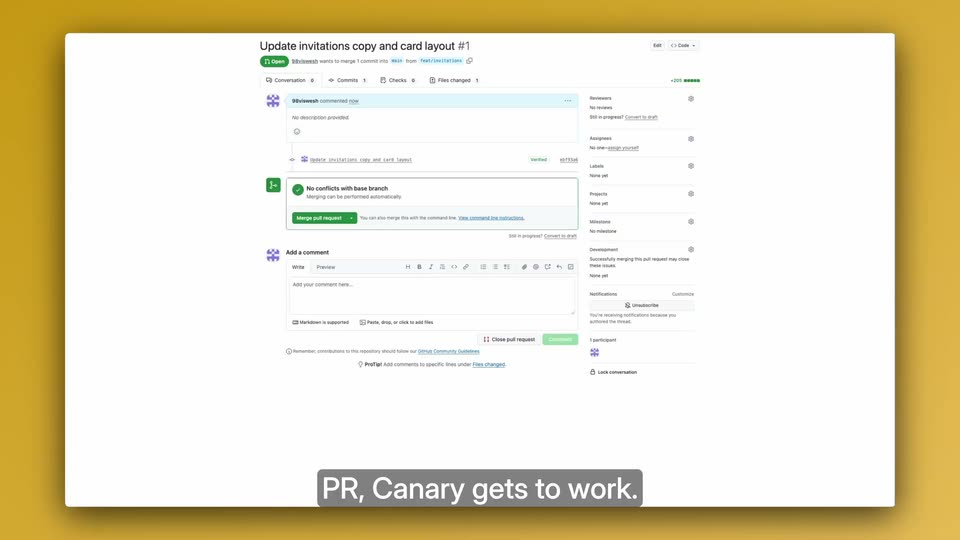
A hand cursor clicks the green Create pull request button on a flat GitHub page, then the view pulls back to show the whole pull request card floating in 3D on a yellow background. A gray caption bar at the bottom reads “PR, Canary gets to work.”
On-screen text: “A developer raises a”, “PR, Canary gets to work.”
Techniques: Cursor demo, 3D mockup
Camera: Pull out
11 · Feature reveal · 0:25–0:31
A GitHub pull request view zooms into a bot comment showing a Canary Analysis and Change Summary. A text cursor glides over the bullet points as caption lines appear at the bottom. The interface text stays still while the camera pushes in.
On-screen text: “It analyzes the diff,”, “figures out which user”, “workflows the feature impacts,”, “and creates tests for each of them.”
Techniques: UI zoom
Camera: Push in
12 · Feature reveal · 0:31–0:35
A pull request page displays a Canary Execution table listing three generated tests. The cursor moves down the rows, then the view zooms into the table and reframes on the Execution column links.
On-screen text: “Not just happy paths, every”, “combination a user could try.”
Techniques: Cursor demo, UI zoom
Camera: Push in
13 · Feature reveal · 0:35–0:38
A close-up of a pull request comment shows canary test results with one failed test. The view pans across the failed-tests table as a hand cursor moves to the View recording link and clicks it, while a caption types out at the bottom.
On-screen text: “Video recordings drop right back into the PR”
Techniques: Cursor demo, Kinetic type
Camera: Pan
14 · Feature reveal · 0:38–0:39
A test dashboard fills the frame: a step list on the left with one row outlined in red, a cursor hovering over it, and a session-recording browser window on the right. A dark caption bar sits at the bottom.
On-screen text: “Any bugs get flagged all before merge.”
Techniques: Cursor demo
Camera: Push in
15 · Feature reveal · 0:39–0:40
A test dashboard fills the frame: a step list on the left with one row outlined in red showing a failure note, and a session recording on the right playing a browser view of the Canary app. The list scrolls up. A caption bar holds the line at the bottom.
On-screen text: “Any bugs get flagged all before merge.”
Camera: Pan
16 · Feature reveal · 0:40–0:43
A product settings page fills the frame, sidebar on the left. The shot opens tight on the bottom video player, then reframes to the full page as the cursor taps pause and a toast slides in at the right. A fast horizontal blur closes the scene.
Techniques: UI zoom, Cursor demo
Camera: Push in
17 · Feature reveal · 0:43–0:47
A GitHub pull request comment box is in focus as a canary command is typed into it. The view zooms out to show the whole panel, and a hand cursor clicks the green Comment button. Dark caption bars at the bottom carry the narration.
On-screen text: “Got something specific to test?”, “Ask Canary to run it, right from the PR.”
Techniques: Cursor demo, UI zoom
Camera: Pull out
18 · Feature reveal · 0:47–0:49
A GitHub pull request page is shown in close-up, first out of focus then sharpening, as the comment box types '@canary run' followed by a test instruction. A bottom caption reads 'Ask Canary to run it, right from the PR.' then switches to 'Want more coverage?'
On-screen text: “Ask Canary to run it, right from the PR.”, “Want more coverage?”
Techniques: Cursor demo
Camera: Pull out
19 · Feature reveal · 0:49–0:55
A flat product screen titled 'Generate tests for' is reframed and zoomed as a mouse cursor types a sentence into the input box, then a hand cursor clicks the yellow Generate button, which switches to a red Stop button. Dark caption bars with white text appear along the bottom.
On-screen text: “Want more coverage?”, “Just type what to test.”, “Those tests, they become part of your”, “regression suite automatically.”
Techniques: UI zoom, Cursor demo
Camera: Push in
20 · Feature reveal · 0:55–0:56
A close-up of a product interface starts blurred and racks into sharp focus. A prompt box reads 'Generate tests for billing flow of the product' above a Suite toggle and repo field; below, yellow 'Flying around' and a gray repository status line. A hand cursor and text caret appear, then vanish.
On-screen text: “regression suite automatically.”
Camera: Static
21 · Feature reveal · 0:56–0:58
A test suite list with green pass badges and a hand cursor hovering over rows; the view pulls back to reveal dashboard stat cards, then pushes in toward a generate-tests panel. A caption runs along the bottom throughout.
On-screen text: “Canary understands your branching logic,”
Techniques: Cursor demo, UI zoom
Camera: Static
22 · Feature reveal · 0:58–1:03
A test-suite editor pans through a numbered list of agent and verify steps. A hand cursor then moves to the left sidebar and clicks Schedules, revealing a panel with one configured schedule. Subtitle captions track the voiceover along the bottom.
On-screen text: “Can you understand your branching logic,”, “generates tests for full coverage,”, “and runs them on every commit and on”, “nightly schedules automatically.”
Techniques: Cursor demo
Camera: Pan
23 · Feature reveal · 1:03–1:06
A warm-toned product screen shows the Schedules page; a hand cursor taps the menu, then the view pans right across the table rows to reveal a Failed status badge. A bottom caption reads nightly schedules automatically.
On-screen text: “nightly schedules automatically.”
Techniques: Cursor demo, UI zoom
Camera: Pull out
24 · Product intro · 1:06–1:06
A blurred interface panel slides off the right edge, clearing the frame to a flat yellow field where the white canary mark and the wordmark sit centered and hold.
On-screen text: “runcanary.ai”
Camera: Static
25 · Product intro · 1:06–1:07
A flat mustard-yellow field holds a centered white logo, a stylized bird with a location pin, above the domain text. The frame is locked off and static for the full duration.
On-screen text: “runcanary.ai”
Camera: Static
26 · Social proof · 1:07–1:09
A man in a black zip-up jacket sits against a beige wall, turning from profile to face the camera as he speaks. A lower third with his name and title sits at left; a white subtitle on a dark bar runs along the bottom. The frame stays locked off.
On-screen text: “In the early days of Hyperspell,”, “Conor Brennan-Burke | Canary Customer”, “Founder @ Hyperspell (YC F25)”, “we actually had a customer go in and they”
Camera: Static
27 · Social proof · 1:09–1:11
Two men sit on a green couch against a tan wall. The man on the right in a black hoodie gestures with both hands while speaking; the man on the left in gray listens. A name caption sits at lower left, subtitles along the bottom. Locked-off frame.
On-screen text: “Conor Brennan-Burke | Canary Customer”, “Founder @ Hyperspell (YC F25)”, “we actually had a customer go in and they”, “ran to all these issues and bugs.”
Camera: Static
28 · Social proof · 1:11–1:13
A man in a black zip-up hoodie sits against a plain tan wall, gesturing with his hands while speaking in a locked-off medium shot. A lower-third name caption sits at left and a white subtitle line runs along the bottom.
On-screen text: “Conor Brennan-Burke | Canary Customer”, “Founder @ Hyperspell (YC F25)”, “And that customer actually ended up not”, “signing the customer.”
Camera: Static
29 · Social proof · 1:13–1:15
Two men sit on a green sofa against a tan wall; the man in the black jacket gestures while speaking, the man in the gray shirt listens. A lower-third caption names the speaker and fades out, white subtitles run along the bottom.
On-screen text: “Conor Brennan-Burke | Canary Customer”, “Founder @ Hyperspell (YC F25)”, “signing the customer.”, “We decided to double down on QA.”
Camera: Static
30 · Social proof · 1:15–1:17
A young man in a black zip-up jacket sits on a green couch against a beige wall, gesturing with his right hand as he speaks. White captions appear at the bottom of the frame in two lines. The camera is locked off.
On-screen text: “We were spending hours”, “chasing down random UI bugs.”
Camera: Static
31 · Social proof · 1:17–1:19
Two men sit on a green couch against a tan wall in a medium shot. The man on the right in a black jacket gestures with both hands while speaking, the man on the left in a grey shirt listens. A caption is locked at the bottom of the frame.
On-screen text: “chasing down random UI bugs.”
Camera: Static
32 · Social proof · 1:19–1:25
A man in a black zip-up jacket sits against a plain beige wall, gesturing with his right hand as he speaks to an off-screen interviewer. The locked-off medium close-up holds steady while white subtitles swap line by line along the bottom.
On-screen text: “Your most valuable and most expensive”, “resource in a startup”, “is your engineering's time and bandwidth.”
Camera: Static
33 · Social proof · 1:25–1:27
Two men sit on a green couch against a tan wall. The man on the right, in a black jacket, gestures with both hands as he speaks; the man on the left, in gray, listens with clasped hands. White subtitles read at the bottom. Locked-off medium shot.
On-screen text: “is your engineering's time and bandwidth.”, “It's tens of thousands of dollars.”
Camera: Static
34 · Social proof · 1:27–1:29
A man in a black zip-up jacket sits against a plain beige wall, gesturing with a raised hand as he speaks. He then turns his head to the side and smiles. A white subtitle caption sits at the bottom of the locked-off frame.
On-screen text: “Those hours that they spend,”
Camera: Static
35 · Social proof · 1:29–1:31
Two men sit on a green couch against a tan wall. The man in a black jacket on the right gestures with his hand while speaking, then rests his hands; the man in a gray shirt on the left listens with hands clasped. White subtitles run along the bottom.
On-screen text: “you can't get them”, “back once they disappear.”
Camera: Static
36 · CTA · 1:31–1:37
A white circular canary mark sits above the wordmark runcanary.ai on a flat mustard field. Short white captions in a dark rounded box fade in and out at the bottom, ending on the URL.
On-screen text: “We are building the”, “validation layer for AI code.”, “Check us out at runcanary.ai.”
Camera: Static