3:44

Pikmin 4 – Nintendo Switch 2 Edition + Dandori Academy – Overview Trailer
Nintendo · Nov 2026
Callstack · Nov 2026 · 0:30 · Full motion · AI-annotated
Callstack’s 0:30 launch film runs 12 scenes, about 2.5 s each. The product is on screen from the first frame and 3 features are revealed. There is no explicit call to action. A gamified product demo for the agent-device CLI, staged as a mission with three acts (find, fix, verify) played out in a split layout of a typing terminal and a live phone mockup, framed by a game HUD with score, XP pops and an HP bar. The style is dark and neon, with monospace type, orange warning callouts that flash over the UI, and a confetti mission-complete payoff that dissolves into a centered tagline card.
Is this your launch? to your site or press kit.
Nintendo · Nov 2026
Discord · Consumer · Jun 2022
Figma · Design · May 2025
Films whose music sounds like this one, voice left out
Origami · Electronic, chiptune
Composio · Electronic dance music, Eurodance, Trance
Gridline · Electronic, Lo-fi Hip-hop, Bassline House, Video Game Style
A dark 3D field of floating hexagonal prisms and ripple rings drifts slowly. Left-aligned text holds a pink NEW MISSION tag, a large white monospace headline, and an orange objective line. A phone mockup fades in on the right, revealing a Recipes app screen.
On-screen text: “agent-device”, “NEW MISSION”, “agent-device audit”, “Objective: make Pantry accessible.”
Techniques: Parallax, 3D mockup
Camera: Static
A tilted iPhone with a recipes app sits right over a dark field of floating hexagons. Left, a pink NEW MISSION tag and large white agent-device audit title with an orange objective line fade out, giving way to a terminal window and a HUD with score and A11Y HP bar.
On-screen text: “NEW MISSION”, “agent-device audit”, “Objective: make Pantry accessible.”
Techniques: 3D mockup, Kinetic type, Masking
Camera: Static
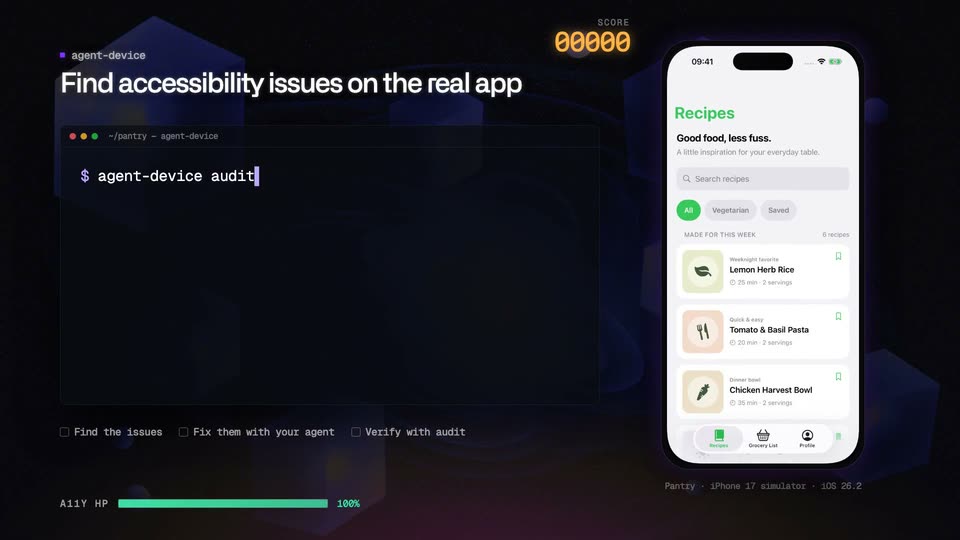
A dark stage holds a terminal window left and a phone mockup right showing a recipes app. The terminal types out a command, then a results line fades in beneath it, while the headline and task checkboxes stay static.
On-screen text: “Find accessibility issues on the real app”, “SCORE 00000”, “Find the issues”, “Fix them with your agent”, “Verify with audit”, “AI17 HP 100%”, “Pantry · iPhone 17 simulator · iOS 26.2”
Camera: Static
A dark 3D scene with floating polyhedra. Left, a terminal window types an audit command and lists warnings line by line. Right, a tilted iPhone mockup shows a Recipes app with an orange TOO SMALL tag pointing at a button. A green HP bar fills bottom left and a score counter sits top center.
On-screen text: “agent-device”, “Find accessibility issues on the real app”, “SCORE”, “00100”, “TOO SMALL”, “Find the issues”, “Fix them with your agent”, “Verify with audit”, “A11Y HP”, “Pantry - iPhone 17 simulator - iOS 26.2”
Techniques: 3D mockup
Camera: Static
A white headline tops a dark two-panel stage: a flat audit terminal left, a 3D-tilted iPhone running a recipes app right. Orange TOO SMALL! tags flash over the phone's tiny save buttons as the terminal logs the same warnings.
On-screen text: “agent-device”, “Find accessibility issues on the real app”, “SCORE 00300”, “TOO SMALL!”, “Find the issues”, “Fix them with your agent”, “Verify with audit”, “ALLY HP”
Techniques: 3D mockup, Split screen
Camera: Static
A dark scene pairs a terminal on the left with a flat iPhone mockup on the right. The terminal types the audit command, then two warning lines appear, while a red circle and label mark the item-name field on the phone.
On-screen text: “agent-device”, “SCORE 00300”, “Find accessibility issues on the real app”, “Find the issues”, “Fix them with your agent”, “Verify with audit”, “A11Y HP”, “46%”, “Pantry - iPhone 17 simulator - iOS 26.2”
Camera: Static
A dark game-styled frame pairs a terminal window on the left, listing two missing-name warnings from an agent-device audit, with a glowing iPhone on the right running a Grocery List add-item form. A white headline sits top-left, an orange NO NAME! callout hovers center, and a SCORE counter and A11Y HP bar frame the edges.
On-screen text: “SCORE 00400”, “Find accessibility issues on the real app”, “NO NAME!”, “A11Y HP 26%”
Camera: Static
A glowing phone on the right shows a Grocery List add-item sheet with orange 'No accessible name' flags. On the left, the heading swaps from finding to fixing issues as a terminal runs an audit, then a 'YOU' prompt types a fix command and code diffs appear.
On-screen text: “Find accessibility issues on the real app”, “Find the issues”, “Fix them with your agent”, “Verify with audit”, “Hand the findings to your agent”, “fix audit issues on this screen”
Techniques: Kinetic type, 3D mockup, Parallax, Masking
Camera: Static
A dark 3D scene with floating hexagons. Left, a terminal window types the audit command, then a green check line reads no findings; right, an iPhone mockup shows a grocery form. A score, XP pop and HP bar update at the edges.
On-screen text: “Verify the fix with the same command”, “+300 XP”, “No findings - current screen”
Techniques: 3D mockup, Kinetic type
Camera: Static
Dark HUD: a terminal on the left reports a clean audit, a phone on the right switches from the add-item form to the grocery list. Big orange MISSION COMPLETE text and confetti fill the center, then the text fades out. Score and HP bar frame the edges.
On-screen text: “MISSION COMPLETE”, “+1000 XP · 0 WARNINGS”, “SCORE 02100”, “A11Y HP 100%”, “Find the issues”, “Fix them with your agent”, “Verify with audit”, “Pantry · iPhone 17 simulator · iOS 26.2”
Techniques: Kinetic type, Particles
Camera: Static
A dark game-style layout pairs a terminal card on the left with a phone mockup of the Recipes app on the right. Green +300 XP tags pop in one after another, the score counts up to 03000, and a Zero warnings achievement banner slides in at the top.
On-screen text: “Verify the fix with the same command”, “SCORE 02100”, “Find the issues”, “Fix them with your agent”, “Verify with audit”, “ALLY HP 100%”, “Pantry · iPhone 17 simulator · iOS 26.2”, “+300 XP”, “ACHIEVEMENT UNLOCKED Zero warnings”
Techniques: Kinetic type
Camera: Static
A crossfade dissolves a phone screen into a dark field of floating 3D hexagonal cubes and concentric contour lines. The centered headline holds still, with two monospace caption lines beneath it.
On-screen text: “Find it. Fix it. Verify it.”, “agent-device help accessibility”, “Touch targets · accessible names · covered controls · iOS and Android”
Camera: Static