2:38


Introducing reMarkable — the paper tablet
reMarkable · Hardware · Mar 2023
Cal.com’s 0:25 launch film runs 9 scenes, about 2.8 s each. The product shows up at 0:02 and 4 features are revealed. The call to action lands at 0:23 (91% in), over a voiceover. A 25-second launch built as a chain of centered title cards over one continuous dark starfield: each beat fades in a bold white headline (key phrase in violet), holds on a small rounded UI card or phone mockup, then crossfades to the next, with a vertical verb roll and a final two-line CTA to close. The signature moves are the dim-to-bright text ease, the word-by-word headline slide, and the soft crossfade between locked-off frames, all cut to a steady 132 BPM pulse.
Is this your launch? to your site or press kit.
Films whose music sounds like this one, voice left out
Flock PHP · Electronic dance music with funk and Latin influences
Leonardo AI · Cinematic Electronic
Sifflet · High-energy electronic dance music with hip-hop and trap influences.
Two centered lines fade in over a dark navy starfield: white “Introducing” above purple “AI-powered calls”. The frame stays locked off with no further motion after the text settles.
On-screen text: “Introducing”, “AI-powered calls”
Camera: Static
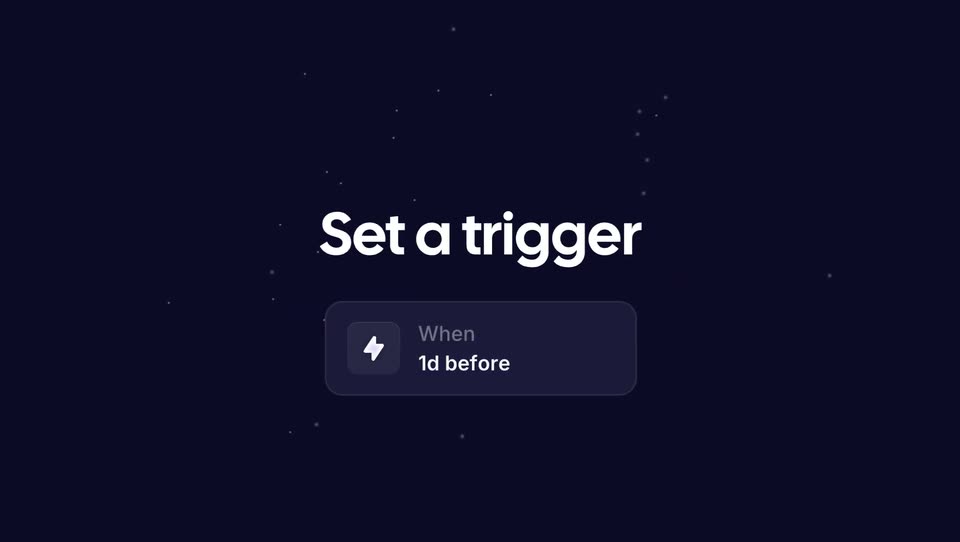
On a dark navy field with faint star dots, the headline “Set a trigger” slides in and brightens from dim to white. A rounded card with a lightning icon and the lines “When” and “1d before” fades in below it.
On-screen text: “Set a trigger”
Techniques: Kinetic type
Camera: Static
On a dark navy field with faint drifting specks, the white headline Set a trigger and a rounded card with a lightning icon and When 1d before fade out as the next headline add phone number fades in. Locked-off frame.
On-screen text: “Set a trigger”, “add phone number”
Techniques: Kinetic type, Particles
Camera: Static
Dark navy background with slowly drifting star dots. The white headline 'add phone number' slides in word by word, then a rounded input box with a US flag and the number +1 (415) 873-1159 fades in below. The whole scene fades out at the end.
On-screen text: “add phone number”
Techniques: Kinetic type, Particles
Camera: Static
On a dark navy starfield, the headline and match in white and your tone in purple slides into the center. A rounded card with a phone number fades out as two toggle cards, Professional tone and Friendly, slide up and switch on.
On-screen text: “and match”, “your tone”
Techniques: Kinetic type
Camera: Pan
A centered iPhone fades in on a dark starry field, showing an incoming call from Cal.ai Agent. The green answer pill slides right, the screen switches to in-call buttons, and a bottom caption types out the caller's question word by word.
On-screen text: “Professional tone”, “Friendly”, “Hey are you able to attend our meeting tomorrow?”
Techniques: Kinetic type
Camera: Pan
A tilted iPhone mockup floats over a dark starfield, its call screen showing the Cal.ai Agent number, while a centered headline crossfades from Cal.ai Agent to Cal.ai schedules and fades out as the phone settles in the middle of the frame.
On-screen text: “Cal.ai schedules”
Techniques: 3D mockup
Camera: Pan
On a dark navy field with drifting star specks, the purple Cal.ai wordmark sits left of white verbs that roll vertically: schedules, reminds, reschedules, follows-up, then does it all. The line clears and Try now appears, now in dim gray.
On-screen text: “Cal.ai schedules”, “Cal.ai reminds”, “Cal.ai reschedules”, “Cal.ai follows-up”, “Cal.ai does it all”, “Try now”
Techniques: Kinetic type, Particles
Camera: Static
A locked-off dark navy frame with faint star dots. Centered, the white line Try now sits above the violet line Cal.ai; both ease from dim to full brightness.
On-screen text: “Try now”, “Cal.ai”
Camera: Static