
0:26
Explore
Real-Time Color Detection Vision System
Bucket Robotics · Nov 2026 · 0:24 · AI-annotated
- Length
- 0:24
- Scenes
- 15 · 1.6 s avg
- Product on screen
- 0:02
- Features shown
- 1
- Voiceover
- No
- Views
- 11 on YouTube
as of November 26, 2026
00:00:00 / 00:24:14
- Length
- 0:24
- Scenes
- 15 · 1.6 s avg
- Product on screen
- 0:02
- Features shown
- 1
- Voiceover
- No
- Views
- 11 on YouTube
as of November 26, 2026
Bucket Robotics’s 0:24 launch film runs 15 scenes, about 1.6 s each. The product shows up at 0:02 and 1 feature is revealed. There is no explicit call to action. The film is a single feature demo wrapped in a dark, low-key workshop: a floating white UI card opens, then live hands scan green and red apples while flat interface panels mirror the action on the right. Signature moves are the physical-to-flat split screen, real-time updating color swatches and hex codes, and the hard cut to a black logo sting.
Footage neededEstimated needs: 2 capture groups — your screens or recordings · 1 official logo — reused across the film · 12 filmed passages — shoot, supply or replace
Is this your launch? to your site or press kit.
More like this

4:31
X Square Robot - What if a dexterous robot could learn a 20+ step chemistry experiment
X Square Robot · Sep 2026
0:45

Tilion | For the internet's next evolution
Tilion · B2B · Jul 2026
Similar soundtrack
Films whose music sounds like this one, voice left out
0:43
Custom sales demos on your real product | Dessn (4K)
Dessn · Lo-fi hip-hop
0:37

Krea - introducing Voice Mode. speak as you draw and get changes in real-t
Krea · Lo-fi hip-hop, chillhop
0:29

Kimpton (YC P26) - EvalRouter now charts every benchmark run. Two models can post the s
Kimpton · Lo-fi hip-hop, chillhop, jazz fusion
Real-Time Color Detection Vision System, scene by scene
· 15 scenes as text
01 · Hook · 0:00–0:02
A white inspection form card floats over a dark, blurred workshop floor. The form switches its selected procedure and model, a pixel emoji and an Inspection caption fade out of the center, and the yellow button relabels to Start reading.
On-screen text: “Inspection”, “A procedure that checks a surface and starts a procedure.”
Camera: Pan
02 · Feature reveal · 0:02–0:04
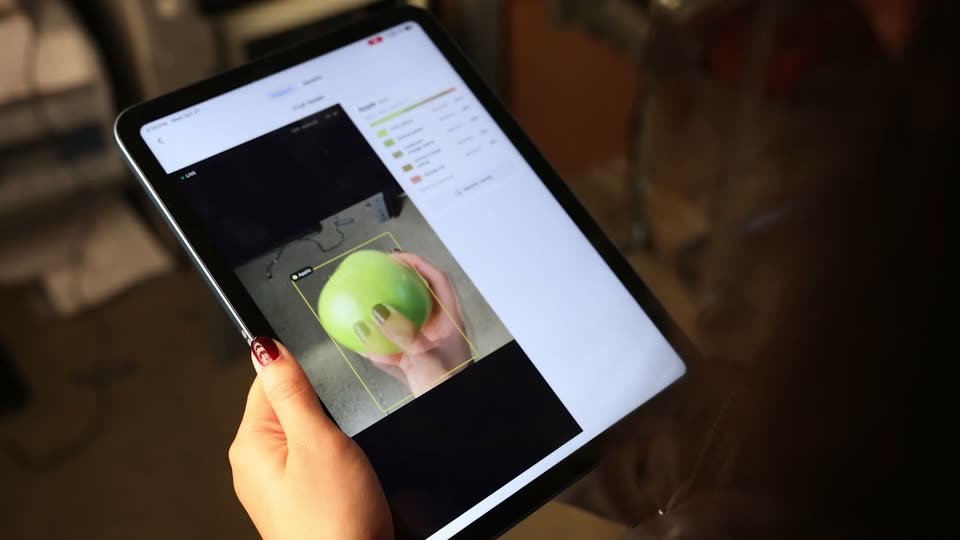
A hand with dark red nails holds a tablet at an angle against a blurred background. The camera racks focus from a soft screen to a sharp view of the interface, showing a photo of a hand holding a green object inside yellow annotation boxes beside a list panel.
Camera: Pan
03 · Feature reveal · 0:04–0:08
A hand with dark red nails turns a green apple against a blurred background, split-screened with a phone app on the right. The app's Fruit reader panel refreshes its color swatch list and confidence percentage as the apple rotates.
Techniques: Split screen
Camera: Static
04 · Feature reveal · 0:08–0:08
A hand holds a tablet displaying a live camera feed of two green apples. The hand moves the apples up and out of the frame, leaving the open palm visible on the screen.
Camera: Static
05 · Feature reveal · 0:08–0:10
A hand holds a tablet showing an app analyzing a red apple in a yellow box, with a color breakdown panel updating on the right. It cuts to a close-up of the apple beside a floating card listing red tones and percentages.
Techniques: 3D mockup
Camera: Static
06 · Feature reveal · 0:10–0:11
A hand with dark red nails holds a red apple in front of a blurred laptop. On the right, a white color-analysis card updates its percentage and swatch list as the apple rotates.
Camera: Pull out
07 · Feature reveal · 0:11–0:13
A hand with dark nail polish holds a glossy red apple in front of a dark laptop, turning it slowly. A white analysis card pinned to the right updates its color percentages, hex codes and pixel count in real time as the apple rotates.
Camera: Static
08 · Feature reveal · 0:13–0:14
A hand holds and slowly rotates a red apple in front of a blurred laptop. A white color-analysis card on the right updates its hex codes and percentages in real time as the fruit moves.
Camera: Static
09 · Feature reveal · 0:14–0:16
Over-the-shoulder shot of a person holding a tablet in one hand and a red apple in the other, the tablet screen mirroring the fruit. A white phone UI panel on the right updates from an empty state to a 99% apple match with a red-shade color list, a yellow box framing the apple in the live view.
Techniques: 3D mockup
Camera: Static
10 · Feature reveal · 0:16–0:18
A person holds a tablet showing a live camera view of a red apple in their other hand. A clean panel of the same app interface sits on the right, its yellow bounding box and color percentages updating as the apple is turned.
Techniques: Split screen
Camera: Static
11 · Feature reveal · 0:18–0:19
Over-the-shoulder view of a hand holding a tablet that scans a red apple, the screen showing a fruit analysis. A flat UI panel floats on the right with color bars and an identify button. The apple turns slightly in the fingers.
Techniques: Split screen
Camera: Static
12 · Feature reveal · 0:19–0:19
A person holds a tablet in a dark workshop, the screen framing a hand that grips a red apple inside a yellow box. A flat white UI card on the right shows the same view with a color breakdown list.
Techniques: Split screen
Camera: Static
13 · Feature reveal · 0:19–0:21
A white fruit-reader interface card sits over a dark, out-of-focus set, showing a hand holding a red apple and color-analysis bars. The card then tilts and slides out toward the upper right as the frame darkens.
Techniques: Masking
Camera: Static
14 · Other · 0:21–0:22
A hand reaches toward the camera with fingers splayed in a dim room, then closes into a fist as the dark-sleeved arm swings forward. Low-key lighting, close-up handheld framing over a concrete floor and shadowed equipment in the background.
Camera: Static
15 · Outro · 0:22–0:24
A black background holds the Bucket Robotics lockup: an orange bucket-shaped robot icon with a small face beside the white two-line wordmark. The icon's mouth shifts subtly while the rest of the frame stays locked off.
On-screen text: “Bucket Robotics”
Camera: Static