
1:10
Explore
Introducing Avallon AI
Avallon AI · May 2025 · 1:32 · AI-annotated
- Length
- 1:32
- Scenes
- 52 · 1.8 s avg
- Product on screen
- 0:20
- Features shown
- 4
- Voiceover
- Yes
- Views
- 920 on YouTube
as of November 23, 2026
00:00:00 / 01:32:28
- Length
- 1:32
- Scenes
- 52 · 1.8 s avg
- Product on screen
- 0:20
- Features shown
- 4
- Voiceover
- Yes
- Views
- 920 on YouTube
as of November 23, 2026
Avallon AI’s 1:32 launch film runs 52 scenes, about 1.8 s each. The product shows up at 0:20 and 4 features are revealed. There is no explicit call to action; a voiceover carries the film. Two-act structure: a tense black-and-grain problem montage cut to a 123 bpm pulse, then a clean pastel product section where UI cards rotate in 3D over drifting color blobs and a recurring blue orb. Signature moves are the glowing photo frames on black, the word-by-word headline builds, and the 3D-tilted interface mockups that resolve from blur to focus.
Footage neededEstimated needs: 5 capture groups — your screens or recordings · 1 official logo — reused across the film · 9 filmed passages — shoot, supply or replace · 5 graphic passages — draw or supply · 6 3D passages — build or supply
Is this your launch? to your site or press kit.
More like this
1:03

Introducing Den (2025)
Den · B2B · May 2025
3:44

Introducing DJI FlyCart 30 | DJI Delivery
DJI · Hardware · Jan 2024
Similar soundtrack
Films whose music sounds like this one, voice left out
2:32

2:40

OB–4 overview
Teenage Engineering · Electronic
0:46

KelAI YC P26 launch
KelAI · Modern electronic
Introducing Avallon AI, scene by scene
· 52 scenes as text
01 · Problem · 0:00–0:02
A black frame holds centered white text. The word Insurance fades in at the center, then is broken joins it to complete the phrase. The frame stays locked off with the full line held for the rest of the clip.
On-screen text: “Insurance is broken”
Techniques: Kinetic type
Camera: Static
02 · Problem · 0:02–0:02
A newspaper webpage sits out of focus, its masthead and red banner blurred, while the serif headline stays sharp in the center. The frame is locked off and static as the voiceover lists industry problems.
On-screen text: “Insurance is broken”
Camera: Static
03 · Problem · 0:02–0:03
A white webpage fills the frame in a locked-off close-up with shallow depth of field. The page scrolls up, and bold black headlines move through the focus zone: “claimants left waiting … years,” then “insurers struggle with customer experience.” Surrounding body copy stays blurred.
Camera: Static
04 · Problem · 0:03–0:04
A news article page holds static and out of focus, the blue headline about Q1'25 net income down 37% staying sharp while the banner and body copy fall into blur.
Camera: Static
05 · Problem · 0:04–0:05
Out-of-focus insurance news headlines flash in quick succession as the page scrolls past blurred article titles and bylines, the text never coming into sharp focus.
Camera: Static
06 · Problem · 0:05–0:05
A blurred feed of insurance news headlines cycles behind a centered black serif line that reads “Profitability Is Declining, Moody’s.” The headline stays static and sharp while the background articles change.
On-screen text: “Profitability Is Declining, Moody’s”
Camera: Static
07 · Problem · 0:05–0:06
A blurred news article fills the frame behind sharp black serif text reading “underwriting loss” in the center. The background cuts to a second blurred headline as the line updates to “with underwriting loss –”.
On-screen text: “underwriting loss”, “with underwriting loss –”
Techniques: Kinetic type
Camera: Static
08 · Problem · 0:06–0:06
A blurred news article page fills the frame with the bold black caption “Underwriting losses spike” centered over it. The caption fades as a blurred one-star review card, with a red star and complaint text, slides in from the right.
On-screen text: “Underwriting losses spike”
Camera: Static
09 · Problem · 0:06–0:09
A heavily blurred list of one-star review cards scrolls slowly behind a static bold black headline and a gray paragraph of customer complaint text, keeping the quote sharp while the interface drifts out of focus.
On-screen text: “You will spend three filings BUT NEVER SEE THE MONEY”, “They will reimburse me, I attached photos of everything. The thing is, they told me they didn't know what the thing was and they spoke to supervisor and the sup”
Techniques: Parallax
Camera: Static
10 · Problem · 0:09–0:09
A desaturated, grainy close-up of a desk with a keyboard and a red phone, a suited person's hands resting on it, framed in a glowing rounded rectangle on black. The image resolves from heavy film grain to a clearer shot while the word Adjusters holds centered.
On-screen text: “Adjusters”
Camera: Static
11 · Problem · 0:09–0:09
A close-up of a hand turning black knobs on an orange panel, framed in a glowing box on a black background. The word “Adjusters” is centered.
On-screen text: “Adjusters”
Camera: Static
12 · Problem · 0:09–0:10
A rounded, glowing window on black frames a person in a white shirt at a desk beside a tall paper stack. Centered white text builds from Adjusters to Adjusters are Drowning while the footage stays locked off.
On-screen text: “Adjusters are Drowning”
Techniques: Kinetic type
Camera: Static
13 · Problem · 0:10–0:11
A close-up of a hand holding a red pen over a handwritten ledger of figures, framed as a rounded-corner card with a soft glow on black. The white caption sits centered over the paper, static for the shot.
On-screen text: “Adjusters are Drowning”
Camera: Static
14 · Problem · 0:11–0:11
A close-up, slightly soft shot of a black pen writing digits into a boxed paper form, framed as a glowing square window on black. A white caption reads across the center while the pen tip fills a box.
On-screen text: “Hundreds of”
Camera: Static
15 · Problem · 0:11–0:12
A square, softly glowing window against black shows a round wall clock in a dim interior. A white caption reads “Hundreds of” then a second line “Cases” drops in beneath it, while the shot stays locked off.
On-screen text: “Hundreds of”, “Cases”
Camera: Static
16 · Problem · 0:12–0:13
A rounded square photo of an old beige desktop computer, dark CRT screen and a hand on the keyboard, glows on a black field. Centered white text reads “Hundreds of Cases”, then swaps to “Disconnected”.
On-screen text: “Hundreds of Cases”, “Disconnected”
Camera: Static
17 · Problem · 0:13–0:14
A square frame with a soft white glow on black holds a sepia close-up of a numbered metal dial that pulls from blur into focus. White text reads “Disconnected”, then “Legacy Systems” joins below it.
On-screen text: “Disconnected”, “Legacy Systems”
Camera: Static
18 · Problem · 0:14–0:15
A rounded square card with a glowing edge sits centered on black, holding a blurry dark-green image with a pale curved stroke. White text reads “Disconnected Legacy Systems”, then swaps to “Constant”.
On-screen text: “Disconnected Legacy Systems”, “Constant”
Techniques: Kinetic type
Camera: Static
19 · Problem · 0:15–0:15
A vintage clip of a hand turning the rotary dial of a red telephone plays inside a rounded, softly glowing card on black. Centered white text reads “Constant”, then “Phone Tag” drops in on a second line.
On-screen text: “Constant”, “Phone Tag”
Techniques: Kinetic type
Camera: Static
20 · Problem · 0:15–0:16
A white screen panel on a black background holds a dense column of grey case-list lines. Centered white headline text cycles through phrases, each line swapping or scaling in over the static list.
On-screen text: “Constant Phone Tag”, “Endless”, “Data-Entry.”
Techniques: Kinetic type
Camera: Static
21 · Problem · 0:16–0:17
White text “Endless” scales in above “Data-Entry.” held still, centered over a blurred spreadsheet on a curved 3D screen against black, the screen warping as it plays.
On-screen text: “Endless”, “Data-Entry.”
Techniques: Kinetic type, 3D mockup
Camera: Static
22 · Problem · 0:17–0:20
Centered dark gray sans-serif words cycle on a plain light background: “Endless” and “Data-Entry.” pass quickly, then “Until Now” scales up from the center, holds, and fades out. Locked-off frame, no other elements.
On-screen text: “Endless”, “Data-Entry.”, “Until Now”
Techniques: Kinetic type
Camera: Static
23 · Product intro · 0:20–0:21
On a plain off-white field, the word Meet holds centered, then Avallon fades in to its right to complete the line. The frame stays locked off as the full title rests in the middle.
On-screen text: “Meet Avallon”
Techniques: Kinetic type
Camera: Static
24 · Product intro · 0:21–0:23
On a pale gradient field with drifting pastel color blobs, the centered title Meet Avallon, with a small dark logo mark, fades out as a two-line headline, AI agents to in black and Automate Claims in blue, scales in below it.
On-screen text: “Meet Avallon”, “AI agents to”, “Automate Claims”
Techniques: Kinetic type
Camera: Static
25 · Product intro · 0:23–0:25
A centered headline builds word by word on a soft pastel gradient, then scales up and blurs out as a tilted white chat card rotates into view in 3D perspective.
On-screen text: “AI agents to Automate Claims Operations”
Techniques: Kinetic type, 3D mockup
Camera: Static
26 · Product intro · 0:25–0:28
A tilted chat card showing a claim conversation floats in 3D over a blurred blue headline. It rotates to face the camera, scales up, then slides right to reveal the claims dashboard with sidebar and claim info panel behind it.
On-screen text: “Automate Claims Operations”
Techniques: 3D mockup, UI zoom
Camera: Static
27 · Product intro · 0:28–0:30
A tilted 3D mockup of the Avalon claims dashboard floats on a pale gradient background, framed by a glowing purple-to-cyan border. The view zooms in as the doubled, overlapping interface text resolves into a clean layout, exposing the intake transcript and claimant info panels.
Techniques: 3D mockup, UI zoom
Camera: Static
28 · Product intro · 0:30–0:31
A claims dashboard interface floats as a glowing card on a light background, then the view zooms in to a close-up of the transcript and AI summary panels. A small badge and icon animate on the left rail.
Techniques: UI zoom
Camera: Pan
29 · Demo · 0:31–0:33
A 3D-tilted claims app mockup with a glowing rim slides down out of frame on a pastel gradient, leaving the big black 24/7 centered. The text scales gently as the mockup exits, leaving it alone on the soft background.
On-screen text: “24/7”
Techniques: 3D mockup, Kinetic type
Camera: Static
30 · Demo · 0:33–0:38
A soft pastel gradient holds blurred phrases in many languages. Centered black text types in to read in 32 languages as a small blue-purple orb drifts across the lower frame.
On-screen text: “in 32 languages”
Techniques: Kinetic type
Camera: Push in
31 · Demo · 0:38–0:48
A pastel gradient holds a chat thread: a white bubble with a blue avatar types a greeting from David at Greenpoint Claims, a right-aligned bubble with a photo avatar types a reply, then a third bubble types a response, the list scrolling up as each message appears.
On-screen text: “in 32 languages”
Techniques: Kinetic type
Camera: Static
32 · Demo · 0:48–0:49
A locked-off split view pairs a contact table scrolling up on the left with a chat panel on the right, where a support greeting and a user claim message appear as bubbles that scale in.
Techniques: Split screen
Camera: Push in
33 · Demo · 0:49–0:51
A split view shows a data table on the left scrolling upward through names, phone numbers, codes and dollar amounts, while a chat conversation with message bubbles stays fixed on the right.
Techniques: Split screen
Camera: Pan
34 · Demo · 0:51–0:58
A chat thread on a soft blue gradient: white message bubbles type out word by word, an agent bubble asks about a 2023 Lexus RX, and a user bubble replies as blue vertical bars pulse in behind the messages.
Techniques: Kinetic type
Camera: Pan
35 · Demo · 0:58–0:59
A chat thread of white message bubbles scrolls upward over a row of blue audio waveform bars on a pale gradient background. A user reply bubble with a small circular avatar sits at the lower right.
Camera: Pan
36 · Feature reveal · 0:59–1:00
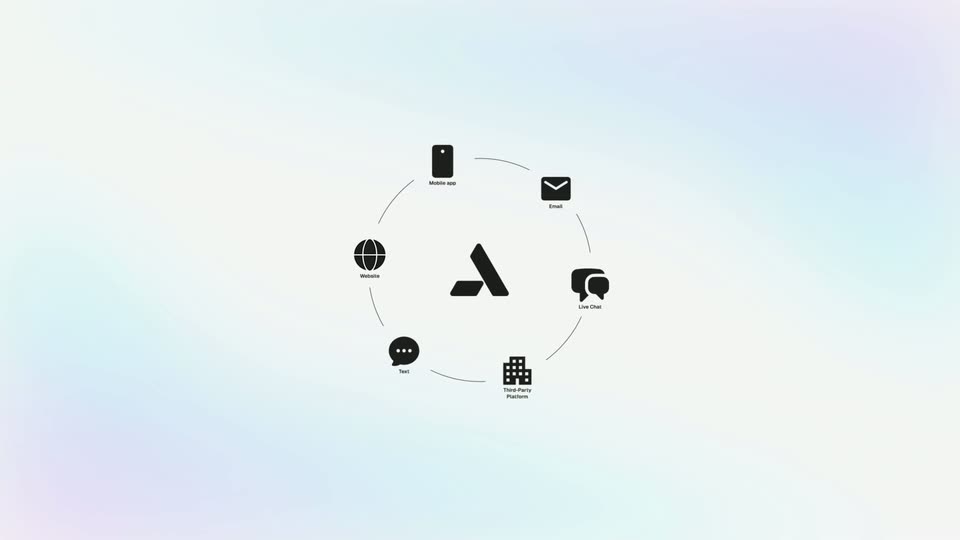
On a pastel gradient, a black angular logo centers the frame with blurred blue bars at the edges. A white chat bubble with avatar and timestamp fades out as six labeled channel icons arrange in a circle around the logo.
Camera: Static
37 · Feature reveal · 1:00–1:02
A pastel gradient background holds a black angular logo at center. A thin gray ring links six dark icons, each with a small label: Mobile app, Email, Live Chat, Third-Party Platforms, Text, Website. The icons drift downward into place as the ring draws in.
On-screen text: “Mobile app”, “Email”, “Live Chat”, “Third-Party Platforms”, “Text”, “Website”
Camera: Static
38 · Feature reveal · 1:02–1:04
On a pale gradient background, a soft blue disc holds the dark Arc logo at its center, surrounded by a thin ring of six labeled channel icons. The ring and icons fade out, then the logo dissolves, leaving the plain blue disc.
Camera: Pull out
39 · Feature reveal · 1:04–1:05
A soft blue gradient orb floats on a pale pastel background. A white rounded field with a thin blue border grows out from the orb to the right as the orb drifts left, and the word CallTranscript types out inside it letter by letter with a blinking cursor.
Techniques: Kinetic type
Camera: Static
40 · Feature reveal · 1:05–1:06
A white card titled Call Transcript is centered on a pale gradient background with a soft blue orb at left. The examiner and Jordan dialogue fills in line by line, and the card expands to fit each new line.
Camera: Static
41 · Feature reveal · 1:06–1:08
Two rounded document cards, a call transcript above a handwritten injury report form, float on a pale blue gradient. They drift slowly down and left, the form sliding into fuller view beneath the transcript.
Techniques: Parallax
Camera: Static
42 · Feature reveal · 1:08–1:09
A CityRail workplace injury incident report, filled with blue handwritten entries, sits in front of a call transcript card on a pale background. The report drifts left and down, sliding to reveal more of the transcript behind it.
Camera: Static
43 · Feature reveal · 1:09–1:11
Two rounded UI cards float over a pale blue-to-lavender gradient. The left card lists a call transcript between an examiner and Jordan; the right card stacks claimant details with small icons. Both cards sway side to side, drifting against a blurred color blob for depth.
Techniques: Parallax
Camera: Static
44 · Feature reveal · 1:11–1:12
A white Claimant Info card listing fields for name, contact, workplace, date, location, incident and diagnosis settles into place on a soft gradient background, its text briefly ghosting and overlapping as the transition resolves.
Camera: Static
45 · Feature reveal · 1:12–1:14
A white Avallon Copilot dialog card is centered on a soft pastel gradient. It grows to add a follow-up field, then hard cuts to a fault-distribution view with two progress bars while the word Cut fades in at the left.
On-screen text: “Cut”
Camera: Static
46 · Feature reveal · 1:14–1:16
A white Avallon Copilot result card sits on the right over a soft blue gradient blob, its text settling from a brief doubled crossfade. On the left, the gray headline Cut Cycle Times holds as a lighter second line, Unleash Adjuster Productivity, fades in beneath it.
On-screen text: “Cut Cycle Times”, “Unleash Adjuster Productivity”
Techniques: Kinetic type
Camera: Static
47 · Feature reveal · 1:16–1:18
A bold black headline crossfades on a pale pastel gradient of blue and lavender. The line dissolves in over a fading text state, the words briefly overlapping before settling into a centered lockup.
On-screen text: “Unleash Adjuster Productivity”
Camera: Static
48 · Feature reveal · 1:18–1:19
A centered gray headline, Unleash Adjuster Productivity, sits on a soft pastel gradient, then dissolves to leave the empty gradient.
On-screen text: “Unleash Adjuster Productivity”
Camera: Static
49 · Feature reveal · 1:19–1:23
A 2x2 cluster of blurred photo tiles surrounds the centered word “Level Up.” The tiles enlarge and drift apart into four quadrants, sharpening to show a house, a car, a hard-hat worker, and two medical staff, as purple and blue pill labels slide in beside each.
On-screen text: “Level Up”, “Auto”, “Property”, “Worker's Comp”, “Healthcare”
Techniques: Kinetic type
Camera: Static
50 · Feature reveal · 1:23–1:24
A pale blue-to-white gradient fills the frame. A centered headline builds word by word: “Supercharge” in a blue-purple gradient, then “your claims operations” in black, while a blurred shape dissolves at the start.
On-screen text: “Supercharge your claims operations”
Techniques: Kinetic type
Camera: Static
51 · Feature reveal · 1:24–1:26
A centered headline sits on a soft pastel gradient background. The word Supercharge renders in a blue-to-purple gradient, the rest in black. The line eases into place over the first second, then holds on a locked-off frame.
On-screen text: “Supercharge your claims operations”
Techniques: Kinetic type
Camera: Static
52 · Outro · 1:26–1:32
On a soft pastel gradient, the tagline fades out around the centered logo mark, which slides left to join the Avallon wordmark. The lockup holds for a beat, then fades to white.
On-screen text: “Supercharge your claims operations”, “Avallon”
Camera: Static