
1:04
Explore
00:00:00 / 00:44:15
- Length
- 0:44
- Scenes
- 21 · 2.1 s avg
- Product on screen
- 0:33
- Call to action
- 0:43 · 97%
- Voiceover
- No
- Views
- 389 on YouTube
as of November 26, 2026
autarc’s 0:44 launch film runs 21 scenes, about 2.1 s each. The product shows up at 0:33. The call to action lands at 0:43 (97% in). The video opens on a typed question over a heat pump grille, then runs one continuous workflow demo: a tilted 3D browser and flat forms for project creation, live-action tablet LiDAR scanning, a rotating blue 3D room model, report generation and a signed-offer notification, before closing on cycling feature text, an All-In-One tagline with a UI montage and a typed URL. Its style is a clean off-white canvas with deep blue accents, where screen mockups float and tilt in 3D space, live-action shots
Footage neededEstimated needs: 3 capture groups — your screens or recordings · 6 filmed passages — shoot, supply or replace · 5 3D passages — build or supply
Is this your launch? to your site or press kit.
More like this

0:30

Aryan Sawhney - Today we’re launching Narrative: the AI video editor for the rest of
Narrative · Consumer · Sep 2026
0:26

Similar soundtrack
Films whose music sounds like this one, voice left out
1:38
1:11

Alloovium - Today, we launched @alloovium on @ycombinator On major projects, doc
Alloovium · Corporate promotional video
1:00

TrueMile Launch Video (YC F26) | Unveil Studio
TrueMile · Modern electronic
YC Launch autarc, scene by scene
· 21 scenes as text
01 · Hook · 0:00–0:02
Locked-off close-up of a dark green heat pump fan grille. A white rounded search bar with a magnifying glass icon appears in the center, the query is typed into it letter by letter, then the bar disappears, leaving the grille alone.
On-screen text: “How to sell and plan a heat pump?”
Techniques: Kinetic type
Camera: Static
02 · Demo · 0:02–0:04
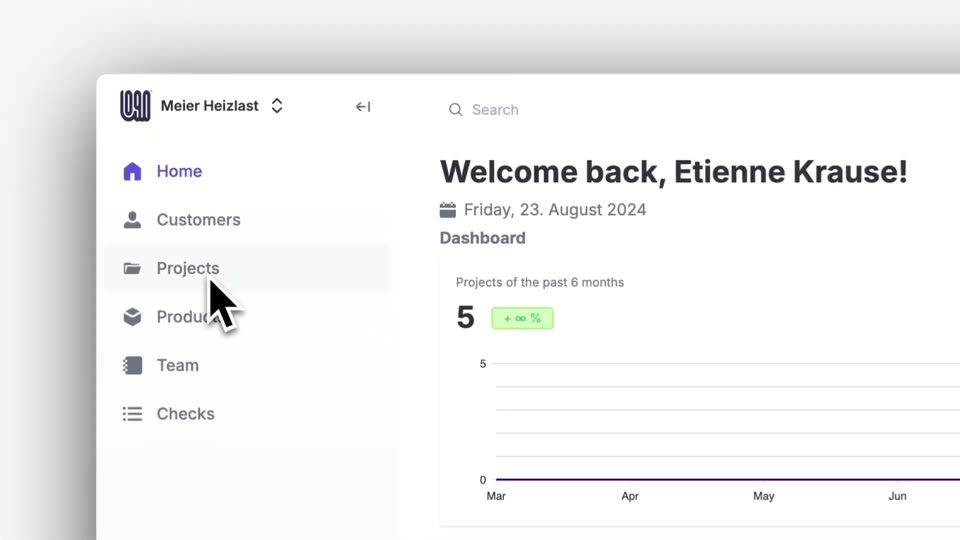
A white dashboard panel tilted in 3D perspective. A cursor clicks Projects in the left sidebar, and the main view crossfades from a welcome dashboard to a Projects list with tabs and a table.
Techniques: 3D mockup, Cursor demo
Camera: Push in
03 · Demo · 0:04–0:09
A flat web form titled Create new Project fills in as a cursor types a name and address, a suggestion list drops down, and the view scrolls to the Create Project button. The shot reframes from a wide browser view to a close-up of the form.
Techniques: UI zoom, Cursor demo
Camera: Pan
04 · Demo · 0:09–0:12
A tilted browser window with a project details page floats in 3D over a blurred copy of the same page. The content scrolls through the details, location and customer sections as a green confirmation toast sits in the corner and a cursor hovers near the create button.
Techniques: 3D mockup, Cursor demo
Camera: Pull out
05 · Demo · 0:12–0:13
A person's hands type on a tablet keyboard case propped on a desk, the screen showing a white list interface with a purple button. Horizontal blinds with a blue stripe fill the background. The shot fades in from black.
Camera: Push in
06 · Demo · 0:13–0:14
A hand reaches toward a tilted tablet displaying a German form, then the display goes dark as the fingers curl away. The office with slatted blinds sits softly blurred behind.
Camera: Static
07 · Demo · 0:14–0:16
Two hands hold a tablet in landscape in an office, the screen showing a live camera view of a slatted wall with a white scanning frame and a small inner box. The device tilts slightly while the slat partition and window stay soft and out of focus.
Camera: Static
08 · Demo · 0:16–0:19
A bearded man in a black shirt stands in a bright office, holding a tablet with a keyboard case. The screen shows a 3D room view with placed furniture. He rotates the tablet from horizontal to vertical, aligning the virtual layout with the real space by the window.
Camera: Pan
09 · Demo · 0:19–0:20
A bearded man in a dark shirt holds a tablet over his shoulder, its screen showing a 3D room model with windows. The shot cuts to a close-up of that 3D model, a dark blue and white room corner, beside a settings panel with form fields and a toggle.
Techniques: 3D mockup
Camera: Static
10 · Demo · 0:20–0:25
A close-up of a 3D room model with blue walls and a gray floor pulls back to reveal the full product window: a form panel on the left and the rotating 3D room on the right, floating on a white background.
Techniques: UI zoom, 3D mockup
Camera: Pull out
11 · Demo · 0:25–0:26
A tilted tablet mockup floats on a white background, its screen showing a project page. The building reports list of three cards with Open buttons transitions into the Heatpump Report detail, revealing room data and a radiator table.
Techniques: 3D mockup
Camera: Static
12 · Demo · 0:26–0:27
A white project window floats over a blurred light background. The camera zooms into the lower half of the window, enlarging the Download Report link and the Notes / Photos tab while the header text grows out of frame.
Techniques: UI zoom
Camera: Push in
13 · Demo · 0:27–0:28
A modal dialog with selection checkboxes and a language picker sits centered over a dimmed report screen. The view zooms in on the modal as it scales up, the background report sliding out of frame.
Techniques: UI zoom
Camera: Push in
14 · Demo · 0:28–0:28
An iPad mockup sits at a slight angle on a light gray backdrop, its screen showing the Files app in the Recents view. A blue sidebar lists locations and colored tags while two file thumbnails sit in the main pane.
Techniques: 3D mockup
Camera: Static
15 · Demo · 0:28–0:31
A tablet mockup tilted in 3D perspective on a pale gray background, locked off, shows a report document; the page scrolls down from the title and aerial map with red pins to a two-column data table.
Techniques: 3D mockup
Camera: Static
16 · Demo · 0:31–0:32
A black cursor glides from the center toward a purple “Send offer” button in the top right, then rests on it as the button gains a soft drop shadow.
Techniques: Cursor demo
Camera: Static
17 · Demo · 0:32–0:33
A black cursor clicks a blue Send offer button on a plain light background. A gray notification card then fades in at the center, showing a small logo, the word NOTIFICATION, autarc energy, and Your Offer. The frame stays locked off.
Techniques: Cursor demo
Camera: Static
18 · Product intro · 0:33–0:34
A light gray notification card sits centered on a pale background, showing the autarc logo, sender line and a signed-offer message with a check. The card fades out and the autarc offers wordmark fades in at the lower left, dark text followed by gray.
On-screen text: “autarc offers”
Camera: Static
19 · Product intro · 0:34–0:40
On a pale off-white background, dark 'autarc offers' holds fixed at left while light blue-gray service names cycle in at right: Heat Pump Check, LiDAR-Scan, Room Heat Load, Technical Feasibility, Subsidies, Financing Options, System Design. Each phrase slides in as the last fades; the final line slides left off frame.
On-screen text: “autarc energy”, “autarc offers Heat Pump Check”, “autarc offers LiDAR-Scan”, “autarc offers Room Heat Load”, “autarc offers Technical Feasibility”, “autarc offers Subsidies”, “autarc offers Financing Options”, “autarc offers System Design”
Techniques: Kinetic type
Camera: Static
20 · Product intro · 0:40–0:43
On a light background, gray text slides in: “autarc offers System Design” exits left as “All-In-One” slides to the center. The headline scales up and darkens while product UI screens fade in around it.
On-screen text: “autarc offers System Design”, “All-In-One”
Techniques: Kinetic type
Camera: Static
21 · CTA · 0:43–0:44
Product interface cards and two tablets with 3D building and house renders drift outward to the frame edges, opening the center where the URL www.autarc.energy types out letter by letter in dark type on a light background.
On-screen text: “www.autarc.energy”, “All-In-One”
Techniques: Kinetic type, 3D mockup
Camera: Push in