1:58


Verdant AI v2 (with sound)
Verdant · Government
Cartesia · Oct 2026 · 1:04 · AI-annotated
Cartesia’s 1:04 launch film runs 14 scenes, about 4.6 s each. The product shows up at 0:06 and 1 feature is revealed, with social proof. The call to action lands at 0:58 (90% in), over a voiceover. White-stage launch film that alternates hand-drawn ink illustration, animated leaderboards and flat UI panels, each beat sliding or easing in while a dark caption bar carries the voiceover. Signature moves are the green watercolor audio waveform, 3D cards flattening into frame, and green highlights marking Cartesia's #1 rankings.
Is this your launch? to your site or press kit.
Verdant · Government
Stacktrace · B2B · Nov 2026
Gem · Sep 2026
A hand-drawn ink and watercolor illustration of the San Francisco skyline, with the Golden Gate Bridge, the Transamerica Pyramid and a green cable car. The view slowly zooms in on the buildings as a small sound-wave icon drifts across the sky. A subtitle bar sits at the bottom.
On-screen text: “Every customer we talk to wants the same things from a voice agent:”
Camera: Pan
A hand-drawn San Francisco skyline, with the Golden Gate Bridge, slides down out of frame on a white background as an audio waveform, a black line with green watercolor fill above a row of green equalizer bars, settles into the center. A dark caption bar sits at the bottom.
On-screen text: “Every customer we talk to wants the same things from a voice agent:”
Camera: Pan
A white field holds two animated waveforms, a smooth green-and-blue sine line above a row of pulsing green bars. Two white notification pills with green checks slide in over the lower bars as a dark caption bar sits at the bottom.
On-screen text: “Sounds human”, “Gets the task right”, “Every customer we talk to wants the same things from a voice agent”, “sound natural while also getting the task done.”, “Appointment booked · Thu 10:30”, “Order confirmed”
Camera: Static
On a white background, a green waveform pulses under the gray label 'Sounds human'. Two white checkmark chips sit under 'Gets the task right'. A dark caption box reads 'sound natural while also getting the task done.' A product panel slides up from the bottom edge.
On-screen text: “Sounds human”, “Gets the task right”, “sound natural while also getting the task done.”
Camera: Static
Two overlapping Cartesia configuration panels sit on a pale background under a “Sounds human” headline and a green audio waveform. The panels slide into a stacked layout as a white caption bar appears at the bottom.
On-screen text: “Sounds human”, “That's why we built Cartesia Managed Agents,”
Camera: Static
A pale gray stage holds the Cartesia configuration screen as a tilted 3D card that eases flat. A black serif headline 'Cartesia Managed Agents' fades in above it, and a dark caption bar at the bottom swaps its line. The composition slides up out of frame.
On-screen text: “That's why we built Cartesia Managed Agents,”, “Cartesia Managed Agents”, “our end-to-end voice agent platform for enterprise conversations.”
Techniques: 3D mockup
Camera: Pan
On a white background, an Artificial Analysis leaderboard of seven horizontal bars animates, scores counting up while rows reorder so Cartesia Managed Agents climbs to first place with a green bar. A dark caption pill updates at the bottom, then a large serif line reads #1 on human preference.
On-screen text: “In Artificial Analysis's Speech Agent Arena,”, “Managed Agents ranked #1 for human preference”, “#1 on human preference”
Camera: Pan
A flat UI mockup on a pale background shows two side-by-side cards, Agent A and Agent B, each with an animated audio waveform and a Prefer button. Agent A's button fills green as the waveforms ripple, then the frame zooms in on the layout.
On-screen text: “on tasks like booking appointments and ordering takeout.”
Techniques: UI zoom
Camera: Pan
The view slides left past an Agent B card with a waveform and Prefer button, revealing the servicenow logo and a gray Evaluated by ServiceNow AI Research header above a vertical chart line. A dark caption bar reads ServiceNow also put it to the test on EVA-Bench
On-screen text: “ServiceNow also put it to the test on EVA-Bench,”, “Evaluated by ServiceNow AI Research”
Camera: Static
A white scatter plot builds in: a gray dot cluster forms mid-chart, green dots scatter around it, and category labels fade in. A green dot appears top-right labeled Cartesia Managed Agents as a green Pareto frontier region draws in.
On-screen text: “Independently evaluated by ServiceNow AI Research”, “Experience (EVA-X)”, “Accuracy (EVA-X)”, “Source: ServiceNow EVA-Bench, pass@1, Oct 2026”, “Speech-to-speech”, “Grok Voice 3.0”, “Cascaded pipelines”, “ElevenAgents (GPT-5.4)”, “ElevenAgents (Haiku 4.5)”, “Cartesia Managed Agents”
Camera: Push in
A green Pareto-frontier scatter chart with labeled dots sits under a black serif headline that fades in, plus a gray subhead and a dark caption bar. The scene then cuts to a white Knowledge Base UI screen with a green Add knowledge button and a gray question pill at the bottom.
On-screen text: “Independently evaluated by ServiceNow AI Research”, “Cartesia Managed Agents sets a new Pareto frontier across both.”, “Source: ServiceNow EVA-Bench, pass@1, Oct 2026”, “Cartesia Managed Agents #1 on EVA-Bench”, “Ahead on accuracy and experience”, “So how do we do it?”
Techniques: Kinetic type
Camera: Pan
A flat UI screen shows an empty Knowledge Base with a cursor on the Add knowledge button, then a file list. The view pans right to a call transcript; chat bubbles and tool-call chips appear in sequence above a dark caption bar.
On-screen text: “So how do we do it?”, “Knowledge bases, tool calls, and multilingual support give every agent what it needs for complex calls.”
Techniques: Cursor demo, UI zoom
Camera: Push in
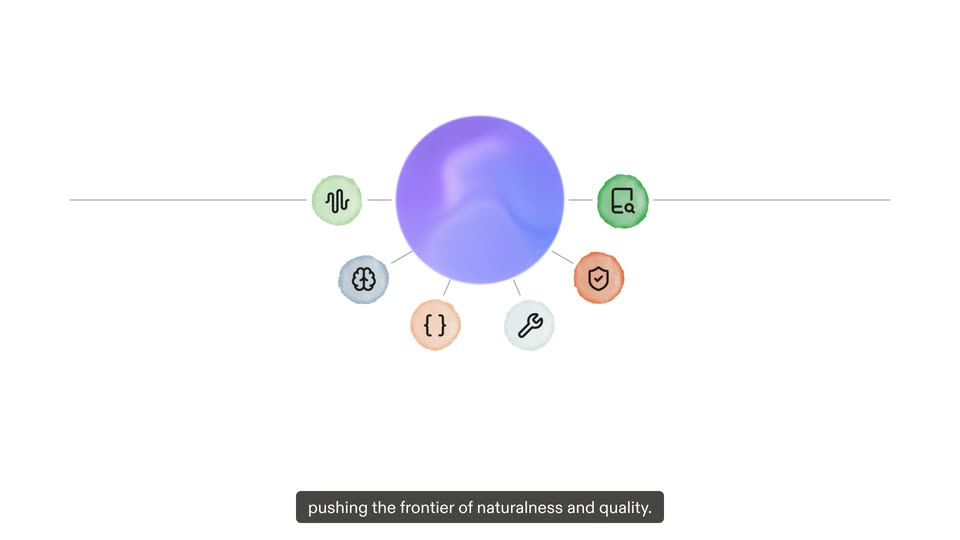
Hub-and-spoke diagram on white: a purple gradient circle at the center, six small icon circles (waveform, brain, braces, wrench, shield, document) on thin lines. Each icon tints from gray to color as a dark label pops in beside it. The center swirls, then the diagram fades to white.
On-screen text: “But our real edge is co-designing the harness and our voice models together,”, “Speech model”, “AI model”, “Variables”, “Tool calls”, “Guardrails”, “Knowledge retrieval”, “pushing the frontier of naturalness and quality.”
Camera: Static
Plain off-white card: the Cartesia logo sits above a large serif 'Managed Agents' headline that sharpens into focus. A gray subline and green pill '50% off through Dec 31' fade in, then the URL 'cartesia.ai/agents'. A dark pill caption at the bottom carries the voiceover, swaps lines, then fades out.
On-screen text: “Managed Agents”, “Start building with 50% off through Dec 31”, “cartesia.ai/agents”, “Get 50% off through the end of the year”, “and start building your next great voice agent.”
Techniques: Kinetic type
Camera: Static