1:46

Uncovering Zero-Day Vulnerabilities
Theorem · B2B · May 2025
Artifact’s 0:50 launch film runs 4 scenes, about 13 s each. The product is on screen from the first frame. The call to action lands at 0:36 (71% in), over a voiceover. The video opens with a locked-off talking head that names the product, moves to a single long screen-capture pass through the interface, and closes with a short ask and a static logo card. Pacing is slow with long holds and few cuts, and the signature moves are the purple grid frame boxing the presenter and subtitle lines that swap in sync with the narration.
Is this your launch? to your site or press kit.
Theorem · B2B · May 2025
Almanac · B2B · Aug 2026
Films whose music sounds like this one, voice left out
Factory · Modern electronic and rock
Warp · Upbeat electronic and lo-fi hip-hop
TryNearby · Promotional / Tech Launch
A man in a brown jacket and round glasses talks to camera in a brick-walled room with a whiteboard, his video framed by a dark patterned border. The shot stays locked off while white subtitle lines swap at the bottom as he introduces the product.
On-screen text: “Hey there.”, “I'm excited to unveil Artifact,”, “a modern workspace for electrical system design.”, “Our goal with Artifact was to create a 2D”, “electrical CAD tool which automates tedious and”, “error prone tasks like data sheet ingestion,”, “multifidelity system design and manufacturing”, “documentation.”
Camera: Static
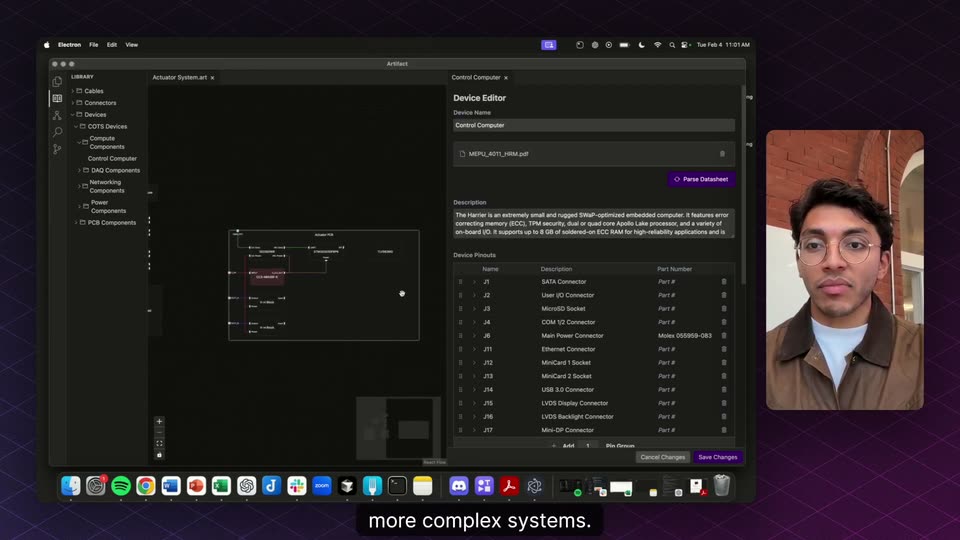
A dark desktop app fills the frame with a small webcam video of the presenter on the right. The cursor right-clicks the diagram canvas, opens a file dialog, drops a new component block, then opens a pin-table popup.
On-screen text: “What I have in front of me is a typical design”, “ecosystem.”, “On the right I have my AI datasheet parser,”, “and on my left I have my diagramming window where”, “I can drag and drop predefined components or even”, “more complex systems.”, “Once I have all my components all laid out and”, “connected.”, “The built in engineering back end also lets me see”, “design details such as pin tables for any given”
Techniques: Cursor demo
Camera: Static
A man in a brown jacket and round glasses speaks to the camera in a room with red brick and arched windows, framed by a dark purple grid border. White subtitle captions appear at the bottom as he talks.
On-screen text: “Follow along to see our updates,”, “join as an early power user and be a part of the”, “development journey of Artifact.”
Camera: Static
The white Artifact logo, three curved swoosh strokes beside the wordmark, sits centered on a black background and holds still for the full shot.
Camera: Static