0:57
The new MacBook Pro with M6 delivers blazing-fast performance and up to 24 hours of battery life.
Apple · Hardware · Oct 2026
Apple’s 0:57 launch film runs 39 scenes, about 1.5 s each. The product is on screen from the first frame and 6 features are revealed. There is no explicit call to action. The video is built as a chain of glowing type cards on a black void, each naming a feature and immediately cut to a short 3D hardware render or UI demo, closing on a logo sign-off. Pacing is quick at about 25 cuts per minute, with signature moves of a cyan bloom that lifts the text from dim to bright, glints traveling along the laptop edge, and straight-in zooms into the screen content.
Is this your launch? to your site or press kit.
Apple · Hardware · Oct 2026
Miro · Productivity · Oct 2023
Films whose music sounds like this one, voice left out
MacBook Pro · Electronic dance music with cinematic and orchestral elements
Microsoft · Cinematic Electronic / EDM
Mercedes-Benz · Cinematic trailer music, hybrid electronic
On a black background, the words MacBook Pro fade in at center, brightening from a dim blue to white with a soft glow.
On-screen text: “MacBook Pro”
Camera: Static
On black, a silver MacBook Pro in side profile tilts into view in 3D, its display edge lit cyan, with the dark product name set large and low-contrast behind it.
On-screen text: “MacBook Pro”
Techniques: 3D mockup
Camera: Static
A thin silver laptop floats in 3D on a black background, angled diagonally across a large teal-to-blue M6 wordmark. The device's top edge catches a bright glint while the bottom edge shows its ports. The frame stays locked and the elements hold still.
On-screen text: “M6”
Techniques: 3D mockup, Light sweep
Camera: Static
A dark laptop lies at a low angle in 3D, its bottom edge showing a speaker grille, two ports and a jack against a teal screen. A bright glint travels along the lid edge while the frame holds steady on the hardware.
Techniques: 3D mockup, Light sweep
Camera: Static
Two space-gray laptops rise from black and open into a V shape in 3D perspective. The left screen shows a dark wavy wallpaper, the right lid shows the Apple logo. The reveal is slow and deliberate on a pure black field.
Techniques: 3D mockup
Camera: Pull out
Two space gray laptops sit on a black void, one open with a wavy monochrome wallpaper on its screen, one closed showing the Apple logo on its lid. The pair rotates slowly in 3D, the open lid tilting as the port-lined bases stay flat.
Techniques: 3D mockup
Camera: Static
A glowing white text “Now with” is centered on a black background.
On-screen text: “Now with”
Camera: Static
A square M6 chip with a glowing blue edge sits centered on black, the Apple logo and M6 mark in silver at its heart. The edge light shifts around the frame while a small disclaimer line holds at the bottom.
On-screen text: “Chip availability varies by model.”
Techniques: Light sweep
Camera: Static
Three glowing square chip tiles settle on a black background: the left fades in teal with the Apple logo and M6, the middle cools from bright cyan to blue with M5 PRO, and the right shifts to purple with M5 MAX. A small disclaimer caption sits centered below.
On-screen text: “Chip availability varies by model.”
Camera: Static
A black screen holds the glowing white headline “One big, powerful family,” which fades in softly and stays centered. The text carries a faint cyan halo and remains locked in place for the duration of the shot.
On-screen text: “One big, powerful family”
Camera: Static
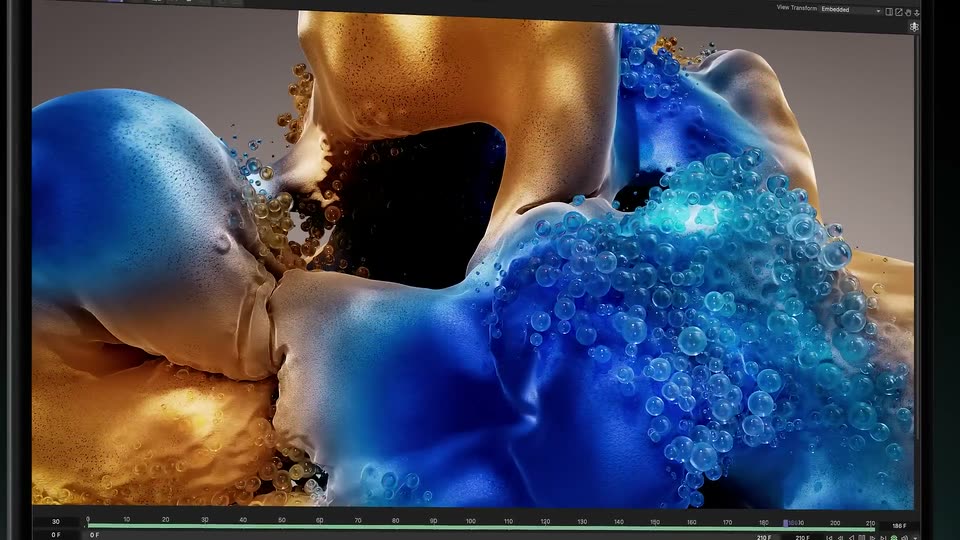
A 3D bouquet of blue, white and orange flowers on green stems fills a Cinema 4D viewport against a flat orange backdrop. The virtual camera pulls back and orbits, widening the view to reveal an orange cone shape, while a locked-off tagline sits over the render.
On-screen text: “One big, powerful family”
Techniques: Parallax
Camera: Pull out
A dark laptop mockup sits centered on a black background, its screen showing a 3D viewport with green thorny tendrils and blue spiky flowers against an orange backdrop. The device orbits slowly, shifting from a front-left angle toward a more frontal view.
Techniques: 3D mockup
Camera: Static
Centered on a black field, the line A pro at AI holds in a soft cyan glow that brightens to white over the shot. The frame stays locked off with no camera move.
On-screen text: “A pro at AI”
Camera: Static
A dark settings panel: the cursor clicks the Enhancement toggle, which turns blue and reveals a resolution dropdown. The scene then cuts to a woman in red riding a horse against a clear blue sky.
Techniques: Cursor demo
Camera: Static
A rider in a red period costume and wide-brimmed hat sits astride a chestnut horse under a clear blue sky, a pale stone structure at the right edge. A thin vertical white line drifts leftward across the frame.
Camera: Static
A dark enhancement app displays a split view of a horse rider in red, original on the left and upscaled on the right. The playhead advances along the bottom timeline, updating both frames, while a right panel of sliders and dropdowns stays fixed.
Camera: Static
On a black background, the gradient headline “Apple Intelligence and Siri AI” scales into the center, then gives way to a second gradient line, “More personal. More powerful,” which holds still. A small gray disclaimer runs along the bottom edge.
On-screen text: “Apple Intelligence and Siri AI”, “Siri AI is available in English. Usage limits may apply. Learn more: support.apple.com/en-in/148587”, “More personal. More powerful.”
Techniques: Kinetic type
Camera: Static
A white headline reads across a black field, the line sliding slowly to the right while a small grey disclaimer line sits fixed at the bottom edge.
On-screen text: “More personal. More powerful.”, “Siri AI is available in English. Usage limits may apply. Learn more: support.apple.com/en-in/148587.”
Techniques: Kinetic type
Camera: Static
A black Siri query pill types out a voice command over a green collage of a lotus leaf macro and a scientific paper page. A smaller Siri button sits below it while a large white serif headline is cropped at the bottom left.
On-screen text: “Show me the lotus flower pictures I took last weekend — Ask Siri”, “Show Results”, “SCIENTIFIC PERSPECTIVES”, “FRANÇOIS THIBAULT”, “The Effect of Roughness”, “logant”
Techniques: Kinetic type
Camera: Static
A dark rounded command bar holds white typed text with a blinking caret, above a Show Results pill button. The pair sits over a green lotus leaf and a scientific article layout, then dissolves away to reveal the article heading.
On-screen text: “Show me the lotus flower pictures I took last weekend — Ask Siri”
Camera: Static
A static two-column reading screen. Left shows a macro photo of a green lotus leaf with water droplets and a large white serif word at the bottom. Right is a dark green article panel with a serif headline, a byline, and a line diagram. A dark rounded loading pill labeled Working with a spinning dot ring sits at the top center.
Camera: Static
A green lotus-effect PDF fills the Preview window. A search card floats over it, spinning, then resolves into a 3x3 grid of lotus photos. The cursor taps a tile and the card expands into a larger viewer showing a filename and a blurred loading image.
Techniques: Cursor demo, Morph
Camera: Static
A macOS Preview window holds a PDF page with a floating image viewer on top, showing a green lotus leaf dotted with water droplets. A cursor rests on the leaf. The interface stays static through the shot.
Camera: Static
A centered headline brightens from dark to a glowing cyan on a black background, with a small disclaimer fixed at the bottom.
On-screen text: “All-day battery life”, “Battery life varies by use and configuration.”
Camera: Static
A rounded battery icon glows teal on a black background. Its interior fills from a partial charge to full between the two frames, while a small disclaimer caption sits static at the bottom.
On-screen text: “Battery life varies by use and configuration.”, “All-day battery life”
Camera: Static
On a black field, a centered line of light sans text reads “Up to 24 hours” as the number counts up from 22. A soft cyan glow sweeps left to right across the letters, brightest at the edges.
On-screen text: “Up to 24 hours”
Techniques: Kinetic type, Light sweep
Camera: Static
On a black field, a glowing cyan diagonal line runs from top to lower right. The headline fades in letter by letter, resolving to two centered lines, while the line stays fixed.
On-screen text: “Liquid Retina”, “XDR display”
Techniques: Kinetic type
Camera: Static
On a black background, the line “Extreme brightness and high contrast” builds up word by word in white sans-serif, while a soft blue-white glow blooms behind the words. The frame stays locked off and the text holds static once complete.
On-screen text: “Liquid Retina”, “XDR display”, “Extreme brightness and high contrast”
Techniques: Kinetic type, Light sweep
Camera: Static
A 3D laptop mockup tilts in on black, its screen showing the Canva color-grading workspace with a vibrant crowd photo. The view then zooms straight into the photo, filling the frame with the colorful faces.
On-screen text: “Extreme brightness and high contrast”
Techniques: 3D mockup, UI zoom
Camera: Push in
A top-down view of a dense pile of laughing people in iridescent, neon-colored outfits, their hands reaching toward the camera. The frame holds almost still, with only slight drifting motion across the group.
Camera: Static
On a black background, the white phrase “Connectivity and security” is revealed left to right by a glowing cyan edge that sweeps across the letters, then the line settles into a dim steady state.
On-screen text: “Connectivity and security”
Techniques: Masking
Camera: Static
Two dark device edges float on black, top one showing a Thunderbolt port, two USB-C ports and a jack, bottom one an SD slot, USB-C and HDMI. White labels fade and scale in above and below the ports.
On-screen text: “Connectivity and security”, “Thunderbolt”, “SD”, “HDMI”
Techniques: Kinetic type
Camera: Static
Tight close-up of a dark metal device body with a perforated grille above and a small green LED dot centered. The unit slides upward through the frame, exposing a cable at the bottom, while small port labels pop in beside it.
On-screen text: “Thunderbolt”, “SD”, “HDMI”
Camera: Static
Extreme close-up of a black keyboard key holding a circular fingerprint sensor. A glowing blue fingerprint icon pulses on the sensor, then fades out to leave a dark glossy button, beside the F12 volume key and a perforated speaker grille.
Camera: Static
Two MacBooks float on a black background. The open one shows a dark wallpaper of glowing curved lines, the closed one shows the Apple logo. The pair rotates in 3D, and the closed lid tilts up to expose its thin edge.
Techniques: 3D mockup
Camera: Static
A side profile of a laptop is centered on a black background, shifting between dark and silver finishes. The text 'MacBook Pro' fades in over the device.
On-screen text: “MacBook Pro”
Camera: Static
On a black field, the centered words MacBook Pro sit still while a soft teal glow travels left to right, lifting the text from half-lit to fully bright.
On-screen text: “MacBook Pro”
Techniques: Light sweep
Camera: Static
A black frame holds a glowing Apple logo at center, its blue halo brightening slowly. A block of small gray legal text sits along the bottom edge. The frame is locked off and the logo stays fixed.
On-screen text: “MacBook Pro”
Camera: Static
A glowing blue Apple logo sits centered on a black field. A block of small grey legal fine print at the bottom fades out, leaving the logo alone as the sign-off.
On-screen text: “Some software is sold separately. Apple Intelligence is available with Siri and device language set to Chinese (Simplified), Chinese (Traditional), Danish, dut,”, “Apple Intelligence is available with Siri and device language set to Chinese (Simplified), Chinese (Traditional), Danish, Dutch, English, French, German, It”, “Japanese, Korean, Norwegian, Portuguese, Spanish, Swedish, Turkish or Vietnamese. Some features may not be available in all regions or languages. Some dev”, “Some devices may not be available in all regions. Siri AI is available in beta in macOS 27 and requires an Apple Intelligence–enabled device set to a support”, “language. Available in English, French, Japanese, Korean, Portuguese and Spanish to start. Siri AI will not be initially available in the EU on iOS, iPadOS”, “watchOS. Siri AI is not available for users under 13. Certain Siri AI and Apple Intelligence features have usage limits. Expanded access to such features wi”, “available for a fee in the future. Use of these features is subject to the Apple Intelligence Terms and Conditions. Learn more at support.apple.com/en-in/14”
Camera: Static