1:37


Introducing ChatGPT Atlas
OpenAI · AI · Oct 2025
Anthropic’s 2:32 launch film runs 37 scenes, about 4.1 s each. The product shows up at 0:05 and 9 features are revealed. The call to action lands at 2:24 (95% in), over a voiceover. A presenter-led launch video built as a checklist of upgrades: a cold-open device demo, a serif agenda card, then a steady cadence of host shot plus UI or 3D device mockup per feature, closed by a comment prompt and the logo. The style is warm cream and near-black with a single terracotta accent, a high-contrast serif display paired with a clean sans for UI, and a signature move of rounded cards and red-edged wipes sliding in to bridge the talking head and the product screens.
Is this your launch? to your site or press kit.
OpenAI · AI · Oct 2025
Anthropic · AI · Jan 2026
A man in a green shirt talks to the camera in a room with a large window. A white smartphone mockup showing a bar chart and the number 4,406 fades in on the right.
Camera: Static
A man in an olive shirt talks to camera on the left beside a bright window. On the right, a flat phone mockup shows a bar chart with a large 4,406, then the phone unfolds into a wider two-panel view revealing the full chart.
Techniques: Morph
Camera: Static
A foldable phone in 3D perspective unfolds flat on a light gray stage, revealing a chat panel with a message and artifact card on the left beside a chart page on the right. A “Your conversation” pill appears below, then the phone fades out.
On-screen text: “Your conversation”
Techniques: 3D mockup
Camera: Static
On a cream background, a white rounded card fades in holding the large number 4,406, which scales slightly, then the card and number fade out, leaving the small Claude apps label with an orange dot centered on screen.
On-screen text: “4,406”, “Claude apps”
Techniques: Kinetic type
Camera: Static
A cream title card holds a centered black serif headline with a small gray “Claude apps” label above. Rounded pill tags for the platforms and features fade in with their light fills, then a dashed “Search coming soon” tag appears at the right edge.
On-screen text: “Claude apps”, “Upgrades across the Claude apps”, “iPhone Duo”, “iPhone”, “iPad”, “Android”, “Voice mode”, “Languages”, “Search coming soon”
Techniques: Kinetic type
Camera: Static
A cream card holds a small orange-dot label, a large serif headline, and a row of feature pills. A white rounded panel then wipes in from the right to cover the card, masking the transition to the next shot.
On-screen text: “Claude apps”, “Upgrades across the Claude apps”, “iPhone Duo”, “iPhone”, “iPad”, “Android”, “Voice mode”, “Languages”, “Search coming soon”
Techniques: Masking
Camera: Static
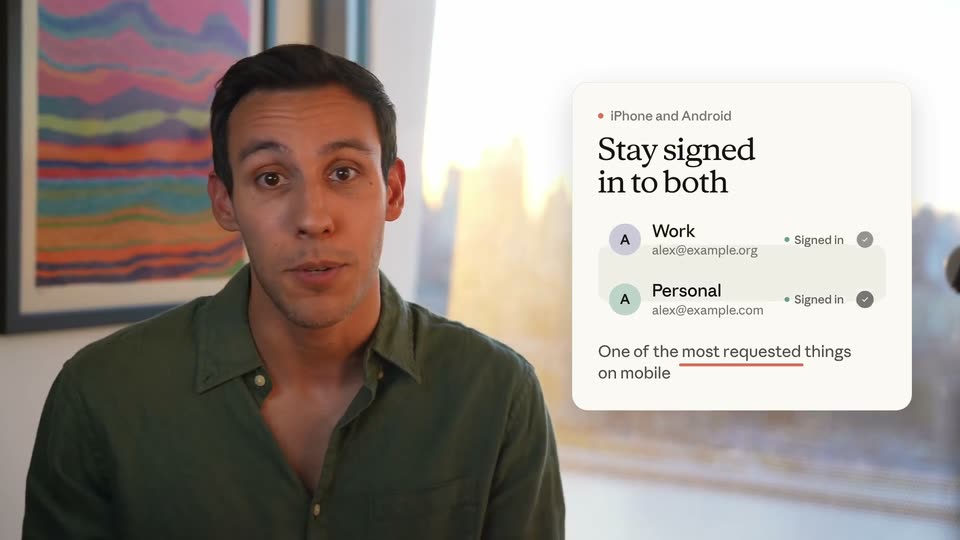
A presenter in a green shirt talks to camera in a bright room with a city view. A white card on the right lists Work and Personal accounts under a serif headline. A checkmark and green Signed in tags shift between the two rows, then the card contents clear.
On-screen text: “iPhone and Android”, “Stay signed in to both”, “One of the most requested things on mobile”
Camera: Static
A man in a green shirt talks to camera in a sunlit room with a city skyline behind him. A thin red line enters from the right, then a white vertical bar with red edges wipes across the frame as a transition.
Techniques: Masking
Camera: Static
Under a small iPhone tag and the serif headline Photos show up right away, a centered chat input card shows three illustrated thumbnails popping in, a question typing itself out, and checkmarks appearing as the send button turns orange.
On-screen text: “iPhone”, “Photos show up right away”
Camera: Static
A man in a green shirt speaks to camera in a bright office with a city view through the window. A Claude chat card showing a bar chart and the figure 4,406 appears on the right side.
Camera: Static
Cutting from a presenter, a centered tablet mockup shows a chat pane and a data page side by side. A red outline frames the data page, then the input box as a command is typed, and the page updates to a new total before the device fades out.
On-screen text: “Its own column”, “Ask for changes”
Camera: Push in
A tablet in 3D perspective on a light background, its screen showing a report with a large serif number and a white bar chart with one yellow bar.
Techniques: 3D mockup
Camera: Static
A tablet mockup sits flat on a light background, its screen split into a chat panel on the left and a chart artifact on the right. The artifact shows a large 3,886 figure, a bar chart with one highlighted yellow bar, and three bullet lines. The frame holds still.
Camera: Static
A rounded UI card with a chat panel and a bar chart fades in on white, then glides to fill the full screen, before cutting to a man in a green shirt speaking in front of a window with a city skyline.
Techniques: UI zoom
Camera: Static
A man in a green shirt talks to camera. At 4s a flat tablet mockup with placeholder lines and an iPad tag pops in on the right; at 7s a stats sidebar with a bar chart slides in; at 10s it switches to a chat view with a generated poster.
On-screen text: “iPad”
Camera: Pull out
A man in a green shirt talks to camera beside a window with a city skyline. A Claude app tablet mockup floats on the right, showing a chat with a blue summer poster, then splits into two side-by-side chat windows, then fades out as he gestures.
Techniques: Split screen
Camera: Static
A plain cream background holds a centered gray rounded rectangle that scales in, a small dark pill sitting at its middle and a soft shadow pooling beneath it. The shape then holds static for the rest of the clip.
Camera: Static
A silver laptop in 3D perspective shows a chat window on a white background. A black tablet slides in from the right, displaying a travel itinerary document, and the laptop shifts left. A gray caption reads 'Android - Chromebooks and foldables' on the right.
On-screen text: “Android - Chromebooks and foldables”
Techniques: 3D mockup
Camera: Push in
A white laptop in 3D perspective displays a chat app, while a serif headline and a three-line feature list fade in on the right. A cursor resizes the sidebar and touches the trackpad, then two keys light up orange.
On-screen text: “Android · Chromebooks and foldables”, “Works like a laptop app”, “Resizable sidebar”, “Mouse and trackpad, with right-click”, “Same keyboard shortcuts as Claude Desktop”
Techniques: 3D mockup, Kinetic type, Cursor demo
Camera: Static
A white laptop in 3D perspective sits center-left, its screen showing a chat app, while a gray eyebrow line, a large black headline and three icon bullets list features on the right. A white card then wipes across the screen to reveal a man in a green shirt standing by a sunset window.
On-screen text: “Android · Chromebooks and foldables”, “Works like a laptop app”, “Resizable sidebar”, “Mouse and trackpad, with right-click”, “Same keyboard shortcuts as Claude Desktop”
Techniques: 3D mockup, Masking
Camera: Static
A man in a green shirt speaks to camera in a sunlit room with a city skyline behind. A black rounded card slides in at right showing a serif headline and two waveform bars labeled You and Claude, while short captions rotate beneath the waveforms.
On-screen text: “Voice mode · iPhone and Android”, “Answers sooner. Hears you better.”, “You”, “Claude”, “Starts answering sooner”, “Hears you in a noisy room”, “And when you speak quietly”, “On more Android phones”
Camera: Static
On a black background, a thin gray line widens and stretches into a rounded rectangle outline. The frame then fills with a soft cream gradient, leaving a faint vertical bar along the left edge.
Techniques: Morph, Masking
Camera: Static
A beige car display fills the frame on black. An orange starburst pulses in the center as Listening fades in above it; microphone and close buttons rise at the bottom, and a caption appears below the screen.
On-screen text: “Voice mode works with Apple CarPlay”
Camera: Static
A cream device screen on black shows the word Listening above an orange starburst and two pill buttons. The interface elements fade out, leaving only the burst, as the camera pulls back to reveal the device in a room.
On-screen text: “Voice mode works with Apple CarPlay”
Techniques: 3D mockup
Camera: Static
A man in an olive shirt talks to camera in a bright room, city skyline glowing through the window behind him. A dark pill caption types in at the top right, then a white panel with a thin red edge slides up from the bottom, covering the lower half.
On-screen text: “Voice mode sounds more natural in other languages”
Techniques: Kinetic type, Masking
Camera: Static
A white panel wipes down over a filmed person in a room, then settles into a centered white card with a soft drop shadow on a light gray background.
Techniques: Masking
Camera: Static
A Claude chat card slides right to make room for a left column where an orange numeral counts from 23 to 24 above serif “more languages”, then “33 in total” and platform pills fade in. The card cycles through Vietnamese, Gujarati, Turkish, and Kannada greetings.
On-screen text: “Including”, “বাংলা”, “Dansk”, “Kiswahili”, “Inu”, “Türkçe”, “Українська”, “Tiếng Việt”, “The Claude app”, “24 more languages 33 in total Web Desktop iOS Android”
Techniques: Kinetic type, Split screen
Camera: Pan
A static left panel holds a big orange 24, more languages, 33 in total, and platform pills. On the right, a language-picker dialog sits over a dimmed app window; a cursor moves through the three-column list as it scrolls, while an Including row of language pills stays fixed below.
On-screen text: “The Claude app”, “24”, “more languages”, “33 in total”, “Web”, “Desktop”, “iOS”, “Android”, “Including”, “বাংলা, Dansk, Kiswahili, Інш, Türkçe, Українська, Tiếng Việt”
Techniques: Cursor demo
Camera: Static
A cream card pairs a red 24 and 'more languages' headline with a tilted tablet mockup showing a language menu. The composition holds briefly, then dissolves to white as the scene ends.
On-screen text: “The Claude app”, “24”, “more languages”, “33 in total”, “Web”, “Desktop”, “iOS”, “Android”, “Including”, “বাংলা Dansk Kiswahili ไทย Türkçe Українська Tiếng Việt”
Techniques: 3D mockup
Camera: Static
A man in a green shirt talks to camera beside a phone mockup showing the Claude sidebar. The mockup scales in, then a search field opens and 'kyoto' is typed, listing chat results; 'noti' brings up a Notifications toggle. A 'Coming soon' pill floats above the phone.
On-screen text: “Coming soon”
Techniques: Split screen, Morph
Camera: Push in
A presenter in a green shirt talks on the left while a phone mockup on the right shows the Claude home menu, then wipes to a notifications settings screen with toggles. A Coming soon badge floats above the phone.
On-screen text: “Coming soon”
Techniques: Masking
Camera: Static
On a cream background, a small orange dot and the label “Pro tip” fade in above a large black serif headline. Two white keycaps, Command and K, split by a plus sign, pop in below, then the caption “On a Mac” fades in.
On-screen text: “Pro tip”, “Already on web and desktop”, “On a Mac”
Techniques: Kinetic type
Camera: Static
A cream card shows a 'Pro tip' tag, a gray serif headline 'Already on web and desktop', two white rounded app icons (a command glyph and the letter K) with a plus sign, and an 'On a Mac' caption. The composition slides right out of frame.
On-screen text: “Pro tip”, “Already on web and desktop”, “On a Mac”
Camera: Static
A man in a green shirt speaks to camera in a sunlit room. On the right, a white card fades from translucent to solid: the question turns dark and a comment field with a send button appears.
On-screen text: “Your turn”, “What would you like to see next?”, “Add a comment”
Camera: Static
A man in a green shirt talks to camera on the left against a bright window, while a white comment card sits on the right with the serif question “What would you like to see next?” and an input field. A text caret appears in the field as he gestures.
Techniques: Cursor demo
Camera: Static
A man in a green shirt speaks to camera on the left against a sunlit window and a colorful painting. A white rounded card on the right holds a serif prompt and a comment field, then expands to fill the frame, wiping out the shot.
On-screen text: “Your turn”, “What would you like to see next?”, “Add a comment”
Techniques: Masking
Camera: Static
An orange asterisk mark grows at the center of a cream field, then the word Claude builds up letter by letter beside it, and the finished lockup holds still.
On-screen text: “Claude”
Techniques: Kinetic type
Camera: Static