1:19


Y Combinator - ZeroSettle (@ZeroSettle) is building a drop-in direct billing SDK for
ZeroSettle · Fintech · Mar 2026
Antares’s 0:35 launch film runs 21 scenes, about 1.7 s each. The product is on screen from the first frame and 3 features are revealed. There is no explicit call to action; a voiceover carries the film. The video opens and closes on the glowing AUTO-TUNE VOCAL EQ lockup framed by animated rainbow spectrum bars, with the middle built as a feature tour (pitch metering, pitch tracking, vocal learning) interleaved with live shots of producers at a purple-lit studio. Its signature moves are the shattering 3D title reveal, the white bracketed caption boxes that draw themselves on, and 3D camera tilts that zoom into the plugin UI.
Is this your launch? to your site or press kit.
ZeroSettle · Fintech · Mar 2026
Films whose music sounds like this one, voice left out
DJI · Cinematic trailer and modern electronic
Microsoft · Upbeat electronic
Berachain · Orchestral, Electronic, J-Pop
A white AUTO-TUNE VOCAL EQ wordmark holds center over a blurred microphone, while rainbow audio waveforms pulse above and below it on a dark gradient field with bokeh lights.
On-screen text: “AUTO-TUNE”, “VOCALEQ”
Camera: Pull out
The white AUTO-TUNE VOCAL EQ title with a rainbow waveform sits over a dim studio shot. The letters shatter into 3D blocks that fly off, revealing a man in a cap at a computer with a microphone and a DAW screen.
On-screen text: “AUTO-TUNE”, “VOCAL EQ”
Techniques: Masking, Particles
Camera: Static
Two people in caps sit before a large monitor showing an EQ plugin with a frequency curve; the left one points at the graph. The dark room glows purple with scattered blue dots, a laptop rests in the foreground.
Camera: Pull out
The Pro Tools session fills the frame as the camera pushes in on the Auto-Tune Vocal EQ window, its blue spectrum analyzer flickering with the audio. It cuts to a producer in a cap and headphones, the EQ panels floating in horizontal slices across his face.
Techniques: UI zoom
Camera: Push in
A man in a cap and headphones sits in a purple-lit studio as a 3D-tilted EQ and compressor plugin with a DAW timeline of waveforms floats over him, then slides off to the right to reveal him lifting a hand to his cap.
Techniques: 3D mockup
Camera: Static
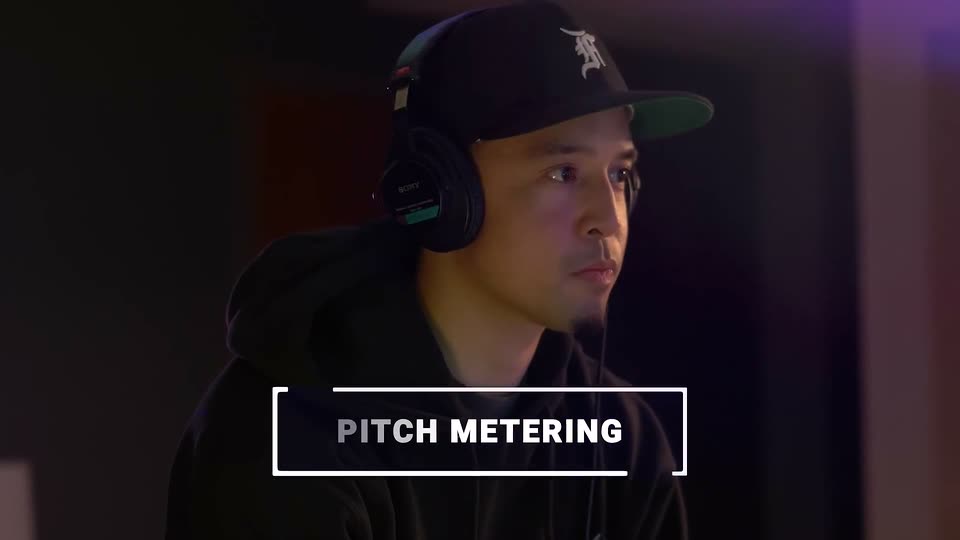
A man in a black cap and over-ear headphones sits in a dim room lit by purple light, glistening to the right as he adjusts his cap. A white outlined box with the text PITCH METERING sits at the bottom center. The frame is locked off.
On-screen text: “PITCH METERING”
Camera: Static
A man in a black cap and headphones sits in a dim room, gazing right. A flat equalizer panel expands to reveal a pitch analyser curve and a waveform strip at right. A white bracketed caption PITCH METERING holds at the bottom.
On-screen text: “PITCH METERING”
Camera: Static
A vocalist in a cap sits in a dark room at left while the Auto-Tune Vocal EQ plugin window settles to the center, its spectrum analyzer filling with blue peaks and the EQ curve showing colored nodes. A white-outlined box at the bottom holds the static label PITCH METERING.
On-screen text: “PITCH METERING”
Camera: Static
The Auto-Tune Vocal EQ plugin window sits over a Pro Tools session, showing a frequency curve with numbered nodes and a live spectrum analyzer. A white-outlined caption box at the bottom holds the title PITCH METERING. The frame stays locked off.
On-screen text: “PITCH METERING”
Camera: Static
Two people in a purple-lit home studio face a large monitor running a DAW with an open EQ pitch-metering window. The seated person in a red plaid shirt points at the screen while a white cube logo fades in at center.
Camera: Static
Two people face a large monitor running an audio interface in a purple-lit room. A white rectangular outline draws itself across the frame center, revealing the caption PITCH TRACKING in bold white type as it closes.
On-screen text: “PITCH TRACKING”
Techniques: Masking
Camera: Static
Two men in a dim room washed in purple and orange light. The man on the right, in a black cap with headphones at his neck, watches forward while the other lifts an orange rectangular device, then lowers it. A white boxed label reads PITCH TRACKING below.
On-screen text: “PITCH TRACKING”
Camera: Push in
A dim studio desk lit in purple and blue, a large monitor shows the EQ interface with a frequency curve and knob panel while a laptop below mirrors it. A dark foreground silhouette dissolves away to reveal the full setup flanked by two small plants.
On-screen text: “PITCH TRACKING”
Camera: Push in
The Auto-Tune Vocal EQ panel floats over a dim, purple-lit studio as its frequency curve draws across numbered nodes. A white box captions VOCAL LEARNING, then the view tilts into 3D and zooms onto the gain and threshold sliders while a light streak crosses the panel.
On-screen text: “VOCAL LEARNING”
Techniques: 3D mockup, UI zoom, Light sweep
Camera: Push in
A flat Auto-Tune Vocal EQ control panel sits fixed along the bottom edge with its knobs and meters. Above it, a horizontally motion-blurred backdrop of studio monitors and DAW screens drifts sideways. A white bracket frame holds the caption VOCAL LEARNING in the center, with the product logo locked at top.
On-screen text: “AUTO-TUNE VOCAL EQ”, “VOCAL LEARNING”
Camera: Static
A dark stage holds a colorful audio waveform that tilts and brightens behind a faint singer silhouette, while the Auto-Tune Vocal EQ control panel sits along the bottom. A white outlined box frames the headline VOCAL LEARNING in the center.
On-screen text: “AUTO-TUNE”, “VOCAL EQ”, “VOCAL LEARNING”
Techniques: 3D mockup
Camera: Static
The AUTO-TUNE logo with the VOCAL EQ tagline resolves from a soft blur into sharp focus at center, framed by two rainbow audio-spectrum bars over a dark multicolor bokeh background.
On-screen text: “AUTO-TUNE”, “VOCAL EQ”
Techniques: Kinetic type
Camera: Static
The white AUTO-TUNE wordmark slides in over a blurred microphone and colorful bokeh, with spaced VOCAL EQ caps set below. Two rows of animated rainbow equalizer bars frame the text and mirror beneath it.
On-screen text: “AUTO-TUNE”, “VOCAL EQ”
Techniques: Kinetic type, Particles
Camera: Static
A rainbow audio spectrum pulses across a dark misty backdrop behind a blurred microphone silhouette. The white AUTO-TUNE wordmark slides in over the static VOCAL EQ line.
On-screen text: “AUTO-TUNE”, “VOCAL EQ”
Techniques: Kinetic type
Camera: Static
The white AUTO-TUNE VOCALEQ wordmark holds center over green and magenta spectrum bars, while oversized teal AUTO-TUNE and UNLIMITED letters slide and scale behind it, motion-blurred on a dark blue gradient.
On-screen text: “AUTO-TUNE”, “VOCALEQ”, “UNLIMITED”
Techniques: Kinetic type
Camera: Pull out
On a dark 3D circuit board with glowing pads, the teal AUTO-TUNE UNLIMITED lockup assembles: the wordmark slides in while the tagline scales into place beneath it, then the whole logo fades to black.
On-screen text: “AUTO-TUNE”, “UNLIMITED”
Techniques: Kinetic type
Camera: Pull out