2:05

A new visual editor: design directly in your codebase
Cursor · Developer tools · Dec 2025
Microsoft’s 2:21 launch film runs 46 scenes, about 3.1 s each. The product is on screen from the first frame and 4 features are revealed. There is no explicit call to action; a voiceover carries the film. Presenter-led feature walkthrough: the host introduces each capability against a flat gray backdrop, then the video cuts to locked-off over-the-shoulder shots of a phone and monitor on a white desk. Signature moves are white rounded caption cards with blue sans-serif text that fade in beside the presenter, a sliding lower-third name card, and the blue cloud graphic that opens the demo montage.
Is this your launch? to your site or press kit.
Cursor · Developer tools · Dec 2025
Films whose music sounds like this one, voice left out
Aerogen Systems · Modern electronic, corporate tech
DJI · Upbeat corporate electronic
Meridian · Electronic, Corporate
A woman in a blue-and-white striped shirt speaks to the camera against a plain gray backdrop. A white lower-third card with her name and title slides in from the left, holds, then slides out.
On-screen text: “Sneha Sultania”, “Senior Product Manager”
Camera: Static
A gradient blue cloud icon hovers over a dim desk lit by a warm lamp. Vertical streaks of light begin to fall from the cloud's base like rain.
Techniques: Particles
Camera: Static
A blue gradient cloud hovers over a dim desk, vertical light streaks falling beneath it. The cloud drifts upward, revealing an arc of app and file icons above a laptop screen showing a Windows desktop.
Techniques: 3D mockup
Camera: Pan
A laptop sits on a dim desk, its screen showing a Windows desktop with scattered app icons and an open Start menu. A warm lamp glows above and thin vertical light streaks hang in the dark background. The frame is locked off and still.
Camera: Static
Extreme close-up of a browser tab bar and address bar rendered with shallow depth of field. The URL https://windows365.microsoft.com types in letter by letter from left to right while the view drifts slowly left, the close and plus icons staying soft in the background.
On-screen text: “https://windows365.microsoft.com”
Techniques: Kinetic type, 3D mockup
Camera: Static
A person holds a smartphone in one hand and taps the screen with the other as the frame sharpens from soft focus, the app showing a purple gradient card. A white URL overlay sits still at the frame edge.
On-screen text: “https://windows365.microsoft.com”
Camera: Static
A woman in an orange blouse and black skirt walks toward the camera along a covered outdoor walkway, glancing down at a phone she taps with one finger. Glass architecture, planters and warm ceiling lights frame the path in dusk light.
Camera: Static
A young woman in an orange sleeveless top walks toward the camera through a dim glass-walled walkway at dusk, glancing down at a phone in her hand. Cool blue light falls on her face while warm ceiling strips glow behind her.
Camera: Static
A wide shot of a Dell monitor on a stand in a room with a pegboard wall and a plant. On screen, the Windows Start menu fades from translucent to solid over the desktop, revealing app tiles and a search bar above an open browser window.
Camera: Static
A man in a green safety vest stands in a dim warehouse, holding a phone in one hand and tapping its screen with the other. Stacked boxes and overhead lights blur in the background behind him.
Camera: Static
A worker in a green vest walks down a warehouse aisle between tall stacks of shrink-wrapped boxes, holding a tablet and tapping its screen. The camera tracks forward with him, keeping the box stacks in motion on both sides.
Camera: Push in
A woman with long dark hair in a blue and white striped shirt talks to camera against a plain gray backdrop. She gestures with both hands at the start, then lowers them as she continues speaking.
Camera: Static
A woman in a blue-and-white striped shirt speaks to camera on the left against a gray backdrop. A white rounded card fades in on the right holding the blue headline. She gestures with clasped hands while talking.
On-screen text: “Enhanced Windows 365”, “App Experience”
Camera: Static
A woman with long dark hair in a blue and white striped shirt speaks in a medium close-up against a plain gray backdrop, a lavalier mic clipped to her collar. She talks off-axis with small head movements while two caption lines sit locked on screen.
On-screen text: “Enhanced Windows 365”, “App Experience”
Camera: Static
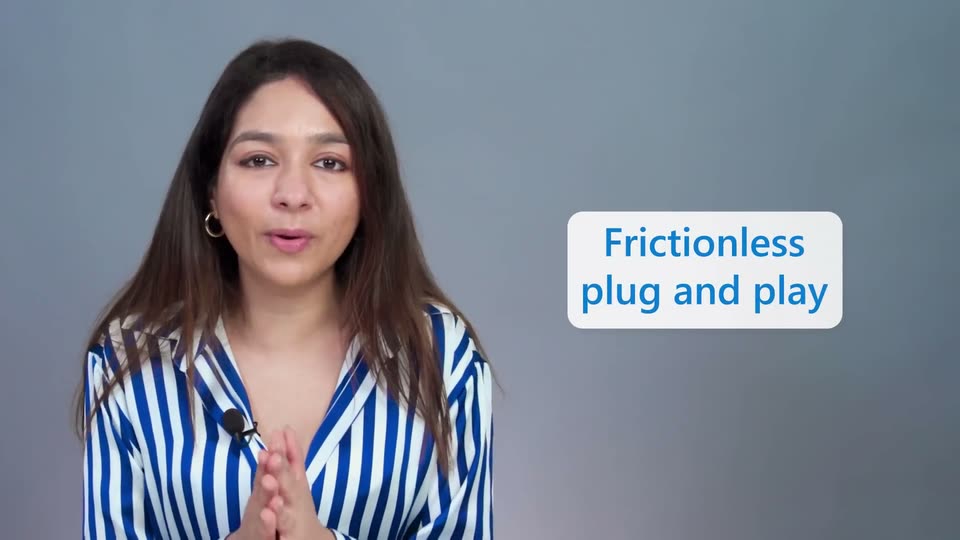
A woman in a blue and white striped shirt speaks to camera against a plain gray backdrop, gesturing with her hands. A white rounded card with blue text reading 'Frictionless plug and play' holds steady on the right.
On-screen text: “Frictionless”, “plug and play”
Camera: Static
A woman with long dark hair in a blue and white striped shirt speaks to an off-camera interviewer against a flat gray backdrop, gesturing with her hands in a locked-off medium close-up. The words Frictionless and plug and play hold as static captions in the frame.
On-screen text: “Frictionless”, “plug and play”
Camera: Static
A woman with long dark hair, wearing a blue and white striped shirt and a clipped lavalier mic, speaks against a plain gray backdrop. She gestures with one hand while talking, framed in a static medium close-up.
Camera: Static
A woman in a blue-and-white striped shirt sits at a white desk, picks up a black phone with her left hand, and plugs a black cable into it. A monitor and keyboard sit to her left.
Camera: Pull out
A woman in a blue and white striped shirt sits at a white desk facing a black monitor, holding a cable-connected phone in her left hand. The phone screen shows a colorful home screen, then switches to a dark app view with a white button. Locked-off over-the-shoulder framing.
Camera: Push in
Over-the-shoulder shot of a woman holding a phone at a desk, facing a monitor showing a tile menu under the Motorola logo. A cursor on the screen taps the Windows 365 tile, the display switches to a four-square loading animation, and the phone updates to a white image list.
Techniques: Cursor demo
Camera: Static
Over-the-shoulder, a person in a striped shirt holds a phone showing two blue wallpaper thumbnails, while a large monitor on a black stand displays the matching blue abstract wallpaper and a clock. The locked-off frame holds with a faint duplicate of the phone screen fading in at left.
Camera: Static
A woman sits at a white desk, seen over her shoulder, holding a phone that shows an app list. The monitor in front of her displays a Windows lock screen with a blue abstract wallpaper, then a black connecting screen, then a landscape video of green water and hills.
Camera: Static
Over-the-shoulder view of a woman at a white desk, holding a phone in her left hand. A large monitor in front of her shows the Windows desktop. The frame is locked off and the phone screen stays still.
Camera: Static
A woman in a blue-and-white striped shirt holds a smartphone and gestures while speaking against a plain gray wall. Blue text appears at the right, then a white rounded box forms behind it, reading “Automatic Cloud PC configuration.”
On-screen text: “Automatic Cloud PC configuration”
Camera: Static
Over-the-shoulder shot of a person at a white desk, right hand resting on a black mouse with a blue accent, facing a monitor showing the Windows 11 blue bloom desktop and taskbar. The frame is locked off; the hand shifts the mouse slightly.
On-screen text: “Automatic Cloud PC configuration”
Camera: Static
Over-the-shoulder view of a person's right hand on a black mouse with a blue accent, in front of a large monitor showing a colorful bar chart on a Windows desktop. The hand taps the mouse while the locked-off frame holds steady.
Camera: Static
Over-the-shoulder shot of a woman at a desk, holding a smartphone in front of a monitor. The screen displays a BUSINESS MODEL slide, then switches to a PRODUCT OVERVIEW slide with a colorful bar chart. Her thumb taps the phone as the slide changes.
Camera: Static
A woman in a blue-and-white striped shirt speaks in a locked-off medium close-up against a plain gray wall, a lavalier mic clipped to her collar. She begins in profile facing left, then turns her head toward the camera while talking.
On-screen text: “PRODUCT OVERVIEW”, “FIRST TO MARKET”, “AUTHENTIC”, “Feyt beautifully desgred buriding thut's both”, “stylish and functional”
Camera: Static
Over-the-shoulder shot of a woman holding a phone in front of a large monitor. The monitor shows a market comparison slide beside a Windows 365 web page, while the phone displays an article. She holds the phone steady with one hand.
Camera: Static
Over-the-shoulder view of a woman at a white desk holding a black phone in front of a curved monitor. The monitor shows a chat list and a video call with two participants. Her hand tilts the phone slightly as she looks at the screen.
Camera: Static
Over-the-shoulder, a person holds a smartphone showing a chat screen and taps the on-screen keyboard with one thumb. Behind, a monitor runs a video call with two women next to a market comparison slide with three colored cards.
Camera: Static
A woman with long dark hair in a blue and white striped shirt speaks to the camera against a plain gray backdrop. She turns her head slightly and gestures with her open right hand as she talks.
Camera: Static
A woman in a blue and white striped shirt stands against a gray backdrop, holding a phone and a small speaker, while a white rounded label with blue text fades in on the right.
On-screen text: “Work with connected peripherals”
Camera: Static
Over-the-shoulder, locked-off shot of a person holding a smartphone with a dark screen in front of a desktop monitor showing a Teams video call. The hand tilts the phone upright and holds it steady in front of the speaker's tile. A static headline reads “Work with connected peripherals.”
On-screen text: “Work with connected peripherals”
Camera: Static
A desk monitor shows a browser page titled Welcome to your Windows 365 Cloud PC. A Microsoft survey dialog slides into the center of the screen while a hand holds a locked phone in the foreground.
Camera: Static
Locked-off shot of a desk monitor showing a PowerPoint market-comparison slide on the left and a Windows 365 Cloud PC page on the right, where a Microsoft survey popup slides in. A hand holds a dark smartphone in front of the lower right corner.
Camera: Static
A locked-off shot frames a desk monitor showing a pitch deck, with the back of a presenter's head soft in the right foreground. The slide advances from a solution slide to a three-column business model slide while the camera stays still.
Camera: Static
A person seen from behind holds a smartphone in front of a large monitor, scrolling its screen with one thumb. The monitor shows a presentation slide with three colored cards next to a video call window with a woman. The frame is locked-off and static.
Camera: Static
A woman with long dark hair in a blue and white striped shirt speaks in a medium close-up against a flat gray backdrop, a small lavalier mic clipped to her collar. She is framed right of center, looking off-camera left, with subtle head movement and steady eye contact as she talks.
On-screen text: “MARKET COMPARISON”, “$3B”, “$2B”, “$1B”
Camera: Static
A woman in a blue-and-white striped shirt with a lapel mic talks to the camera against a flat gray wall. The shot cuts to a hand holding a phone that displays a cloud PC panel, set in front of a monitor showing a blue abstract wallpaper.
Camera: Static
A hand holds a phone showing the Cloud PC Enterprise screen with the auto-start toggle enabled, in front of a monitor with a blue abstract wallpaper. A pale caption card with blue text reading Zero click experience with Auto Start appears in the top right.
On-screen text: “Zero click experience with Auto Start”
Camera: Static
A hand holds a phone showing the Your Cloud PCs list in front of a blurred monitor. The shot cuts to a wider view from behind the person at the desk, still holding the phone. A white caption box with blue text stays in the upper right.
On-screen text: “Zero click experience with Auto Start”
Camera: Static
A woman at a desk holds a phone on a cable before a black monitor. She plugs the cable in, the screen lights up with a Windows desktop, then she turns to the camera. A white caption box with blue text stays in the top right until the end.
On-screen text: “Zero click experience with Auto Start”
Camera: Static
A woman in a blue and white striped shirt sits at a white desk against a gray backdrop. She holds a black foldable phone with a cable plugged in, gesturing with her free hand while speaking to the camera. The shot stays static.
Camera: Static
A woman with long dark hair, wearing a blue and white striped shirt and a lapel microphone, speaks directly to the camera against a plain gray backdrop. She gestures with her hands while talking. The framing is a static medium close-up.
Camera: Static
The Microsoft four-square logo and white wordmark fade in from black, hold centered on a plain black field, then fade back to black. The frame is locked off with no camera movement.
On-screen text: “Microsoft”
Camera: Static