1:33

Zomma Launch
Zomma · B2B · Aug 2026
Affinity · May 2024 · 0:44 · AI-annotated
Affinity’s 0:44 launch film runs 13 scenes, about 3.5 s each. The product is on screen from the first frame and 1 feature is revealed. The call to action lands at 0:37 (84% in). The video is a feature montage: the app icon opens, then each variable font axis is shown by a slider drag in the dark UI followed by locked-off poster frames reacting to the change, and a static beta card closes the loop. Pacing holds near 16 cuts per minute, with the signature moves being the slider drag, the thin-to-bold headline morph, and the horizontal letter pulse.
Is this your launch? to your site or press kit.
Zomma · B2B · Aug 2026
Mercury Agent · Sep 2026
StackBlitz · Developer tools · Mar 2025
A dark purple background holds a horizontal dock of colorful app icons along the bottom. A white cursor hovers over the orange icon, which scales up, while a dark rounded tooltip above it reads Affinity Publisher 2 Beta.
Techniques: Cursor demo
Camera: Static
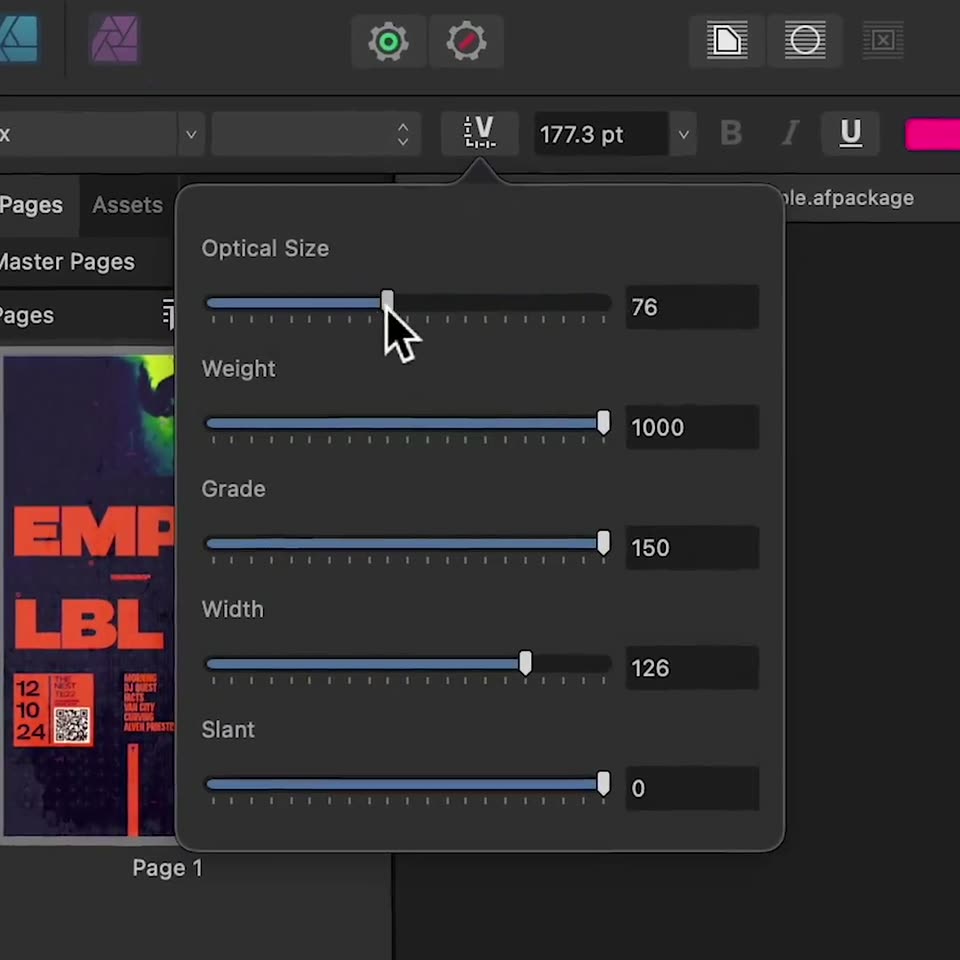
A dark design app interface shows a poster thumbnail on the left. A cursor clicks the variable-font button, opening a panel of sliders. The cursor drags the Optical Size slider left, the value dropping from 144 to 28 while the other sliders stay put.
On-screen text: “Affinity Publisher 2 β”
Techniques: Cursor demo
Camera: Static
A dark, grainy poster covered in a grid of pink plus signs. A thin-outlined pink word inside a blue box fills solid while a heavier pink word below it slides left; small pink caption blocks sit in the bottom corners. The whole layout drifts slowly to the left.
On-screen text: “EMPI01”, “LBLN”, “12”, “THE NEST”, “TE22”, “NEAREST STOP”, “MORNING”, “DJ QUEST”, “FACTS”
Techniques: Kinetic type
Camera: Push in
A purple panel holds a stacked outline typeface reading Les, Une, Jour in light blue, with an orange dotted band across the top and three yellow circles on the left edge. The bottom line slides while the frame stays locked.
On-screen text: “Les”, “Une”, “Jour”
Techniques: Kinetic type
Camera: Static
A dark slider panel sits over a colorful canvas. A cursor drags the Weight slider right, raising the value from 200 to 470, then moves down and drags the Width slider to 93.8. The canvas behind shows large blue outlined text.
Techniques: Cursor demo
Camera: Static
A flat collage of patterned tiles on a black background: a purple square with cartoon eyes, a coral square, vertical lavender stripes, a purple-and-white checkerboard, and an orange sunburst. A bordered caption sits over the center. The frame is locked off and static.
On-screen text: “Carrés, rayures, losanges + points”
Camera: Static
A peach card holds a date line, a large navy headline boxed in a thin blue outline, and a subhead naming the startup Boarding. The headline weight animates from thin to bold with a brief echo, while a curved dark object sits at the right edge.
On-screen text: “| February 10, 2025 |”, “The Ultimate Guide”, “Find the most flight skilled crew from around the globe with new luxury startup Boarding”
Techniques: Kinetic type
Camera: Static
A locked-off dark interface shows a top carousel panel with an abstract violet 3D form and four pagination dots, above a two-column grid of blue-bordered lorem ipsum blocks and a circular plus button. The hero form drifts slowly.
Camera: Static
The word Position. sits inside a thin blue selection box on a dark gray field. The letters stretch wider and snap back in a horizontal pulse, repeating twice, while a black panel and a purple diagonal edge stay still below.
On-screen text: “Position.”
Techniques: Kinetic type
Camera: Static
Over a dark illustration of a pale face and a checkered floor, a blue-outlined band scrolls green text across the frame with a ghosted trail, while a large green serif 'UTILITY' and small credits stay locked.
On-screen text: “in association with”, “PRESERVED CONSTANT”, “無限にたくさん”, “Presents:”, “COMPONENTS OF COMMUNICATION CATEGORISED AS ETHICAL”, “UTILITY”, “Creation of the 'ACTIVATIONAL OBJECT'”
Techniques: Kinetic type
Camera: Static
Over a dark, low-contrast photo of a building facade, lime green caption lines and a huge serif word inside a thin blue rectangle slide left at a slow, steady pace, revealing the text “COMPONENTS OF COMMUNICATION CATEGORISED AS UTILITIES”.
On-screen text: “COMPONENTS OF COMMUNICATION CATEGORISED AS UTILITIES”
Techniques: Kinetic type
Camera: Pan
A dark title card centers a lime-green letter-spaced headline, 'COMPONENTS OF COMMUNICATION CATEGORISED AS ETHICAL', above a large lime serif 'UTILITY' in a blue selection box. Purple flowers, a checkered floor and ornate borders frame it; the lower line drifts left slowly.
On-screen text: “In association with”, “PRESERVED CONSTANT”, “無限にたくさん”, “Presents:”, “COMPONENTS OF COMMUNICATION CATEGORISED AS ETHICAL”, “UTILITY”, “Creation of the 'ACTIVATIONAL OBJECT'”
Techniques: Kinetic type
Camera: Push in
A dark gray card holds a white triangular logo, a thin headline, three bold benefit lines and a URL, all static. A vertical gradient bar on the left edge cycles through red, purple, blue and green over the duration.
On-screen text: “Join our Beta Program”, “Access pre-release builds.”, “Test drive new features.”, “Share your feedback.”, “affin.co/beta”
Camera: Push in