1:10

Introducing ClickUp 3.0
ClickUp · Productivity · Jun 2022
Zopia’s 1:43 launch film runs 62 scenes, about 1.7 s each. The product shows up at 0:08 and 6 features are revealed. There is no explicit call to action; a voiceover carries the film. The video opens with a rapid-cut montage of AI film clips, then settles into a dark green brand chapter where gold italic serif titles and tilted 3D UI panels tour the features one by one, each linked by a glowing connector line. Signature moves are the zoom-blur title snap, the drifting 3D interface cards on a black-green field, and the white bottom caption bar that tracks the voiceover.
Is this your launch? to your site or press kit.
ClickUp · Productivity · Jun 2022
Topaz Labs · Jun 2025
A man in profile, wearing glasses and a black turtleneck, holds a stack of white papers against his chest in a dark studio. A bright overhead light glows in the upper right and a camera with red and blue indicator lights sits blurred in the background. The shot holds almost still.
On-screen text: “AI-Generated Film”
Camera: Push in
A man in a black jacket runs toward the camera on a glass-railed balcony, raising glowing blue gauntlets overhead. Neon billboards blur in the background as he advances with fast, motion-blurred pace.
On-screen text: “AI-Generated Film”, “It's time”
Camera: Static
A 3D armored warrior raises a large ornate blade overhead, then slams it into the ground. A violet energy burst radiates outward from the blade's base. A red patterned moon fills the stormy sky behind him.
On-screen text: “AI-Generated Film”, “It's time”
Techniques: Particles
Camera: Static
A dark armored robot with glowing blue rings charges a large spiky monster in a flooded neon city at night. The robot fires a bright laser beam that strikes the creature's head, sending sparks and debris flying through the misty water.
On-screen text: “AI-Generated Film”
Techniques: Particles
Camera: Static
A figure fires a rifle down a dusty war-torn street, muzzle flash flaring, while others sprint past damaged buildings. The shot cuts to a dark silhouette aiming beneath a red laser beam slicing across a smoky, burning sky.
On-screen text: “AI-Generated Film”
Camera: Pull out
A large combat mech explodes in a dusty desert as a foreground turret fires. Smaller mechs and flying vehicles move across the background landscape.
On-screen text: “Al-Generated Film”, “ORACCE”
Techniques: Particles, 3D mockup
Camera: Static
A black F1 car with red and yellow livery speeds across a track at sunset, shot from a low angle near the asphalt. A cross-dissolve blends the wide side view into a tighter rear-quarter view as tire smoke rises. A black caption box reading 10 minutes sits at the bottom.
On-screen text: “AI-Generated Film”, “10 minutes”
Camera: Push in
A neon-lit 3D city street at night, wet asphalt reflecting pink and blue billboards, a lone figure in a coat walks toward the camera down the center. The white title with a magenta offset snaps from a heavy zoom blur into a locked-off frame, a small caption sits below.
On-screen text: “INSANE IDEA?”, “Turn the insane idea in your head into a film”
Techniques: Speed ramp
Camera: Push in
A horned dragon spreads its wings amid purple lightning, then cuts to a cloaked figure with red wings seen from behind before a wall of glowing screens. A caption line sits at the bottom while a huge INSANEIDEA? title holds the frame.
On-screen text: “Turn the insane idea in your head into a film”, “INSANEIDEA?”
Camera: Static
A mosaic of 3D sci-fi shots, with burning cities, flying discs and a rider over clouds, pans and zooms so the central sunset frame grows larger. A caption runs along the bottom edge.
On-screen text: “Turn the insane idea in your head into a film”
Techniques: Split screen
Camera: Pull out
A solid black screen holds a single small line of text, static for the full duration. The voiceover introduces Zopia as an unlimited AI film agent while the caption stays fixed.
On-screen text: “Turn the insane idea in your head into a film”
Camera: Static
On a near-black green background, a cream line stroke draws and closes into an abstract eight mark of two linked diamonds, centered in frame. The mark settles with a soft glow while a small white caption stays fixed at the bottom.
On-screen text: “Get to know Zopia”
Techniques: Morph
Camera: Static
On a dark olive gradient, the cream Zopia logo and wordmark hold center, then slide left and fade as the italic headline slides in from the right and locks in the center. Small logo glyphs drift across the background while a white caption box sits at the bottom.
On-screen text: “The world's first unlimited AI film agent”, “The World's First AI Film Agent”
Techniques: Kinetic type, Particles
Camera: Static
A dark green blurred backdrop with faint drifting specks. A gold italic serif headline sits centered while a white subtitle bar holds the tagline below; a soft light sweep glides across the headline.
On-screen text: “The World's First AI Film Agent”, “The world's first unlimited AI film agent”
Techniques: Light sweep, Particles
Camera: Static
Five stylized 3D mascots stand on rubble against a ruined sunset skyline. Frosted-glass badges with icons fade in above each figure, naming their roles, while a white caption runs along the bottom. The shot holds, then fades to black.
On-screen text: “A film-grade multi-agent collaboration system”, “The World's First AI Film Agent”
Camera: Static
Floating 3D app icons tilt in perspective around a glowing gold headline on a dark green field, while a white caption fades in at the bottom.
On-screen text: “All Generative Models”, “Seamlessly integrated with all generative models”
Techniques: 3D mockup
Camera: Pull out
A dark green-black void with a soft radial glow holds six white logo cards tilted in 3D perspective, orbiting a centered gold italic headline. The cards drift slowly in depth while a white caption bar rests at the bottom edge.
On-screen text: “All Generative Models”, “Seamlessly integrated with all generative models”
Techniques: 3D mockup
Camera: Pull out
Six tilted app icons with model names orbit a dark background lit by a green glow on the right. The italic headline sits in the center while the icons drift slowly in a loose circle, and a white caption runs along the bottom edge.
On-screen text: “All Generative Models”, “Seamlessly integrated with all generative models”
Camera: Static
A tilted 3D view of the dark Zopia interface shows the headline and an empty prompt field. The camera zooms into the field as a sentence types out, then settles flat-on with a cursor hovering the yellow Create button. A caption runs along the bottom.
On-screen text: “You only need to enter a single idea or a full script”
Techniques: 3D mockup, UI zoom, Cursor demo
Camera: Push in
A dark prompt box sits centered on a blurred green background, its typed text ending on a blinking caret. A mouse pointer rests on the yellow Create button and clicks it, while a white caption at the bottom of the frame fades out.
On-screen text: “You only need to enter a single idea or a full script”
Techniques: Cursor demo
Camera: Static
A glowing document card titled 'Script' floats in 3D on a dark green field, rising and tilting as a luminous line arcs from it to a capsule on the right. A white caption bar slides in at the bottom.
On-screen text: “The Director Agent oversees the entire process”
Techniques: 3D mockup, Morph
Camera: Pan
Glowing outlined cards labeled Script, Role and Storyboard float in a dark green 3D space, linked by a curved line with node dots. The camera pans right, bringing the storyboard thumbnails into view. A white caption sits on a black bar at the bottom.
On-screen text: “The Director Agent oversees the entire process”
Techniques: 3D mockup, Parallax
Camera: Push in
Two glowing UI panels float in 3D space on a dark green background, linked by a curved line. The camera pans right, moving from a character-model card panel to a Storyboard panel showing a grid of video thumbnails.
Techniques: 3D mockup
Camera: Pan
Two tilted interface cards, a Storyboard thumbnail grid and a Timeline video player, sit on a dark green field linked by a glowing curved line. The camera pans right from the storyboard to the timeline frame while a white caption holds at the bottom.
On-screen text: “Turning your concept into a finished film in just ten minutes”
Techniques: 3D mockup
Camera: Pan
Tight on a tilted Timeline panel, the camera pulls back to reveal four dark UI panels, Script, Role, Storyboard and Timeline, linked by a glowing yellow curve. The Timeline preview scrubs from a fiery scene to a green cave. A white caption sits at the bottom.
On-screen text: “Turning your concept into a finished film in just ten minutes”
Techniques: 3D mockup, Parallax
Camera: Pull out
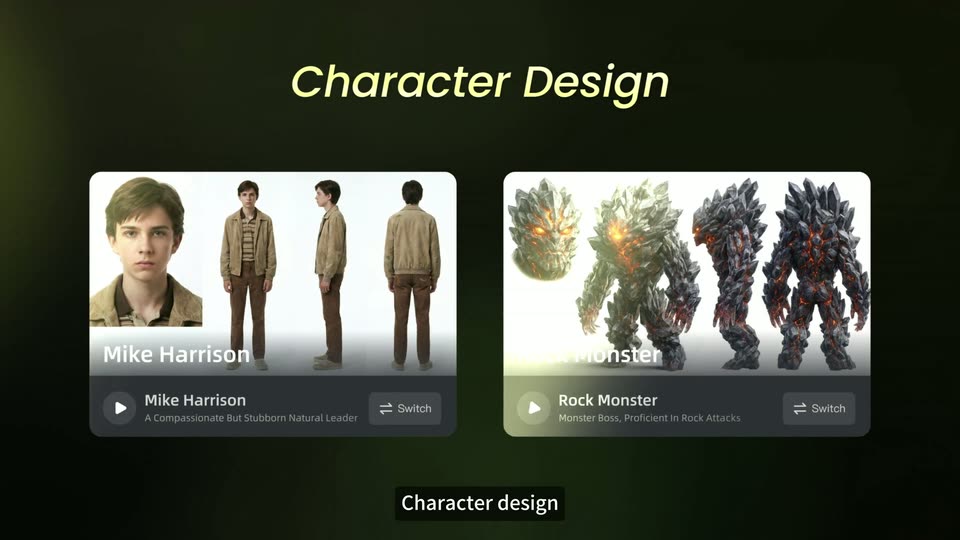
A dark green backdrop holds the italic title Character Design above two UI cards that fade in. Each card shows a character turnaround sheet with multiple views, a name, a one-line description, and a Switch button.
On-screen text: “Character Design”, “Character design”
Camera: Pull out
A product UI shows a Character Design heading above two character turnaround cards and four interior scene thumbnails. The view pushes in as a cursor hovers a Switch button, then the background blurs and a dark voice list with SELECT buttons appears at right.
On-screen text: “And scenes support one-click multi-angle generation”
Techniques: UI zoom, Cursor demo
Camera: Push in
A dark voice-selection panel with avatar rows and SELECT buttons floats over a blurred character card; a cursor hovers on a button as a bottom caption appears.
On-screen text: “Voice tones can be freely switched and selected”
Techniques: Cursor demo
Camera: Push in
Two voice profile cards sit side by side on a dark green field. The left shows a man in three poses with a white audio waveform pulsing across him. The right shows a rocky monster head with glowing orange eyes. A white caption sits in a black bar below.
On-screen text: “Voice tones can be freely switched and selected”
Camera: Static
A dark shot-list panel with thumbnail rows starts blurred and drifting, then racks into focus on a storyboard grid of fantasy frames. The italic headline Keep Consistent holds below with a small caption.
On-screen text: “Keep Consistent”, “Consistency is maintained across shots”
Camera: Push in
A dark shot-list interface with film thumbnails updates its rows and images while the large italic headline switches from Keep Consistent to Across Episodes. The panel then slides up out of frame as a new prompt bar rises from below.
On-screen text: “Keep Consistent”, “Consistency is maintained across shots”, “Across Episodes”, “And even across episodes”
Techniques: Kinetic type
Camera: Push in
A close-up of a dark chat panel with a green-check task list and an Open the Storyboard button zooms out to reveal the full storyboard interface in 3D perspective. Rows of shot thumbnails populate the grid with colorful images and video clips while captions change across the bottom.
On-screen text: “One click generates every shot”, “Even hundreds”, “No prompt writing”, “Three core modes”
Techniques: UI zoom, 3D mockup
Camera: Pull out
On a near-black green field with faint drifting loop outlines, the italic serif title Three Core Modes fades in at center, brightening from dim to full cream yellow. A small white caption Three core modes stays locked at the bottom edge.
On-screen text: “Three Core Modes”, “Three core modes”
Techniques: Kinetic type
Camera: Static
On a dark green-black field, the italic headline slides right and fades as a 2x3 grid of black-and-white comic panels wipes in at the left, then wipes out. A small white label fades in at the bottom center.
On-screen text: “Three Core Modes”, “Multi-grid”
Camera: Static
Three feature panels appear left to right on a dark green gradient: a 2x2 manga grid, a looping video still, and a fan of character model cards, each with a sliding label. A bracket line connects the outer labels; a caption sits at the bottom.
On-screen text: “Multi-Grid”, “and Multi-reference Generation”, “Video Reasoning”, “Multi-Reference”
Techniques: Kinetic type, Masking
Camera: Static
On a dark green field, three panels sit in a row: a black-and-white manga grid, a video still of a boy with a glowing staff, and a fan of character reference photos. Italic cream labels read beneath them, joined by a bracket line. The layout slides up as the word Agent fades in on the line, above a dark forest still, with a caption at the bottom.
On-screen text: “Multi-Grid”, “Video Reasoning”, “Multi-Reference”, “They ensure high character consistency”, “Agent”
Techniques: Kinetic type
Camera: Pan
A pale yellow italic “Agent” label slides up above a rounded panel holding a 3D-rendered clip: four characters stand with their backs to camera, facing a glowing crystalline creature in a dark cave. A white caption bar sits below the panel.
On-screen text: “Agent”, “They ensure high character consistency”
Techniques: Kinetic type
Camera: Pan
A rounded window showing a young man swinging a glowing electric staff in a cave expands to fill the frame. The cream italic title Agent slides out from the top as the bottom caption changes from They ensure high character consistency to And seamless.
On-screen text: “Agent”, “They ensure high character consistency”, “And seamless”
Techniques: Kinetic type, Masking
Camera: Push in
Four young men stand in a dark lava-streaked cavern, one raising a glowing sword, as a large fiery orange mass looms behind them. A black caption box reads 'And seamless' at the bottom center. The frame stays locked while the fire shifts.
On-screen text: “And seamless”
Camera: Static
A spiky obsidian creature with molten orange cracks and glowing eyes fills the frame in close-up. The camera pulls back to reveal its full body in a dark arched hall as small embers drift. A white caption bar sits at the bottom.
On-screen text: “And seamless”, “Coherent storytelling without continuity errors”
Techniques: Particles
Camera: Static
A dark stone corridor with tall pillars; the camera pushes toward a crystalline arch cracked with glowing orange lava. Smoke rises from the ember-veined floor. A white caption box holds the line at the bottom.
On-screen text: “Coherent storytelling without continuity errors”
Techniques: Parallax
Camera: Push in
Four teenagers sprint through a dark stone cavern lit by glowing orange lava cracks. The camera tracks them across the frame as they run, a rocky foreground element passing in front. A white caption holds steady at the bottom.
On-screen text: “Coherent storytelling without continuity errors”
Camera: Static
Three figures seen from behind stride toward a towering creature of black rock and molten orange veins in a dark cavern. The camera holds behind them at mid distance as they advance. A white caption sits fixed at the bottom of the frame.
On-screen text: “Coherent storytelling without continuity errors”
Camera: Static
A tilted 3D view of a storyboard interface shows a grid of ember-filled video thumbnails beside a chat panel with prompt messages and an input field holding a bone cursor. The camera pushes in toward the panel as a caption reads at the bottom.
On-screen text: “Conversational batch editing”
Techniques: 3D mockup, UI zoom
Camera: Push in
A tilted 3D view of a dark storyboard interface opens on a chat input where a command types itself, then the frame pulls back to reveal the full grid of shots and a chat panel as a cursor hovers over it.
On-screen text: “Conversational batch editing”, “Reshape dozens of shots with a single sentence”
Techniques: 3D mockup, UI zoom, Cursor demo
Camera: Pull out
A dark storyboard interface is tilted in 3D perspective against a green backdrop, a cursor rests on its right panel. The view eases back slightly as a white caption holds at the bottom.
On-screen text: “Reshape dozens of shots with a single sentence”
Techniques: 3D mockup
Camera: Pull out
A dark app interface floats tilted in 3D against an olive backdrop, cycling through a storyboard list, an asset picker modal of scene thumbnails, and an empty infinite canvas with a prompt box. A cursor hovers the Confirm button. A caption sits at the bottom.
On-screen text: “Or create freely on an infinite canvas”
Techniques: 3D mockup, Cursor demo
Camera: Pull out
A dark app canvas with a storyboard grid, text panel and prompt box. The view pushes in as a cursor types a prompt and a fiery scene regenerates into a frost version. Bottom captions swap in sequence.
On-screen text: “Or create freely on an infinite canvas”, “Something off?”, “It detects and fixes errors automatically”
Techniques: Cursor demo, UI zoom
Camera: Pan
A sci-fi space battle plays in a preview window at the top while, below, shot thumbnails fill the timeline track one after another. A black caption box at the bottom holds the line about automatic placement.
On-screen text: “All shots are placed on the Timeline Editor automatically”
Camera: Static
A dark video editor fills the frame: a preview window at top plays an animated spaceship bursting into flames over clouds, while below, a row of shot thumbnails populates the timeline from left to right. A white caption in a black box sits at the bottom.
On-screen text: “All shots are placed on the Timeline Editor automatically”
Camera: Static
A dark video-editor interface shows a preview panel above a timeline of thumbnails. A bottom caption states that shots are placed automatically, then a fast blurred zoom pushes into the timeline and a second caption appears.
On-screen text: “All shots are placed on the Timeline Editor automatically”, “Smart video extension”
Techniques: UI zoom
Camera: Push in
A dark editor timeline shows a row of sci-fi video thumbnails with a purple plus button between two clips. A hand cursor glides in to hover the button as the clips shift, while a caption labels the feature.
On-screen text: “Smart video extension”
Techniques: Cursor demo
Camera: Static
Tilted 3D view of a video editor timeline with film clips. A cursor hovers the selected clip marked What's next?, types She pointed a bow at the man into the prompt bar, and clicks the yellow arrow. The clip swaps to a new shot and the bottom caption changes.
On-screen text: “Seamless transitions from one shot to the next”, “Voiceover and music sync automatically”
Techniques: 3D mockup, Cursor demo
Camera: Static
A dark, out-of-focus green background holds centered italic text. “One Click” blurs and fades out as “Final Film” scales up into sharp focus. Small white captions at the bottom track the voiceover, ending with a tagline.
On-screen text: “One Click”, “One click”, “Final film”, “Final Film”, “A new way to create films with Al”
Techniques: Kinetic type
Camera: Static
Extreme close-up of a person's eye as the camera slowly pushes in. The reflection in the iris shifts from an orange fireball to a neon city street with a glowing figure, while white captions sit on dark bars at the bottom.
On-screen text: “A new way to create films with Al”, “One person”, “Final Film”
Camera: Push in
Extreme close-up of a human eye, the iris reflecting a silhouetted caped figure against an orange, smoky sky. The figure shifts pose within the reflection while the eye stays still. A small caption box sits at the bottom center.
On-screen text: “One person”
Camera: Push in
Extreme close-up of a human eye. The iris reflects a city skyline at dusk, then dissolves into clouds with a bright sun and a small aircraft. White captions read at the bottom center.
On-screen text: “One person”, “One full crew”
Camera: Static
Extreme macro of a human eye; the pupil mirrors a hyperspace warp, bright streaks flying outward in radial blur while the frame pushes in tighter. A caption holds at the bottom edge.
On-screen text: “One full crew”
Techniques: Particles
Camera: Pull out
A black frame holds a small white caption centered near the bottom. The text remains still throughout the short clip.
On-screen text: “One full crew”
Camera: Static
On a near-black green background, a cream logomark of two stacked leaf outlines and the wordmark Zopia blur in from the sides and lock into a centered sign-off. The mark reads as a stylized 8.
Camera: Pull out
On a dark olive background, the pale-yellow Zopía knot logo and wordmark fade out as the italic phrase “You Imagine” fades in at center, then crossfades to “We Produce.” Small white captions in black boxes at the bottom repeat each phrase as it appears.
On-screen text: “Zopía”, “You imagine”, “You Imagine”, “We produce”, “We Produce”
Techniques: Kinetic type
Camera: Static
A near-black background with a soft green glow in the upper right holds the centered italic phrase We Produce, which dims from pale yellow-green to almost invisible as the clip ends.
On-screen text: “We Produce”
Camera: Static