
0:42
Explore
World Labs - The World API is live. Generate persistent, explorable 3D worlds fro
World Labs · Jan 2026 · 0:35 · AI-annotated
- Length
- 0:35
- Scenes
- 22 · 1.6 s avg
- Product on screen
- 0:00
- Features shown
- 3
- Call to action
- 0:31 · 89%
- Voiceover
- Yes
- Views
- 663K on X
as of November 15, 2026
00:00:00 / 00:35:19
- Length
- 0:35
- Scenes
- 22 · 1.6 s avg
- Product on screen
- 0:00
- Features shown
- 3
- Call to action
- 0:31 · 89%
- Voiceover
- Yes
- Views
- 663K on X
as of November 15, 2026
World Labs’s 0:35 launch film runs 22 scenes, about 1.6 s each. The product is on screen from the first frame and 3 features are revealed. The call to action lands at 0:31 (89% in), over a voiceover. The video loops a fixed beat: a code call spawns a 3D scene, a convex lens dives from a reflective sphere into the full render, a white label names the use case, and a pull-back to a ring of orbs hands off to the next world. Bookended by the starfield logo, it ends on a five-window montage and the URL lockup, so the signature moves to reuse are the sphere-to-scene lens zoom and the orb-ring transition.
Footage neededEstimated needs: 3 capture groups — your screens or recordings · 1 official logo — reused across the film · 1 filmed passage — shoot, supply or replace · 2 graphic passages — draw or supply · 13 3D passages — build or supply
Is this your launch? to your site or press kit.
More like this

World Labs - The World API is live. Generate persistent, explorable 3D worlds fro, scene by scene
· 22 scenes as text
01 · Product intro · 0:00–0:01
A white abstract W-shaped mark holds centered above the white text World API on a dark starfield. The lockup stays static, then fades out, leaving the starfield with a faint crescent glow at center.
On-screen text: “World API”
Camera: Pull out
02 · Demo · 0:01–0:02
A dark rounded code card floats over a starry space backdrop. Syntax-highlighted monospace code types itself line by line, finishing a fetch request with a quoted prompt string.
Techniques: Kinetic type
Camera: Static
03 · Demo · 0:02–0:05
A code panel fades out as a large reflective sphere centers, its warped reflection of a medieval cobblestone alley settling into a clear view. The sphere flattens into a circular porthole while smaller orbs drift and blur against a dark starfield.
On-screen text: “8”
Techniques: Morph, Kinetic type
Camera: Push in
04 · Demo · 0:05–0:06
A convex circular lens floats at center on black, showing a fisheye cobblestone alley with timber buildings, ringed by blurred colored orbs. The lens scales up, the alley image zooms in until the circle fills the frame.
Techniques: Masking
Camera: Push in
05 · Feature reveal · 0:06–0:08
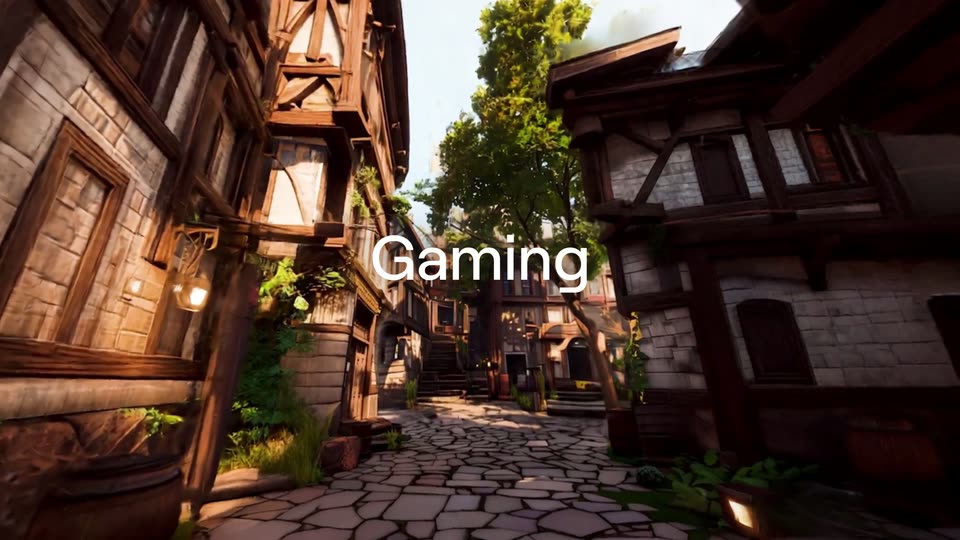
A low 3D camera push moves forward down a cobblestone alley between timber-framed houses, with ivy, barrels and warm daylight. The word Gaming stays centered in the frame.
On-screen text: “Gaming”
Camera: Push in
06 · Feature reveal · 0:08–0:10
A white 'Gaming' headline appears over a white-armored knight in a cobblestone village viewport. The view widens to the full 3D editor, then a cursor drags the blue transform gizmo at the knight's feet next to a light-properties panel.
On-screen text: “Gaming”
Techniques: UI zoom, Cursor demo
Camera: Pull out
07 · Feature reveal · 0:10–0:11
A fast zoom-out starts inside a glass sphere holding an armored figure on a tiled floor, then pulls back to reveal a ring of colored orbs floating on black, each containing its own 3D scene. The motion decelerates from a blurred rush to a settled wide shot.
On-screen text: “Entity”, “Light”, “Array”
Techniques: Speed ramp
Camera: Pull out
08 · Feature reveal · 0:11–0:12
A dark void holds a cluster of glossy spheres, each reflecting a different colored world. The central sphere, in sharp focus, shows a distorted game scene: a cobblestone street and a lone figure with a sword. The sphere recedes and softens as the clip ends.
Techniques: Parallax
Camera: Static
09 · Feature reveal · 0:12–0:13
On a black background, glossy glass spheres drift through space, some holding green patterns, others reflecting a sunlit room in fisheye. The camera pans right as the orbs parallax past at different depths.
Techniques: Parallax
Camera: Pan
10 · Feature reveal · 0:13–0:14
A polished chrome sphere floats at center on black, its surface reflecting a sunlit living room, while blurred colored orbs sit scattered around it. The sphere rotates slowly as a large numeral 8 slides into frame.
On-screen text: “8”
Techniques: Kinetic type, Parallax
Camera: Static
11 · Feature reveal · 0:14–0:16
A 3D metallic sphere reflecting a living room transitions to a full view of the rendered room. The word 'Architecture' is centered on the screen.
On-screen text: “Architecture”
Camera: Push in
12 · Feature reveal · 0:16–0:17
A 3D living room render fills the design tool's canvas, the top toolbar and right panel fade in as the view pulls back, and the word Architecture types out in white at the center.
On-screen text: “Architecture”
Techniques: Kinetic type
Camera: Pull out
13 · Feature reveal · 0:17–0:18
A 3D living-room render sits inside a dark editor interface. The camera pulls back to reveal the full app window, framing a left thumbnail strip, a top toolbar and a right settings panel around the canvas.
Camera: Pull out
14 · Feature reveal · 0:18–0:20
A chrome sphere reflecting a lit room sits at the center of a dark void, ringed by small planet-like globes. The view pulls back from a tight, blurred close-up to a wide, sharp composition, the globes drifting at different depths.
Techniques: 3D mockup, Parallax, Speed ramp
Camera: Pull out
15 · Feature reveal · 0:20–0:20
Glossy planet-textured spheres float and rotate in a dark void, the central sphere sliding down and out of frame as the others drift in 3D perspective.
Techniques: 3D mockup
Camera: Pan
16 · Feature reveal · 0:20–0:21
A top-down locked-off shot holds a black field scattered with small glass spheres in green, brown and gray. A large convex lens at the center sharpens into focus, reflecting a bright white interior with vertical lines. The frame stays static while the central sphere scales slightly.
On-screen text: “00”
Techniques: Kinetic type
Camera: Static
17 · Feature reveal · 0:21–0:23
A dark void fills with floating glass orbs, one large circular window in the center showing a distorted 3D kitchen. The camera dives through the circle into a marble kitchen where a white robotic arm with black joints pulls open a black drawer. The white label 'Robotics' sits centered over the arm.
On-screen text: “00”, “Robotics”
Techniques: Masking, 3D mockup
Camera: Push in
18 · Feature reveal · 0:23–0:27
A white articulated robot arm with black joints works a black coffee machine on a marble kitchen counter, filmed from a high 3D angle. The camera drifts slowly around the scene. The word Robotics holds centered in white at the start.
On-screen text: “Robotics”
Techniques: 3D mockup
Camera: Static
19 · Feature reveal · 0:27–0:28
A white robotic arm with dark joints stands in a rendered kitchen, its gripper resting at the open door of a black countertop oven. The camera drifts left past the marble counter and sink, and the frame tightens with black side bars.
Techniques: 3D mockup, Parallax
Camera: Pull out
20 · Demo · 0:28–0:29
A tilted central panel shows a white robot arm in a marble kitchen as smaller panels of a woman drawing, a stone patio, and a person by a fireplace slide in on a black starfield. The letters Ro fade in at the bottom.
On-screen text: “Ro”
Techniques: Split screen, Particles
Camera: Pull out
21 · Demo · 0:29–0:31
Five labeled video windows float on a black starfield: a hand drawing, a living room, a white robot arm, a game level, a VR performer. Each white label types itself in letter by letter while the windows drift slowly.
On-screen text: “Art & Design”, “Architecture”, “Robotics”, “Gaming”, “Virtual Production”
Techniques: Kinetic type
Camera: Static
22 · CTA · 0:31–0:35
A blurred white shape sharpens into the angular World Labs mark in a drifting starfield. The mark slides left while the words World API and the URL wipe in on the right, holding as a centered lockup.
On-screen text: “Gaming”, “World API”, “platform.worldlabs.ai”
Techniques: Morph, Masking
Camera: Static