0:31
Explore
00:00:00 / 00:42:02
- Length
- 0:42
- Scenes
- 24 · 1.8 s avg
- Product on screen
- 0:32
- Features shown
- 1
- Call to action
- 0:37 · 89%
- Voiceover
- Yes
- Views
- 109K on X
as of November 14, 2026
Wonder 3D’s 0:42 launch film runs 24 scenes, about 1.8 s each. The product shows up at 0:32 and 1 feature is revealed. The call to action lands at 0:37 (89% in), over a voiceover. The video stages a text to 3D demo inside a pottery studio, where a typed prompt summons a parade of clay style models that morph into one another on a wooden turntable, then zooms out to reveal the Flow Studio interface and lands on a black title card with a Try It button. Its signature moves are the locked off shallow focus framing and the pink scan line that melts one model into the next at a steady 104 bpm.
Footage neededEstimated needs: 3 capture groups — your screens or recordings · 1 official logo — reused across the film · 2 filmed passages — shoot, supply or replace · 14 3D passages — build or supply
Is this your launch? to your site or press kit.
More like this


Autodesk Flow Studio - Introducing Wonder 3D, a new generative AI model in Flow Studio for f, scene by scene
· 24 scenes as text
01 · Hook · 0:00–0:02
A pottery studio fills the frame, shelves of ceramic pots and clay sculptures blurred behind a wooden stool seat in focus. A dark rounded input bar with two typing dots fades in at the center.
Camera: Static
02 · Hook · 0:02–0:05
A dark rounded prompt bar floats over a blurred shelf of mugs. Two typing dots appear, then white text types in as the bar widens into a full-width band, and light blue text scrolls into view.
On-screen text: “ave explorer boy”
Techniques: Kinetic type
Camera: Static
03 · Feature reveal · 0:05–0:06
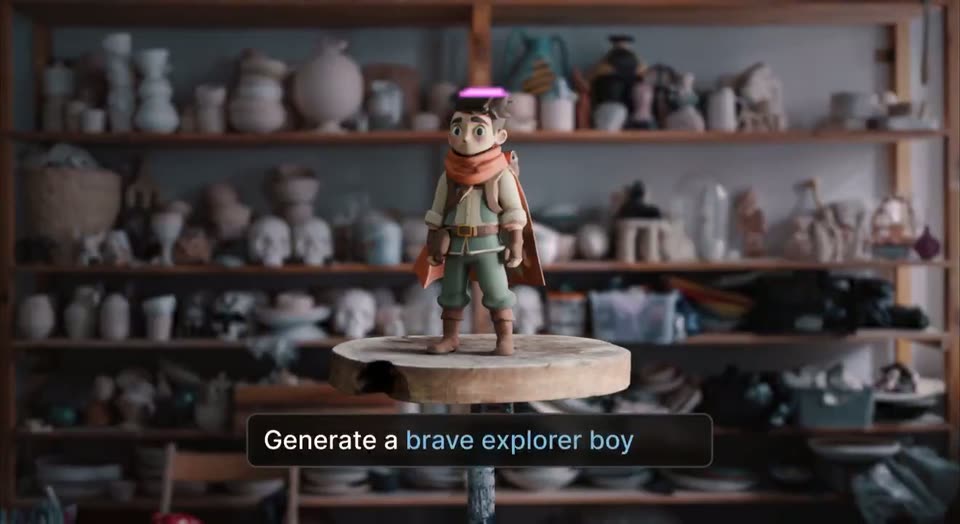
A blurred pottery workshop with shelves of clay figures fills the frame, a wooden stool centered in front. A dark prompt box reads the text, then drops and fades as a 3D cartoon boy scales up onto the stool, ringed by magenta scan lines.
On-screen text: “Generate a brave explorer boy”
Techniques: 3D mockup
Camera: Static
04 · Feature reveal · 0:06–0:07
A clay-style figurine of a boy with an orange scarf stands on a wooden turntable before shelves of pottery. The figurine is swapped for a white robot while the bottom caption changes. Locked-off framing, shallow depth of field, slow pace.
On-screen text: “Generate a brave explorer boy”, “Generate a lederhosen sheep”
Camera: Static
05 · Feature reveal · 0:07–0:08
A white and teal 3D robot stands on a wooden turntable, arms slightly out, before a blurred workshop shelf of clay pots. The model's limbs flash with pink and teal light. A dark caption bar with the prompt sits at the bottom of the frame.
On-screen text: “Generate a lederhosen sheep”
Techniques: 3D mockup, Light sweep
Camera: Static
06 · Feature reveal · 0:08–0:10
On a wooden turntable before blurred pottery shelves, a 3D sheep figurine in lederhosen, ringed by a pink glow, morphs into a glowing teal lantern. A bottom caption bar swaps the prompt text.
On-screen text: “Generate a lederhosen sheep”, “Generate a dream core lantern”
Techniques: Morph, 3D mockup
Camera: Static
07 · Feature reveal · 0:10–0:10
A small ornate lantern with glowing blue-and-white panels sits on a wooden turntable, rotating slowly, against a blurred workshop wall of pottery shelves. A dark caption bar at the bottom holds the prompt text.
On-screen text: “Generate a dream core lantern”
Techniques: 3D mockup
Camera: Static
08 · Feature reveal · 0:10–0:11
A white, purple and yellow sneaker hovers above a wooden disc in a workshop lined with clay sculptures. A small pink glow flickers over the heel as the shoe settles, then the camera holds on the floating product.
Techniques: 3D mockup
Camera: Static
09 · Feature reveal · 0:11–0:13
A 3D leather backpack rests on a wooden stool in a pottery workshop, shelves of vases blurred behind. A pink horizontal scan line sweeps across the bag while its form morphs and solidifies. A dark rounded caption bar at the bottom holds the generation prompt.
On-screen text: “Generate a leather backpack”
Techniques: 3D mockup, Light sweep, Morph
Camera: Static
10 · Feature reveal · 0:13–0:14
A rugged orange handheld GPS sits on a wooden stool in a pottery studio. A magenta scan line sweeps across it and the device morphs into a small fireman figure with arms outstretched, while a prompt caption sits at the bottom.
On-screen text: “Generate a leather backpack”, “Generate a yellow fireman”
Techniques: Morph, Masking
Camera: Static
11 · Feature reveal · 0:14–0:15
A 3D firefighter figure in tan and yellow gear stands with arms out on a wooden disc, set against a blurred pottery studio. Its lower body dissolves into a purple form, suggesting regeneration. A dark caption bar at the bottom holds the prompt text.
On-screen text: “Generate a yellow fireman”
Techniques: 3D mockup, Morph
Camera: Static
12 · Feature reveal · 0:15–0:16
A claymation-style boba tea cup character with purple limbs stands on a wooden stump in a pottery studio, holding a staff. As the prompt caption at the bottom edits itself, the figure's face, staff and belt reshape into a techno variant with a pink visor.
On-screen text: “Generate a boba tea wizard”, “Generate a boba tea”
Techniques: Morph
Camera: Static
13 · Feature reveal · 0:16–0:18
A 3D figurine on a wooden turntable in a pottery studio morphs from a red astronaut into a cream lamb as a pink scan ring crosses it. A caption bar at the bottom swaps the prompt text.
On-screen text: “Generate a techno Mars explorer”, “Generate a cute lamb in a cute coat”
Techniques: Morph
Camera: Static
14 · Feature reveal · 0:18–0:19
A clay lamb figurine in a beige coat stands on a wooden turntable before blurred shelves of sculptures. It morphs into a brass and green steampunk device with a glowing pink line. A dark caption bar at the bottom shows the prompt, then updates to the new one.
On-screen text: “Generate a cute lamb in a cute coat”, “Generate a botanical analyzer”
Techniques: Morph
Camera: Static
15 · Feature reveal · 0:19–0:20
A brass steampunk device with two green lenses sits centered on a wooden pedestal, shelves of pottery blurred behind. The lenses brighten with a green glow while a caption stays locked at the bottom.
On-screen text: “Generate a botanical analyzer”
Camera: Static
16 · Feature reveal · 0:20–0:27
On a wooden turntable in a pottery studio, a hovering drone-bot with pink lights morphs into a glowing sword, a chubby clay knight, a double-bladed warrior, and a teal gem figure; the pedestal cracks and an hourglass with pink and yellow sand appears. A bottom caption updates with each prompt.
On-screen text: “Generate a drone-bot”, “Generate a mighty power sword”, “Generate a chubby knight”, “Generate a double-bladed warrior”, “Generate a cave explorer in gems”, “Generate a botanical analyzer”
Techniques: Morph
Camera: Static
17 · Demo · 0:27–0:28
A 3D hourglass with pastel sand rests on a wooden base, set against a blurred background of pottery shelves. The frame slowly zooms out, revealing a dark interface panel on the right edge.
Camera: Static
18 · Demo · 0:28–0:30
A 3D software interface displays a beige suitcase model on a wooden stand. A vertical line sweeps across the model from left to right, revealing a different shading mode on the right half. The background shows a blurred workshop.
Techniques: Masking
Camera: Pull out
19 · Demo · 0:30–0:31
A dark 3D-generation interface fills the screen. A white flying car model rotates on a turntable in the center viewport while a pink scan line sweeps across it. The prompt field on the left types out a text prompt.
Camera: Static
20 · Demo · 0:31–0:32
A dark Autodesk Flow Studio interface fills the frame, with a Create Mesh panel on the left, a 3D logo viewport in the center, and a My Library panel on the right. The whole screen then dims to black, leaving only the central 3D oval faintly visible.
Camera: Static
21 · Product intro · 0:32–0:34
A dark UI panel holds a 3D oval artwork with a pastel face illustration and three buttons below. The panel collapses into a circle on black as the product name and a tagline slide in to the right, partly hidden behind the circle.
On-screen text: “AUTODESK Flow Studio”, “Dancing Wonder 3D”
Techniques: Masking, Morph
Camera: Static
22 · Product intro · 0:34–0:36
On a black field, a translucent 3D capsule holding a small figure rotates slowly on the left. To its right, white title text reads AUTODESK Flow Studio above Introducing Wonder 3D, both held static.
On-screen text: “AUTODESK Flow Studio”, “Introducing Wonder 3D”
Camera: Static
23 · Product intro · 0:36–0:37
A small oval app icon with a pale figure illustration sits left of white text on a black background. The title card holds still, then blurs and fades out at the end.
On-screen text: “AUTODESK Flow Studio”, “Introducing Wonder 3D”
Camera: Static
24 · CTA · 0:37–0:42
A dark sign-off holds a centered app icon, a rounded square showing a hooded figure under a starry sky. Below it, a thin outlined Try It button and the URL Flowstudio.com sit static on black.
On-screen text: “Try It”, “Flowstudio.com”
Camera: Static