0:45

Earendil YC Launch
Earendil Robotics · Industrials · Aug 2026
Warp · May 2024 · 0:19 · Full motion · AI-annotated
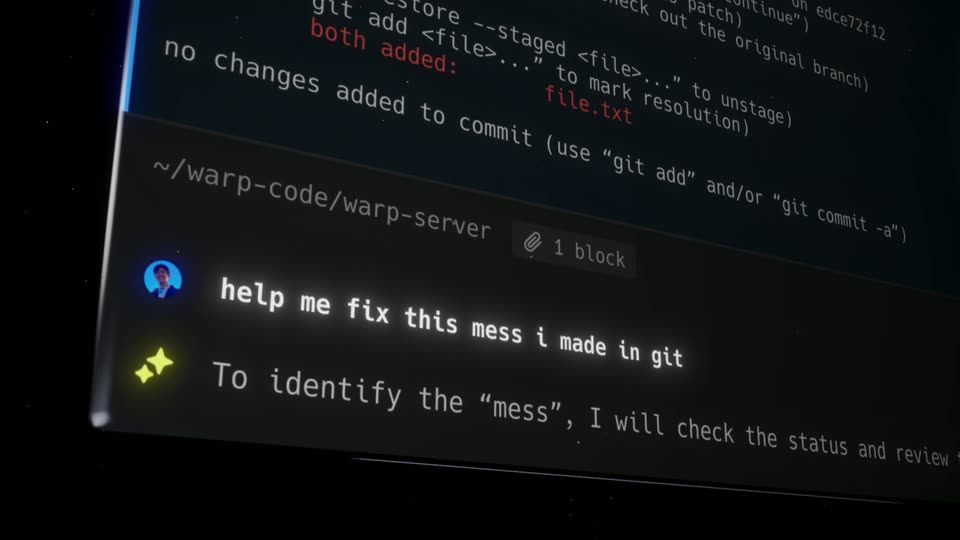
Warp’s 0:19 launch film runs 5 scenes, about 3.9 s each. The product shows up at 0:07. There is no explicit call to action. The clip is one continuous 3D shot of a floating terminal panel that the camera tilts, orbits and zooms to follow the chat, cutting only on the beat of the dialogue. Glowing monospace text and a small sparkle icon carry the AI's actions against a near-black field, with the panel held in perspective so every line of code reads like a physical card.
Is this your launch? to your site or press kit.
Earendil Robotics · Industrials · Aug 2026
Akon Labs · B2B
Petrarch · B2B · Jul 2026
A solid black frame fills the screen, holding without motion or visible elements.
Camera: Static
A dark terminal shows red git conflict output above a glowing purple path. The view pulls back as a sparkle icon and a typed prompt appear, spelling out a request to fix the mess.
Techniques: UI zoom, Kinetic type
Camera: Static
A terminal window with git error output and a typed prompt sits on a black background. The camera rotates the panel into a 3D tilt as the text cursor blinks at the end of the command line.
Techniques: 3D mockup
Camera: Static
A tilted terminal screen floats in 3D perspective on black, showing a chat where the user asks help me fix this mess i made in git. A yellow Thinking spinner swaps to a sparkle and response text, then a blue box slides in with the git status command, reframing down.
Techniques: 3D mockup, UI zoom
Camera: Pull out
A dark terminal panel with a user prompt and an assistant reply floats in 3D space. The camera zooms onto the command box as its loading spinner morphs into a green checkmark.
Techniques: UI zoom, Morph
Camera: Push in