1:28
Explore
#ai #governance #coding | Akon Labs (YC S26)
Akon Labs · 0:55 · AI-annotated
- Length
- 0:55
- Scenes
- 17 · 3.2 s avg
- Product on screen
- 0:20
- Call to action
- 0:50 · 92%
- Voiceover
- Yes
00:00:00 / 00:55:03
- Length
- 0:55
- Scenes
- 17 · 3.2 s avg
- Product on screen
- 0:20
- Call to action
- 0:50 · 92%
- Voiceover
- Yes
Akon Labs’s 0:55 launch film runs 17 scenes, about 3.2 s each. The product shows up at 0:20. The call to action lands at 0:50 (92% in), over a voiceover. The video opens with a desaturated archival montage that states a governance thesis, flips a calendar page to jump to the present, then settles into one continuous dark-UI demo where cream serif value-prop headlines crossfade over an evolving glowing node graph, and closes on a held logo card with the URL. Pacing is slow and deliberate (low cut rate, text-driven), with signature moves being the calendar page-flip transition, the crossfading serif headlines, the connector lines that draw between
Footage neededEstimated needs: 1 capture group — your screens or recordings · 1 official logo — reused across the film · 4 filmed passages — shoot, supply or replace · 1 graphic passage — draw or supply · 1 3D passage — build or supply
Is this your launch? to your site or press kit.
More like this
1:24
1:11

Alloovium - Today, we launched @alloovium on @ycombinator On major projects, doc
Alloovium · Real Estate and Construction · Jul 2026
#ai #governance #coding | Akon Labs (YC S26), scene by scene
· 17 scenes as text
01 · Hook · 0:00–0:01
A dim, desaturated workshop fills the frame, a large spoked flywheel silhouetted in the center with arched windows glowing behind it. The title slides in across the top in cream serif caps.
On-screen text: “THE INDUSTRIAL REVOLUTION”
Techniques: Kinetic type
Camera: Pull out
02 · Hook · 0:01–0:02
A dark, desaturated factory hall fills the frame, a large spoked wheel centered before arched windows. Two all-caps serif headlines crossfade in sequence over the still set.
On-screen text: “THE INDUSTRIAL REVOLUTION”, “THEN CAME INDUSTRIAL AUTOMATION”
Techniques: Kinetic type
Camera: Pull out
03 · Hook · 0:02–0:07
A darkened black-and-white factory floor with robotic arms; framed still photos of robots and car bodies scale into a collage across the frame while serif headlines appear at the top.
On-screen text: “THEN CAME INDUSTRIAL AUTOMATION”, “Heavy lifting.”, “Automated.”, “POWER NEEDS GOVERNANCE.”, “Standards. Checks. Safeguards.”
Techniques: Kinetic type
Camera: Pull out
04 · Problem · 0:07–0:08
A white calendar card sits centered over a static collage of grayscale factory and robotic-arm photos. Its top page curls upward, flipping the year from 1961 to 2026.
On-screen text: “1961”, “2026”
Techniques: Morph
Camera: Static
05 · Problem · 0:08–0:10
A white calendar page flips flat to reveal the year 2026 in dark serif type, centered over a collage of grayscale factory and robot-arm photographs framed by thin white borders and corner brackets.
On-screen text: “2026”
Techniques: 3D mockup
Camera: Static
06 · Problem · 0:10–0:20
A silver laptop sits on a dark desk in a dim office, angled toward camera. The serif headline fades and scales in on its screen above a PR Ready card, the camera pushes in on the display, and a cursor glides to the Merge button and clicks it as the screen crossfades to a wider interface.
On-screen text: “Now, AI ships your code.”, “But does it ask...”
Techniques: 3D mockup, Kinetic type, UI zoom, Cursor demo
Camera: Push in
07 · Demo · 0:20–0:26
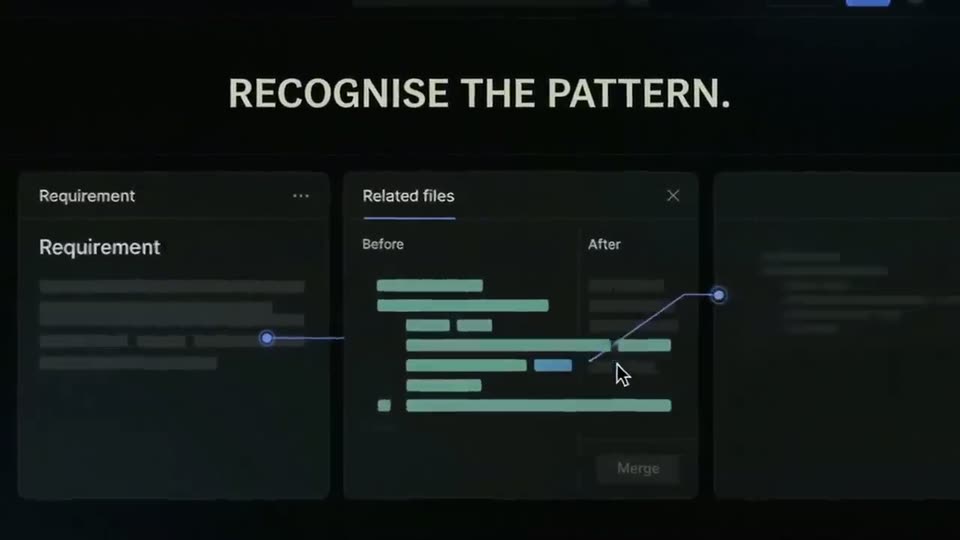
A dark IDE view shows a Related files panel with Before and After code lines. A green box highlights the Before block, lines glow teal, and blue connectors draw between nodes as the frame zooms out to a network of related cards. A serif headline swaps to RECOGNISE THE PATTERN.
On-screen text: “But does it ask...”, “THE RIGHT PROBLEM.”, “RECOGNISE THE PATTERN.”
Techniques: Kinetic type, Cursor demo, UI zoom
Camera: Pan
08 · Demo · 0:26–0:27
A dark product interface shows three code panels linked by purple connector lines while a cursor hovers over the center. The serif headline cross-fades from the first line to the second as an Evidence panel rises from the bottom edge.
On-screen text: “RECOGNISE THE PATTERN.”, “EVIDENCE BEFORE CONFIDENCE.”
Techniques: Cursor demo
Camera: Static
09 · Demo · 0:27–0:30
A blurred dark dashboard sits behind a centered Evidence modal that settles into place, its close icon scaling in and the Before column sliding in. A cursor moves across the two columns as a green outline traces the content area. The headline EVIDENCE BEFORE CONFIDENCE. holds still above.
On-screen text: “EVIDENCE BEFORE CONFIDENCE.”
Techniques: Cursor demo
Camera: Static
10 · Demo · 0:30–0:31
A dimmed GitNexus dashboard holds a glowing Evidence panel with Before and After code bars while the serif headline reads EVIDENCE BEFORE CONFIDENCE. The view then pulls back to three panels linked by a node graph labeled PR Ready, Merge, Cause and Symptom, and the headline swaps to CAUSE OR SYMPTOM as a cursor rests at the lower right.
On-screen text: “EVIDENCE BEFORE CONFIDENCE.”, “CAUSE— OR SYMPTOM?”
Techniques: Cursor demo, UI zoom
Camera: Static
11 · Demo · 0:31–0:34
A dark GitNexus interface shows a node graph assembling under a serif headline. A blue line runs from a Merge button to a glowing Source node, through a square Total node, to a glowing Symptom node that a cursor points at. The Total node gains a teal selection box, then the whole diagram dims and fades out.
On-screen text: “CAUSE— OR SYMPTOM?”
Techniques: UI zoom, Cursor demo
Camera: Static
12 · Demo · 0:34–0:40
A dark graph canvas shows an Order node branching to Paid and Unpaid; an amber glow and rounded outline group the two states, a Review rule card slides in on the right and links by a blue line, while the serif headline fades in and crossfades to the next line.
On-screen text: “AN IMPOSSIBLE STATE?”, “ONE BEHAVIOR.”
Techniques: Kinetic type
Camera: Static
13 · Demo · 0:40–0:41
A dark node-graph interface fills the frame, an Order node branching to Paid and Unpaid inside an orange box, with a Review rule panel at right. Above it, a white serif headline crossfades from one phrase to another over the still diagram.
On-screen text: “ONE BEHAVIOR: AN IMPOSSIBLE STATE?”, “ONE BEHAVIOR. HOW MANY FILES?”
Techniques: Kinetic type
Camera: Pull out
14 · Demo · 0:41–0:46
A dark GitNexus screen shows a node graph connecting Order, Paid and Unpaid states to PR panels, with a cream serif headline above it. The headline crossfades from one line to another while small dots travel along the graph's blue edges.
On-screen text: “ONE BEHAVIOR. HOW MANY FILES?”, “Your codebase. Your rules. Applied to every PR.”
Camera: Pull out
15 · Demo · 0:46–0:50
A dark interface shows three panels: a file graph, a PR panel with a Paid-to-Unpaid state loop, and a review rule card. A serif headline sits above. The center panel sharpens and a Conflicting states warning fades in beside the Merge button.
On-screen text: “Your codebase. Your rules. Applied to every PR.”
Camera: Static
16 · CTA · 0:50–0:51
A dimmed GitNexus interface with a node graph and rule panels sits behind the centered white logo and wordmark. The backdrop darkens to black as the tagline and URL fade in beneath the logo.
On-screen text: “GitNexus”, “AI-NATIVE GOVERNANCE”, “akonlabs.com”
Camera: Static
17 · Outro · 0:51–0:55
A dimmed, blurred product interface sits in the background. The GitNexus logo and wordmark hold center with the tagline beneath, then a two-line headline and the URL appear below. The frame stays locked-off as the elements fade in and hold.
On-screen text: “GitNexus”, “AI-NATIVE GOVERNANCE”, “Every PR.”, “Held to your engineering standards.”, “akonlabs.com”
Camera: Static