1:10

Introducing ClickUp 3.0
ClickUp · Productivity · Jun 2022
Vidu · Nov 2025 · 0:49 · AI-annotated
Vidu’s 0:49 launch film runs 29 scenes, about 1.7 s each. The product shows up at 0:02 and 8 features are revealed. There is no explicit call to action. The video is a rapid feature rundown: a blurred title card opens, then each upgrade is announced with a centered white caption over full-bleed generated footage, punctuated by short UI tours and a bottom strip of source thumbnails. Cuts run near 103 bpm with letter-by-letter caption builds, blur-to-sharp title reveals, and 3D-tilted interface shots as the signature moves.
Is this your launch? to your site or press kit.
ClickUp · Productivity · Jun 2022
Raise Zero · May 2026
A black frame holds as the line of text materializes near the center, its letters smeared by horizontal motion blur as it animates into place.
On-screen text: “Q2 Image to Video Image to Image”
Techniques: Kinetic type
Camera: Static
On a black field, the blurred title with faint echo trails on both sides sharpens and scales up to 'Q2 Image to Video'. 'Upgraded' then slides up from the bottom edge to sit beneath it, forming a centered two-line title.
On-screen text: “Q2 Image to Video”, “Upgraded”
Techniques: Kinetic type
Camera: Static
A dark image-to-video app screen stays locked off, prompt controls on the left and a generated water-battle preview on the right. Large white overlay text scales in at center, then a second line slides across the frame.
On-screen text: “Q2 Image to Video”, “Upgraded”
Techniques: Kinetic type
Camera: Push in
A dark UI interface pans down the left panel to reveal a text prompt box and model settings. A cursor hovers over the model dropdown while a generated video of fantasy characters plays on the right.
Techniques: Cursor demo
Camera: Push in
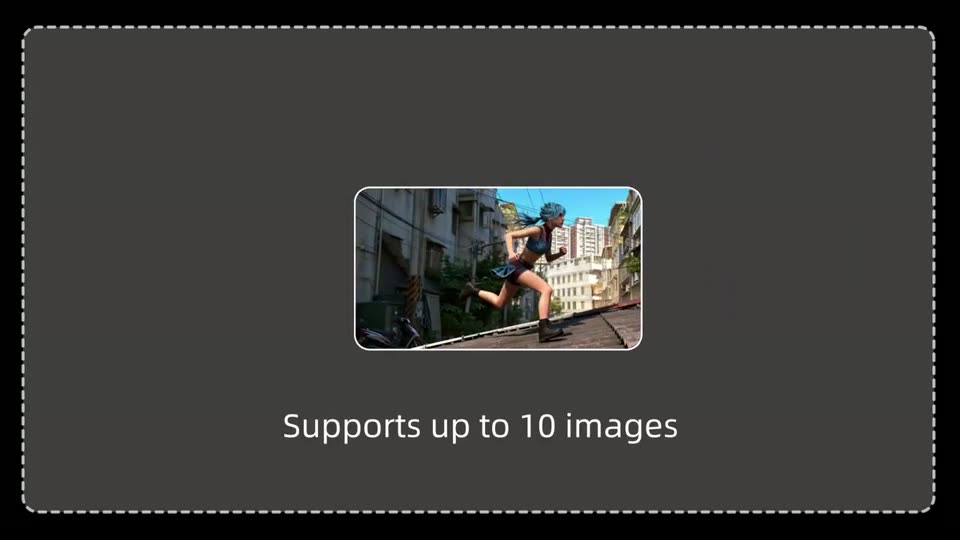
A fanned row of ten rounded photo cards sits in 3D perspective on a dark gray panel, brightening as the caption builds letter by letter below. The row then collapses into a single centered card of the running figure.
On-screen text: “Supports up to 10 images”
Techniques: 3D mockup, Kinetic type, Morph
Camera: Push in
A woman with a grey ponytail in a sports bra and plaid skirt sprints across a sunlit rooftop as the camera tracks her. White text holds center over her torso. She then leaps and lands near a metal railing, the text clearing.
On-screen text: “64-second-videos”
Camera: Push in
A batter in a white uniform and helmet swings in a sunlit stadium; the camera arcs from his front to his back while a four-clip filmstrip bar with a highlighted first frame sits along the bottom.
On-screen text: “64-second-videos”
Camera: Static
A pale blue sky fills the frame with a centered white headline. Four rounded photo cards of baseball action sit in a row along the bottom while a small ball arcs across the upper right corner.
On-screen text: “More coherent stories with multi-image creation”
Camera: Static
Live-action baseball footage crossfades from a wide stadium view to a close-up of a crouching catcher catching a ball. Four small reference thumbnails sit along the bottom. A vivid purple-and-teal fish illustration sweeps across the frame as a transition.
On-screen text: “More coherent stories with multi-image creation”
Techniques: Masking
Camera: Pan
A 3D-rendered multicolored fish swims past a forested shoreline, then the backdrop morphs into a sunlit mountain valley as the fish glides through the air. Three small image thumbnails rest along the bottom edge while a white caption line holds steady across the center.
On-screen text: “More coherent stories with multi-image creation”, “Longer AI-generated videos for wholesome ideas”
Techniques: Light sweep, Morph
Camera: Pan
A locked-off 3D landscape shows a lake under a cloudy sky filled with fish swimming through the air. A white headline sits centered, and three small sample frames (a fish head, an underwater sunbeam, a river valley) line the bottom edge.
On-screen text: “Longer AI-generated videos for wholesome ideas”
Camera: Static
A stylized sunset sky with pink clouds and a white spired castle floating above the clouds. A white headline sits centered, and three rounded thumbnails of sample shots line the bottom. The headline letters tighten from wide tracking while small embers drift across the frame.
On-screen text: “Richer visuals with various shot transitions”
Techniques: Kinetic type, Particles
Camera: Static
A 3D wizard in a pointed hat crouches in a dim stone room, reaching toward a small glowing purple orb on a table. The shot opens inside a large translucent purple sphere that shrinks away to reveal the scene. Three rounded preview thumbnails sit at the bottom.
On-screen text: “Richer visuals with various shot transitions”
Techniques: Masking
Camera: Static
A 3D-rendered sunset vista shows a metallic camera rig on a ridge; the view pushes in, then cuts to a light beam over a forest and an explosion under a ringed planet. Two inset thumbnails sit at the bottom as a white headline holds center, letters scrambling in.
On-screen text: “Richer visuals with various shot transitions”, “Smoother results with start-to-end frame generation”
Techniques: Kinetic type, 3D mockup
Camera: Pull out
A white cursor arrow hovers beneath the words New Features, which scale from a blurred state into sharp white type on a black field. Released fades in below them, then a small caption line appears.
On-screen text: “New Features”, “Released”, “Smoother results with start-to-end frame generation”
Techniques: Cursor demo, Kinetic type
Camera: Static
A tight close-up of a young man with curly blonde hair and goggles on his forehead stares into the lens, his smudged face framed by a white fur collar as snow flecks drift across him.
Camera: Static
Extreme close-up of a man's face in a fur-lined hood, snow flecks on his skin, as he lifts the hood with both hands. A blue rounded banner with white text and a white cursor arrow fades in across the center of his face and holds.
On-screen text: “Extended video length now supports quality boost”
Camera: Static
A close-up of a person in a fur hood fits dark, snow-dusted ski goggles over their eyes, shown inside a product interface with a Video Details panel on the right. A cursor hovers near the Upscale button while a caption stays locked on screen.
On-screen text: “Extended video length now supports quality boost”
Techniques: Cursor demo
Camera: Static
A dark Upscale dialog floats over a blurred fantasy portrait. A cursor taps the 4k row, the radio fills with a blue check, and the disabled Confirm button lights up with a blue-to-purple gradient.
Techniques: Cursor demo
Camera: Static
Extreme close-up of a freckled face with blond hair and a fur collar. Hands lift dark blue ski goggles up over the eyes. Snow specks drift and cling to the curved lens. The shot stays centered as the goggles settle into place.
Techniques: Particles
Camera: Pan
On a dark navy background, a glowing blue rounded button reads 'RefHub searching available' in orange. A white cursor slides in from the right and rests on the button, where the label shifts to white and the button brightens. The frame stays locked.
Techniques: Cursor demo
Camera: Static
A dark product dashboard is shown full-frame, then the view zooms into the top bar while a cursor types a search query, highlighting a matching result card.
On-screen text: “RefHub searching available”
Techniques: UI zoom, Cursor demo
Camera: Push in
A dark Vidu dashboard with a left menu and a row of filter pills. A white cursor glides from the right onto a hamburger image card as the search field types the word Hamburger.
Techniques: Cursor demo
Camera: Static
A double cheeseburger on a gold-rimmed plate rests on a white tablecloth among goblets and cutlery. A person in a dark suit leans in from the top edge and spreads both hands around the plate in a presenting gesture, while dark sauce drips onto the rim.
Camera: Push in
A furry blue creature with wide eyes leans over a gold-rimmed plate holding a dripping cheeseburger. It extends both paws and lifts the burger off the plate. A teacup, fork, and knife sit on a white tablecloth behind it.
Camera: Pan
A dark pricing page interface tilts into view in 3D perspective, showing a left sidebar and four plan cards. A blue banner reading “Enterprise plan now available” sits centered over the cards with a white cursor arrow pointing at it.
On-screen text: “Enterprise plan now available”
Techniques: 3D mockup, Cursor demo
Camera: Pull out
A dark pricing table with four plan columns fills the frame. The view zooms onto the Enterprise column, blurring the rest, as a black caption box with white text slides in at the left edge.
On-screen text: “Bulk discounts and dedicated enterprise accounts are supported.”
Techniques: UI zoom
Camera: Static
A blue gradient loop mark and the wordmark Svidu resolve from a blurred state into a centered lockup on black, then hold as a static sign-off.
On-screen text: “Svidu”
Camera: Static
A black background holds the centered Vidu logo, a blue gradient loop mark to the left of the white wordmark. The frame is static and locked off, with no motion or reveal.
On-screen text: “Vidu”
Camera: Static