0:38
New Raycast. Coming 2026
Raycast · Productivity · Dec 2025
Vercel · Apr 2023 · 0:25 · Full motion · AI-annotated
Vercel’s 0:25 launch film runs 8 scenes, about 3.1 s each. The product is on screen from the first frame and 1 feature is revealed. There is no explicit call to action. The video bookends a single Linear interface demo with the Vercel and Linear marks on black, moving from a tilted 3D landing page into a flat issue view. Signature moves are slow 3D tilts that settle to a frontal angle, parallax drift between stacked UI layers, and a stacked-word highlight that shifts focus one word at a time.
Is this your launch? to your site or press kit.
Raycast · Productivity · Dec 2025
Designeer · Oct 2026
Teamily AI · Nov 2026
Films whose music sounds like this one, voice left out
Astor · Upbeat, modern electronic and rock instrumental
HeyGen · Upbeat electronic dance-pop
Wato · Upbeat electronic
A thin plus sign draws in at the center of a black frame, then a white triangle and a shaded sphere with a rotating diagonal band appear on either side.
On-screen text: “D”
Camera: Static
A dark landing page fades in with the headline “Linear is a better way to build products” above a tilted 3D mockup of the Linear app. The camera zooms in on the interface as a comment card pops in over the issue list.
Techniques: 3D mockup, UI zoom
Camera: Push in
A dark Linear app window floats over a landing page while a cursor types a reply in a comment card, clicks send, then taps a mute icon. The page text drifts down at a different speed behind the window.
On-screen text: “Meet the new standard for modern software development. Streamline issues, sprites, and product roadmaps”, “to build products”
Techniques: Cursor demo, Parallax
Camera: Static
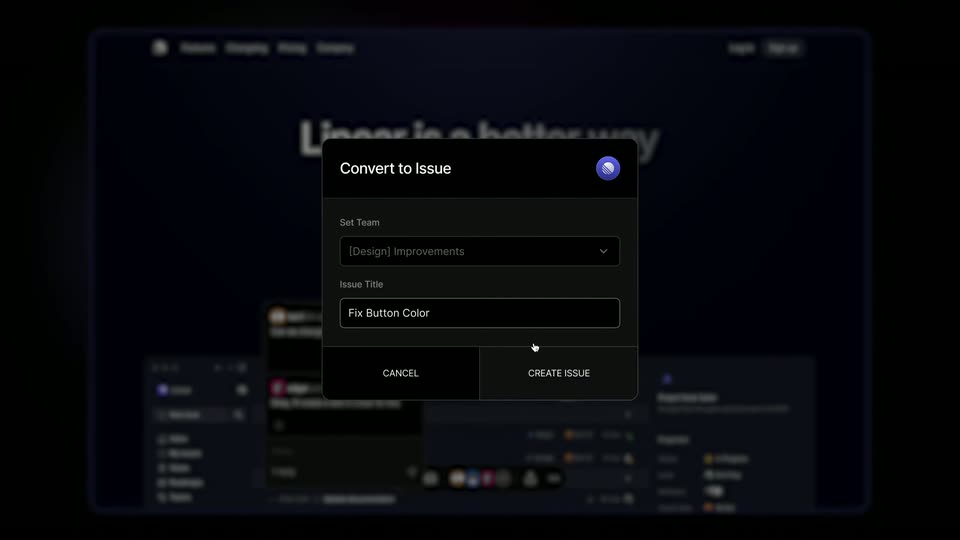
A Convert to Issue dialog scales in over a blurred, darkened Linear screen; a cursor types Fix Button Color into the Issue Title field, then the view switches to the new issue page showing the created issue and its properties panel.
Techniques: Cursor demo
Camera: Pull out
A dark Linear issue view floats on a black background, tilted in 3D perspective. The panel eases from a slanted, dimmed angle into a flat frontal view while brightening, revealing an issue titled Fix Button Color with a comment thread and a right-hand property sidebar.
Techniques: 3D mockup
Camera: Push in
Three words stacked vertically on a black background: Develop., Preview. and Ship. The active word glows bright white while the others stay dim gray. The highlight shifts from Develop. to Preview., which slides into the center as Develop. scales and fades.
On-screen text: “Develop.”, “Preview.”, “Ship.”
Techniques: Kinetic type
Camera: Static
Four words, Develop, Review, Preview and Ship, stack vertically on a black background. Preview glows brightest while the others dim, then the top words fade out and Ship scales up to dominate the frame.
On-screen text: “Develop.”, “Review.”, “Preview.”, “Ship.”
Techniques: Kinetic type
Camera: Static
On black, a small gray triangle scales up slowly at center, then slides left as the word Vercel appears beside it to form the logo lockup, which holds for a beat and fades to black.
On-screen text: “Vercel”
Camera: Static