0:30
NFTs are Officially Live on Uniswap!
Uniswap · Feb 2023
Uniswap · Apr 2023 · 0:36 · AI-annotated
Uniswap’s 0:36 launch film runs 23 scenes, about 1.6 s each. The product is on screen from the first frame and 1 feature is revealed, with social proof. There is no explicit call to action. The video is built as a logo and tagline opener, a 3D phone-mockup tour of the wallet, one isolated feature block for multi-chain swaps, a short NFT gallery, a trust claim and a closing app-icon card. Its style is defined by magenta-on-black branding, soft pink gradients, locked-off frames, and phone mockups that fan, pivot and drift to suggest depth.
Is this your launch? to your site or press kit.
Uniswap · Feb 2023
Sidekick · B2B · Jul 2026
A magenta unicorn head fades in on a black background, then a violet glow blooms around the mark as the word ARC appears behind it in translucent purple.
On-screen text: “ARC”
Camera: Static
A dark purple field of pink organic blobs sits behind the centered headline, then a light pink gradient rises to cover it as the first line scales up. The magenta text stays centered on a locked-off frame.
On-screen text: “The power of”, “Uniswap in”, “your pocket”
Techniques: Kinetic type
Camera: Static
A magenta headline reads 'The power of Uniswap in your pocket' over a soft pink gradient. A tilted 3D phone mockup rises from the bottom edge, its screen showing a crypto balance. The frame stays locked off while the device climbs into view.
On-screen text: “The power of Uniswap in your pocket”
Techniques: 3D mockup
Camera: Static
A tilted 3D phone mockup of a crypto wallet floats over a pink gradient behind a large pink headline. The phone slides up and to the right while the headline text scales and fades out.
On-screen text: “The power of Uniswap in your pocket”
Techniques: 3D mockup, Kinetic type
Camera: Pull out
A phone mockup of a crypto wallet sits centered on a pink background with a faint offset echo behind it, then fans out into three tilted screens showing different accounts in 3D perspective.
Techniques: 3D mockup
Camera: Static
Three phone mockups fan out in 3D perspective over a pink background. The center phone stands upright on a crypto wallet screen showing a dollar balance and token list, while the two side phones tilt outward showing other balances, all drifting with a slow float.
Techniques: 3D mockup
Camera: Static
Three black-framed phones stand side by side on a flat pink background, each showing a crypto wallet with a different account, balance and token list. The token rows blur and settle into place in the first moment, then hold still.
Techniques: 3D mockup
Camera: Static
Three phone screens sit side by side on a pink background, each showing a crypto price chart and a colored Swap button. A dashed playhead sweeps left to right across the middle Ethereum chart as a gray touch dot presses its Swap button.
Techniques: Cursor demo
Camera: Static
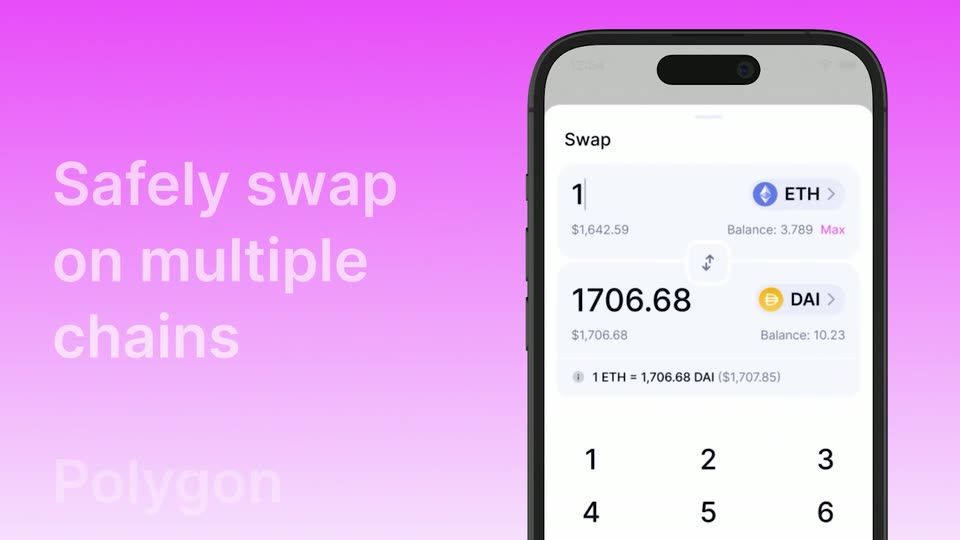
Three phone mockups of a crypto app stand in a row on a pink gradient, then pivot in 3D so the Ethereum screen swings right. A white headline and the word Polygon fade in on the left as the screen switches to a swap form with a keypad.
On-screen text: “Safely swap on multiple chains”, “Polygon”
Techniques: 3D mockup
Camera: Push in
A 3D phone mockup on the right shows a swap screen, tokens changing from ETH/DAI to WETH/USDC. On the left, the headline “Safely swap on multiple chains” fades as chain names Polygon, Optimism, Arbitrum scroll up, each highlighted in a pill chip with its logo.
On-screen text: “Safely swap on multiple chains”, “Polygon”, “Optimism”, “Arbitrum”
Techniques: Kinetic type, 3D mockup
Camera: Static
A pink gradient background holds a 3D phone on the right showing a swap screen that converts OP to WBTC. On the left, network names Polygon, Optimism and Arbitrum scroll vertically as a highlighted pill slides between them and 'and more...' fades in at the bottom.
On-screen text: “Polygon”, “Optimism”, “Arbitrum”, “and more...”
Techniques: 3D mockup, Kinetic type
Camera: Static
On a purple gradient, a vertical list of network names scrolls upward, showing Optimism, Arbitrum in a highlighted pill, and the line and more, beside a 3D phone displaying a swap screen with DAI and ETH fields.
On-screen text: “Optimism”, “Arbitrum”, “and more...”
Techniques: 3D mockup, Kinetic type
Camera: Static
A front-facing phone mockup on the right shows a success screen, its green checkmark circle drawing itself closed. The left half is a pink gradient holding the static white headlines 'Arbitrum' and 'and more...'. The frame stays locked off.
On-screen text: “Arbitrum”, “and more...”
Camera: Static
A tilted smartphone mockup rotates to face the camera on a pink gradient, its screen listing crypto holdings with prices and a magenta Swap button. The view pushes in toward the top of the list as it scrolls.
Techniques: 3D mockup, UI zoom
Camera: Static
A dark smartphone mockup in 3D perspective shows a wallet home screen with a search bar, four token cards and two wallet chips. The device eases from a slight tilt to a frontal view while the frame pushes in, cropping the status bar.
Techniques: 3D mockup
Camera: Static
A phone on a black background displays a wallet profile screen. The green header and token list push in from the right over a prior screen, then hold. Rows list Optimism, Optimistic ETH, Ethereum, Arbitrum ETH and Opyn Squeeth with values and green or red percent changes.
Camera: Static
A central phone on black shows a wallet app switching from a token balance list to a grid of pixel-art NFTs, then opening an NFT detail card with an owned-by line and description field. Four surrounding phone screens display other profiles and token lists, held static.
Camera: Static
Three iPhone mockups in a row on black, each showing an NFT listing: a pink mfer character, a green mushroom-headed Shroomio, and white digital socks. The phones fade in and drift, the center one rising and the outer ones sliding to suggest depth.
Techniques: 3D mockup, Parallax
Camera: Pan
Three smartphone mockups float in 3D perspective on a dark background. The center phone, largest and frontmost, displays a grid of mushroom characters under the Shroomio profile. Two angled phones on either side show other NFT collections with character and sock grids.
Techniques: 3D mockup
Camera: Static
NFT cards showing a sock, a frog and a purple-haired woman, plus a Bitcoin coin, fly in from the frame edges and scatter across a black background. A large dark purple headline sits centered over them.
On-screen text: “From the most trusted name in DeFi”
Camera: Static
A large white headline reads From the most trusted name in DeFi on a black background, while colorful NFT cards and crypto tokens drift and rotate around the edges, fading in from dim to bright.
On-screen text: “From the most trusted name in DeFi”
Camera: Static
A white three-line headline sits centered on black. A blue coin and a yellow app icon with a purple dot sweep across the frame, passing over the text, then exit, leaving the static headline alone.
On-screen text: “From the most trusted name in DeFi”
Camera: Static
A gray tagline sits behind a purple unicorn mark on black. The tagline fades, the mark shrinks into a white app icon, and the magenta product name plus a white platform line appear below.
On-screen text: “From the most trusted name in DeFi”, “Uniswap Wallet”, “Available on iOS”
Camera: Pull out