1:30
Introducing Shire
Shire · Nov 2026
Tire Swing · Nov 2026 · 1:17 · AI-annotated
Tire Swing’s 1:17 launch film runs 26 scenes, about 3.0 s each. The product shows up at 0:14 and 9 features are revealed. The call to action lands at 1:12 (93% in), over a voiceover. The video opens with slow live-action establishing shots of housing and paperwork to frame the pain, then switches to a flat UI tour where each feature is announced by a left-aligned headline card and demoed in a white panel on a soft cream-to-pink gradient. Pacing is steady and modular: locked-off product screens with small cursor or slide-in motions, punctuated by a return to the empty-apartment motif for the emotional close and a static logo card.
Is this your launch? to your site or press kit.
Shire · Nov 2026
Simular AI · Nov 2026
A static wide shot frames a two-story brick apartment complex behind a sunlit lawn, with large leafy trees filling the upper half. Dappled shadows fall across the grass. The camera holds still on the establishing view.
Camera: Static
A tracking shot glides down a quiet street beside a long tan brick apartment block, its rows of windows and air conditioners repeating into the distance. Dappled tree shadows fall across the facade and the empty sidewalk.
Camera: Static
A static exterior of a covered brick walkway with a concrete bench and metal railing cuts to a tight close-up of a cluttered office desk holding a filing cabinet, stapler and stacked papers.
Camera: Static
A close view of a cluttered office desk: two stacks of paper files, manila folders, a stapler, a pen and a wall calendar behind. The camera slowly pushes in, tightening the frame on the paperwork.
Camera: Pan
A close-up of a shelf of dark gray binder spines with cream labels (HOME, USDA RD, QAP, HUD 4350.3, HOTMA) holds in a static frame. A white caption sits in the lower left corner over the binders.
On-screen text: “Changing rules.”
Camera: Static
Macro shot of a white board studded with a grid of small copper pins, purple, green and coral strings stretched between them over a faint floor plan. The camera slowly pulls back to reveal the full geometric structure while static captions sit in the lower left.
On-screen text: “Section 8”, “LIHTC”, “HOME”, “Complex funding programs.”
Camera: Pull out
A full-screen grid of small task cards is covered in handwritten red, green and blue marker circles and arrows, as if a whiteboard. A bold white caption reads in the lower left, the line changing from “Complex funding programs.” to “Constant deadlines.”
On-screen text: “Complex funding programs.”, “Constant deadlines.”
Camera: Static
A locked-off shot of an empty apartment. A set of keys rests on a light wood kitchen island in the foreground, bare gray walls and hardwood floors stretch behind, and a band of sunlight cuts across the room.
On-screen text: “7”
Camera: Static
A flat analytics dashboard sits on a soft cream gradient, locked-off. A dark headline reads 'Your portfolio, at a glance.' above four stat cards and a wide panel holding a blue area chart and a brown-and-blue donut chart. The frame holds still with no motion.
On-screen text: “Your portfolio, at a glance.”
Camera: Static
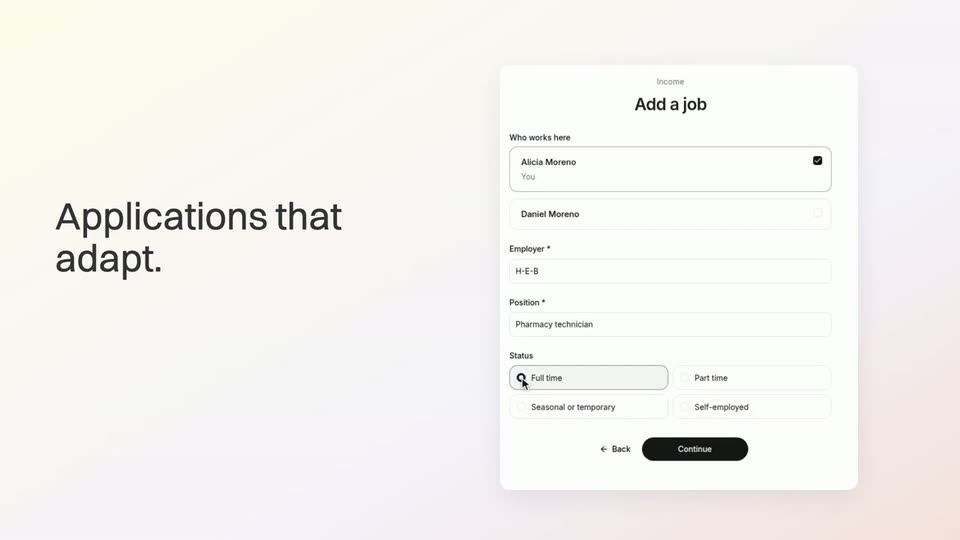
A white “Add a job” form sits on the right over a soft pink gradient while the headline “Applications that adapt.” holds the left. A cursor finishes typing “Pharmacy technician”, selects “Full time”, and moves to the Continue button.
On-screen text: “Applications that adapt.”
Techniques: Cursor demo
Camera: Static
A soft gradient background holds a large left headline beside a white product card. The card dissolves from a job application form into a signature form, and the headline fades from “Application started” to “Your forms. Signed online.”
On-screen text: “Application started”, “adapt.”, “Your forms. Signed online.”
Camera: Static
A flat document interface occupies the right half of the frame. A cursor clicks the signature field, then the Sign button, and the form scrolls up to the next section. A large black headline 'Your forms. Signed online.' stays static on the left.
On-screen text: “Your forms. Signed online.”
Techniques: Cursor demo
Camera: Static
A cream frame holds a static two-column layout. Left: the product's Tasks panel lists documents to upload with Upload buttons and a black 'Upload a new copy' button. Right: the headline 'Documents collected directly.' sits above the Tire Swing logo. Locked off, no motion.
On-screen text: “Documents collected directly.”
Camera: Static
A white earnings statement card sits centered on a soft peach gradient, with a dark headline at the top left. The document holds still, showing employee details, an earnings table and a net pay line.
On-screen text: “Read the page. Structure the details.”
Camera: Static
A dark gray headline sits top left over a soft gradient. A white earnings-statement card on the left stays put while a second white card slides in from the right, separated by a purple arrow, revealing extracted fields: employee, pay frequency, gross pay.
On-screen text: “Read the page. Structure the details.”
Techniques: Split screen
Camera: Pull out
A white checklist card on a soft pastel gradient lists three rows, Student eligibility, Paystubs and Bank statement, each with a status badge on the right. A dark headline sits above the card. The frame holds static with no motion.
On-screen text: “Check eligibility against every program.”
Camera: Static
A light dashboard UI shows a verification summary card on the left and Documents and Citations lists on the right. The view then zooms in on the two right-hand panels, enlarging their list items.
Techniques: UI zoom
Camera: Push in
Two white cards sit on a pale cream-to-lavender gradient. The left card, headed Documents, lists four uploaded files with dates; the right card, headed Citations, lists four legal references. Each row carries a small diagonal arrow. The frame holds still.
Camera: Static
A dashboard card lists upcoming recertifications with due dates, household names and ready-to-send statuses on a soft gradient background. A Send notices modal scales in over the card, dimming it, and shows three residents marked By email above a dark send button.
On-screen text: “Recertification outreach”
Camera: Static
A soft cream-to-pink gradient holds a dashboard: a headline top left, three white stat cards with large numbers, and a wider panel of purple progress bars. The layout stays static.
On-screen text: “From notice to response.”
Camera: Static
A white documents card on a soft cream-to-pink gradient, dissolving in from a previous dashboard. A purple progress bar fills under the Birth certificate row, then the row tints green with a Received checkmark while the counter drops from 5 left to 4 left.
On-screen text: “Documents collected directly.”
Camera: Static
A static cream card holds a left-aligned text block: a small gray eyebrow, a two-line dark headline, a thin horizontal rule, and a small gray subline. The frame stays locked with no motion for the full duration.
On-screen text: “FOR PROPERTY MANAGERS”, “Calculate subsidies.”, “Know what to claim from HUD.”, “Your forms. Your rules. Your programs.”
Camera: Static
A white dashboard card rests on a pale gradient background beneath the headline Know where every file stands. The card shows a large 45% figure and three property rows, each with a green and pink progress bar. The frame is locked off and holds still.
On-screen text: “Know where every file stands.”
Camera: Static
A static dashboard view on a soft cream-to-pink gradient. A dark headline sits above four white stat cards, with a line chart and a bar chart in two panels below.
On-screen text: “See the trends. Find the delays.”
Camera: Static
A set of keys rests on a kitchen island in an empty, sunlit apartment. In the background, a person walks in through a doorway carrying a cardboard box and sets it down on the floor.
On-screen text: “7”, “1”
Camera: Static
A blurred, light background holds a centered black logo lockup. A split circular mark sits beside the wordmark Tire Swing, with the tagline and a small URL stacked below. The frame stays locked and static throughout.
On-screen text: “Tire Swing”, “Built for affordable housing.”, “gettireswing.com”
Camera: Static