
1:02
Explore
The Token Company (YC W26) Launch Video
The Token Company · Mar 2026 · 0:37 · Code only · AI-annotated
- Length
- 0:37
- Scenes
- 20 · 1.9 s avg
- Product on screen
- 0:28
- Voiceover
- No
- Views
- 878 on YouTube
as of November 23, 2026
00:00:00 / 00:37:07
- Length
- 0:37
- Scenes
- 20 · 1.9 s avg
- Product on screen
- 0:28
- Voiceover
- No
- Views
- 878 on YouTube
as of November 23, 2026
The Token Company’s 0:37 launch film runs 20 scenes, about 1.9 s each. The product shows up at 0:28. There is no explicit call to action. The video is built as a problem montage: a flat vector typing scene and a dark chat UI feed documents into an AI, then a 3D dive into a 'blaa' token wall, counting cost and context-window meters, and red warning triangles dramatize the bloat. A masked type-on mission statement pivots to a blurred-in logo lockup. The style is a near-black charcoal field with off-white UI, one red accent for alarms and one blue for the cursor, a clean geometric sans, and a steady 132 BPM cut rhythm of 2 to 5 beat
No filming indicatedEstimated needs: 1 capture group — your screens or recordings · 1 official logo — reused across the film · 11 graphic passages — draw or supply · 1 3D passage — build or supply
Is this your launch? to your site or press kit.
More like this
1:44

Introducing Flow | Google’s New AI Filmmaking Tool
Google · AI · May 2025
1:16

Introducing Locata
Locata · Healthcare · Aug 2025
Similar soundtrack
Films whose music sounds like this one, voice left out
1:15
Sats Terminal - Sats Terminal is LIVE on the App Store 🟠 Buy Bitcoin, Borrow against
Sats Terminal · Orchestral
1:28

Ethos Space (YC S26)
Ethos Space Resources · Orchestral film score
2:45

Mania, Inc. - introducing ✨ the greatest AI company ever built to waste your time,
Mania · Cinematic orchestral trailer
The Token Company (YC W26) Launch Video, scene by scene
· 20 scenes as text
01 · Problem · 0:00–0:01
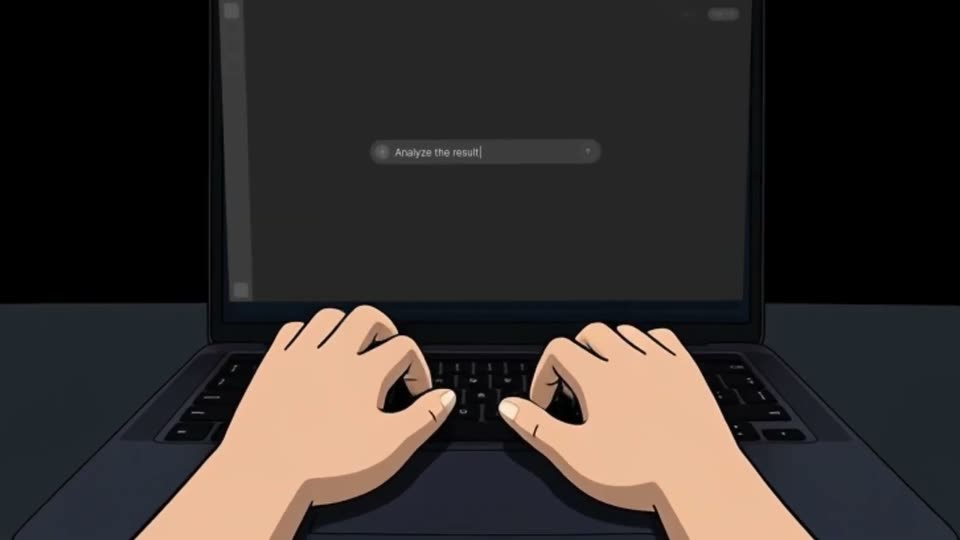
A flat vector illustration fades in on a dark table: two hands hover over a laptop, then begin typing as the screen brightens to show a search field filling with text. The view pushes in toward the keyboard.
Camera: Push in
02 · Problem · 0:01–0:02
On a dark field, a rounded command bar types the prompt about analyzing study results, then a white document icon with a hand cursor slides up from below and docks into the bar's left slot.
Techniques: Kinetic type, Cursor demo
Camera: Static
03 · Problem · 0:02–0:03
A dark interface centers a prompt card holding a study.pdf chip and a typed question. A mouse cursor rests on the round send button, which flips from an up arrow to a stop square while the chip's lock icon becomes a close X.
Techniques: Cursor demo
Camera: Static
04 · Problem · 0:03–0:09
A dark chat interface scrolls down from a study.pdf chip and prompt pill in the upper right to the input bar, where How about these documents? is typed and PDF chips attach above it; a cursor clicks send and the message appears as a bubble over skeleton response lines.
Techniques: UI zoom, Cursor demo
Camera: Pan
05 · Problem · 0:09–0:10
A dark prompt field on a near-black background holds the typed text 'Summarize all the research papers from last year' as a cursor blinks. The rounded field expands to two lines while a mouse pointer hovers by the up-arrow send button. Gray placeholder bars sit above.
Techniques: Cursor demo
Camera: Static
06 · Problem · 0:10–0:11
A dark list of gray placeholder bars scrolls upward in a locked-off frame as rounded prompt bubbles, including “Summarize all the research papers from last year”, rise into view from the bottom.
Camera: Static
07 · Problem · 0:11–0:14
A dark chat screen holds a question bubble over gray placeholder bars, then the view dives into the response, a 3D grid of the word blaa receding into the distance. The grid levels to fill the frame as a blue cursor with a Your AI tag slides in bottom right.
Techniques: UI zoom, 3D mockup, Kinetic type
Camera: Push in
08 · Problem · 0:14–0:15
A wall of gray repeated text fills the dark frame as a blue cursor tagged Your AI glides across it. A large white headline, what you actually need, slides up from the bottom edge.
On-screen text: “Your AI”, “what you actually need”
Techniques: Kinetic type
Camera: Pan
09 · Problem · 0:15–0:17
A dark field of repeated gray “blaa” text fills the frame. A large white headline “what you actually need” slides down from the top edge to center and holds, while a blue arrow cursor with a white “Your AI” tag drifts from the lower-left up to the upper-left.
On-screen text: “what you actually need”, “Your AI”
Techniques: Kinetic type
Camera: Pull out
10 · Problem · 0:17–0:19
A white horizontal bar expands left to right across a dark background, its LLM Cost figure counting up as the label slides right and off. A blue pointer labeled Your AI and the bold headline what you actually need slide out to the right, framed by gray bars.
On-screen text: “Your AI”, “what you actually need”, “LLM Cost”
Techniques: Kinetic type
Camera: Pan
11 · Problem · 0:19–0:21
White document icons drift upward across a dark field while a wavy white fill rises from the bottom. A centered counter ticks up from 169.1K to 445.7K beneath the label Context Window.
On-screen text: “Context Window”, “169.1K / 1M”, “261.3K / 1M”, “445.7K / 1M”
Techniques: Particles
Camera: Static
12 · Problem · 0:21–0:21
White document icons fall from a dark top section over a wavy line. Centered text shows 'Context Window' and a rapidly counting number.
On-screen text: “Context Window”, “553.3k / 1M”, “614.8k / 1M”, “691.6k / 1M”, “753.1k / 1M”
Techniques: Kinetic type, Particles
Camera: Static
13 · Problem · 0:21–0:24
A white frame holds a red Context Window label and a counter that ticks from 829.9K / 1M up past 2.2M / 1M, the figure turning red as it crosses 1M. Red warning triangle icons with exclamation marks multiply and swell across the frame, filling it by the end.
On-screen text: “Context Window”, “829.9K / 1M”, “1.0M / 1M”, “1.9M / 1M”, “2.2M / 1M”
Techniques: Kinetic type
Camera: Push in
14 · Problem · 0:24–0:25
A flat vector illustration of two hands typing on a dark laptop set on a black desk. The screen shows a dim login form with two rounded input fields. The fingers tap the keys in a short loop while a label and a figure appear beside the device.
On-screen text: “Context Window”, “2.2M/1M”
Techniques: Kinetic type
Camera: Push in
15 · Problem · 0:25–0:26
A dark screen packed with rows of gray placeholder text scales up, then a white rounded card slides in from the left while a cost label and figure appear on the right.
On-screen text: “LLM Cost”, “$2,922.00”
Techniques: Kinetic type
Camera: Static
16 · Problem · 0:26–0:27
White document icons float in a dark upper section above a wavy line dividing the frame. Centered text displays “Context Window” over a large number that rapidly counts up from 415.0K to 737.7K / 1M.
On-screen text: “Context Window”, “415.0K / 1M”, “737.7K / 1M”
Techniques: Kinetic type
Camera: Static
17 · Problem · 0:27–0:28
A white field of red warning triangles drifts slowly while a red counter at the top ticks from 1.9M to 2.0M beneath the label Context Window.
On-screen text: “Context Window”, “1.9M / 1M”, “2.0M / 1M”
Camera: Static
18 · Product intro · 0:28–0:29
A dark diamond-patterned background with a soft light gradient at the top. A line of white text is revealed left to right by a mask, reading “We set out to compress LLM inputs”, while a small “Context Window” label slides in.
On-screen text: “Context Window”, “We set out to compress LLM inputs”
Techniques: Masking
Camera: Static
19 · Product intro · 0:29–0:34
White text on a dark diamond-patterned background. The line about compressing LLM inputs fills in word by word, then a second two-line statement about improved accuracy types in the same way, centered and locked off.
On-screen text: “We set out to compress LLM inputs”, “then we realized it improved”, “the accuracy”
Techniques: Kinetic type
Camera: Static
20 · Outro · 0:34–0:37
A white square-and-rectangle logo lockup sharpens into focus on a dark diamond-patterned field, the wordmark resolving from a blurred, condensed state. Below it, the tagline words slide into a single centered line.
On-screen text: “THE TOKEN COMPANY”, “Intelligent compression for context bloat”
Techniques: Kinetic type
Camera: Static