
0:30

Introducing Oura Ring 5: The World’s Smallest Smart Ring
Oura · Hardware · May 2026
Teamble · Feb 2022 · 0:29 · Full motion · AI-annotated
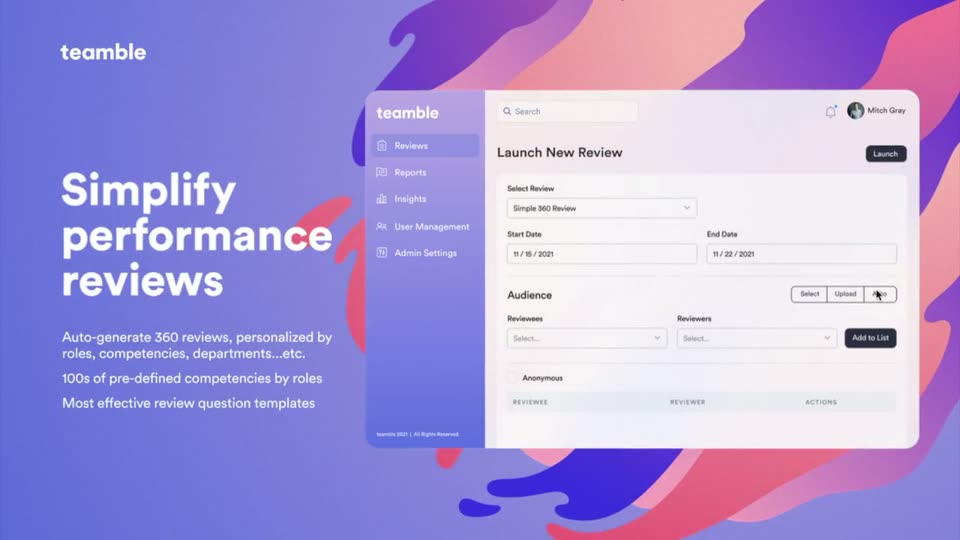
Teamble’s 0:29 launch film runs 7 scenes, about 4.2 s each. The product is on screen from the first frame and 1 feature is revealed. There is no explicit call to action. The video is a short SaaS promo built on a left-headline, right-mockup split, where a static welcome slide crossfades into one feature demo and a cursor walks through the app while the headline stays locked on the left. Pacing is slow and steady with crossfades between UI states, and the signature move is the flat interface card floating over a drifting abstract paint-stroke background.
Is this your launch? to your site or press kit.
Oura · Hardware · May 2026
Retool · Developer tools · Jul 2023
Topograph · Nov 2026
A white lowercase t logo mark sits centered on a blue gradient background that fades from deep blue at the top left to cyan at the bottom right. The shot is static and locked off, with no motion or camera movement.
Camera: Static
A flat teamble dashboard mockup sits right over a purple gradient with pink blobs, beside a large white and purple headline 'Welcome to the teamble People Management Suite'. The static slide then crossfades to 'Simplify performance reviews' with a templates grid.
On-screen text: “Welcome to the teamble”, “People Management Suite”, “Manage your organization's feedback, performance reviews, surveys, reports, and people insights”, “Simplify performance reviews”, “Auto-generate 360 reviews, personalized by roles, competencies, departments...etc.”, “100s of pre-defined competencies by roles”, “Most effective review question templates”
Camera: Static
A flat teamble app window on a purple gradient with abstract shapes: a cursor clicks the Simple 360 Review card, the panel switches to a Launch New Review form with a reviewer table, then the cursor clicks Launch and the window fades. A white headline and bullets sit left.
On-screen text: “Simplify performance reviews”, “Auto-generate 360 reviews, personalized by roles, competencies, departments...etc.”, “100s of pre-defined competencies by roles”, “Most effective review question templates”
Techniques: Cursor demo
Camera: Static
A purple gradient slide with abstract pink and orange paint strokes shows the white headline “Simplify performance reviews” and three lines of body copy on the left. A white messaging notification card fades in on the right as a cursor drifts down toward its button.
On-screen text: “Simplify performance reviews”, “Auto-generate 360 reviews, personalized by roles, competencies, departments...etc.”, “100s of pre-defined competencies by roles”, “Most effective review question templates”
Techniques: Cursor demo
Camera: Static
A purple gradient backdrop with drifting pink and magenta brushstrokes. A Slack-style notification card fades out at right while a flat Teamble app window with sidebar and review list fades in and rises to center. A white headline and three bullet lines sit static on the left.
On-screen text: “Simplify performance reviews”, “Auto-generate 360 reviews, personalized by roles, competencies, departments...etc.”, “100s of pre-defined competencies by roles”, “Most effective review question templates”
Techniques: Parallax
Camera: Static
A Teamble review form window fades in over an abstract purple and coral background, beside the headline and three bullet lines on the left. A cursor glides from the rating options down to the Submit button, then the whole window fades out.
On-screen text: “Simplify performance reviews”, “Auto-generate 360 reviews, personalized by roles, competencies, departments...etc.”, “100s of pre-defined competencies by roles”, “Most effective review question templates”
Techniques: Cursor demo
Camera: Static
The white lowercase teamble wordmark sits centered on a blue-to-pink gradient, with the tagline locked beneath it. The logo eases into place with a small scale-up while the tagline stays still, a calm sign-off.
On-screen text: “where great teams are built”
Techniques: Kinetic type
Camera: Static