1:13
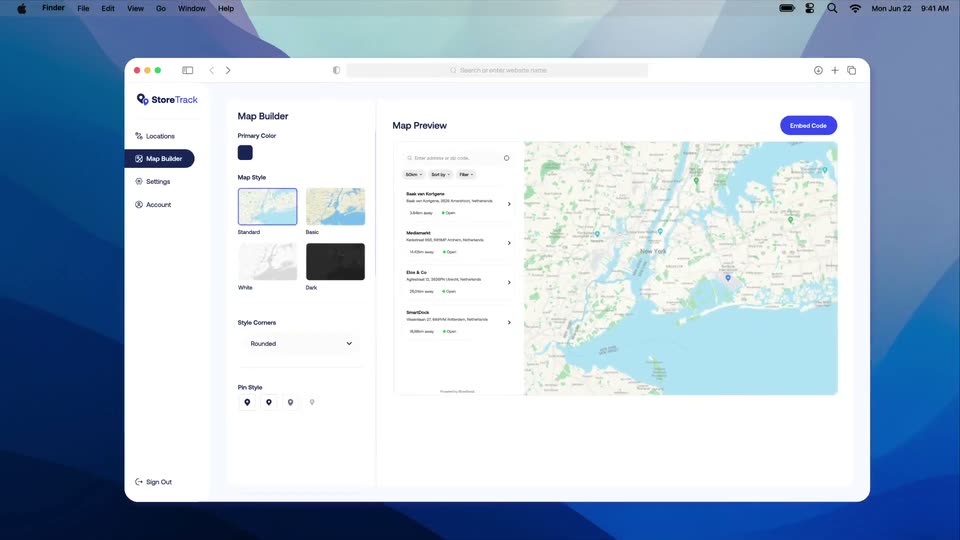

StoreTrack – Simplify Store Discovery & Location Management
StoreTrack · Jun 2026
Synthesia · Sep 2026 · 0:49 · AI-annotated
Synthesia’s 0:49 launch film runs 21 scenes, about 2.3 s each. The product is on screen from the first frame and 2 features are revealed. The call to action lands at 0:40 (82% in). The video opens with a live-action brand bumper, then moves to a clean white stage where 3D-tilted cards and typed text carry the pitch, before settling into a flat interface tour that demos two prompt-driven features in sequence. Pacing is steady at about two and a half cuts per minute, with the signature moves being cards that scale from close-up to full view and fly off edge, text that types then shrinks into a UI field, and a soft gradient wipe that closes the piece.
Is this your launch? to your site or press kit.
StoreTrack · Jun 2026
Canva · Design · Aug 2024
Opti · Oct 2026
A woman on a brown leather sofa in a sunlit living room closes her laptop and leans toward the camera, ending in a wide-angle close-up as she reaches for the lens. The white words Introducing, then Assistant with a hexagon mark, appear centered over her.
On-screen text: “AI GENERATED”, “Introducing”, “Assistant”
Techniques: Kinetic type
Camera: Static
A freckled woman in glasses and a yellow sweater leans toward a wide-angle camera in a living room, smiling, with a white Assistant wordmark over the shot. The background then becomes colorful wavy shapes and she is framed in a white border.
On-screen text: “Assistant”, “AI GENERATED”
Techniques: Masking
Camera: Pull out
A white onboarding card scales from a close-up to a full view. A smiling woman with glasses fills the right video panel over a colorful leafy background, as 'Welcome to the team' and 'Onboarding' slide into the left panel.
Camera: Pull out
A 3D-tilted slide card showing a smiling woman and 'Welcome to the team' rotates and flies off the left edge, blurring, while smaller cards sit at the bottom. Gray monospace text 'What if creating a video' appears centered on white.
On-screen text: “What if creating a video”
Techniques: 3D mockup
Camera: Pull out
A ring of 3D video thumbnail cards drifts around the edges of a white frame while three black phrases scale in at center. The final line ends with a typing caret and a soft rounded pill appears behind it.
On-screen text: “What if creating a video”, “was just like having”, “a conversation?”
Techniques: Kinetic type, 3D mockup
Camera: Push in
A white screen shows a text input line. A light blue rounded chip holding the dark text “a conversation?” and a large text cursor scales away, then “I want to make an” types in black with a thin caret and fades to light gray.
On-screen text: “a conversation?”, “I want to make an”
Techniques: Kinetic type
Camera: Static
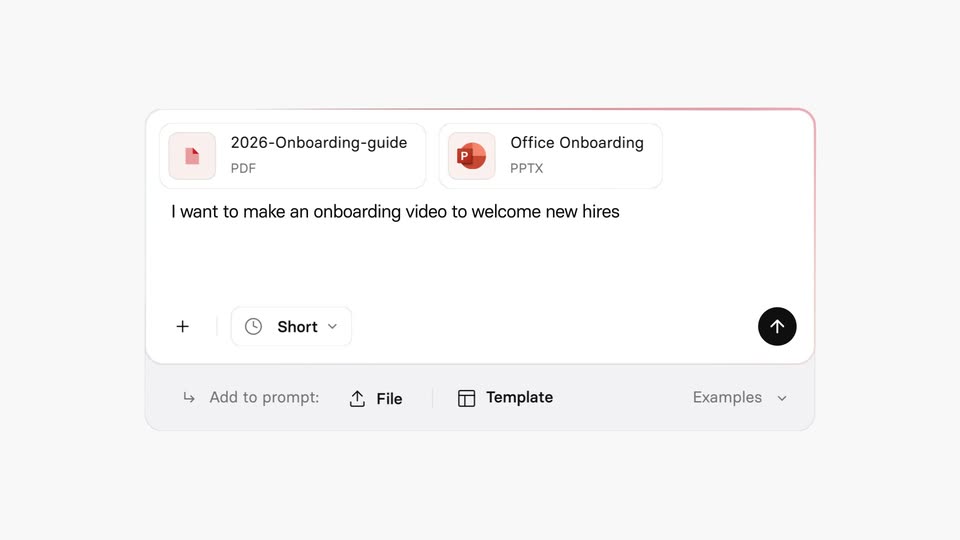
A sentence types out in large dark type between two thin pink lines, then shrinks into the prompt field of an input card that fades in behind it. Two file chips drop in from a waving hand icon, and a black circular cursor moves onto the send button.
On-screen text: “I want to make an onboarding video to welcome new hires”
Techniques: Kinetic type, Morph, Cursor demo
Camera: Pull out
A white product view fades in: a step list on the left advances as a hexagon icon marks the active line, while a 3D-tilted panel on the right stacks document cards that turn into a webpage mockup with photos. The active label scales in as each step completes.
Techniques: 3D mockup
Camera: Pan
A flat interface walks a generation workflow: a task list and a grid of photos fill in, the view shifts to the prompt, design cards and a numbered script, then a cursor clicks the blue Generate video button, opening an empty Interactive panel.
Techniques: Cursor demo
Camera: Pan
A tilted 3D stack of interface cards. The top card shows 'Onboarding Roleplay' beside a portrait of a woman in a brown blazer; a second panel slides up to reveal a video call with Joanna and the prompt 'A part fails inspection but looks fine to you. What now?'
Techniques: 3D mockup, UI zoom
Camera: Pan
A 3D stack of tilted product screens glides downward: a video call with Joanna, a role-play question card with three answer rows, and a reporting dashboard with a worker photo. The camera pulls back from the top call screen to reveal the lower cards.
Techniques: 3D mockup
Camera: Pull out
A light grid of product cards scrolls vertically: video thumbnails of a smiling woman, a blue Operator Onboarding title card, a bar chart, and a dark Reporting a False Reject card. The chart percentage counts up while a floating card with blurred cycling words drifts across the center.
Techniques: Parallax
Camera: Pan
A close-up of a video card and text zooms out to reveal a full interface with a list of frames and a right sidebar. A cursor moves down and clicks a button next to the second frame.
Techniques: UI zoom, Cursor demo
Camera: Pull out
A blurred assistant chat fades to a plain cream background as a rounded card holding three indigo icons and a line of text slides to the center, then holds.
Techniques: UI zoom
Camera: Push in
A pale gray prompt card with three small blue icons and a task sentence sits at the top of a white interface. Below it, a gray status line and a darker confirmation message appear. The whole view drifts slowly upward, settling the text into place.
Camera: Static
A light chat interface shows a prompt bubble and a status line above a blue preview panel. Inside the panel, thin white curves draw outward from a center vertical line over a faint grid, with three dark rounded rectangles along the bottom. The text lines slide into position.
Camera: Static
A tight crop of a chat screen zooms out to reveal a blue card holding three charts, The scale, The customers, The growth, joined by white branching lines. The camera then pans right across the layout while an assistant reply types out in the chat panel.
On-screen text: “Create a motion graphic of our scale and”, “growth, using this reference”, “Scene created >”, “Done! I've created the motion”, “graphic asset for your video”
Techniques: UI zoom, Kinetic type
Camera: Push in
A product editor interface resolves from a ghosted double exposure into a crisp view as a pale yellow low-poly shape sweeps across the left edge. The canvas holds three dark chart cards titled The scale, The customers and The growth.
Camera: Pull out
A soft yellow and pink gradient expands over a product chat screen, wiping it away until only a plain gradient field remains. The centered headline holds still throughout the move.
On-screen text: “One prompt. Unlimited possibilities.”
Techniques: Masking
Camera: Static
A cream card holds the tagline, then the Assistant wordmark with a dark scalloped badge scales in at center. On white, the call to action Try it today appears and fades out word by word.
On-screen text: “One prompt. Unlimited possibilities.”, “Assistant”, “Try it today”
Techniques: Kinetic type
Camera: Static
A centered lowercase wordmark “synthesia” in dark navy bold sans rests on a plain off-white field, held static as the closing sign-off, with a short tagline settling in beneath it.
On-screen text: “synthesia”, “Try it today”
Camera: Static