1:52
Ample's YC F26 Launch Video
Ample Computer · Nov 2026
Street · Oct 2024 · 0:38 · AI-annotated
Street’s 0:38 launch film runs 20 scenes, about 1.9 s each. The product is on screen from the first frame, with social proof. The call to action lands at 0:32 (85% in), over a voiceover. The video argues in fast beats: open with the name and an award, knock the old CRM with word cards and a 1-star review card, then flip the same card to 5 stars for the new promise and close on a demo booking. Signature moves are single-word cuts on black and white, flat placeholder-line cards, and 3D device renders on flat lavender fields.
Is this your launch? to your site or press kit.
Ample Computer · Nov 2026
Ample Computer · Nov 2026
Assuryn · Jul 2026
A silver laptop rises from the bottom edge into the center of a plain pale-blue background, its screen showing a CRM contact page with the name Lise Smith, blue action buttons and a list of enquiry rows.
Techniques: 3D mockup
Camera: Static
A silver laptop and a black phone stand side by side on a plain light background, both showing the STREET CRM interface. The laptop displays a viewing request page while the phone shows a property listing with a house photo. The frame is locked-off and static.
Techniques: 3D mockup
Camera: Static
A laptop and phone mockup in 3D perspective sit on a pale background, showing the Street interface. A fast horizontal whip blurs the frame, revealing two flat cards with photos and award text.
On-screen text: “Acoes etasts”
Techniques: 3D mockup
Camera: Pan
A white news-article card sits static on a pale lavender background, its left half holding a blue 'INDUSTRY NEWS' tag, black headline, two gold badges and gray lines, its right half a photo of three people holding award plaques on stage.
On-screen text: “INDUSTRY NEWS”, “Street.co.uk Takes The Win At EA Masters.”
Camera: Static
A plain white frame holds the word “How?” centered in large black type. The word snaps in during the first frames, then stays locked on a static frame.
On-screen text: “How?”
Techniques: Kinetic type
Camera: Static
A black screen holds the white word “How?” centered, then cuts to the smaller word “well” centered. The frame stays locked-off with no camera movement and no motion on the type.
On-screen text: “How?”, “well”
Techniques: Kinetic type
Camera: Static
A man in a light blue shirt sits at a wooden desk, thumbs typing on a green phone. He looks down at the screen, with blurred office windows and a notebook beside him.
Camera: Static
A beige 3D retro desktop computer sits on a blue backdrop; its monitor shows a login window that flips to a one-star review card reading Unhelpful. The camera pulls back as a flat sidebar and the same review card slide in from the left beside the device.
Techniques: 3D mockup
Camera: Static
A flat CRM mockup sits on a pale gray field of faint contour lines. The sidebar highlights Reviews, and the main panel swaps a large serif headline through negative titles above a one-star rating, in step with the voiceover.
On-screen text: “Unhelpful”, “Badly Designed”, “Inadequate”
Techniques: Kinetic type
Camera: Static
Black screen. White words pop in at the center one by one, each replacing the last: but, then what, then if. The type changes size and weight with each word, keeping pace with the spoken line.
On-screen text: “but”, “what”, “if”
Techniques: Kinetic type
Camera: Static
A laptop on a white desk, a leafy plant blurred in the background, displays the STREET lettings application page. A grid of status cards fills the screen while a cursor hovers over the Referencing card. The shot is static with soft natural window light.
Techniques: Cursor demo
Camera: Static
Small black lowercase words swap in the center of a plain white background. The word “that” fades out as “with you” takes its place, one phrase at a time.
On-screen text: “that”, “with you”
Techniques: Kinetic type
Camera: Static
Black screen, locked-off frame. White bold phrases appear one after another in sync with the voiceover: “with you”, then “rather” scaling up, then “against you”, each holding briefly before cutting to black.
On-screen text: “with you”, “rather”, “against you”
Techniques: Kinetic type
Camera: Static
A single bold black word sits centered on a plain white field. It reads “as”, then swaps in place to “that” about a third of the way through the clip, holding until the end.
On-screen text: “as”, “that”
Techniques: Kinetic type
Camera: Static
A flat review-card interface floats on a pale background with gray wavy contour lines. The highlighted headline cycles through “Refreshing”, “Forward Thinking”, and “Redefines Estate Agency” above five yellow stars, while the sidebar keeps “Reviews” selected. The card fades out to a plain background.
On-screen text: “Refreshing”, “Forward Thinking”, “Redefines Estate Agency”
Techniques: Kinetic type
Camera: Static
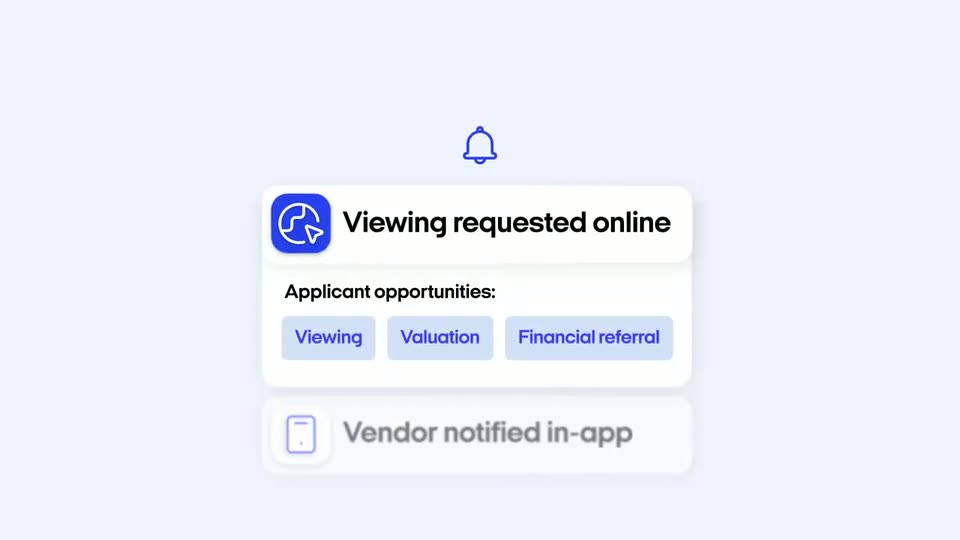
A blue outline bell sits above two white notification cards, globe and phone icons, on a pale lavender field. The first card highlights and expands to show three tags, then collapses as the second highlights.
On-screen text: “Viewing requested online”, “Vendor notified in-app”
Techniques: Kinetic type
Camera: Static
A flat phone mockup of the Street.co.uk agent app sits on a light lavender field. Two white notification cards slide in from the right and resolve from blur to sharp, the second showing a viewing request with Decline and Accept buttons.
Camera: Static
A white bold sans-serif line reading “a CRM that's” sits centered on a black background, locked off and completely still, then the frame cuts to black as the voiceover continues.
On-screen text: “a CRM that's”
Camera: Static
A plain white frame holds the SIREET_CO UK wordmark, a thin black sans with a small stacked CO UK suffix, centered and locked off for the full shot. The lowercase tagline a CRM that's is present in the frame.
On-screen text: “a CRM that's”
Camera: Static
A black sign-off frame holds the white headline Book a demo today on the left above the STREET.CO logo and two gold award badges, while a 3D mockup of a desktop monitor and a smartphone showing the app sits on the right with a soft reflection. The whole composition fades to black at the end.
On-screen text: “Book a demo today”
Techniques: 3D mockup
Camera: Static