1:47


Sam Gorman - Today we're launching Rivet, a tool that explores dozens of interface
Rivet · B2B · Jul 2026
Strawberry · Oct 2025 · 1:42 · AI-annotated
Strawberry’s 1:42 launch film runs 43 scenes, about 2.4 s each. The product is on screen from the first frame and 6 features are revealed, with social proof. The call to action lands at 1:21 (80% in), over a voiceover. The video alternates a live-action founder in a sunlit loft with flat UI mockups and 3D blob mascots, structuring three use-case demos (outreach, recruiting, invoicing) each opened by a short pain line and a named companion. Signature moves include the logo blooming from soft orange blobs, 3D characters stepping in front of blurred interfaces, and cursor-driven interactions on a warm cream palette.
Is this your launch? to your site or press kit.
Rivet · B2B · Jul 2026
Notion · Productivity · Feb 2026
A young man in a black sweater sits centered in a bright loft office, speaking to the camera. The background stays softly out of focus, showing tall windows, potted plants, and a red chair on the left.
Camera: Static
On a white field, soft orange blobs contract into small dots arranged in a ring around a central orange square, with a yellow square forming above it.
Techniques: Morph
Camera: Static
On a plain off-white background, the Strawberry logo lockup (red dot cluster with a yellow square plus a serif wordmark) scales down from a large blurred state to a small sharp one. Below it, the tagline fades in from a soft blur to a crisp line, then the whole composition holds still.
On-screen text: “Strawberry”, “The self-driving browser”
Camera: Static
On a white background, a diamond of red dots with a yellow square morphs into three cartoon characters, a teal cube, a yellow blob, and a green leaf. A browser window with an address bar and Chat button then frames them as they stand on a soft shadow.
On-screen text: “Strawberry contains”
Techniques: Kinetic type, Morph
Camera: Static
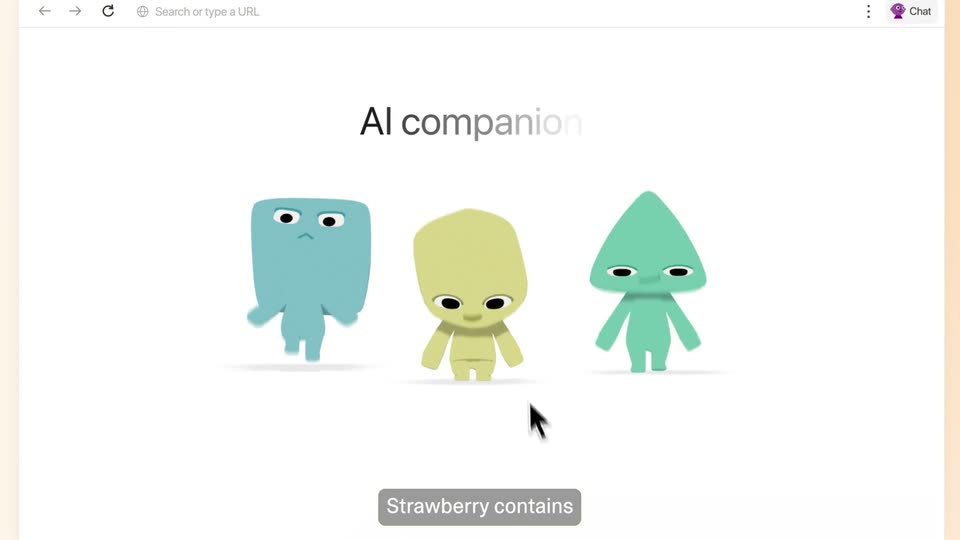
A flat browser window on a cream background shows the heading AI companions above three cartoon mascots, blue, yellow and green. The mascots fade in and change pose, the yellow one waving and rising over the heading, as the window drifts up. A gray caption bar carries the voiceover line.
On-screen text: “Strawberry contains”, “that can click and type”
Camera: Pull out
A flat browser window shows a message field that types out a sentence as several colored cursors drift around the page. A blue cursor clicks the Send button, which flips to a checkmark, while gray caption pills swap at the bottom.
On-screen text: “directly inside your tabs”, “to automate your grunt work.”, “I use Strawberry.”
Techniques: Cursor demo
Camera: Pull out
A flat browser window on a peach background shows a Message panel and a black checkmark button while four colored cursors drift; a black cursor moves up to the LinkedIn tab. A gray pill caption reads “I use Strawberry.” at the bottom.
On-screen text: “I use Strawberry.”
Techniques: Cursor demo
Camera: Static
A flat browser mockup shows LinkedIn, where a fan of stacked chat windows shuffles, swapping contact names and titles. The view then zooms into the front window as a greeting is typed, ending with the words ugh, too formal.
On-screen text: “I used to spend more time”, “finding leads”, “than actually closing them,”, “so I created an AI companion”
Techniques: Cursor demo, UI zoom
Camera: Push in
A rounded teal 3D character with two eyes and a small smile walks across the foreground, passing in front of a blurred LinkedIn message window showing a contact card and a Send button. A subtitle at the bottom reads that does outreach for me.
On-screen text: “that does outreach for me.”
Camera: Pull out
A teal 3D robot with a square head stands at right before a blurred browser window. A prompt bar types a message, then a mouse cursor clicks the send button as the robot shrinks away. Gray captions read “Prospect Peter.” and “Get to work, Peter!.”
On-screen text: “Prospect Peter.”, “Get to work, Peter!”
Techniques: 3D mockup, Cursor demo
Camera: Pull out
A tilted stack of LinkedIn chat windows sits in 3D perspective. The front window shows a profile and a message typing out, with a teal Prospect Peter tag and Send button. The view zooms in and flattens as a cursor rests at the right edge.
Techniques: 3D mockup, UI zoom
Camera: Push in
A tilted LinkedIn interface in 3D perspective shows stacked message windows cycling through five prospects, each swapping in a new name, title and pitch message. A green Prospect Peter tag fades out while a cursor hovers at the right edge.
On-screen text: “Prospect Peter”
Techniques: 3D mockup
Camera: Static
A tilted browser window floats on a soft blue gradient, showing a LinkedIn page with a chat card in front. The card rotates in 3D, swapping the recipient from Oladimeji to Charlotte to Emma while the outreach message holds. A cursor drifts from the card up to the tab bar.
Techniques: 3D mockup, Cursor demo
Camera: Static
A browser window opens on a candidate spreadsheet as a translucent LinkedIn profile and post composer dissolve away, leaving the sheet fully visible under the cursor.
Camera: Static
A light spreadsheet with candidate columns sits behind two floating profile cards. The cards then multiply and fan out across the frame, scattering many candidate cards over the sheet.
On-screen text: “In the past,”
Camera: Static
A cluster of candidate profile cards, each with a photo, name, role and hourly rate, floats and drifts across a peach gradient, layered over a faint calendar and app icons, while a cursor glides between them and a caption reads “I spent days”.
On-screen text: “I spent days”
Techniques: Cursor demo, Parallax
Camera: Pull out
A wide field of overlapping profile cards drifts across a peach background, each card showing a headshot, role tag, rate and location, while a cursor hovers over the Invite buttons. A gray caption pill with white text appears at the bottom center.
On-screen text: “hundreds of profiles”, “when recruiting.”
Techniques: Cursor demo
Camera: Pull out
A green 3D cat mascot with large eyes and a smile slides into focus at center, its body and face sharpening from a heavy blur. Behind it, out-of-focus candidate profile cards with avatars fill the frame. A bottom caption switches from 'when recruiting.' to 'Now, Recruiter Ryan'.
On-screen text: “when recruiting.”, “Now, Recruiter Ryan”
Camera: Pull out
A green 3D alien mascot stands before a blurred wall of chat cards, focus sharpening on it. A chat box types a prompt, then a cursor clicks the send button. The mascot shrinks away, leaving the cards behind as the caption cheers Ryan on.
On-screen text: “Now, Recruiter Ryan”, “finds the best leads for me.”, “Go get em, Ryan!”
Techniques: Cursor demo
Camera: Pull out
A scattered field of recruiter profile cards on a peach background pulls from blur into focus. A cursor hovers over one card, a green Recruiter Ryan tag pops in beside it, and a gray caption with white text sits at the bottom.
On-screen text: “Go get 'em, Ryan!”
Techniques: Cursor demo
Camera: Push in
Candidate profile cards with photos, roles and rates float in a 3D perspective field, drifting past the camera at different depths. A green tooltip reading Recruiter Ryan with a cursor arrow holds near center as the cards parallax around it.
Techniques: 3D mockup, Parallax
Camera: Push in
A field of candidate profile cards floats in 3D perspective on a pale green background, each card showing a headshot, name, role tag, rate and city. A green pointer callout marks the Recruiter Ryan card. The view pans so the cards drift past at different depths.
Techniques: 3D mockup, Parallax
Camera: Push in
Candidate profile cards with photos, rates and tags float in 3D perspective over a faint spreadsheet grid. The view dollies in as the cards scale up and drift toward the viewer at different depths, a green Recruiter Ryan label and a cursor arrow sit on the central card.
Techniques: 3D mockup, Parallax
Camera: Push in
A Google Sheets spreadsheet titled List of candidates fills the frame, with a green Recruiter Ryan label and a cluster of small avatar photos drifting across the rows. The view zooms out to reveal the browser window, where a black cursor clicks the Mail tab at the top.
On-screen text: “Recruiter Ryan”
Techniques: UI zoom, Cursor demo
Camera: Pull out
A spreadsheet of candidates fades out over a Gmail inbox in a browser window. A cursor scrolls down the list of messages while caption pills appear at the bottom of the frame.
On-screen text: “Every month,”, “I need to tediously”, “search my inbox”
Techniques: Cursor demo
Camera: Push in
A smiling green alien with big black eyes and a hand on its hip enters from the right and settles in front of a Gmail inbox screen. The character is semi-transparent over the interface. A gray caption box reading 'for all the bills' sits at the bottom.
On-screen text: “for all the bills”
Camera: Pull out
A green 3D alien mascot stands left of a blurred task list panel tilted in 3D perspective. A foreground chat bar types 'Find all the invoices an' while a cursor blinks, and a caption reads 'that are due.'
On-screen text: “that are due.”
Techniques: 3D mockup, Cursor demo
Camera: Pull out
A smiling green mascot stands left of a blurred app list. A white prompt card types “Find all the invoices and add them to quickbooks”, then a cursor clicks the green send arrow. A gray caption below reads “Today, Invoice Ivy”, then “does this grunt work”.
On-screen text: “Today, Invoice Ivy”, “does this grunt work”
Techniques: Kinetic type, Cursor demo
Camera: Static
A pale yellow cartoon alien stands left of a tilted 3D browser window showing a Gmail inbox, above a chat box typed with the invoice task. The window rotates flat and zooms to fill the frame as the alien slides out. A gray pill caption sits at the bottom.
On-screen text: “does this grunt work”, “for me!”
Techniques: 3D mockup, UI zoom
Camera: Push in
A full-screen mail inbox view. The email list crossfades and slides upward as rows reorder, while the sidebar and top toolbar hold still. A cursor drifts down the right edge, and the list settles into a clean two-column layout.
Camera: Push in
A white email inbox list scrolls gently downward while a stack of PDF invoice chips is dragged across the rows, tagged by a yellow highlighter label reading Invoice Inv.
On-screen text: “Invoice Inv”
Camera: Pan
A QuickBooks invoice table fills a tilted browser window. A gray drop-zone dialog with a PDF icon and green logo scales up at center, covering a fanned stack of invoice pages and a yellow Invoice.ly button. A cursor rests on the stack; small text lines the right edge.
Techniques: Cursor demo
Camera: Pull out
Opens on a QuickBooks invoice drop zone with floating cards, then cuts to a man in a black sweatshirt seated in a sunlit loft, gesturing to camera while white subtitles appear at the bottom.
On-screen text: “With Strawberry,”, “you're always”, “in the driver's seat.”
Camera: Push in
A candidate spreadsheet sits open as a second sheet slides in from the left, then a green chat card with a round mascot appears at center, asking 'Are we open to remote work?' with Yes and No options. A gray caption 'If your companions' holds at the bottom.
On-screen text: “If your companions”
Camera: Push in
A white dialog card with a green mascot asks a question over a blurred spreadsheet. The cursor clicks Yes, then the card shrinks and vanishes, revealing the full candidate spreadsheet with a Recruiter Ryan tag.
On-screen text: “ever get stuck,”, “they'll simply ask you for input.”
Techniques: Cursor demo
Camera: Pull out
A flat Create Companion form fills the screen. A cursor types a name and a sales instruction, then clicks to add Gmail, Notion and Zapier icons. The view zooms into the Apps row. Gray caption pills at the bottom read the line, and the scene crossfades out.
On-screen text: “You can create a”, “companion for any task”, “in less than five minutes,”, “and there are dozens”, “of pre-made companions”, “to choose from.”
Techniques: Cursor demo, UI zoom
Camera: Push in
The view opens zoomed into a grid of six companion cards, each pairing a 3D mascot with a name, blurb and Chat button. It then pulls back to reveal the full browser window and tab bar, while a 'to choose from.' caption sits at the bottom.
On-screen text: “to choose from.”
Techniques: UI zoom
Camera: Pull out
A browser view of a companion grid, each card pairing a colored 3D blob with a name and chat button. The frame zooms into the grid, blurring it, while a caption 'We've raised' fades in at the bottom.
On-screen text: “We've raised”
Techniques: UI zoom
Camera: Pan
A young man in a black sweatshirt sits in a sunlit loft with plants and tall windows, speaking and gesturing. A large white $6M pops in on the left, then Backed by with the General Catalyst and EQT Ventures logos appear on the right and fade out.
On-screen text: “We've raised”, “$6M”, “$6 million”, “Backed by”, “GENERAL CATALYST”, “from General Catalyst”, “EQT VENTURES”, “and EQT Ventures,”, “and are on a mission”, “to help modern workers”
Camera: Static
A young man in a black sweatshirt sits in a bright room with floor-to-ceiling windows, potted plants, and a maroon chair. He speaks to the camera, gesturing with one hand. White subtitle captions change at the bottom of the frame.
On-screen text: “love what they do.”, “With Strawberry,”, “you can focus on your best work”, “and skip the rest.”, “We're currently in closed”
Camera: Static
A man in a black sweatshirt sits on a wooden floor in a bright office, talking and gesturing while subtitles caption his lines. A white progress bar with a counting number and a fixed 10,000 label appears, then a white flash ends the shot.
On-screen text: “We're currently in closed”, “beta, but today”, “we're opening up the doors”, “1, 10,000”, “4,123”, “5,873”, “for 10,000 new users!”, “6,599”, “7,507”, “7,960”
Camera: Static
A blurred, washed-out shot of a person at a table fades to a peach-to-white gradient. The orange dot-cluster logo and the URL hold centered and still in a locked-off frame.
On-screen text: “strawberrybrowser.com”
Camera: Static
A cream background holds a small logo of red dots with a yellow-green square on top, centered above the black URL. The frame stays locked and static for the whole clip.
On-screen text: “strawberrybrowser.com”
Camera: Static