0:36
Explore
Type It, Create It – Build with AI Tools from Squarespace
Squarespace · Oct 2026 · 0:15 · AI-annotated
- Length
- 0:15
- Scenes
- 5 · 3.0 s avg
- Product on screen
- 0:00
- Features shown
- 1
- Voiceover
- Yes
- Views
- 24M on YouTube
as of November 23, 2026
00:00:00 / 00:15:01
- Length
- 0:15
- Scenes
- 5 · 3.0 s avg
- Product on screen
- 0:00
- Features shown
- 1
- Voiceover
- Yes
- Views
- 24M on YouTube
as of November 23, 2026
Squarespace’s 0:15 launch film runs 5 scenes, about 3.0 s each. The product is on screen from the first frame and 1 feature is revealed. There is no explicit call to action; a voiceover carries the film. The video is built as a single prompt to result arc: a typed sentence, a builder morph, a 3D orbit of the laptop, the artist revealed in his studio, and a painted tagline card. Pacing is slow and deliberate at about 12 cuts per minute, with centered white type on a pale seamless set and the teal and red brushstrokes as the only color accent.
Footage neededEstimated needs: 1 official logo — reused across the film · 3 filmed passages — shoot, supply or replace · 1 graphic passage — draw or supply · 1 3D passage — build or supply
Is this your launch? to your site or press kit.
More like this



Similar soundtrack
Films whose music sounds like this one, voice left out
0:41
Still Iconic I Beats Studio Pro
Beats Studio Pro · Cinematic, electronic, and hip-hop inspired
3:31

The NEW Email Editor is here!
Resend · Upbeat electronic
0:56

Best Explainer Video for SaaS Platform | Peko
Peko · Modern electronic
Type It, Create It – Build with AI Tools from Squarespace, scene by scene
· 5 scenes as text
01 · Product intro · 0:00–0:04
A man in a white tee and dark cap stands in a pale gray studio holding a laptop. The Squarespace logo holds center, then fades as large white text types out “Create a website for my art studio.” with a blinking cursor.
On-screen text: “SQUARESPACE”, “Create a website”, “for my art studio.”
Techniques: Kinetic type
Camera: Static
02 · Feature reveal · 0:04–0:08
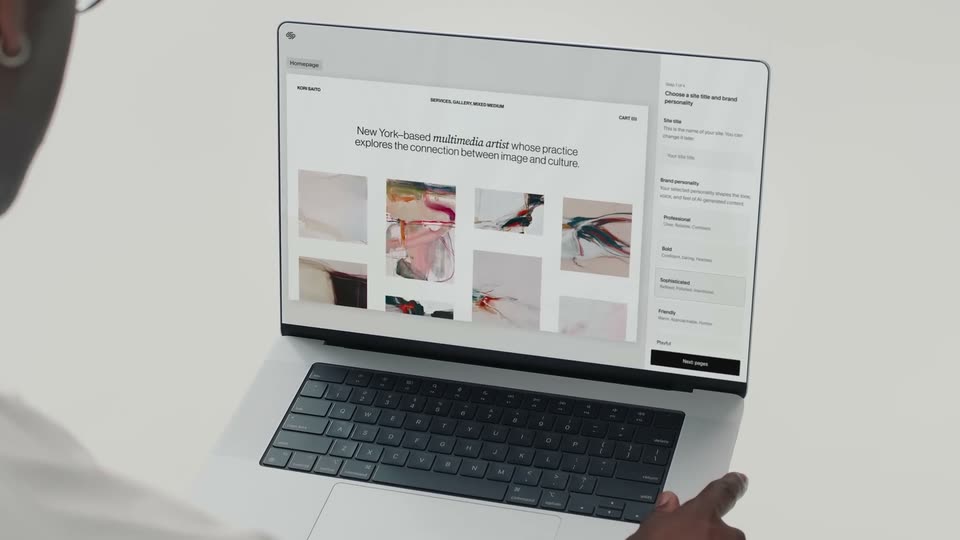
Over-the-shoulder view of a person at an angled laptop on a white set. The screen shows a website builder where a gray placeholder layout morphs into a finished gallery site with abstract images, while a settings panel stays fixed on the right.
Techniques: Morph
Camera: Push in
03 · Feature reveal · 0:08–0:09
A silver laptop sits open on a white surface, its screen showing a website with a grid of abstract art thumbnails and a headline about a multimedia artist. The camera orbits slowly around the device, shifting the 3D perspective as the on-screen text settles into place.
Techniques: 3D mockup
Camera: Push in
04 · Feature reveal · 0:09–0:11
A man in a white tee and blue trousers stands center frame in a bright studio, holding an open laptop, with large abstract canvases, a floor lamp, paint cans and brushes around him. The camera slowly pulls back to widen the shot while a short bio caption scales in over the frame.
On-screen text: “New York-based multimedia artist whose practice”, “explores the connection between image and culture.”
Camera: Pull out
05 · Outro · 0:11–0:15
An abstract painted backdrop of teal and red brushstrokes on white canvas holds centered white text reading 'A website makes it real'. The line is replaced by the Squarespace logo and wordmark. The frame stays locked off throughout.
On-screen text: “A website makes it real”, “SQUARESPACE”
Camera: Static