1:10

Introducing ClickUp 3.0
ClickUp · Productivity · Jun 2022
SpAItial AI · Apr 2026 · 1:01 · AI-annotated
SpAItial AI’s 1:01 launch film runs 43 scenes, about 1.4 s each. The product shows up at 0:03 and 8 features are revealed. There is no explicit call to action. A 62 second product launch for spAltial Echo-2 built as a fast montage of capability beats over a blue-to-green gradient. Each beat is a 3D render or photo inside a tilting rounded card, announced by a centered word or a typed prompt pill, cut at roughly 136 bpm with glitch and blur transitions. The structure opens full-bleed with a scaling title, moves through a list of features (create, plan, change style, explore, understand, shop, train, play), and closes on the brand lockup.
Is this your launch? to your site or press kit.
ClickUp · Productivity · Jun 2022
Framer · Design · Oct 2023
Airtable · Productivity · Oct 2026
A 3D jungle temple with a flowing stream fills the frame. The white title Create 3D Worlds scales up at the center and clears by mid-scene, leaving the view to drift forward along the water between mossy ruins.
On-screen text: “Create”, “3D Worlds”
Techniques: Kinetic type
Camera: Push in
The phrase “with one click” hovers over a dark grainy field, then “one” scales up to fill the frame on a blue-green gradient dotted with bokeh. A white rounded card holding a bright interior with tables and plants masks in at center and eases smaller.
On-screen text: “with one click”
Techniques: Kinetic type, Masking, Particles
Camera: Push in
A 3D-rendered restaurant interior with wooden tables, hanging plants and warm lamps, framed in a rounded rectangle that sharpens from a soft edge glow as the camera pushes in. A white pill caption fades in at the bottom center.
On-screen text: “create: an ice cave”
Techniques: Masking
Camera: Push in
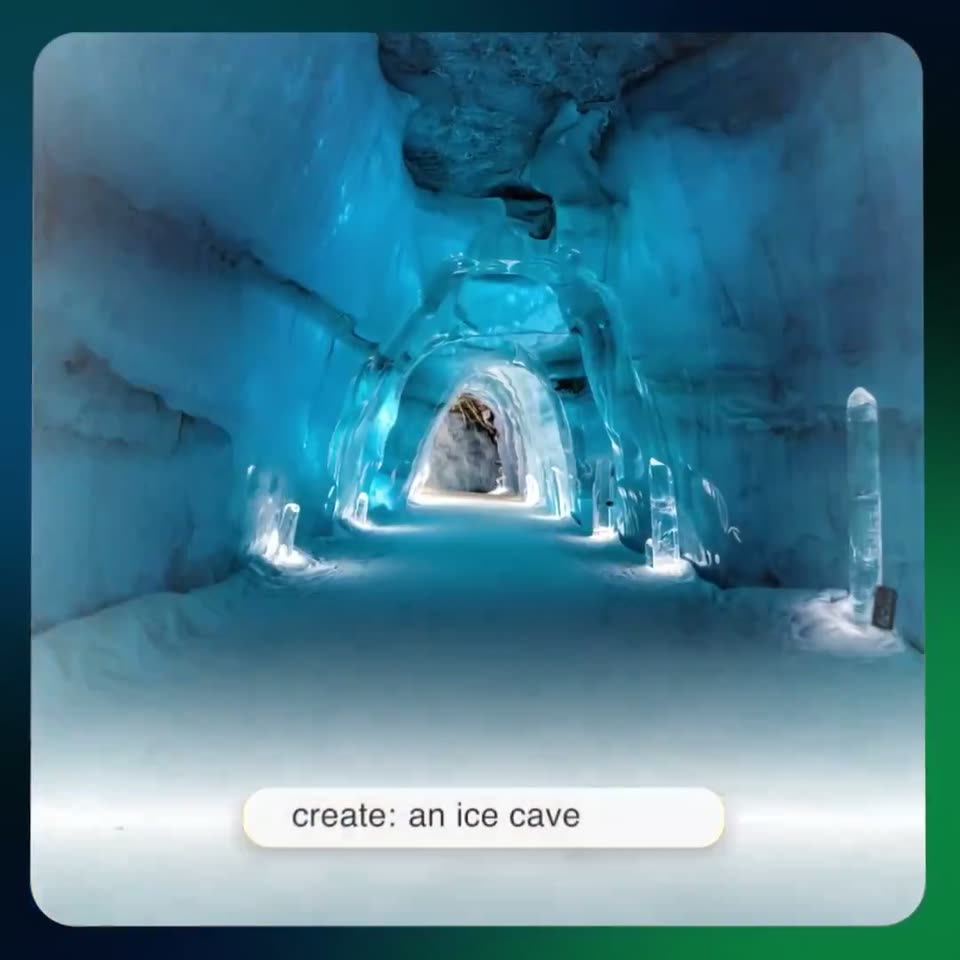
A blue ice cave with glowing arches and a snowy floor fills a rounded card, the camera pushing forward down the tunnel. A white pill at the bottom holds the prompt text.
On-screen text: “create: an ice cave”
Camera: Static
A rounded card on a dark teal-to-green gradient frames a blue ice cave tunnel, the view pushing slowly forward through the arches. A white prompt pill at the bottom shows 'create: an ice cave', then changes to 'create: a woodshop'.
Camera: Push in
The camera glides forward down the central aisle of a 3D woodshop, past lumber stacks and workbenches under a high skylit ceiling. A white rounded pill at the bottom holds the prompt text, static.
On-screen text: “create: a woodshop”
Camera: Push in
A 3D white gallery corridor advances forward, teal loop sculptures and framed paintings sliding past in depth. The view sits in a rounded rectangle over a dark green field, with a rounded prompt bar at the bottom.
On-screen text: “Welcome to a world built from a single prompt”
Techniques: Kinetic type, 3D mockup, Parallax
Camera: Static
A 3D rendered ruined temple corridor, walls carved with hieroglyphs, opens to a bright sunset. The camera pushes forward through the rubble as the first headline slides out and a second line slides in at the bottom. The scene sits in a rounded frame on a dark green background.
On-screen text: “Welcome to a world built from a single prompt”, “Don't just visit, create”
Techniques: Kinetic type
Camera: Push in
A 3D-rendered baroque palace hall with a coffered ceiling, chandelier and parquet floor. The camera dollies forward toward the chandelier and a framed portrait above the fireplace while the tagline slides in at the bottom.
On-screen text: “Don't just visit, create”
Camera: Push in
A 3D palace interior with a gilded portrait and fireplace blurs as oversized white letters slide across the frame. The room flattens into a white architectural floor plan on a teal gradient, with a caption below.
On-screen text: “Don't just visit, create”, “Plan a world to fit your vision”
Techniques: Kinetic type, Morph
Camera: Pan
A top-down floor plan with black walls, thin furniture outlines and dimension lines sits on a white rounded card over a blue-to-green gradient. The drawing holds steady with a slow zoom-in while the caption rests centered below it.
On-screen text: “Plan a world to fit your vision”
Camera: Static
A white rounded card on a blue-to-green gradient shows a 2D floor plan that morphs into a 3D rendered apartment with wood floors and furnished rooms. A white caption sits centered below the card.
On-screen text: “Plan a world to fit your vision”
Techniques: Morph, 3D mockup
Camera: Push in
A 3D model of a furnished apartment, seen top-down inside a rounded frame on a blue-to-green gradient, tilts into a 3D perspective angle to reveal the room's depth. A white caption stays fixed at the bottom.
On-screen text: “Plan a world to fit your vision”
Techniques: 3D mockup
Camera: Push in
A rounded card frames a 3D apartment render. The camera opens top-down on a cutaway floor plan, then dollies in and tilts up to a full interior with wooden ceiling beams, drifting toward the bed. The view blurs out at the end. A white caption sits below the card.
On-screen text: “Plan a world to fit your vision”, “Generate full 3D visualizations”
Camera: Push in
A white pill-shaped search bar with a circular up-arrow button slides right to left across a dark green-to-blue gradient. The typed query inside reads “Create environments in seconds,” the word “seconds” scaling in as the bar exits frame left.
On-screen text: “Generate full 3D visualizations”, “Create environments in seconds”
Camera: Static
A white rounded button labeled seconds with an up-arrow icon sits on a dark green gradient, then the view cuts to a dark, radially blurred forest path that fades to black.
Camera: Static
A motion-blurred bedroom resolves into a sharp classic interior with a green bed, draped canopy, and brass chandelier. A white rounded label sits centered showing the style prompt. The camera holds a wide angled view of the room.
On-screen text: “change style to: classic”
Camera: Push in
A 3D attic bedroom with exposed timber beams, a metal-frame bed and a framed abstract print. A white pill caption sits centered reading the style command, the word after the colon swapping from classic to modern as the camera drifts slightly left.
On-screen text: “change style to:”, “classic”, “modern”
Techniques: Morph
Camera: Static
A 3D attic bedroom holds a static wide angle as its walls, bedding and decor morph through three styles. A white prompt chip centered in frame reads the style being applied, cycling from minimal to more plants to modern.
On-screen text: “change style to: minimal”, “change style to: more plants”, “change style to: modern”
Techniques: 3D mockup, Morph
Camera: Pull out
A small label 'change style to:' sits above a white pill bar on a dark blue-green gradient. The bar dissolves into a glitching, pixelated image with orange and blue fragments that expands to fill the center.
Techniques: Morph
Camera: Static
A tilted 3D screen floats against a blue-to-green gradient, its display flickering in a liquid-metal glitch effect. The distorted surface resolves into a street scene with a horse-drawn cart on cobblestones as the panel shifts slightly in perspective.
Techniques: 3D mockup
Camera: Push in
A rounded-corner card on a blue-green gradient shows a 3D stable with three horses, which crossfades into a lantern-lit wooden interior, then the view drifts through an arch into a leafy garden. The white word Explore scales in at the center and fades out.
On-screen text: “Explore”
Techniques: Kinetic type
Camera: Push in
A rounded 3D frame over a blue-green gradient shows a low-poly wooden medieval interior. The camera pushes through an arched doorway into a room with benches, a bed, a table and a hanging lantern.
Camera: Push in
A rounded card zooms from a small phone thumbnail to a bright living room photo. The white word Understand sits at center while a yellow highlight and the caption white sofa appear over the couch and balcony railing tags the loft, then both fade out.
On-screen text: “Understand”, “white sofa”, “balcony railing”
Techniques: UI zoom
Camera: Push in
A rounded card frames a bright, colorful living room. Small white text labels pop up around the furniture to identify items, while the large word “Understand” remains fixed in the center of the scene.
On-screen text: “Understand”
Camera: Static
A rounded-corner screen on a dark gradient shows a photo of a colorful living room with white labels on its objects and the word Understand centered. A second photo of a study slides in from the left, wiping over the first.
On-screen text: “Understand”
Techniques: Masking
Camera: Static
A photoreal 3D bedroom with a blue tufted bed and wooden beams sits in a rounded card on a teal-to-green gradient. The white word “Understand” holds center over the bed, then blurs and dissolves away.
On-screen text: “Understand”
Techniques: 3D mockup, Kinetic type
Camera: Static
A 3D-rendered bedroom with a blue tufted bed sits in a rounded card. A white pill at center types out the words remove bed, then the whole card blurs and dissolves into a dark green and blue gradient.
On-screen text: “remove bed”
Techniques: Kinetic type
Camera: Push in
A dark green and blue gradient holds, then a cream rounded card slides up from the bottom, revealing a 3D room corner with a wooden floor and a small white device; the word Shop fades in at the center.
On-screen text: “Shop”
Techniques: 3D mockup
Camera: Pull out
A rounded card on a blue-green gradient holds a filmed kitchen. The plain wall wipes into white subway tiles and green cabinets while the white Shop label stays centered. Two white product cards with shopping-bag icons stack in the lower left.
On-screen text: “Shop”
Techniques: Masking
Camera: Static
A rounded kitchen photo card tilts in 3D over a blue-green gradient, the white Shop label centered. A small white card with a bag icon at lower left swaps its thumbnail from a potted shelf to a green stand mixer as the image sharpens from a soft blur.
On-screen text: “Shop”
Techniques: 3D mockup
Camera: Static
A vertical feed of rounded image cards scrolls down quickly in 3D perspective over a blue-to-green gradient. The center card shows a kitchen with a white “Shop” label, while a coffee-maker card and a potted-plant card blur past the edges.
On-screen text: “Shop”
Techniques: 3D mockup
Camera: Pan
A black humanoid robot walks toward the camera through environments that crossfade, from an industrial yard to a parking garage and a forest, inside a rounded card on a blue-green gradient. The white word Train sits centered on its chest.
On-screen text: “Train”
Techniques: 3D mockup
Camera: Static
A chrome humanoid robot with a glowing cyan visor strides forward through a muddy forest trail, then an industrial yard, inside a rounded card on a blue-green gradient. The white word Train holds centered.
On-screen text: “Train”
Techniques: Masking, 3D mockup
Camera: Pull out
A metallic humanoid robot walks toward the camera through a dim, painterly alley, its body soft and degraded. The word Train sits static in the center. The shot is framed in a rounded card on a blue-green gradient.
On-screen text: “Train”
Techniques: 3D mockup
Camera: Pull out
A chrome humanoid robot walks forward on a wet industrial platform inside a rounded-square frame over a dark teal gradient. The white word Train holds centered as the figure approaches and the textured wall blurs behind it.
On-screen text: “Train”
Techniques: 3D mockup
Camera: Push in
A dark metallic humanoid figure stands on a gridded floor in a dim amber-lit industrial corridor, framed in a rounded square on a blue-green gradient. White text “Train” sits centered over the figure, and the shot ends with a fast blurred push-in.
On-screen text: “Train”
Techniques: Speed ramp
Camera: Push in
Three rounded panels stack vertically on a blue-to-green gradient, each holding a 3D environment: a red rock canyon, a stone amphitheater, and a snow-covered track. A small red target marker sits at the center of each panel as the panels fade in from black.
Techniques: Split screen
Camera: Push in
Three stacked horizontal panels on a teal-green gradient show 3D game scenes: a red rock tunnel, a stone amphitheater, and a snowy road with a green tank. A white Play label centered on the middle panel scales down from a large blurred state to a crisp size.
On-screen text: “Play”
Techniques: Kinetic type
Camera: Push in
Three rounded video panels stack vertically over a green-to-blue gradient, the middle one carrying a white Play. The panels zoom in as the middle crossfades to a dark shot with a glowing green shape and a small logo, while colored particles drift across.
On-screen text: “Play”
Techniques: Split screen, UI zoom, Particles
Camera: Push in
A dark green and blue gradient fills the frame with radiating particles as the white spAltial logo sharpens at center. The word Echo-2 fades in below it while two rounded video cards, a walking figure above and a blurred interior below, settle into place.
On-screen text: “spAltial”, “Echo-2”
Techniques: Particles
Camera: Push in
A white brand lockup, the geometric cube mark beside spAltial with Echo-2 beneath, sits centered on a dark blue-to-green gradient. Blurred vertical video clips scroll vertically behind it, their motion softened by heavy blur while the lockup stays fixed.
On-screen text: “spAltial”, “Echo-2”
Techniques: Kinetic type
Camera: Static
A white geometric cube mark and the wordmark spAltial sit centered on a blue-green gradient, with the tagline Echo-2 below. A blurred image panel slides down out of the bottom edge as the logo lockup scales into place.
On-screen text: “spAltial”, “Echo-2”
Techniques: Kinetic type
Camera: Static