2:42

Introducing GPT-6 Astra: the most intelligent and aligned model in the world.
OpenAI · AI · Sep 2026
Skye · Apr 2026 · 0:38 · AI-annotated
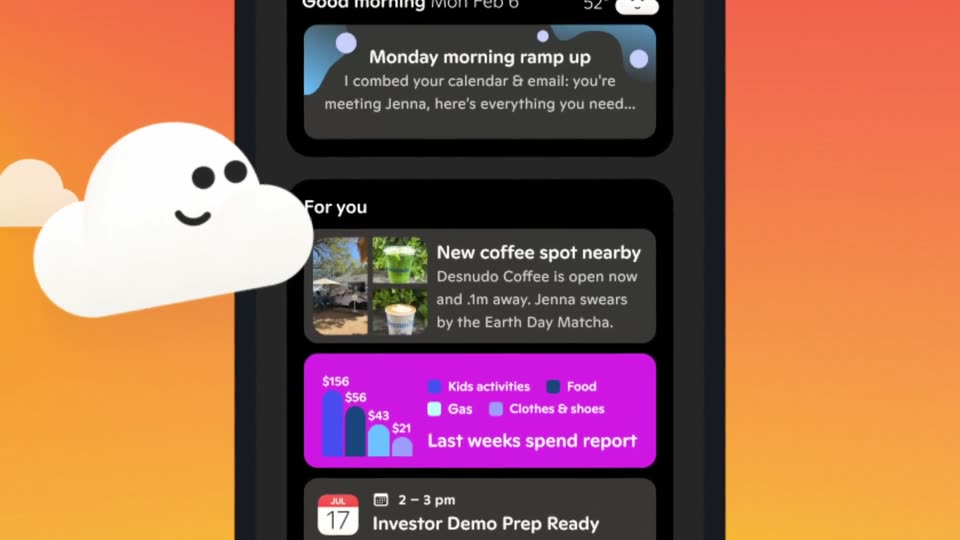
Skye’s 0:38 launch film runs 18 scenes, about 2.1 s each. The product shows up at 0:02. The call to action lands at 0:34 (92% in). The video opens on a 3D phone and the smiling cloud mascot, names the product with a meet card, then tours the live home screen across morning, afternoon and evening while the cloud drifts past each frame and the camera pushes into the stacked cards. Its signature moves are the tilting, push-in phone mockups and the gradient sky backdrops that shift color with the time of day, capped by a tagline and a clean logo plus URL card.
Is this your launch? to your site or press kit.
OpenAI · AI · Sep 2026
Moonshot · Consumer · Jun 2026
The Browser Company · Productivity · Jul 2023
A dark iPhone mockup sits centered on a charcoal field. The iOS home screen, with its app grid and dock, slides up from the lower edge and locks into a clean front-facing view. The motion is brief and settles by mid-clip.
Techniques: 3D mockup
Camera: Static
A dark, blurred iPhone home screen sharpens and brightens to reveal a grid of app icons. A white cloud icon with a face pops into the center, then vanishes as the icons pulse in and out of focus.
Techniques: 3D mockup
Camera: Push in
A white smiling cloud with a waveform icon floats over a blurred smartphone home screen. The cloud slides right as the background apps fade and the screen darkens.
Camera: Pan
A blurred smartphone mockup sits centered on a dark background. A smiling white cloud logo shrinks from the foreground and slides right to settle between the words meet and skye, which fade in on either side.
On-screen text: “meet”, “skye”
Techniques: Kinetic type
Camera: Pull out
A dark phone mockup is centered and pushed in as floating notification cards and a smiling cloud icon settle around it. Large background words meet and skye hold still at the edges.
On-screen text: “meet”, “skye”
Techniques: 3D mockup, UI zoom
Camera: Static
A tilted iPhone mockup floats against an orange gradient sky with a sun and a smiling white cloud mascot that drifts around the device. The camera pushes in on the home-screen cards, then pulls back as the cloud settles on top of the phone.
Techniques: 3D mockup, UI zoom
Camera: Push in
A smartphone mockup floats in 3D perspective against a soft blue sky with a smiling cloud and a sun. The camera zooms into the dark-mode home screen, reframing onto the stacked notification cards as the cloud drifts past the frame edges.
Techniques: 3D mockup, UI zoom, Parallax
Camera: Push in
A dark-mode smartphone floats in a blue sky, tilting from a slanted angle into an upright pose as a smiling cloud mascot slides up its left edge. The screen stacks cards: a blue health check, a reading digest, and a restaurant reservation, above an app dock.
Techniques: 3D mockup
Camera: Pull out
A phone mockup floats in a purple 3D landscape with a glowing sun and smiling cartoon clouds drifting past it. The camera pushes in on the screen, reframing from the whole device to a close-up of the stacked notification cards.
Techniques: 3D mockup, UI zoom
Camera: Push in
A centered phone mockup shows a stack of notification cards over a dusk sky. The cards fade out until the screen is black, while a smiling cloud drifts from the left to the top edge and scales up.
Camera: Static
A dark phone mockup in 3D perspective fills the frame. The interface content scrolls upward, moving from the back button and headline to the passport details and the travel.st link at the card's bottom.
Techniques: 3D mockup
Camera: Static
A dark phone mockup sits in 3D perspective on a gray backdrop, its screen showing a chat message that a passport renewal form is ready to submit. Two white cloud shapes with smiley faces float to the right, drifting and bobbing past one another.
Techniques: 3D mockup
Camera: Static
A dark phone mockup in 3D perspective holds a chat message card on a plain dark background. A white smiling cloud illustration slides from the right across the screen to the left, shrinking as it moves, while the interface swaps from a dark card to a blue gradient card.
Techniques: 3D mockup
Camera: Static
A flat phone mockup on the right scrolls a feed of app cards upward, from a reading digest to a fitness streak and a spend report, while a white smiley cloud drifts down the left side at a slower pace against a dark gray backdrop.
Techniques: Parallax
Camera: Static
A dark phone mockup displays a finance app report screen next to a white smiling cloud. The interface scrolls upward, the spend report card rises and a purple card with a coffee shop note appears at the top, while the cloud bobs gently.
Camera: Push in
A front-facing phone mockup on the right scrolls a feed of purple cards while a smiling white cloud floats on the left. The italic word your fades in at the center over the dark gray background.
On-screen text: “your”
Camera: Static
A smiling white cloud icon slides from the left edge up to a small spot above a two-line headline, which holds over a blurred purple phone screen on a dark gray background.
On-screen text: “your live ai”, “home screen”
Camera: Static
On a dark gray field, a white smiling cloud icon and the light blue lowercase wordmark resolve from a soft blur into sharp focus at center. A few tiny pink sparkles flick near the cloud's top edge, while the white URL and the App Store badge sit static along the bottom.
On-screen text: “skye”, “skyeapp.ai”
Techniques: Particles
Camera: Static