0:45


Backpack 🎒 - Meet the new Backpack app. Feel modern finance.
Backpack · Oct 2026
Skydive’s 0:23 launch film runs 15 scenes, about 1.5 s each. The product shows up at 0:03. There is no explicit call to action. Two-act build: a cinematic night-to-dawn mountain opener, then a light off-white UI stage where the assistant's bear works across a phone and a Mac using slow 3D slides and crossfades. Pacing is steady and unhurried at about 104 bpm, with typed text and cursor beats carrying the story, closing on a blooming petal logo.
Is this your launch? to your site or press kit.
Backpack · Oct 2026
Webflow · Design · Sep 2026
Films whose music sounds like this one, voice left out
CapCut · Electronic dance music
Tesla · Electronic dance music with cinematic sound design elements
Xiaomi · Electronic dance music
Layered mountain ridges under a night sky slowly brighten toward dawn, clouds shifting from black to soft purple. Centered white text shows “While”, then completes to “While you were asleep...” while the frame stays locked.
On-screen text: “While”, “While you were asleep...”
Techniques: Kinetic type
Camera: Static
A locked-off dusk shot of layered mountain ridges under a purple sky. The white caption 'While you were asleep...' sits centered, then sits lower as a small name 'Omar' and the message 'Bro where are you???' appear above it.
On-screen text: “While you were asleep...”, “Omar”, “Bro where are you???”
Techniques: Kinetic type
Camera: Static
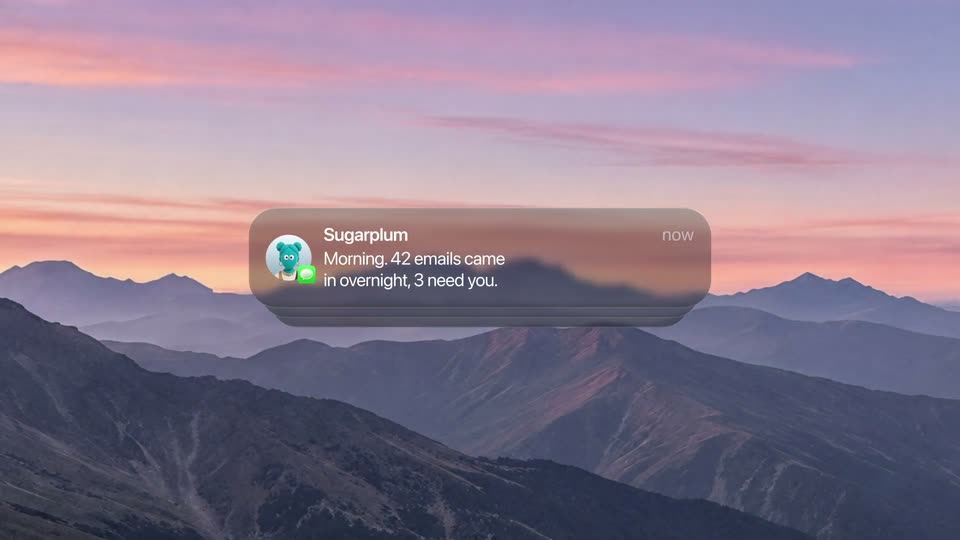
A frosted notification banner floats over a dusk mountain wallpaper. It crossfades from Omar's message to Sugarplum's as the card eases slightly upward, the timestamp sliding in.
Camera: Static
Two iPhone mockups on a white background, the front one sliding up past a blurred back one. The front screen shows an iMessage thread with Sugarplum: a gray message sits at the top, then a blue reply bubble types in after three dots, ending with the full text above the keyboard.
Techniques: Parallax, Kinetic type
Camera: Static
A 3D iPhone mockup showing an iMessage thread slides left as a Mac desktop with a sunset wallpaper slides in from the right, the two screens ending side by side.
Techniques: 3D mockup, Split screen
Camera: Pan
An iPhone with an iMessage thread sits left of a Mac desktop; a cursor clicks the terminal icon in the dock, a white beam of light rises from it, and the icon morphs into a globe. Both screens hold still through the short beat.
Techniques: Split screen, Cursor demo, Light sweep, Morph
Camera: Static
A phone and a desktop sit side by side. On the phone, a blue message types out a request; on the desktop, the assistant's bear cursor works inside a calendar app. The phone slides off left, centering the calendar.
Techniques: Split screen, Cursor demo, UI zoom
Camera: Pan
A flat desktop window crossfades from a Calendar app into a Browser showing Google Calendar, while a cursor carrying a small teal 3D figure moves across the top bar. The dock below highlights the globe icon as the transition settles.
On-screen text: “Sugarplum's computer”
Techniques: Morph, Cursor demo
Camera: Static
A desktop with a sunset mountain wallpaper shows a browser window open to a Notion new project page. The whole screen zooms in slightly as the window enlarges and the menu bar text scales up. A cursor rests near the address bar.
Techniques: UI zoom
Camera: Push in
A white project panel is shown close-up over a blurred sunset. The title types “New project”, then changes to “Arc • ren” as a black cursor hovers and a round avatar with a teal 3D bear drifts beside it. A properties list below stays static.
Techniques: Kinetic type, Cursor demo
Camera: Static
A light project-detail screen shows the title “Acme - pipeline review” under a blue sync logo, with a Properties list of empty fields and a round avatar of a blue cartoon character. A cursor hovers by the avatar as the content drifts right with a ghosted duplicate.
Techniques: Cursor demo
Camera: Pan
A light gray product form with a heading, gray Empty field values and two circular 3D avatars slides left off the screen, a black cursor trailing the leftmost avatar.
Techniques: Cursor demo
Camera: Static
A gray notification card with a blue avatar and the name Sugarplum sits on a light background. A second card slides in below it, and both scroll upward, revealing a Send input bar with a blue arrow button at the bottom.
Camera: Pan
Large soft pink, orange and blue blobs slide off the edges of a plain off-white frame, clearing the view to a small ring of six pastel blobs held in the center. The cluster stays still as the background empties out.
On-screen text: “Want me to send?”
Camera: Static
On a plain off-white background, the dark gray Skydive wordmark holds still while its multicolored petal mark animates, the six shapes spreading from an overlapping cluster into an open ring.
Camera: Static