0:35

Ari, your CFO, in every meeting | Ari x Tana
Tana · Productivity · Nov 2026
ShowTake · Nov 2026 · 0:39 · AI-annotated
ShowTake’s 0:39 launch film runs 8 scenes, about 4.9 s each. The product shows up at 0:33. The call to action lands at 0:35 (91% in). Two locked-off text cards state the claim, a split screen then shows the agent driving the app while the terminal logs each move, and a rendered take plus a green punchline close the proof before the brand card. The edit breathes on slow fades over a dark indigo glow, with green reserved for the payoff word and the URL.
Is this your launch? to your site or press kit.
Tana · Productivity · Nov 2026
Input Systems · Oct 2026
Input Systems · Oct 2026
Two centered lines of white text fade up from black over a deep blue radial glow, the bold headline above a lighter subline. The locked-off frame holds, then the whole card fades back to black.
On-screen text: “Built the app with AI in an hour.”, “Then spent a day filming it by hand.”
Camera: Static
Centered white sans-serif text reads “I asked Claude to make my app's launch video.” over a dark indigo radial glow. The frame is locked off; the text and the central glow fade up from near-black, hold bright, then dim back down.
On-screen text: “I asked Claude to make my app's launch video.”
Camera: Static
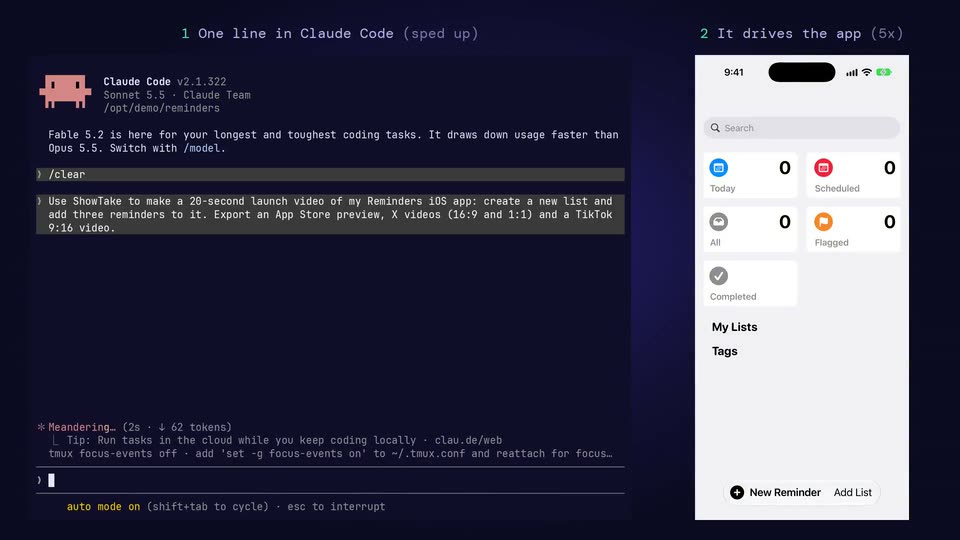
A locked-off split screen shows a Claude Code terminal on the left and a Reminders iOS app on the right. Numbered labels identify the terminal as sped up and the app as driven at five times speed.
On-screen text: “1 One line in Claude Code (sped up)”, “2 It drives the app (5x)”, “I asked Claude to make”, “my app's launch video.”
Techniques: Split screen
Camera: Static
A split screen shows a dark terminal on the left scrolling agent log lines while a phone on the right cycles through Reminders app screens, opening a new list and typing reminder titles on the keyboard.
On-screen text: “1 One line in Claude Code (sped up)”, “2 It drives the app (5x)”
Techniques: Split screen
Camera: Static
A phone with a blank white screen is centered on a blue gradient, its lower edge overlapping a dark pill that reads Add a reminder. A faint New Reminder button fades into the screen. The frame stays locked off.
On-screen text: “3 The video ShowTake rendered from that take”, “Add a reminder”
Camera: Static
A flat iPhone mockup centered on a purple-to-blue gradient shows the New Reminder form. The view zooms in on the form as “Post video” is typed into the Title field, while dark pill captions “Add a reminder” and “Type a title” appear at the bottom of the phone.
On-screen text: “3 The video ShowTake rendered from that take”, “Add a reminder”, “Type a title”
Techniques: UI zoom
Camera: Push in
A green headline “It did.” holds centered over a smaller lavender caption on a dark indigo radial glow. The frame is locked off; the text stays still while the central glow lifts in brightness.
On-screen text: “It did.”, “Every shot filmed by ShowTake, driven by Claude Code.”
Camera: Static
On a dark indigo radial gradient, an app icon with white viewfinder brackets and a glowing green dot sits above the bold white wordmark ShowTake, a gray tagline, and a green monospace URL in a rounded outline. The lockup fades in from black, holds, then fades out.
On-screen text: “ShowTake”, “Your agent drives the app. ShowTake films it.”, “showtake.app”
Camera: Static