
0:27
Explore
SHIFT_Improper Payment Detection_Integrated Case Management_Video_V4
Shift Technology · Feb 2023 · 0:42 · Full motion · AI-annotated
- Length
- 0:42
- Scenes
- 17 · 2.5 s avg
- Product on screen
- 0:00
- Features shown
- 3
- Call to action
- 0:36 · 87%
- Voiceover
- Yes
00:00:00 / 00:42:06
- Length
- 0:42
- Scenes
- 17 · 2.5 s avg
- Product on screen
- 0:00
- Features shown
- 3
- Call to action
- 0:36 · 87%
- Voiceover
- Yes
Shift Technology’s 0:42 launch film runs 17 scenes, about 2.5 s each. The product is on screen from the first frame and 3 features are revealed. The call to action lands at 0:36 (87% in), over a voiceover. The video opens on the brand lockup, zooms through the login card, and reveals the live interface through an expanding circular mask before walking through four feature beats (case assignment, detection email, activity timeline, reporting) and closing on a locked end card with the URL. Pacing is deliberate at roughly one cut per 40 seconds, with motion-blurred slides, blur-in text, and count-up charts as the recurring signature moves.
No filming indicatedEstimated needs: 5 capture groups — your screens or recordings · 1 official logo — reused across the film
Is this your launch? to your site or press kit.
More like this

SHIFT_Improper Payment Detection_Integrated Case Management_Video_V4, scene by scene
· 17 scenes as text
01 · Product intro · 0:00–0:01
On a solid indigo field, the bold SHIFT wordmark appears with a thin underline beneath it. It then slides down and shrinks while the smaller label Improper Payment Detection fades in above, settling into a centered lockup.
On-screen text: “SHIFT”, “Improper Payment Detection”
Techniques: Kinetic type
Camera: Static
02 · Product intro · 0:01–0:03
On a solid indigo background, the white SHIFT wordmark shifts into place beneath the headline Improper Payment Detection. A white login card with Email and Password fields and a teal Submit button scales up from center as Welcome. slides in.
On-screen text: “SHIFT”, “Improper Payment Detection”
Techniques: Kinetic type
Camera: Static
03 · Product intro · 0:03–0:04
Flat purple layout. A white login card sits right under the SHIFT wordmark, its greeting and email field typing in, while the bold headline Integrated Case Management resolves from a blur on the left of a thin vertical divider.
On-screen text: “Improper Payment Detection”, “Integrated Case Management”
Camera: Static
04 · Product intro · 0:04–0:06
A purple title card shows a white login mockup on the right with the SHIFT wordmark above it, while white headlines sit left and top. The frame zooms in, reframing onto the login card and cropping the left headline.
On-screen text: “Improper Payment Detection”, “Integrated Case Management”
Techniques: UI zoom
Camera: Push in
05 · Product intro · 0:06–0:07
A purple title screen pairs a white login card on the right with the SHIFT wordmark above and a bold headline on the left. The camera zooms in toward a vertical bar of squares and concentric rings in the center, blurring the headline and pushing the card off the right edge.
On-screen text: “SHIFT”, “Integrated Case Management”
Camera: Push in
06 · Product intro · 0:07–0:08
A miniature SHIFT dashboard sits at the center of concentric purple rings on a violet field. The rings widen and the interface scales up, revealed through an expanding circular mask, while a white headline fragment slides out to the left edge.
On-screen text: “se”, “O”
Techniques: Masking, UI zoom
Camera: Static
07 · Demo · 0:08–0:13
A purple alerts table fills the frame. An Assign dropdown opens over the right-hand column, listing four collaborators; the cursor selects joe.zamora, then the whole interface blurs out.
Techniques: Cursor demo
Camera: Pan
08 · Feature reveal · 0:13–0:16
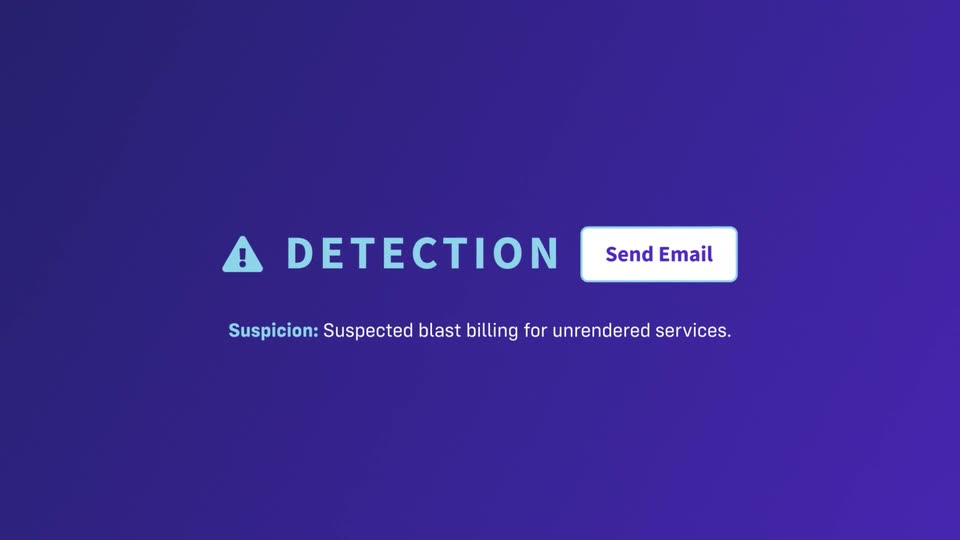
A warning triangle and the word DETECTION blur in on a purple field as a white Send Email button slides in beside it. Below, the caption Suspicion: Suspected blast billing for unrendered services. builds word by word, then holds.
On-screen text: “DETECTION”, “Send Email”, “Suspicion: Suspected blast billing for unrendered services.”
Techniques: Kinetic type
Camera: Static
09 · Feature reveal · 0:16–0:21
A white Send Email dialog sits centered on a flat purple background. The Select a Template dropdown opens, Open Investigation is chosen, and the message field fills with a prewritten note as the cursor moves to the Send button.
Techniques: Cursor demo
Camera: Push in
10 · Feature reveal · 0:21–0:22
A white Send Email dialog with recipient, subject and message fields shrinks and slides off to the right with motion blur over a purple background, while a small teal document icon fades in on the left.
Camera: Pan
11 · Feature reveal · 0:22–0:22
On a flat purple background, a blurred white list panel exits to the right as a light-blue document icon and the heading hold center. Below, a white pill button widens then snaps to fit as the label slides in from the right and settles centered.
Techniques: Kinetic type
Camera: Static
12 · Feature reveal · 0:22–0:23
A light blue document icon and the letter-spaced title sit on a purple gradient as a white rounded button labeled “Add an activity” slides up from below, motion-blurred, then settles into place with a soft drop shadow.
On-screen text: “ACTIVITY TIMELINE”
Techniques: Kinetic type
Camera: Static
13 · Feature reveal · 0:23–0:24
On a purple background, a white timeline card with a dotted list of rows slides in with motion blur beneath the ACTIVITY TIMELINE heading and document icon, while the Add an activity button settles into place below it.
Camera: Static
14 · Feature reveal · 0:24–0:31
The SHIFT activity timeline screen materializes with a brief text glitch. A New Activity modal pops open in the center, a type is picked from the dropdown, the modal closes, and a new row drops into the table before the screen blurs and a light beam sweeps across.
Techniques: Light sweep
Camera: Push in
15 · Feature reveal · 0:31–0:36
A front-facing SHIFT reporting dashboard sits on a purple field. Six KPI cards display totals, then a stacked bar chart, Active Cases by Investigator, animates in: red and purple bars rise to full height and the values count up before settling.
Camera: Static
16 · CTA · 0:36–0:37
A defocused dashboard with metric cards and a stacked bar chart slides down and blurs out on a purple gradient. The white SHIFT wordmark and the tagline Decisions Made Better then fade in, centered, as the sign-off.
On-screen text: “SHIFT”, “Decisions Made Better”
Camera: Pan
17 · CTA · 0:37–0:42
A plain purple end card holds the white SHIFT wordmark, tagline, and URL centered in a locked-off frame. The text remains static throughout the short sign-off.
On-screen text: “SHIFT”, “Decisions Made Better”, “shift-technology.com”
Camera: Static