1:20

Healthcare Product Explainer Video | American Heart Association x MotionCue
American Heart Association · Jul 2026
Rippling · Jul 2025 · 1:54 · AI-annotated
Rippling’s 1:54 launch film runs 32 scenes, about 3.6 s each. The product shows up at 0:08 and 4 features are revealed. The call to action lands at 1:51 (97% in), over a voiceover. The video opens on a montage of scattered expense alerts, then settles on a pastel sunset sky where flat and 3D UI cards float, tilt and rotate to demo each feature in turn, ending on a dashboard tour and a globe wrap-up. Signature moves are springy card slide-ins with checkmark pops, cursor-driven policy edits, 3D tilts of browser windows, and a consistent magenta palette tying live-action vignettes to the interface.
Is this your launch? to your site or press kit.
American Heart Association · Jul 2026
Instant Ai · Aug 2026
A rounded card on a pale gray field holds live footage: a woman in a peach shirt sits behind a marble laptop, then it cuts to hands holding a blue phone and orange card while a red hotel-booking alert appears at the top right.
Camera: Static
A centered vertical clip swaps from a woman to a man walking, while product alert cards (hotel booking, Hertz, Uber, red memo, CEO huddle, flight delayed) scale in and shuffle around it on a pale background.
Camera: Static
A central airport video crossfades behind a floating cluster of expense notifications: Uber out-of-policy, Hertz car cancelled, delayed reimbursement, overdue approvals, an email badge reading 3000, and Receipt Format not supported error dialogs that stack up.
Camera: Push in
Floating expense cards, error pop-ups and a Hertz cancellation hover around a central pink sunset panel. The cards dissolve away, leaving the rounded sky image alone on a white background.
Camera: Push in
A soft pink-and-blue sunset sky fills the frame as the title Rippling Travel eases in, centered in deep magenta. The title holds, then a flat UI card with a Trip to New York header and a bridge photo appears over the same sky.
On-screen text: “Rippling Travel”
Techniques: Kinetic type
Camera: Static
A flight-booking screen floats in 3D over a pink sunset sky, tilted at an angle before rotating flat to face the camera. An open dropdown panel sits to the right of the departure flight card.
Techniques: 3D mockup
Camera: Static
A travel-booking screen for a New York trip floats against a pastel sky. A green “Trip booked!” banner and two white status cards slide in from the right, green checkmarks pop in on each, then the panel fades out.
Camera: Static
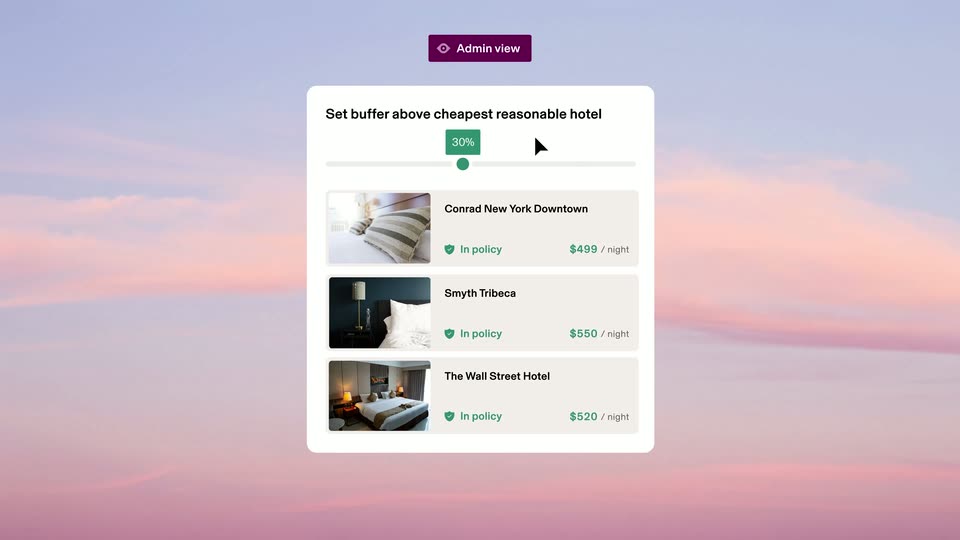
A white settings card fades in over a soft pink sky, tagged with a purple Admin view badge. A cursor drags a slider from 0% to 30%, and two hotel rows switch from red Out of policy to green In policy as the value rises. The card then fades out.
On-screen text: “Admin view”
Techniques: Cursor demo
Camera: Static
A white policy card with a black header sits centered on a pink gradient sky, labeled by a purple Admin view badge above. A cursor clicks three toggles, flipping Seat upgrades off, Checked bags on, and In-flight purchases off, then the card fades out.
On-screen text: “Admin view”
Techniques: Cursor demo
Camera: Static
A flat admin policy card fades in over a pastel sky, under a purple Admin view badge. Its body line types in word by word, then a cursor clicks the toggle from gray to green, and the card fades out.
On-screen text: “Admin view”
Techniques: Kinetic type, Cursor demo
Camera: Static
A soft pink and blue sky fills the frame. The magenta headline “Ready for takeoff” drifts upward and to the left across the clouds, the only foreground element, while the backdrop stays still.
On-screen text: “Ready for takeoff”
Techniques: Kinetic type
Camera: Static
A bold magenta headline over a pink sky slides left, wiping to a dim room with wooden chairs and a table. A white Travel card with an airplane icon and Hotel, Car, Flight tabs floats in the center as the sky panel exits.
On-screen text: “Ready for takeoff”
Techniques: Kinetic type, Masking
Camera: Pull out
A flat travel-booking panel floats over a sunlit cafe table. Map price pins pop in, a cursor clicks the $550 pin, the matching row highlights purple and a tooltip flags it out of policy, then the panel clears to its header.
Techniques: Cursor demo
Camera: Static
A travel-booking screen hovers over a sunlit wooden cafe table in 3D perspective. A cursor clicks the Flight tab, hovers an Out of policy label to open a warning tooltip, then taps a headset icon as a maroon mask wipes across.
Techniques: 3D mockup, Cursor demo, Masking
Camera: Static
Split screen: a smiling agent in a headset talks in a bright office on the left. On the right, a dark purple panel builds a chat thread, message bubbles and a flight card pop in one by one, ending with a green flight-updated bar.
Techniques: Split screen
Camera: Push in
A barista in a yellow shirt and dark apron hands a coffee cup to a woman in blue at a bright cafe counter, then taps the counter tablet. A white Rippling notification card scales in at the lower left.
On-screen text: “Rippling”, “just now”, “Your $17.50 transaction needs a receipt and a memo.”
Camera: Static
A barista hands a coffee cup to a customer at a cafe counter; a white Rippling notification card sits in the lower left, then a purple panel wipes in from the right carrying a tilted 3D phone that shows the same message.
Techniques: Masking, 3D mockup
Camera: Static
A front-facing phone mockup is centered on a solid purple background. The chat screen shows a Rippling header with a purple circular logo, and a grey message bubble fades in beneath it.
Camera: Static
A flat phone mockup on a dark purple field shows a Rippling chat thread. The receipt photo and a blue memo bubble rise into frame as the conversation scrolls, finishing on a gray confirmation message.
Camera: Static
A 3D phone mockup on a dark purple field shows a coffee receipt in a chat. A white transaction row card detaches from the phone and glides right, landing into a dimmed desktop transactions table that fills the right side.
Techniques: 3D mockup
Camera: Pan
A flat transactions table sits on a dark purple field, listing vendors, categories, amounts, employee avatars, dates, and colored approval pills under a search bar. The labels begin doubled and offset, then snap into a single clean layer.
Camera: Static
A transactions dashboard settles into place as the right-hand detail panel slides in from the edge, revealing a $17.50 Poetica Coffee entry with purchaser fields and a tilted paper receipt on a wood surface. The vendor list on the left stays static with Poetica Coffee highlighted.
Camera: Static
On a solid maroon background, two tilted browser windows float in 3D perspective. The top card shows a coffee transaction detail; it slides up and out of frame, revealing the full Travel dashboard below with its tab bar, to-do list and world map.
Techniques: 3D mockup
Camera: Static
A flat browser window on a dark magenta field shows a Travel dashboard with to-do rows and a world map. The view scrolls up, the first window sliding out as a second window with a spend-by-department bar chart and a compliance card rises into frame.
Camera: Pull out
A tilted 3D mockup of a travel dashboard floats on a dark magenta field, with stacked panels receding behind it. The Travel overview screen shows a department bar chart, a policy donut and a traveler table; the card rotates slightly as the bars rise.
Techniques: 3D mockup, Parallax
Camera: Static
A travel analytics dashboard tilts in 3D perspective against a dark magenta background, scrolling from a department spend bar chart down to a ranked table of top travel spenders with avatars and totals.
Techniques: 3D mockup
Camera: Static
A white interface card on a dark purple field shows a table of top travel spenders with employee photos, sums and counts. The list scrolls up slightly as the card eases into place.
Camera: Static
A flat Top travel spenders table slides down out of frame, revealing a 3D purple globe with small rounded-square avatar photos orbiting around it. The avatars circle the globe at varying depths.
Techniques: Parallax
Camera: Pan
A glossy magenta 3D globe rotates slowly on a deep purple field. Rounded avatar tiles with face photos and small flag icons sit on its surface, joined by dotted lines, then swap to green and white notification pills reading Flight booked, Hotel booked and Transaction approved.
Techniques: 3D mockup
Camera: Pull out
On a flat dark magenta background, the white Rippling wordmark fades in at center. Two small rounded-square icons then appear below it, labeled Bill Pay and Corporate Cards, the second still fading in as the clip ends.
On-screen text: “Bill Pay”, “Corporate Cards”
Camera: Static
On a dark purple background, the Rippling Spend logo sits above a row of five icon tiles labeled Bill Pay, Corporate Cards, Travel, Global Spend and Expenses. Each tile then duplicates one by one, the row expanding to ten tiles as the icons spread across the frame.
On-screen text: “Bill Pay”, “Corporate Cards”, “Travel”, “Global Spend”, “Expenses”
Camera: Static
A magenta rounded-square app icon with a white three-bar mark sits centered on a deep purple background. It eases in with a slight scale, then the URL rippling.com/travel fades in below it and holds.
On-screen text: “rippling.com/travel”
Camera: Static