1:12

NODI YC Launch VIDEO
NODI Energy · Industrials · Aug 2026
Rhoda AI’s 2:53 launch film runs 40 scenes, about 4.3 s each. The product is on screen from the first frame and 7 features are revealed. There is no explicit call to action; a voiceover carries the film. The video interleaves live-action human demos, blindfolded robot trials, and real-time data overlays to explain the tactile sensor step by step. Signature moves include the orange pressure waveform drawn over hands, split-screen human-versus-robot parallels, and plush mascots covering the robot cameras.
Is this your launch? to your site or press kit.
NODI Energy · Industrials · Aug 2026
Unsiloed · B2B · Oct 2025
Google · AI · Oct 2019
Films whose music sounds like this one, voice left out
Invertix · Corporate Tech
OpenEvidence · Electronic, Ambient
Menlo AI · Electronic
Low angle from inside a beige fabric bag: a man in a white shirt and glasses reaches up through the opening and lifts a green spiky ball. The rhoda logo scales in at center, then fades as white captions appear along the bottom edge.
On-screen text: “rhoda”, “As humans, our sense of touch allows us to perform”, “complex manipulation tasks, even when”
Camera: Static
A hand wearing a blue ring zips up a black jacket bearing the rhoda logo, then cuts to a hand plugging a yellow connector into a white wall outlet. White captions sit on a dark bar at the bottom.
On-screen text: “complex manipulation tasks, even when”, “objects are hidden from view.”
Camera: Pull out
A hand plugs a small clear device with yellow ends and metal prongs into the lower socket of a white wall outlet, a green indicator light glowing as it seats. Static side close-up with a gray fabric edge at right; a bottom caption appears, then a large number 33.
On-screen text: “objects are hidden from view.”, “33”
Camera: Static
A hand presses a yellow and clear power adapter with a black cord into a white wall outlet, then pulls away. The locked-off close-up sits against a pale wall, with a gray fabric surface filling the right edge.
On-screen text: “33”
Camera: Static
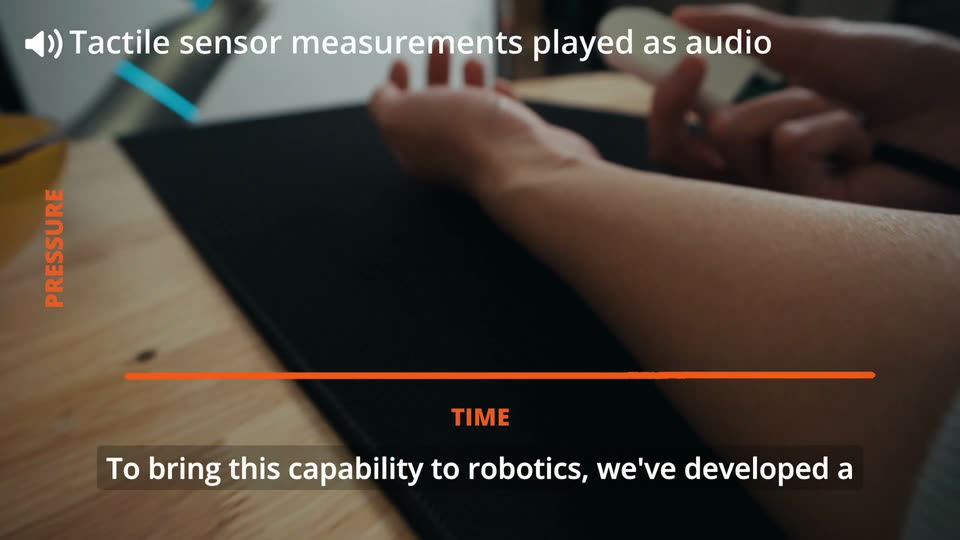
A close-up of a person's open palm resting on a black pad on a wooden table, the other hand holding a small white probe. An orange horizontal line above the word TIME fills in from right to left while the camera slowly pushes in on the hand.
On-screen text: “Tactile sensor measurements played as audio”, “PRESSURE”, “TIME”, “To bring this capability to robotics, we've developed a”
Camera: Static
Close-up of a hand pressing a white tactile sensor pad onto the back of another hand, locked-off camera. An orange waveform draws itself in real time across the frame, scrolling left, framed by PRESSURE and TIME axis labels. Subtitles caption the voiceover at the bottom.
On-screen text: “Tactile sensor measurements played as audio”, “PRESSURE”, “TIME”, “To bring this capability to robotics, we've developed a”, “state-of-the-art tactile sensor,”, “whose sensitivity overcomes”, “limitations of existing technologies.”
Camera: Static
Close-up of a robot gripper with a green sensor board and a plush toy above it. A human finger taps the cream pad. A small diagram with the label TACTILE MEASUREMENTS sits top right. White subtitles on a dark bar run along the bottom. The frame stays locked off.
On-screen text: “TACTILE MEASUREMENTS”, “Equipped with these sensors, our robot can perform a”, “manipulation task even with its”
Camera: Static
A person presses a plush wolf mask over a black sensor bar on a pole, the body blurred in shallow focus. A right-side HEAD CAMERA inset flips from a table view to color static while a TACTILE MEASUREMENTS bar stays green. Bottom subtitles change mid-scene.
On-screen text: “TACTILE MEASUREMENTS”, “manipulation task even with its”, “HEAD CAMERA”, “cameras blindfolded”
Camera: Static
A hand sets a beige teddy bear on the head of a black and white robot, then withdraws. On the right, three locked insets show a green tactile bar, a head camera of static, and a wrist camera view that cuts to static.
On-screen text: “TACTILE MEASUREMENTS”, “HEAD CAMERA”, “WRIST CAMERA”
Techniques: Split screen
Camera: Static
A black screen holds as the line “The robot cannot see.” builds in white bold sans, then “Just feel.” follows word by word, the last words shifting from dark red to gold.
On-screen text: “The robot cannot see. Just feel.”
Techniques: Kinetic type
Camera: Static
Top-down locked-off shot of a wooden table: a hand drops a blue ball into a translucent white bin beside a yellow bowl while a black-and-white robot arm hovers above. A static white caption and orange pill overlay the frame.
On-screen text: “The robot cannot see. Just feel.”, “TASK 1”, “Find the textured ball using only touch.”, “Autonomous, 1x”
Camera: Static
A silver robot arm with a plush bear head on its gripper lowers into a cream tray, pushing a green spiky ball onto a blue one. A second arm, a raccoon plush and a yellow bowl sit on the wooden table, with L and R pill indicators bottom-right.
On-screen text: “Find the textured ball”, “using only touch.”, “Autonomous, 1x”
Camera: Static
A robot arm with a gripper picks balls from a wooden tray. A red circle and WRONG BALL tag mark the blue ball; a green circle and CORRECT BALL tag mark the spiky green ball it lifts into a yellow bowl. L and R force bars sit bottom right.
On-screen text: “Find the textured ball using only touch.”, “Autonomous, 6x”, “L”, “R”, “WRONG BALL”, “Autonomous, 1x”, “CORRECT BALL”
Techniques: Speed ramp
Camera: Push in
On a wooden table seen from above, a black and white robot arm lowers into a clear bin holding a green spiky ball and a blue fuzzy ball, with a yellow bowl beside it. Static white text overlays the scene.
On-screen text: “TASK 2”, “Find all the textured balls using only touch.”, “Trained with only 2 balls, tested with 6 balls!”
Camera: Static
Two silver robotic arms hover over a white bin and yellow bowl on a wooden table. A hand drops a plush raccoon as spiky and smooth balls fill the bin. A cyan caption sits top right; a speed label bottom left shifts from 1x to 12x.
On-screen text: “TASK2”, “Find all the textured balls using only touch.”, “Autonomous, 1x”, “Autonomous, 12x”
Techniques: Speed ramp
Camera: Static
A silver robot arm with a black gripper picks a smooth blue ball from a bin of spiky and smooth balls. A maroon “WRONG BALL” tag pops in, the caption switches from 12x to 1x, and the L and R touch indicators flash as plush toys watch.
On-screen text: “Find all the textured balls using only touch.”, “Autonomous, 12x”, “WRONG BALL”, “Autonomous, 1x”
Techniques: Speed ramp
Camera: Static
A silver robot arm with a plush bear head on its gripper reaches into a white box of spiky and felt balls, lifts the textured ones and drops them into a yellow bowl. Green and red pills pop in to mark correct and wrong picks. Static camera.
On-screen text: “Find all the textured balls”, “using only touch.”, “Autonomous, 12x”, “CORRECT BALL”, “WRONG BALL”, “Nothing at the end of the box”, “Going back to re-scan the box”
Camera: Static
A silver robotic arm lowers its gripper into a white box, grabs a spiky ball and carries it right into a yellow bowl. A second arm and a plush toy sit blurred behind. Cyan caption top right, green tag left, speed label bottom left.
On-screen text: “Find all the textured balls using only touch.”, “Autonomous, 12x”, “Going back to re-scan the box”, “CORRECT BALL”, “Autonomous, 1x”
Techniques: Speed ramp
Camera: Push in
A flow diagram on a cream background builds left to right as boxes and card groups fade in: sensor cards, Causal Video Model, Generated Future, Inverse Dynamics Model, then a yellow Generated Actions square. A gray caption bar at the bottom swaps phrases in time with the voiceover.
On-screen text: “To accomplish this task,”, “our direct video action model”, “predicts future tactile signals.”, “An inverse dynamics model then translates those”, “predictions into robot actions.”
Camera: Static
A filmed robot arm lifts a spiky orange ball from a wooden bin toward a yellow bowl, while two columns of black L and R bars on the right show red pixel blobs moving under MEASURED PRESENT and GENERATED FUTURE labels. A white caption line appears in a gray box at the bottom.
On-screen text: “MEASURED PRESENT”, “L”, “R”, “GENERATED FUTURE”, “L”, “R”, “As the robot moves, new generated”, “predictions guide its next actions.”
Techniques: Split screen
Camera: Static
A locked-off close-up of three sensor prototypes on a black table, each under a dark label card. A hand waves a yellow feather across them left to right as white subtitles run along the bottom.
On-screen text: “RHODA SENSOR”, “MAGNETIC SENSOR”, “OPTICAL SENSOR”, “The sensor can detect even the touch of a feather,”, “contact that produces no distinguishable”, “response in the off-the-shelf optical”
Camera: Static
A finger presses a black foam button on a dark desk, then taps a white module with a green circuit board. Three dark windows labeled RHODA, MAGNETIC, OPTICAL SENSOR sit at the top; the middle shows a faint red pixel grid. White captions line the bottom.
On-screen text: “RHODA SENSOR”, “MAGNETIC SENSOR”, “OPTICAL SENSOR”, “response in the off-the-shelf optical”, “and magnetic tactile sensors that we tested.”
Camera: Static
A small white and green tactile sensor rests on black cloth as a hand taps it with a yellow feather, then a black hexagonal weight is set on it. Top right, a heat-map bar fills with orange and the scale marker moves; captions run along the bottom.
On-screen text: “TACTILE MEASUREMENTS”, “0.001N”, “100N”, “and magnetic tactile sensors that we tested.”, “The sensor can even detect”, “light contact after heavy loading.”, “RHODA SENSOR”, “MAGNETIC SENSOR”, “OPTICAL SENSOR”
Camera: Static
A small white and green sensor rests on a black mat, a dumbbell blurred behind it. A hand lowers a yellow feather to brush the sensor, then lifts it away. A fixed overlay in the top right shows a green bar and a force scale from 0.001N to 100N.
On-screen text: “TACTILE MEASUREMENTS”, “0.001N”, “100N”, “light contact after heavy loading.”, “It can also resolve high frequency vibrations, helping”
Camera: Static
Close-up of hands rubbing a white sensor pad over a spiral notebook and a coiled black cable. An orange waveform traces pressure over time across the frame, spiking densely on the notebook and dipping in V shapes on the cable. White captions run along the bottom.
On-screen text: “Tactile sensor measurements played as audio”, “PRESSURE”, “TIME”, “It can also resolve high frequency vibrations, helping”, “us distinguish between different surface”, “textures.”
Camera: Pull out
A hand presses a white probe onto a black mouse in close-up. An orange pressure waveform animates across the frame in sync with the press, framed by a vertical PRESSURE label and a horizontal TIME label.
On-screen text: “Tactile sensor measurements played as audio”, “PRESSURE”, “TIME”
Camera: Pan
Close-up of a white 3D-printed USB-C device resting on the edge of a black laptop keyboard, shallow depth of field, locked-off frame. A speaker icon, a “Computer audio” label, two bar charts and a caption fade in over the shot.
On-screen text: “Computer audio”, “COMPUTER AUDIO”, “TACTILE MEASUREMENTS”, “It can even hear music by touch.”
Camera: Static
A white 3D-printed sensor rests on a dark desk beside a laptop. Two bar charts, blue and orange, pulse like spectrum analyzers. A speaker-icon label at top switches from Computer audio to Tactile sensor measurements played as audio, and a caption appears below.
On-screen text: “Computer audio”, “It can even hear music by touch.”, “Tactile sensor measurements played as audio”
Camera: Static
Macro shot of a white 3D-printed probe on a laptop keyboard. Two translucent bar charts, blue and orange, overlay the frame, bars jumping in sync with the sound, a gray panel highlighting the active chart. A speaker-icon caption top left alternates between the two sources.
On-screen text: “Tactile sensor measurements played as audio”, “COMPUTER AUDIO”, “TACTILE MEASUREMENTS”, “Computer audio”
Camera: Static
Fingers type on a laptop keyboard while a white 3D-printed sensor rests on the deck. Two bar charts, blue and orange, update their bar heights in real time, comparing computer audio and tactile measurements. A speaker icon and caption sit at the top.
On-screen text: “Tactile sensor measurements played as audio”, “COMPUTER AUDIO”, “TACTILE MEASUREMENTS”
Camera: Static
A dark laptop keyboard fills the blurred background while two bar charts overlay the frame: blue bars for computer audio on the left and orange bars in a translucent panel on the right, both pulsing in real time. A white headline with a speaker icon sits at the top.
On-screen text: “Tactile sensor measurements played as audio”, “COMPUTER AUDIO”, “TACTILE MEASUREMENTS”
Camera: Static
Split screen pairs two live shots: left, a person in a white shirt swings a brown bag onto their shoulder; right, a black-and-silver robot arm lowers its gripper, holding a plush toy, toward a green spiky ball in a wooden bin. A white subtitle line sits at the bottom.
On-screen text: “Just as touch is essential to human dexterity, we”
Techniques: Split screen
Camera: Static
A split screen shows a person in a white sweatshirt holding a brown bag on the left, and a robotic arm gripping a plush hamster above a wooden box on the right. A white subtitle line sits along the bottom edge.
On-screen text: “Just as touch is essential to human dexterity, we”
Techniques: Split screen
Camera: Static
Split screen: a person in a white hoodie pulls a green spiky ball from a brown bag on the left, while a robot gripper lifts the same ball out of a white box on the right. White captions run along the bottom.
On-screen text: “Just as touch is essential to human dexterity, we”, “believe giving robots a sense of touch”
Techniques: Split screen
Camera: Static
Close-up of a robot gripper holding a cream sensor pad. A human finger presses the pad, and a small green-and-black bar graphic in the top right flashes a red dot to register the touch. White subtitles sit at the bottom.
On-screen text: “believe giving robots a sense of touch”, “will help them handle delicate objects, manipulate”
Camera: Static
Close-up, a hand lowers a yellow feather to touch a small green circuit-board device on black cloth, then cuts to a person holding a gray plush bear with the device mounted on its face.
On-screen text: “will help them handle delicate objects, manipulate”
Camera: Static
Close-up of hands adjusting a gray plush wolf cover on a pole-mounted device, then a cut to a wide shot of two silver robot arms on a wooden table, one gripping a plush dog beside a box and a yellow bowl.
On-screen text: “will help them handle delicate objects, manipulate”, “objects hidden from view, and better understand”
Camera: Static
Locked-off shot of a wooden table: a silver robot arm with blue-lit joints holds a teddy bear over a white box holding a green spiky ball and a blue ball. A plush head on a stick and a yellow bowl nearby. Subtitles at the bottom; the frame fades to white.
On-screen text: “objects hidden from view, and better understand”, “the physical world around them.”
Camera: Push in
A bright, low-contrast set shows a robotic arm beside a printed box, a yellow bowl and two small balls. The whole frame fades to white over the duration.
Camera: Static
The rhoda logo, an orange hexagonal mark beside a dark rounded wordmark, sits centered on a plain off-white background. It fades in from a pale gray state to full color, holds briefly, then fades out to a blank white frame.
Camera: Static