1:06

Vendo Launch Video (YC S26) | Unveil Studio
Vendo · Oct 2026
Replit · Jun 2026 · 0:39 · AI-annotated
Replit’s 0:39 launch film runs 15 scenes, about 2.7 s each. The product shows up at 0:19 and 4 features are revealed, with social proof. The call to action lands at 0:30 (78% in). One typed prompt launches a slow pan across a chain of orange cards, each revealing a single deliverable (website, app, slides, animation) before a Publish button hands off to a solid red brand card. The build is flat and precise: hard cuts on a 99 BPM pulse, flat mockups on a cream ground, and a saturated red field reserved only for the brand statement and the logo close.
Is this your launch? to your site or press kit.
Vendo · Oct 2026
Pitch · Productivity · Mar 2020
The word “Build” in large dark sans-serif type sits centered on a plain off-white background, locked off. The dot of the i drops in during the first half-second, after which the wordmark holds still for the rest of the clip.
On-screen text: “Build”
Camera: Static
The words “your business with” slide in on a cream background; a rounded orange-bordered input field slides in from the right. “one prompt and for free” is typed, selected, then replaced by a longer prompt typed out. A black cursor clicks the blue send button as a small orange card pops in.
On-screen text: “your business with”, “one prompt and for free”, “Build me a website, a mobile app, a slide deck and a promo video for my business connecting homeowners to handymen”
Techniques: Kinetic type, Cursor demo
Camera: Static
On a cream ground, a white prompt bubble sits left and an orange reply bubble right, a black cursor resting on the blue send icon. The orange bubble labeled Website scales up, its flat site mockup revealing the headline Skip the shady.
On-screen text: “Website”
Techniques: Cursor demo, UI zoom, Kinetic type
Camera: Push in
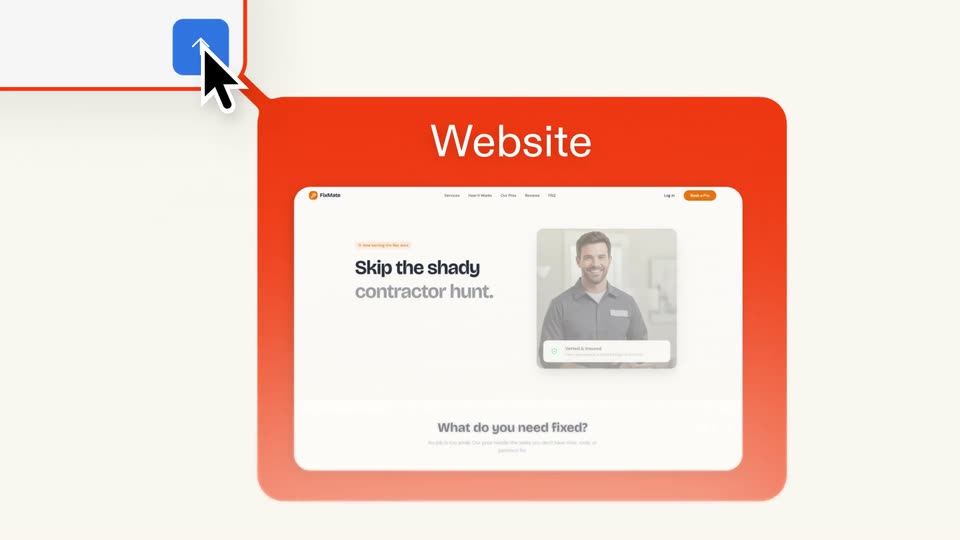
A red rounded card labeled Website holds a flat screenshot of the FixMate homepage, showing a headline and a photo of a smiling man with a Verified badge. A black cursor points at a blue step icon joined by a red line, and the card scales up into place.
On-screen text: “Website”
Camera: Pan
A flat orange panel labeled Website holds a browser mockup with a contractor photo, while a small Mobile App tab sits top right. The view reframes so the phone mockup grows to fill the frame and the website panel shrinks to the lower left.
On-screen text: “Website”, “Mobile App”
Techniques: UI zoom
Camera: Pan
A front-facing phone mockup of the FixMate app screen rests on an orange rounded card headed Mobile App. A second orange card headed Website occupies the bottom edge. The panels shift slightly, reframing the centered mockup.
On-screen text: “Mobile App”, “Website”
Camera: Static
A cream background holds an orange rounded card with the white title “Mobile App”; a flat phone mockup of the FixMate home screen overlaps it. The camera pulls back, shifting the card up-left and the phone down-right to frame both.
On-screen text: “Mobile App”
Techniques: Kinetic type
Camera: Static
Two rounded orange cards float on a cream background. The top, labeled Slide Deck, scales gently and shows a presentation slide with a smiling man; the bottom, labeled Mobile App, slides in from the right holding a phone mockup.
On-screen text: “Slide Deck”, “Mobile App”
Camera: Push in
A camera pans across orange rounded cards on a cream background. It starts on a Slide Deck card holding a 3D-tilted laptop with a smiling man, then moves to an Animation card with a video thumbnail and a Mobile App card with a phone, linked by thin lines.
On-screen text: “Slide Deck”, “Mobile App”, “Animation”
Techniques: 3D mockup
Camera: Push in
An orange card holding a drill video player and an 'Animation' label slides left across a cream background. The headline 'The shady contractor hunt is over.' builds word by word as the card exits, revealing a blank white card on the right.
On-screen text: “Animation”, “The shady”, “contractor”, “hunt is”, “over.”
Techniques: Kinetic type
Camera: Push in
A cursor hovers a centered blue Publish button on a cream field, then the button scales up to fill the frame, turning pink, and the label swaps to the tagline Build anything you want.
On-screen text: “Build anything you want”
Techniques: Cursor demo
Camera: Static
On a solid red-orange field, the white headline “Build anything you want” and “with Replit” in a white pill slide in left of center. A vertical chain of white icon tiles labeled Slides, Web, Mobile, Design, Animation scrolls upward on the right, tiles scaling in and out.
On-screen text: “Build anything you want”, “with”, “Replit”
Techniques: Kinetic type
Camera: Pull out
On a cream background, the black headline “Perks from” scales down and rises as four white rounded app tiles (Stripe Atlas, doola, QuickBooks, Mercury) pop into a row; “for your business” slides in beneath them and the composition holds.
On-screen text: “Perks from”, “for your business”
Techniques: Kinetic type
Camera: Static
Centered text lines scale and hand off on a cream field: 'Try now at' shrinks as the URL 'replit.com/free-business' slides in, letters settling around a red dot and slash, then a lone red circle remains.
On-screen text: “Perks from”, “Try now at”, “replit.com/free-business”
Techniques: Kinetic type
Camera: Static
A red abstract mark morphs into the Replit logo mark on a cream background. The wordmark Replit appears to its right, then the frame holds still.
On-screen text: “Replit”
Techniques: Morph
Camera: Static