
1:30
Explore
reMarkable – the paper tablet (2021)
reMarkable · Nov 2021 · 0:47 · AI-annotated
- Length
- 0:47
- Scenes
- 20 · 2.4 s avg
- Product on screen
- 0:02
- Call to action
- 0:43 · 90%
- Voiceover
- No
- Views
- 33K on YouTube
as of November 28, 2026
00:00:00 / 00:47:23
- Length
- 0:47
- Scenes
- 20 · 2.4 s avg
- Product on screen
- 0:02
- Call to action
- 0:43 · 90%
- Voiceover
- No
- Views
- 33K on YouTube
as of November 28, 2026
reMarkable’s 0:47 launch film runs 20 scenes, about 2.4 s each. The product shows up at 0:02. The call to action lands at 0:43 (90% in). Minimal, alternating montage of macro photography and 3D renders that cuts between the paper-like surface and the stylus laying ink, with a static corner logo holding the brand throughout. Signature moves are diagonal compositions, rack-focus reveals of the thin edge, and halftone dot sweeps that translate the e-ink grain into abstract motion.
Footage neededEstimated needs: 1 official logo — reused across the film · 5 filmed passages — shoot, supply or replace · 4 graphic passages — draw or supply · 10 3D passages — build or supply
Is this your launch? to your site or press kit.
More like this


Similar soundtrack
Films whose music sounds like this one, voice left out
1:26

Introducing the Sony WH-1000XM6 Wireless Noise Cancelling Headphones
Sony · Cinematic electronic
3:16

Meet Insta360 Ace Pro 2 Videography Bundles - Cinematic Filmmaking in 8K
Insta360 · Cinematic ambient and orchestral
1:09

John Kim - Introducing Paraform Hiring Intelligence. Hiring has always been bro
Paraform AI · Cinematic Electronic
reMarkable – the paper tablet (2021), scene by scene
· 20 scenes as text
01 · Hook · 0:00–0:00
A grayscale abstract form of folded paper fills the frame, its diagonal creases running from a dark left to a bright right. The white serif title holds centered and still over the folds.
On-screen text: “The paper tablet”
Camera: Static
02 · Hook · 0:00–0:02
Abstract gray planes fold across the frame like crumpled paper, lit with soft gradients. The white serif headline “The paper tablet” holds centered and still over the dark region. The background drifts almost imperceptibly while the text stays locked.
On-screen text: “The paper tablet”
Camera: Static
03 · Product intro · 0:02–0:04
A tight close-up of the white, paper-textured edge of a reMarkable tablet drifts slowly along the side, showing a small power button near the corner against a dark brown background.
On-screen text: “The paper tablet”, “reMarkable”
Techniques: 3D mockup
Camera: Static
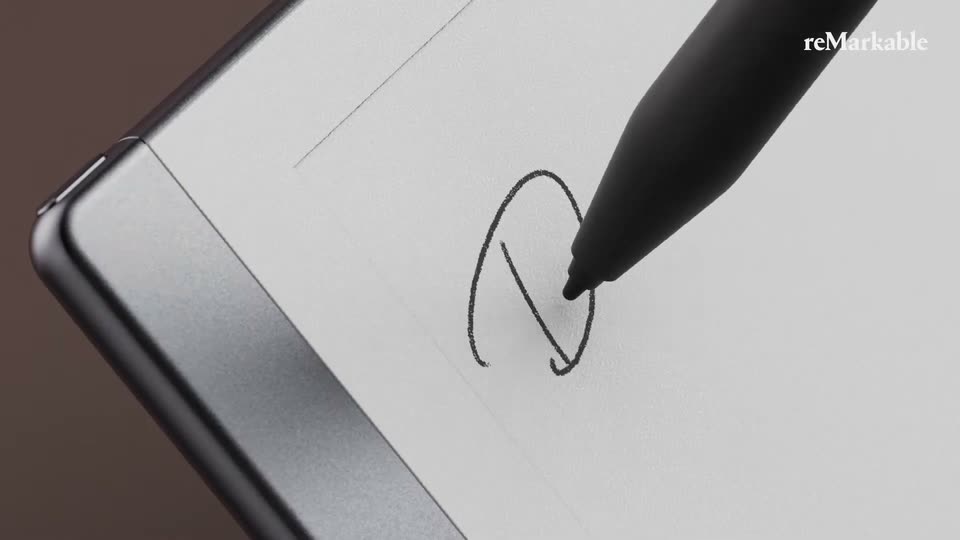
04 · Demo · 0:04–0:06
A black stylus draws a looping stroke across a paper-textured tablet screen, the brushed-metal corner of the device visible at left. The white reMarkable logo sits static in the top right corner.
On-screen text: “reMarkable”
Techniques: 3D mockup
Camera: Static
05 · Demo · 0:06–0:08
A reMarkable tablet floats at an angle in a dark blue void, its screen showing handwritten daily notes. The device tilts slowly toward the camera while the brand logo holds in the top right corner.
On-screen text: “reMarkable”
Techniques: 3D mockup
Camera: Static
06 · Demo · 0:08–0:14
Out-of-focus diagonal dark and light bands rack into sharp focus, revealing a cascading stack of thin black e-ink tablets in 3D perspective, each edge showing gold contact pins and a USB-C port. The white reMarkable logo holds top right.
On-screen text: “reMarkable”
Techniques: 3D mockup
Camera: Pan
07 · Demo · 0:14–0:17
A black stylus nib rests on a white paper-textured surface, a hard diagonal shadow stretching across it. The framing tightens from an angled view of the device edge to an extreme close-up of the tip. The reMarkable wordmark holds the top-right corner.
On-screen text: “reMarkable”
Camera: Static
08 · Demo · 0:17–0:20
A paper-textured light gray field. A dense trail of black halftone dots sweeps diagonally from the top left toward the right, thickening into a long band at a steady pace. The white reMarkable wordmark sits small in the top right corner.
On-screen text: “reMarkable”
Techniques: Particles
Camera: Pull out
09 · Demo · 0:20–0:22
Extreme close-up of a black stylus tip dragging a fine dark line across textured paper, moving left to right. Shallow depth of field keeps the tip sharp while the surface blurs. A small white reMarkable wordmark sits in the top right corner.
On-screen text: “reMarkable”
Camera: Static
10 · Demo · 0:22–0:24
Black particles form blurred horizontal rows across a soft grey gradient. A dense stream of dots pours from the top row, arcing down to the right and settling into a gap below. The white reMarkable wordmark holds static in the top right corner.
On-screen text: “reMarkable”
Techniques: Particles
Camera: Pan
11 · Demo · 0:24–0:27
A black e-ink tablet rests at an angle on a matte brown surface, its screen showing a handwritten “Daily notes” heading and a short task list. A black stylus hovers over the page and drifts right while the camera slowly pushes in.
On-screen text: “reMarkable”
Techniques: 3D mockup
Camera: Static
12 · Demo · 0:27–0:29
A gray tablet lies at an angle on a light surface. The camera tracks along its side edge, past a single button, revealing the screen with blurred lines of text. A white reMarkable wordmark sits in the top right corner.
On-screen text: “reMarkable”
Techniques: 3D mockup
Camera: Static
13 · Demo · 0:29–0:31
A close-up of the lower corner of a tablet, its thin metallic edge and dark screen with faint handwriting catch the light. The device tilts slowly above a soft shadow on a pale surface.
On-screen text: “reMarkable”
Techniques: 3D mockup
Camera: Static
14 · Demo · 0:31–0:32
A macro shot of white paper with a diagonal edge and a soft shadow gradient drifts slowly across the frame. The reMarkable wordmark stays fixed in the top right corner.
On-screen text: “reMarkable”
Camera: Static
15 · Demo · 0:32–0:34
A white e-ink tablet rests at a diagonal on a muted blue backdrop, a black stylus hovering just above the page. Cursive handwriting forms on the screen as the pen moves. The brand logo sits still in the top right corner. The camera holds a locked-off angle.
On-screen text: “reMarkable”
Techniques: 3D mockup
Camera: Static
16 · Demo · 0:34–0:36
Macro close-up of a black stylus tip laying a grainy charcoal curve on white textured paper, then lifting away. The camera stays locked off while the reMarkable logo sits in the top-right corner.
On-screen text: “reMarkable”, “ciuhynstes”
Camera: Pan
17 · Demo · 0:36–0:38
Three black styluses draw loose sketch lines on a white surface in 3D, one lifting and rolling to a stop. A large “1” scales in over the frame as the pens settle. The reMarkable wordmark stays fixed in the top right corner.
On-screen text: “reMarkable”, “1”
Techniques: 3D mockup
Camera: Static
18 · Demo · 0:38–0:39
A black stylus stands diagonally on a cream paper surface, slowly tilting to reveal its metal clip engraved with the brand name. A white reMarkable logo sits in the top right corner.
On-screen text: “reMarkable”
Camera: Static
19 · Demo · 0:39–0:43
A 3D render of the reMarkable tablet lies at an angle on a white surface under soft leaf shadows. The stylus glides in and snaps to the right edge of the device, then the camera slowly pushes in as the scene fades to dark.
On-screen text: “reMarkable”
Techniques: 3D mockup
Camera: Static
20 · CTA · 0:43–0:47
The reMarkable wordmark sits centered on a black field, starting in gray. It brightens to white and scales up to full size, then the URL remarkable.com fades in beneath it and holds.
On-screen text: “reMarkable”, “remarkable.com”
Techniques: Kinetic type
Camera: Static