1:26


Connect your agent to the stock market | Financial Datasets
Financial Datasets · B2B · Aug 2026
Prime Intellect · Aug 2026 · 0:44 · AI-annotated
Prime Intellect’s 0:44 launch film runs 18 scenes, about 2.5 s each. The product is on screen from the first frame and 3 features are revealed, with social proof. The call to action lands at 0:36 (82% in), over a voiceover. A 44-second terminal-style launch for the Prime Agent harness, cut at a steady ~8 cuts per minute on a 123 bpm pulse. It opens on a grainy title card, types an install command, then answers a single prompt with three feature blocks (tool-calling, self-improvement, agent messaging), each built from a typed headline, code lines and a small branching diagram, before a benchmark run rolls a 95.54% score and a comparison chart, closing on a typed install URL and a still butterfly logo. The style is a
Is this your launch? to your site or press kit.
Financial Datasets · B2B · Aug 2026
Viraj Aero · Nov 2026
A dark, grainy background holds the white monospace title PRIME-AGENT, which builds from PRIME, while the subtitle A SELF-IMPROVING RLM HARNESS types in beneath it.
On-screen text: “PRIME-AGENT”, “A SELF-IMPROVING RLM HARNESS”
Techniques: Kinetic type
Camera: Static
A flat terminal window sits over a dark city-bokeh backdrop. The install command types out line by line, a download status and success line appear, then a pixelated white checkmark assembles from dots in the center.
On-screen text: “PRIME-AGENT”, “A SELF-IMPROVING RLM HARNESS”, “curl -fsSL https://app.primeintellect.ai/prime-agent/install.sh | sh”
Camera: Static
A dark terminal-style screen on a blurred noisy backdrop shows a white pixelated logo centered over a faint dot grid, with the caption WELCOME TO PRIME-AGENT below. A > prompt fades in at the top left as the logo jitters.
On-screen text: “curl -fsSL https://app.primeintellect.ai/prime-agent/install.sh |”, “WELCOME TO PRIME-AGENT”
Techniques: Kinetic type
Camera: Static
A dark terminal panel on black; the white monospace line “> how do you work?” types out at top left. A pixelated white glyph and scattered dots flicker in the lower half, then clear as the caption “WELCOME TO PRIME-AGENT” slides away.
On-screen text: “WELCOME TO PRIME-AGENT”
Techniques: Kinetic type
Camera: Push in
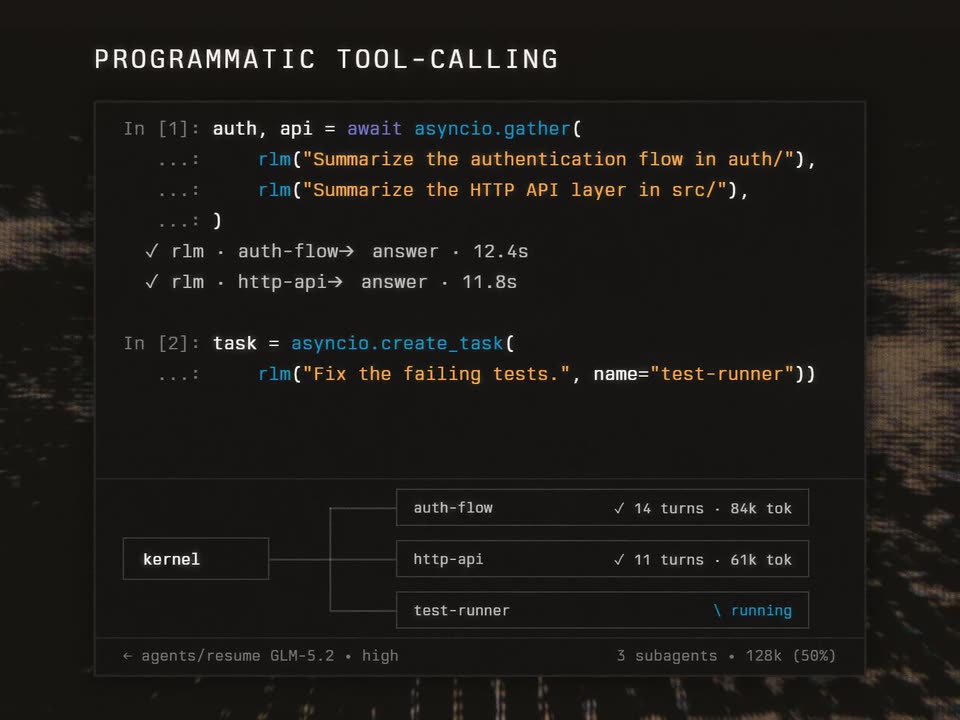
Over a grainy glitch backdrop, a dark code editor types out Python lines while the headline PROGRAMMATIC TOOL-CALLING builds letter by letter at top left. A prompt line reads how do you work?. Below, three sub-agent boxes branch from a kernel box, statuses flipping from running to checkmarks, then the frame dims.
On-screen text: “PROGRAMMATIC TOOL-CALLING”
Techniques: Kinetic type
Camera: Static
A dark terminal panel under the white title CONTINUAL HARNESS types Python calls line by line, then a stats table on the right increments with orange notes. A footer row shows trajectory and refine boxes joined by a line.
On-screen text: “CONTINUAL HARNESS”
Camera: Static
A dark code panel sits over a blurred night-city backdrop. The header swaps from CONTINUAL HARNESS to AGENT-TO-AGENT as the code lines and the gray footer captions change between the two states.
On-screen text: “CONTINUAL HARNESS”, “← agents/resume every change written to disk”, “refine · rollback by id”, “AGENT-TO-AGENT”, “← agents daemon · 14 live sessions”, “subagents persist after their task”
Camera: Static
A flat dark terminal window is centered over a grainy black background. The headline types out above it, then timestamped agent-to-agent messages fill the window line by line.
On-screen text: “AGENT-TO-AGENT COMMUNICATION”
Techniques: Kinetic type
Camera: Static
A dark terminal panel with a thin border sits on a grainy static background, a white monospace title typing out at the top. The frame zooms into the panel as a prompt line types the command, the keyword in blue, a block caret blinking at the end.
On-screen text: “AGENT-TO-AGENT COMMUNICATION”, “> /goal solve ARC-AGI-3”
Techniques: Kinetic type, UI zoom
Camera: Static
A dark terminal window types the command /goal solve ARC-AGI-3, then two status lines fade in beneath it. A 2x2 grid of red-and-blue game boards appears, and corner brackets snap onto the bottom-right board.
Camera: Static
A dark panel holds four 3x3 grids of blue and red squares; the bottom-right grid is framed by corner brackets. Monospace metadata reads out on the right, and two act-to-level mapping lines fade in while one square in the framed grid turns purple.
On-screen text: “game ft09-0d8bbf25”, “6 levels . sub-agent 6/25”, “act 4→ level 1/6”, “act 11→ level 2/6”
Camera: Static
A dark panel floats over a blurred night backdrop. A grid of blue and orange squares on the left reconfigures into a larger red diamond, while monospaced lines on the right stay still and two new lines, an act entry and a gray caption, fade in.
On-screen text: “game ft09-0d8bbf25”, “6 levels · sub-agent 6/25”, “act 4→ level 1/6”, “act 11→ level 2/6”, “act 25→ level 3/6”, “act 41→ level 4/6”, “act 62→ level 5/6”, “refine · pattern→ skill”
Techniques: Morph
Camera: Static
A dark panel floats over a blurred night-city backdrop. On the left a grid of blue, red, orange and purple square tiles shuffles and recolors; on the right a monospace log lists acts mapping to levels, ending with a WIN check.
Camera: Static
A dark results panel holds a 5x5 grid of colorful pixel-art level thumbnails on the left. On the right, a large white percentage rolls up from 74.47% to 95.54% while level and action counters tick, then a gray baseline note appears and the frame zooms into the stats column.
On-screen text: “ARC-AGI-3 · PRIME”, “AGENT + OPUS 5”, “95.54%”, “178/183 LEVELS”, “24/25 GAMES”, “11,245 ACTIONS”, “not built for ARC-AGI-3”, “human baseline 95.4%”
Techniques: Kinetic type, UI zoom
Camera: Push in
A dark results card fills the frame: a scrolling grid of pixel-art game tiles on the left, a large white score and stat lines on the right. The card then scales down and shifts up while a line chart with a dashed human-baseline line drops in below it.
On-screen text: “ARC-AGI-3 · PRIME AGENT + OPUS 5”, “95.54%”, “178/183 LEVELS”, “24/25 GAMES”, “11,245 ACTIONS”, “not built for ARC-AGI-3”, “human baseline 95.4%”, “PRIME-AGENT SOLVES ARC-AGI-3”, “no ARC-specific training · score vs output tokens”, “HUMAN BASELINE · 95.4”
Camera: Pull out
A dark chart panel over a grainy backdrop draws two curves: a blue line climbs steeply to 95.5% while a white line creeps to 38.3%, each ending in a dot as its label fades in, then the whole panel fades to black.
On-screen text: “PRIME-AGENT SOLVES ARC-AGI-3”, “no ARC-specific training · score vs output tokens”, “HUMAN BASELINE · 95.4”, “PRIME AGENT · 95.5%”, “NATIVE CODING HARNESSSES · 38.3%”
Camera: Pan
A black screen shows a single line of white monospace text that types out character by character like a terminal command, ending with a blinking block cursor. At the end the line vanishes and a small cluster of soft white dots blooms in the center.
On-screen text: “> CURL -FSSL HTTPS://APP.PRIMEINTELLECT.AI/PRIME-AGENT/INSTALL.SH”
Techniques: Kinetic type, Particles
Camera: Static
A white butterfly-shaped logo sits centered on a black field, glowing with a soft halo. It holds perfectly still for the duration, with no motion or added text, serving as a quiet sign-off.
Camera: Static