
0:25
Explore
00:00:00 / 00:39:03
- Length
- 0:39
- Scenes
- 33 · 1.2 s avg
- Product on screen
- 0:03
- Features shown
- 4
- Voiceover
- No
- Views
- 14K on YouTube
as of November 24, 2026
Palmier’s 0:39 launch film runs 33 scenes, about 1.2 s each. The product shows up at 0:03 and 4 features are revealed. There is no explicit call to action. A 39 second launch film built as a rapid-fire AI demo: a live-action hook, a brand beat, then four prompted features (organize, edit, generate footage, generate close-up) each cut to a punchy reaction, closing on a grainy eye montage and the palmier.io card. The style is defined by locked-off screen recordings of a near-black UI, hard cuts at roughly 45 per minute, and white caption text that types or slides in over both the interface and the live shots.
Footage neededEstimated needs: 6 capture groups — your screens or recordings · 1 official logo — reused across the film · 12 filmed passages — shoot, supply or replace
Is this your launch? to your site or press kit.
More like this


1:11

A new day for work, powered by AI
Slack · Productivity · Sep 2023
2:41

Y Combinator - Golpo (@GolpoAI) is the most powerful AI video generator for explaine
Golpo · B2B · Jul 2025
Similar soundtrack
Films whose music sounds like this one, voice left out
0:21

Nars - Convert your github into a live resume Use this shortcut to turn you
Skillsync · Cinematic piano with retro video game elements
1:02

Introducing Claude Meetings
Anthropic · Modern electronic, chiptune, and lo-fi hip-hop
Palmier (YC S24) Launch Video, scene by scene
· 33 scenes as text
01 · Hook · 0:00–0:00
A centered white caption sits on a plain grey wall. A blurred person enters from the left, moving a hand and a small object into frame.
On-screen text: “we built Claude”
Camera: Static
02 · Hook · 0:00–0:03
A person in a black shirt walks past a plain gray wall, tucking a silver laptop with an orange label under their arm. A white caption builds word by word at the center of the frame.
On-screen text: “we built Claude”, “it's own video editor...”
Techniques: Kinetic type
Camera: Pan
03 · Hook · 0:03–0:03
A man in a black shirt tilts his head back, then lifts a white Palmier stylus vertically into the frame, holding it in sharp focus against a blurred, colorful screen behind him. The camera stays locked off.
On-screen text: “it's own video editor...”
Camera: Static
04 · Product intro · 0:03–0:04
A white cylindrical bottle with a vertical palmier wordmark sits in sharp focus, a hand steadies its base, a blurred monitor with colored bars and a small figurine fill the background.
Camera: Static
05 · Product intro · 0:04–0:05
A blurred book spine in the foreground racks into a monitor running a video editor. The camera pushes into a tight view of the dock, a cursor hovering the black Palmier icon with a red dot.
Techniques: UI zoom, Cursor demo
Camera: Push in
06 · Product intro · 0:05–0:07
A dark forest wallpaper sits behind a macOS dock. A white cursor lifts the black PalmierPro icon, showing its tooltip, then slides left to the orange Claude icon as the tooltip changes.
Techniques: Cursor demo
Camera: Static
07 · Demo · 0:07–0:08
On black, seven stacked lines of the phrase slide vertically, the outer lines dimmed to gray. The stack collapses to a single centered line, which fades out, leaving a black frame.
On-screen text: “so let's see what it can do”
Techniques: Kinetic type, Masking
Camera: Static
08 · Demo · 0:08–0:09
A locked-off screen recording shows a dark video editor on the right and an AI assistant panel on the left, titled Golden hour thinking with a prompt field and action buttons. A caption slides in over the frame.
On-screen text: “so let's see what it can do”
Camera: Static
09 · Feature reveal · 0:09–0:11
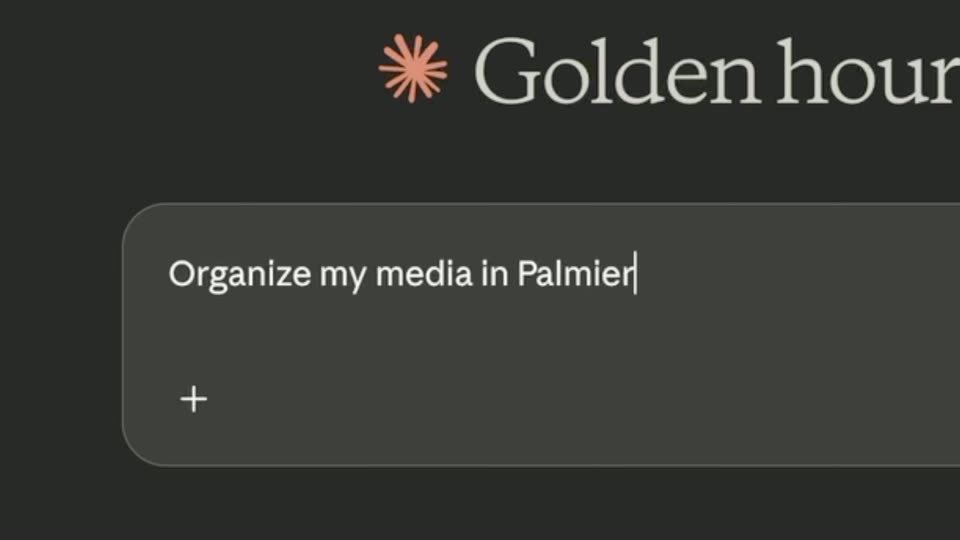
A dark prompt field sits below a cream serif wordmark with an orange asterisk. The line “Organize my media in Palmier” types out character by character behind a blinking caret, a plus mark resting in the box corner.
Techniques: Kinetic type
Camera: Static
10 · Feature reveal · 0:11–0:12
A dark chat interface fills the frame. The assistant line reads that it will create 4 folders, a Create_folder chip and an orange spinner run, then clear. The prompt text appears in the message field at the bottom.
On-screen text: “Golden hour”
Camera: Static
11 · Feature reveal · 0:12–0:14
A dark library panel fills the frame at a locked-off angle. It opens as a grid of 22 mixed items, then the thumbnails collapse and the view re-sorts into four folder tiles with item counts, while a one-line caption slides in at the bottom.
On-screen text: “I'll create 4 folders and sort everything in one pass.”
Camera: Static
12 · Feature reveal · 0:14–0:14
A man in profile fills the right side of the frame against a dark background of soft bokeh lights. The word cool sits in white lowercase letters to the left of his face. The camera holds still on the locked-off shot.
On-screen text: “cool”
Camera: Static
13 · Feature reveal · 0:14–0:15
Close-up of hands typing on a custom mechanical keyboard with RGB backlighting. The text 'what else?' is centered on the screen.
On-screen text: “what else?”
Camera: Static
14 · Feature reveal · 0:15–0:16
Locked-off close-up of a dark rounded chat input field. White text types out “now edit it for me” behind a blinking cursor, with a plus icon below. A partial label reads at the bottom right.
Techniques: UI zoom
Camera: Static
15 · Feature reveal · 0:16–0:18
A dark chat feed shows assistant messages arriving in sequence, with tool rows and a spinning loader, then the frame pulls back to reveal the full screen: the chat panel on the left and a video editing timeline with clips on the right.
Techniques: UI zoom
Camera: Static
16 · Feature reveal · 0:18–0:19
A dark video editor timeline fills the frame, showing stacked video and audio clips with teal labels, a timecode ruler above, and a transport bar at the top. The view is locked off and static for the duration.
Camera: Static
17 · Feature reveal · 0:19–0:20
A dark log screen lists white serif action lines above gray tool labels. An orange starburst and a dotted spinner mark a pending step, then both clear as two new lines type in at the bottom, pushing the list up.
Techniques: Kinetic type
Camera: Static
18 · Feature reveal · 0:20–0:21
A dark video editor screen shows a row of white toolbar icons above a timecode ruler. Two teal timeline clips labeled C2685 carry film thumbnails of a seated person, with an orange timecode readout in the top right corner. The view holds static.
Camera: Static
19 · Feature reveal · 0:21–0:22
A video editor interface fills the frame, locked-off. Its preview monitor plays a clip of a blurred gray background with the white caption we built Claude centered. Below, the timeline shows purple clips on track V1 and a strip of camera thumbnails on V2, with the playhead near the start.
On-screen text: “we built Claude”
Camera: Static
20 · Feature reveal · 0:22–0:24
A flat close-up of a video editor window opens on a preview frame of a hand lifting a laptop, with the caption built Claude centered. The view pulls back to reveal the editor as a desktop window beside a Finder panel, the caption switching to not bad. over the timeline.
On-screen text: “we built Claude”, “not bad.”
Techniques: UI zoom
Camera: Pull out
21 · Feature reveal · 0:24–0:24
A plain black frame holds a single centered line of white text that asks whether the tool can generate footage. The frame is locked off and the text stays static for the full duration.
On-screen text: “but can it generate footage?”
Camera: Static
22 · Feature reveal · 0:24–0:25
A close-up of an editing timeline shows two clips with 'Generating...' progress bars and a red playhead. The view rapidly pulls back with heavy motion blur to reveal the full app, while the caption 'but can it generate footage?' stays locked on screen.
On-screen text: “but can it generate footage?”
Techniques: UI zoom
Camera: Pull out
23 · Feature reveal · 0:25–0:26
A dark video editor UI holds still. The preview monitor frames a laptop on a desk, the timeline below highlights a selected clip, and the right inspector shows transform fields.
Camera: Pull out
24 · Feature reveal · 0:26–0:28
A dark video editor fills the frame. In the center preview, a phone dock zooms in while a cursor hovers an orange app icon, and the tooltip above it changes from PalmierPro to Claude.
Techniques: UI zoom, Cursor demo
Camera: Static
25 · Feature reveal · 0:28–0:29
Extreme close-up of a man's face, his eyes widening in shock. White text reads centered over the bridge of his nose, static for the whole shot. Warm pink and yellow lighting, shallow depth of field.
On-screen text: “holy sh*t”
Camera: Static
26 · Feature reveal · 0:29–0:30
A dark video editor fills the frame, then the view zooms into the chat input box. A cursor types the prompt while a large white caption reads the same words across the screen and a model label sits below.
On-screen text: “Generate four close up”, “Sonnet 4.6 using API key”, “Generate four close up of @Marcos-Eyes left el”
Techniques: UI zoom, Kinetic type
Camera: Push in
27 · Feature reveal · 0:30–0:31
A dark interface panel with the First/Last tab active shows two eye thumbnails under First Frame and Last Frame. Below, a prompt box types out the words zoom into the left eye with a blinking caret.
Techniques: Cursor demo
Camera: Static
28 · Feature reveal · 0:31–0:33
A dark video editor interface fills the frame. The center preview switches from a green eye close-up to a face inside a selection box, while the left prompt panel and the timeline clips update. A cursor hovers over the timeline.
On-screen text: “Finally, a video editor built for AI”
Techniques: Cursor demo
Camera: Push in
29 · Other · 0:33–0:33
A rectangular window frames a man's wide-open eyes against a dark background. The frame expands to full screen as the camera pushes into an extreme close-up of one eye, its dark pupil reflecting a monitor with a small red dot.
Camera: Push in
30 · Other · 0:33–0:34
A grainy, desaturated close-up of a face in green tones. The framing widens from an extreme close-up of the eye to the full face. A white caption sits centered and stays locked off throughout.
On-screen text: “finally, a video editor built for AI.”
Camera: Static
31 · Other · 0:34–0:35
Extreme close-ups of faces and eyes cut rapidly in black and white, ending on a green-tinted eye. A white caption sits centered over the fast montage.
On-screen text: “finally, a video editor built for AI.”
Camera: Static
32 · Other · 0:35–0:36
A grainy black and white macro of a human eye fills the frame as the pupil dilates, while a centered white caption sits over the iris.
On-screen text: “finally, a video editor built for Al.”
Camera: Static
33 · Outro · 0:36–0:39
On a black background the white lowercase palmier wordmark sits centered, a red dot marking the i. The suffix .io then appears at the right to complete the URL, holding as the sign-off.
On-screen text: “finally, a video editor built for Al.”, “palmier.io”
Camera: Static